


 United Kingdom
  FSX Scenery
Aberdeen (Dyce), Scotland
Scenery Aberdeen (Dyce), Scotland, UK. Complete remodelling of the basic (and…
Scotland Landclass Scenery UK v2 refreshes the Highlands, Grampian, and the Hebrides, Orkney and Shetland islands with hand-drawn land use derived from satellite imagery in SBuilderX. Built for FSX, it places believable cities, villages, forests, farmland and rocky mountain terrain at roughly 1 km accuracy for more authentic VFR routes.
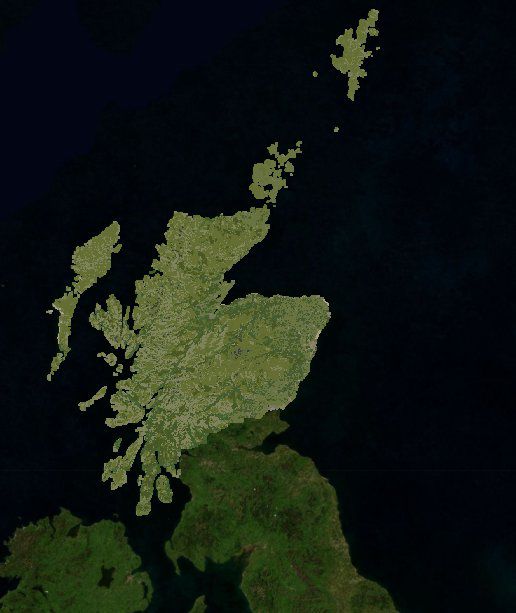
Scotland Landclass Scenery UK v2. The file includes accurate landclass scenery for the entire Highland and Grampian Region of Scotland, along with the Islands in the Hebridean Group, the Orkneys and the Shetland Islands. The landclass was created using the design tool SBuilderX, where the landclass was derived (by hand) from background satellite photos. The landclass depicts cities, towns, medium sized villages, forests, farmland and mountain land usage to an accuracy of about 1 sq km. By Anthony Dyer.
Satellite image of Scotland.
Installation
------------
Copy the scotland folder into your addon scenery folder and then add the scotland folder into your scenery library. Replace any previous files from version 1 or 2 of this scenery. Ensure the priority is set below any addon airports for scotland.
Introduction
----------------
The file includes accurate landclass scenery for the entire Highland and Grampian Region of Scotland, along with the Islands in the Hebridean Group, the Orkneys and the Shetland Islands. The landclass was created using the design tool SBuilderX, where the landclass was derived (by hand) from background satellite photos. The landclass depicts Cities, Towns, Medium Sized Villages, Forests, Farmland and mountain land usage to an accuracy of about 1sqkm
With most of Scotland now covered in custom landclass, It's now possible to fly all the way from Aberdeen to Islay with custom towns and villages in the places where you would expect to see them. No longer do you have to put up with tree covered mountain ranges either! Rocky mountains such as the Grey Corries, Beinn Eighe in Torridon and the Cairngorms are depicted as just that: Rocky! While the Black Cuillin of Skye is depicted in the dark gabbro rock so unique to that chain of mountains.
The ultimate aim of this scenery project is to cover the whole of scotland with accurate landclass, roads, rivers and lakes as depicted in Open Street Map.
The plan for future releases is as follows:
Version 4: Landclass for the central belt of Scotland + Existing landclass
Version 5: Landclass for the whole of scotland
Version 6: Open Street Map Incorporation.
Work with Open Street Map has so far been limited to poking about with railway shape files. For me there's a lot to learn. Once I've mastered things like customising different types of railway (i.e. mainline, dismantled narrow gauge etc...) into their desired parameters then I can start to bring these features into the official release of this scenery. For the time being, they remain on my harddisk.
Known Issues:
--------------------
Lack of suitable landclass texture for heather clad terrain. For the time being I have used landclass code 44 (Mire, Bog, Fen) for such terrain, however this is a lighter terrain colour compared to the brown colour that such terrain actually is. I will be looking into a possible custom texture for such terrain.
The depiction of fields in Landclass seems to be limited to arable crops with tree lined boundaries. This isn't the desired effect for crofting locations of scotland, which tend to be a lot more open. Again, a custom terrain may be required for this type of landclass.
Free for all simmers · 77.83 KB · Scanned clean
Download speed: Free tier is capped at 0.5 Mbps. PRO members download at full line speed.
FSX\Addon Scenery\ containing scenery and texture sub-folders.readme.txt or README file. It tells you exactly where files go, what dependencies are needed, and any quirks specific to this add-on.Use these coordinates to fly directly to this location once the mod is installed.
56.49070000,-4.20260000
Launch FSX or Prepar3D and use Flights → Load to open the downloaded .pln file. Your aircraft will be positioned at this location.
The archive scotland.zip has 10 files and directories contained within it.
This list displays the first 500 files in the package. If the package has more, you will need to download it to view them.
| Filename/Directory | File Date | File Size |
|---|---|---|
| scenery | 06.28.10 | 0 B |
| LC_4611.bgl | 07.16.10 | 18.45 kB |
| LC_4711.bgl | 07.16.10 | 8.86 kB |
| landclass.jpg | 07.16.10 | 40.14 kB |
| Readme.txt | 07.16.10 | 2.74 kB |
| LC_4612.bgl | 07.16.10 | 5.25 kB |
| LC_4511.bgl | 07.16.10 | 732 B |
| LC_4710.bgl | 07.16.10 | 3.48 kB |
| flyawaysimulation.txt | 10.29.13 | 959 B |
| Go to Fly Away Simulation.url | 01.22.16 | 52 B |
More FSX & P3D add-ons hand-picked based on this download.
FSX Scenery
Scenery Aberdeen (Dyce), Scotland, UK. Complete remodelling of the basic (and…
 FSX Scenery
Scotland Stirling International. Scenery for fictional new international airp…
 FSX Scenery
Scenery Scatsta, Scotland, UK. Minor expansion and remodelling of Scatsta air…
 FSX Scenery
FSX Landclass Scenery For Switzerland. Corrects and/or positions the cities a…
 FSX Scenery
Israel Landclass X Base Textures, version 1.01. These are base textures for I…
 FSX Scenery
Scenery And Landclass For Maui, Hawaii (HI). This is a detailed landclass and…
 FSX Scenery
This comprehensive update refines terrain class design throughout southern Af…
 FSX Scenery
Ontario Landclass. Landclass for the entire province of Ontario, Canada. This…
Read what other simmers think, or add your own.

Hi, is there a Flightsim 9 version of this product, or anything similar? Thanks, Bill Thompson