


 FSX General Aviation Aircraft
Rutan 61 Long EZ 'Red 61'
Enhance your virtual hangar by adding a striking, fictional racing-inspired l…
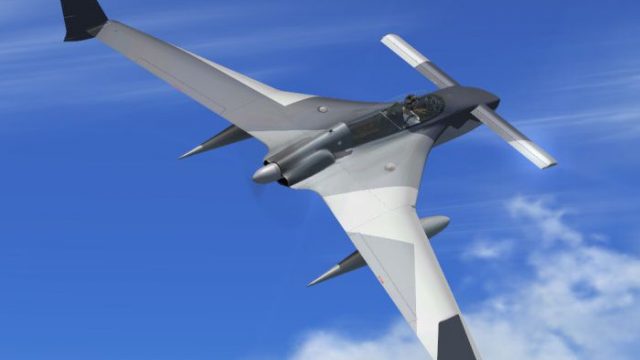
Rutan Model 61 Long-EZ “Ferris” brings a fictional, eye-catching repaint to Burt Rutan’s iconic canard pusher, adding fresh character while preserving the aircraft’s distinctive lines and performance-focused vibe. Designed for Microsoft Flight Simulator X, it requires the payware AlphaSim Rutan 61 Long-EZ and complements its detailed virtual cockpit and visuals.
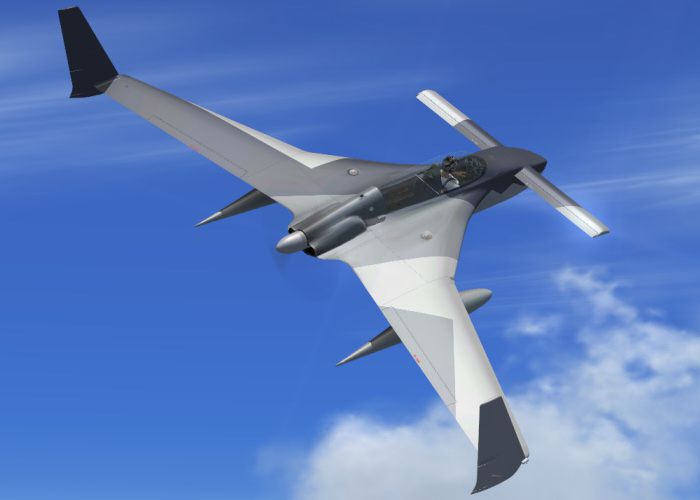

This repaint delivers a fictional “Ferris” livery for the iconic Rutan Model 61 Long-EZ, adapted for use in Microsoft Flight Simulator X. Burt Rutan’s unique canard layout sets this home-built design apart from conventional general aviation aircraft, and this reimagined texture infuses an extra layer of creative flair. Andy Nott of AGN Textures has provided this repaint, which requires the payware AlphaSim Rutan 61 Long-EZ for full functionality.
The Long-EZ – originally engineered by Burt Rutan – is renowned for its forward canard surfaces and rear-mounted engine. Enthusiasts appreciate its efficient aerodynamics and well-balanced flying experience. This fictional “Ferris” scheme interprets that high-efficiency form with a stylish pattern that stands out in flight. The Lycoming O-235 powerplant (in many instances) complements the design’s lightweight structure, allowing robust performance while preserving fuel economy. This themed repaint adds another layer of visual interest to an already distinctive model.

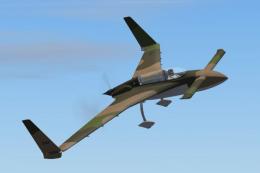
Rutan 61 Long EZ 'Ferris' in flight.
Since this release is a freeware repaint package, you must already own the Rutan 61 Long-EZ from AlphaSim. The original product offers a detailed virtual cockpit, flight model fidelity, and advanced visuals, all of which form a solid base for this “Ferris” texture. Combined, they offer an immersive experience for any pilot looking to try a canard-plane with a pusher configuration in Microsoft Flight Simulator X.
Repaint Developer: Andy Nott of AGN Textures
Payware Model Provided By: AlphaSim Ltd
1. Place the new texture folder named ferris into your existing “ALPHA Rutan 61 Long-EZ O-235 Pods” directory.
2. Edit the aircraft.cfg file inside that folder, and insert the following configuration section. Replace “X” in the bracketed title with the next available number to maintain proper sequence.
[fltsim.X] title=ALPHA Rutan 61 Long-EZ O-235 Ferris sim=ALPHA_LongEZ_o235_pods model=SRP panel= sound= texture=ferris kb_checklists=LongEZ_check kb_reference=LongEZ_pods_ref atc_id= ui_manufacturer="Rutan" ui_type=Rutan Model 61 Long-EZ ui_variation="Ferris Pattern - fictional - (O-235)" ui_typerole="Home-built Aircraft" ui_createdby="AlphaSim Ltd" description=Rutan 61 Long-EZ\n\nThe Rutan Long-EZ for Flight Sim is the first in a next-generation line of AlphaSim products. The Long-EZ is an incredibly popular home-built aircraft flown by pilots all over the world. The prototype of the Long-EZ first flew in 1979. Approximately 700 Long-EZ exist in the USA alone, with many more being built. atc_id_font=Verdana,-11,1,600,0
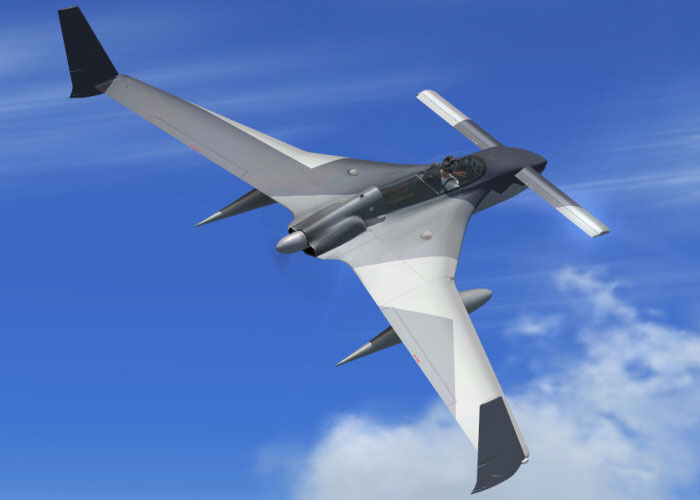
Rutan 61 Long EZ 'Ferris' in flight.
All files included here are safe to use on your system, and you assume full responsibility for usage. This repaint is offered as-is, without any warranties. The developer does not accept liability for potential issues that may arise.
Enjoy operating this fictional repaint as you explore the skies. You will experience Burt Rutan’s inventive engineering in a fresh, visually striking manner while engaging in general aviation tours or short cross-country ventures in Microsoft Flight Simulator X. The final step remains simple: buckle up, power on, and take to the skies with this creative texture added to your virtual hangar.
Free for all simmers · 875.1 KB · Scanned clean
Download speed: Free tier is capped at 0.5 Mbps. PRO members download at full line speed.
SimObjects\Airplanes\, Addon Scenery\, Effects\, or Gauges\.readme.txt or README file. It tells you exactly where files go, what dependencies are needed, and any quirks specific to this add-on.The archive ezferisx.zip has 17 files and directories contained within it.
This list displays the first 500 files in the package. If the package has more, you will need to download it to view them.
| Filename/Directory | File Date | File Size |
|---|---|---|
| ez_ferris_2.jpg | 03.31.08 | 90.71 kB |
| prop.dds | 02.14.08 | 64.12 kB |
| Rutan61_t1_t.dds | 03.31.08 | 1.00 MB |
| Rutan61_t2_t.dds | 03.31.08 | 1.00 MB |
| Rutan61_t3_t.dds | 03.31.08 | 1.00 MB |
| Rutan61_t4_t.dds | 03.31.08 | 1.00 MB |
| Rutan61_t5_t.dds | 03.31.08 | 1.00 MB |
| Rutan61_t6_t.dds | 03.31.08 | 1.00 MB |
| Rutan61_t7_t.dds | 03.31.08 | 1.00 MB |
| Rutan61_t8_t.dds | 03.31.08 | 1.00 MB |
| texture.cfg | 02.06.08 | 134 B |
| thumbnail.jpg | 03.31.08 | 4.56 kB |
| Thumbs.db | 03.31.08 | 5.50 kB |
| file_id.diz | 03.31.08 | 145 B |
| readme.txt | 03.31.08 | 1.23 kB |
| flyawaysimulation.txt | 10.29.13 | 959 B |
| Go to Fly Away Simulation.url | 01.22.16 | 52 B |
More FSX & P3D add-ons hand-picked based on this download.
FSX General Aviation Aircraft
Enhance your virtual hangar by adding a striking, fictional racing-inspired l…
 FSX General Aviation Aircraft
Rutan 61 Long EZ, USMC two tone grey (fictional). This repaint requires the A…
 FSX General Aviation Aircraft
Experience a distinctive livery for the Rutan 61 Long EZ, featuring a vivid b…
 FSX General Aviation Aircraft
This repaint package offers a Rutan Model 61 Long-EZ in a striking “Blue Flam…
 FSX General Aviation Aircraft
This detailed repaint delivers a striking Blue, Yellow, and White finish for …
 FSX General Aviation Aircraft
This carefully crafted repaint introduces an orange and white USAF-style fini…
 FSX General Aviation Aircraft
This fictional G-JACK repaint brings a vibrant Union Jack-inspired aesthetic …
 FSX General Aviation Aircraft
Bring a bold fictional USAF “SEA” theme to your virtual hangar with this high…
Be the first to leave a comment on this download.
Be the first to share your thoughts on this download.