

Fraps 3.0.3
Fraps 3.0.3 provides reliable FPS benchmarking, instant screenshot capture, and real-time video recording for DirectX and OpenGL games on Windows. It supports custom benchmarks with saved stats, auto-named timestamped images, and high-resolution audio/video capture up to 2560x1600 with adjustable frame rates from 10 to 120.
5/5
 Rate
Rate
Rate
Fraps is a universal Windows application that can be used with games using DirectX or OpenGL graphic technology. In its current form Fraps performs many tasks and can best be described as:
Benchmarking Software - Show how many Frames Per Second (FPS) you are getting in a corner of your screen. Perform custom benchmarks and measure the frame rate between any two points. Save the statistics out to disk and use them for your own reviews and applications.
Screen Capture Software - Take a screenshot with the press of a key! There's no need to paste into a paint program every time you want a new shot. Your screen captures are automatically named and timestamped.
Realtime Video Capture Software - Have you ever wanted to record video while playing your favourite game? Come join the Machinima revolution! Throw away the VCR, forget about using a DV cam, game recording has never been this easy! Fraps can capture audio and video up to 2560x1600 with custom frame rates from 10 to 120 frames per second!
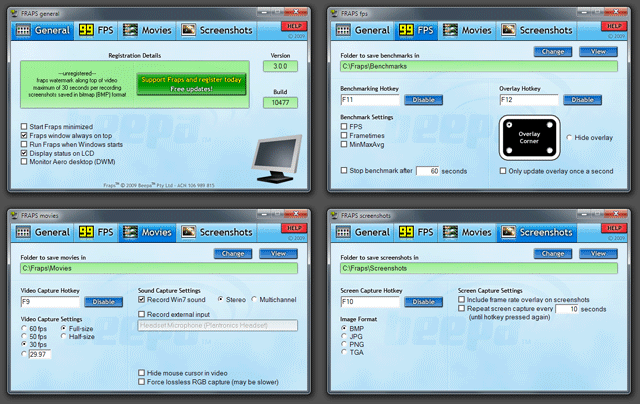
Benchmarking Software - Show how many Frames Per Second (FPS) you are getting in a corner of your screen. Perform custom benchmarks and measure the frame rate between any two points. Save the statistics out to disk and use them for your own reviews and applications.
Screen Capture Software - Take a screenshot with the press of a key! There's no need to paste into a paint program every time you want a new shot. Your screen captures are automatically named and timestamped.
Realtime Video Capture Software - Have you ever wanted to record video while playing your favourite game? Come join the Machinima revolution! Throw away the VCR, forget about using a DV cam, game recording has never been this easy! Fraps can capture audio and video up to 2560x1600 with custom frame rates from 10 to 120 frames per second!
Ready to download Fraps 3.0.3?
Free for all simmers · 1.98 MB · Scanned clean Oct 2026
File information
Filename
frapssetup.exe
File size
1.98 MB
Added
Virus scan
Clean
ClamAV · Oct 2026
Access
Freeware
Content rating
Everyone
Download speed: Free tier is capped at 0.5 Mbps. PRO members download at full line speed.
This is a freeware file — use is subject to our
freeware copyright terms.
Problem with this file? Report it and we’ll take a look.
How to install this mod
FSX / P3D
add-on
How to install this mod
FSX / P3D
add-on
-
Extract the downloaded archive
Use 7-Zip (free) or WinRAR to extract the ZIP to a temporary folder. Don't install while still zipped — the simulator can't read inside ZIP files. -
Place files per the readme
Most FSX add-ons go into one of:SimObjects\Airplanes\,Addon Scenery\,Effects\, orGauges\. -
Always read the included readme
Every mod ships with areadme.txtorREADMEfile. It tells you exactly where files go, what dependencies are needed, and any quirks specific to this add-on.
Rate this add-on
PRO perkOnly PRO members can place votes.
1 comment
Read what other simmers think, or add your own.
Comments below are opinions of individual posters and don’t always reflect Fly Away Simulation’s views. Every comment is manually moderated before publication.
