

Cobalt Co50
Cobalt Co50 Valkyrie brings a sleek four-seat, all-composite canard pusher with retractable gear to FSX, tuned for short-to-medium trips. It includes animated features, SmartDeck-inspired avionics, plus a detailed virtual cockpit with illuminated glass gauges and a classic 2D panel for flexible flying.
 Rate
Rate
The Cobalt Co50 Valkyrie is a four-place aircraft currently undergoing certification by Cobalt Aircraft. It is designed specifically for short to medium length trips. The all-composite aircraft incorporates a canard and split vertical stabilizers in the design, and a pusher engine configuration with retractable landing gear. Introduced in 2010, it's first flight was in September 2012. Features animated parts, virtual cockpit with illuminated glass gauges and 2D panel. By Mark J. S. Macaluso.
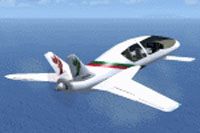
Screenshot of Cobalt Co50 in flight.
The Co50 is not yet in production so design changes are a probability. The Cobalt Co50 also utilizes the SmartDeck avionics suite. To my knowledge FSX does not have the ability to recreate all of the data used in the SmartDeck so I took some liberties in the panel and aircraft design. Example: based on the GMax model, I could not figure out how the passengers got in and out the back seats so I added back doors accessed with [Shift]-[F2].
Ready to download Cobalt Co50?
Free for all simmers · 17.96 MB · Scanned clean Oct 2026
File information
Download speed: Free tier is capped at 0.5 Mbps (this file takes approximately 5 mins at the cap). PRO members download at full line speed.
How to install this mod
FSX / P3D
Complete with Base Model
How to install this mod
-
Extract the downloaded archive
Use 7-Zip (free) or WinRAR to extract the ZIP to a temporary folder. Don't install while still zipped — the simulator can't read inside ZIP files. -
Place files per the readme
Most FSX add-ons go into one of:SimObjects\Airplanes\,Addon Scenery\,Effects\, orGauges\. -
Always read the included readme
Every mod ships with areadme.txtorREADMEfile. It tells you exactly where files go, what dependencies are needed, and any quirks specific to this add-on.
What’s inside this archive
The archive cobalt_co50.zip has 7 files and directories contained within it.
File Contents
This list displays the first 500 files in the package. If the package has more, you will need to download it to view them.
| Filename/Directory | File Date | File Size |
|---|---|---|
| Co50.zip | 02.13.15 | 17.94 MB |
| Cobalt Co50_readme.txt | 02.13.15 | 3.55 kB |
| FILE_ID.diz | 02.13.15 | 232 B |
| Plane1.gif | 02.12.15 | 7.43 kB |
| Plane2.gif | 02.12.15 | 7.88 kB |
| flyawaysimulation.txt | 10.29.13 | 959 B |
| Go to Fly Away Simulation.url | 01.22.16 | 52 B |
Rate this add-on
PRO perkOnly PRO members can place votes.
4 comments
Read what other simmers think, or add your own.
-
I'd like to add a small comment to my previous message... sorry for the trouble...
EDIT
Its performance seems much less than what the technical data of the real aircraft advertises, which e.g. states a take-off obstacle clearance of 1,900ft - in line with what you might expect of such an aircraft.
I've therefore upped the power to
550bhpin theaircraft.cfgfile and set the elevator effectiveness at2i.s.o.0.8. The result is an aircraft that's much more enjoyable to fly and easier (and probably more realistic) to take off and land. -
Cool plane! It flies like a Jumbo, but still it's great fun. A bit more power would be appreciated. About the initial pilot's position, you can easily move into the pilot's seat with
CTRL+BCKSP.One problem though... How can you adjust the Nav bearing? You can change heading, but selecting a VOR bearing seems impossible... :-(
-
This plane flies like its a brick. It took me 5000 feet to take off and it was almost impossible to land. The VC is there but you are seated behind the pilots seat so you can't see the gauges very well. The VC also doesn't have a working yoke other switches/buttons. It looks like a cool plane but its obvious that someone should have taken a little more time on the aircraft.
-


