


 FS2004 Civil Jet Aircraft
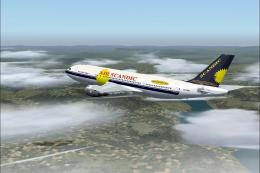
Air Scandic Airbus A300B4-203 G-TTMC
Model by SGA. Livery by Jamie Neilson. Screenshot of Air Scandic Airbus A300B…
Air Scandic’s distinctive Airbus A300B4-200 livery is recreated with crisp, era-accurate textures that bring early-2000s European charter style to the wide-body in Microsoft Flight Simulator 2004. Detailed markings, tail insignia, and subtle shading enhance the virtual cockpit experience, and the repaint requires the SGA A300B4-200 base model.
This freeware repaint brings the classic Air Scandic color scheme to your Airbus A300B4-200 collection for Microsoft Flight Simulator 2004. It captures the airline’s distinctive visual identity through high-fidelity textures prepared by Tom Everitt, reflecting the short-lived carrier’s presence in the early 2000s. You will need the SGA base model (SGAA3B42.ZIP) from the Fly Away Simulation mod library to use these files, as this package includes textures only.
The Airbus A300B4-200 is a significant development within the A300 lineup, incorporating extra fuel capacity compared to earlier variants. This twin-engine, wide-body design was pioneering for its era and offered airlines greater flexibility on mid-range routes. Air Scandic operated these aircraft primarily across European destinations, showcasing a livery noted for its bold color palette.
The wide-body configuration of the A300B4-200 provided increased cabin space and improved operational economics. It also allowed carriers, including Air Scandic, to optimize payload distribution while maintaining strong performance on routes of moderate length.
Tom Everitt, who developed this livery, designed the surface details to reflect the original appearance of Air Scandic’s fleet. The individual markings, tail insignia, and fuselage fonts align closely with the real-world counterpart. These refined textures ensure that the final aircraft model retains authenticity and immerses you further into the airline’s era.
This repaint set is meant for the SGA A300B4-200 (file name: SGAA3B42.ZIP). Be sure to have that freeware package from the Fly Away Simulation mod library installed in Microsoft Flight Simulator 2004 first. Then, integrate these texture files into the existing aircraft folder following the typical add-on installation steps.
No advanced configuration adjustments are required. Simply copy the repaint files into the desired Airbus A300B4-200 folder and update the aircraft configuration entries as per usual addon procedures. Once installed, you can select the Air Scandic variant in the simulator’s menu and immediately experience this unique retro look.
Screenshot of Air Scandic Airbus A300B4-200 in flight.
All credit goes to Tom Everitt for these remarkable freeware textures. This project does not include the base model but delivers a striking representation of Air Scandic’s aesthetic for those seeking to expand their wide-body collection.
Free for all simmers · 2.11 MB · Scanned clean
Download speed: Free tier is capped at 0.5 Mbps. PRO members download at full line speed.
This add-on may require the following files to function properly. If this is a repaint, the dependency below is likely the base aircraft package.
FS9\Aircraft\, FS9\Addon Scenery\, FS9\Gauges\, or FS9\Effects\.readme.txt or README file. It tells you exactly where files go, what dependencies are needed, and any quirks specific to this add-on.The archive scy_a300.zip has 11 files and directories contained within it.
This list displays the first 500 files in the package. If the package has more, you will need to download it to view them.
| Filename/Directory | File Date | File Size |
|---|---|---|
| Texture | 03.29.04 | 0 B |
| A300_A_L.BMP | 03.29.04 | 1.00 MB |
| A300_A_T.BMP | 03.29.04 | 4.00 MB |
| A300_B_L.BMP | 03.29.04 | 1.00 MB |
| A300_B_T.BMP | 03.29.04 | 4.00 MB |
| ENGINES_L.BMP | 02.09.04 | 64.07 kB |
| ENGINES_T.BMP | 02.16.04 | 4.00 MB |
| WINGS_L.BMP | 02.09.04 | 64.07 kB |
| WINGS_T.BMP | 02.09.04 | 1.00 MB |
| flyawaysimulation.txt | 10.29.13 | 959 B |
| Go to Fly Away Simulation.url | 01.22.16 | 52 B |
More FS2004 add-ons hand-picked based on this download.
FS2004 Civil Jet Aircraft
Model by SGA. Livery by Jamie Neilson. Screenshot of Air Scandic Airbus A300B…
 FS2004 Civil Jet Aircraft
This freeware Air France Airbus A300B4-200 package for Microsoft Flight Simul…
 FS2004 Civil Jet Aircraft
This aircraft is mainly operated on Mahan Airs domestic and at times some of …
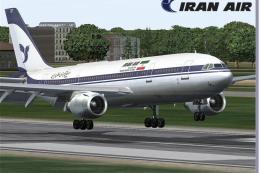 FS2004 Civil Jet Aircraft
Model by SGA. Livery by Amir Alemohammed. Screenshot of Iran Air Airbus A300B…
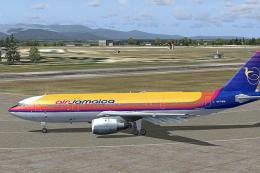 FS2004 Civil Jet Aircraft
A repaint of SGA's Airbus A300 in Air Jamaica colors. Hand painted 32 bit tex…
 FS2004 Civil Jet Aircraft
Model by SGA. Repaint by Barry Moore. Screenshot of Air Contractors Airbus A3…
 FS2004 Civil Jet Aircraft
The new addition to the SGA fleet, the Airbus A300B4-200 is loaded with featu…
 FS2004 Civil Jet Aircraft
This freeware rendition of the Federal Express Airbus A300B4-200—for use in F…
Be the first to leave a comment on this download.
Be the first to share your thoughts on this download.