

 FSX Utilities
Flightplan Creator V3.0
Updated with new features. Here's a complete list of all airports in the FSX …
Airport Design Editor streamlines AFCAD-style airport creation with CAD-like tools, background imagery, object and terrain editing, and a visual approach designer for precise procedure work. Built-in error checks help airports both look right and behave correctly across FS2004, FSX, and Prepar3D v4/v5, with optional real-time sim linking via FSUIPC.
 Rate
Rate
Airport Design Editor (ADE) is a graphical design tool to create and enhance airports for Microsoft Flight Simulators 9 and X. It takes it's inspiration from the excellent AFCAD2 developed for FS9 by Lee Swordy. ADE does for FS9 and FSX what AFCAD does for FS9. It adds support for new FSX features such as fences, jetways and terrain. Users can also remove, move, or edit existing buildings and objects as well as adding new ones In addition to airport elements ADE also has a visual Approach Editor to add and enhance the approaches to your airports ADE is being developed with the help of a small group of dedicated airport designers with a wealth of knowledge and experience.
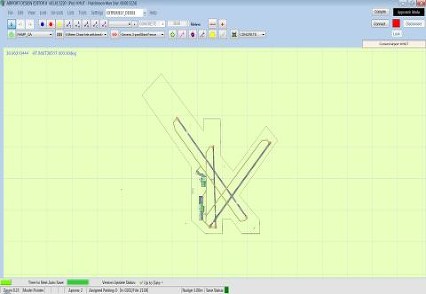 ADE sets out to achieve two things in designing and enhancing airports. First to make the enhanced airport look good, and second to make it work properly. Airport design must address both aspects - the visible and the invisible. The design philosophy goes further in assisting users of all levels to get things right from the start. Error checking and 'common sense' are built in. At the same time it is important to allow users flexibility.
Airport Facilities Design
Terrain (FSX/P3D) and Flattens for FS9
Scenery Object and Buildings
Visual Approach Designer
Free for all simmers · 12.61 MB · Scanned clean Oct 2026
Download speed: Free tier is capped at 0.5 Mbps (this file takes approximately 4 mins at the cap). PRO members download at full line speed.
AF2_*.bgl or AFX_*.bgl) go into FSX\Addon Scenery\Scenery\ or a dedicated AFCAD folder you create.readme.txt or README file. It tells you exactly where files go, what dependencies are needed, and any quirks specific to this add-on.The archive ade_165_full.zip has 4 files and directories contained within it.
This list displays the first 500 files in the package. If the package has more, you will need to download it to view them.
| Filename/Directory | File Date | File Size |
|---|---|---|
| ade_165_full.exe | 03.05.15 | 12.66 MB |
| readme.txt | 10.07.14 | 1.36 kB |
| flyawaysimulation.txt | 10.29.13 | 959 B |
| Go to Fly Away Simulation.url | 01.22.16 | 52 B |
Only PRO members can place votes.
More FSX & P3D add-ons hand-picked based on this download.
FSX Utilities
Updated with new features. Here's a complete list of all airports in the FSX …
 FSX Utilities
Introducing the FSX Flight Plan Creator V12.4, an essential toolkit designed …
FSX Utilities
A utility to create rewards files with multiple sections and criteria. By Cha…
 FSX Utilities
Bug fix. This is a tool, and does not provide any entertainment. If you are a…
 FSX Utilities
FSX Scruffyduck Scenery Design Engine (SDE), v090.2624. The Scenery Design En…
 FSX Utilities
FSX Scruffyduck Software Scenery Design Engine Test Application v1.1. The SDE…
 FSX Utilities
This application allows users of FSDS 3.5.1 to add various tweaks to their mo…
 FSX Utilities
A.I. Traffic tool is created to provide a way for the average flight simulato…
Read what other simmers think, or add your own.

Thanks, I would like to know why a runway I have added in FSX/ADE to Brisbane YBBN won't show up in FSX, it all looks great in ADE, I used "Land class" and "Grass" to flatten the area and that all went okay but no runway, I called the new runway 01 Left and 19 Right and located my starting positions, any help would be appreciated.

I downloaded the current version...the version that I had was a bit outdated. I've uninstalled the older version.
I loaded the new program and It just locks up.
I've downloaded the current version and I'm going to have another shot at it. I just hope that I saved the older version.

Congratulations on your site that I follow weekly I ask a question which version of ADE do you recommend to create airports in FS2020?


This utility is NOT compatible with FSX Steam Edition as it depends on two elements of the FSX SDK which are missing from Steam Edition. There is a workaround which is to download the P3D v1.4 SDK from Lockheed Martin.
Additionally, it requires the Arial Narrow Bold font which is part of the MS Office package and cannot be downloaded legally free of charge. To download just the font itself costs US$49.


