


 Panama
  FSX Scenery
Cayo Coco - Jardines Del Ray
Scenery Cayo Coco - Jardines Del Ray. This scenery is an update of the Cayo C…
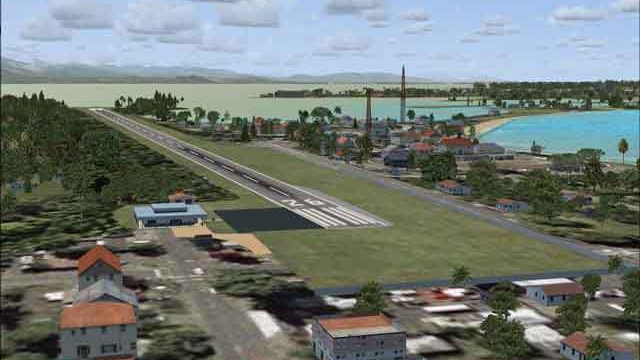
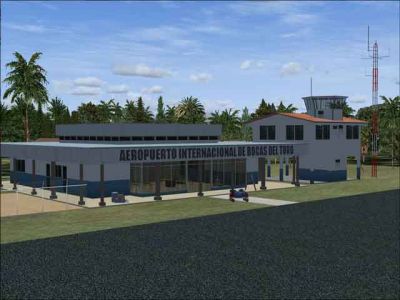
Bocas del Toro International Airport (MPBO) in Panama is recreated for FSX with custom Gmax terminal, tower, antennas, and corrected object placement beyond the default layout. The scenery adds realistic parking for regional turboprops, refined islands, roads, airport background, VOR details, waterclass tuning, improved tower view, and autogen-friendly vegetation integration.
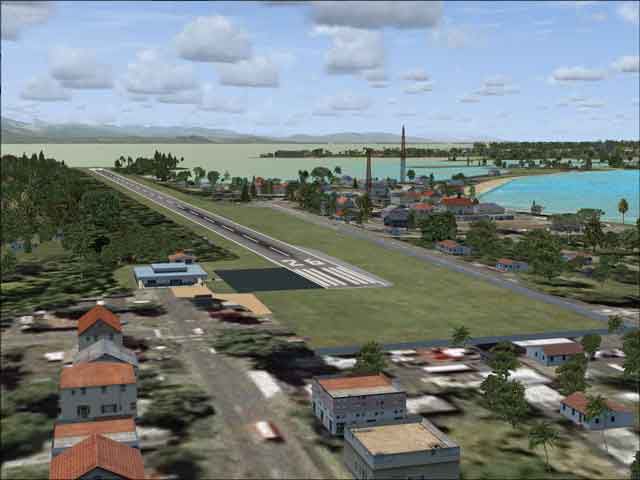
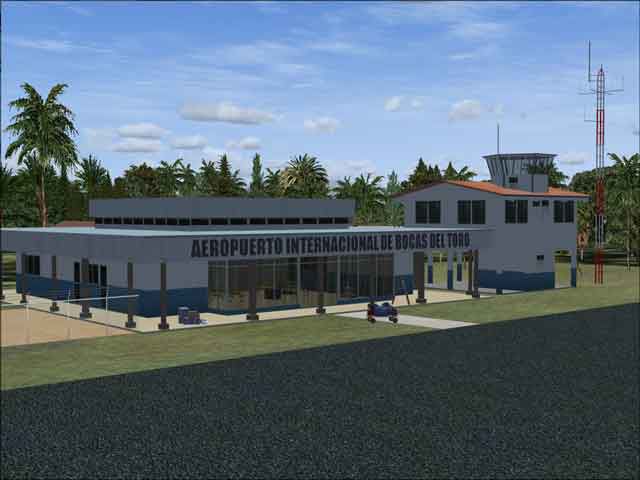
Bocas del Toro International Airport (MPBO), Panama, v1.0. Features structures make with Gmax including terminal, tower, radio antenna, etc. Also realistic parking, adjusting waterclass, reworking surround area and more. By Rhett Browning.
Bocas del Toro International Scenery.
This is a GMAX scenery of Bocas del Toro International Airport, an airport in Panama. This is part of a larger project I have done some work on. At present two other parts of that project that have been released, namely MPTO (Tocumen Intl--AFCAD only), and MPDA (Enrique Malek Intl--gmax scenery).
Bocas del Toro is an interesting community of locals, ex-patriates of various countries (such as the USA, Canada, and Germany), and tourists. Two regional carriers fly into there from Panama City, using mostly Shorts 360, ATR, and occasionally Fokker 27 aircraft.
FEATURES
-- all structures fully GMAX'ed...terminal building and tower, radio antenna, etc.
-- all structures at their exact, precise locations (FSX default scenery is not accurate)
-- realistic parking, based on the best real-world information available to me
-- more parking (max size: 15.1m = F27 size aircraft)
-- reworked cvx scenery (islands, roads, airport background) around MPBO
-- fixed the VOR shack for Bocas del Toro VOR
-- adjusted waterclass around the airport
-- adjusted Tower View
-- integrated vegetation and buildings with the surrounding autogen (recommend you run Very Dense)
INSTALLATION
1) I recommend creating a separate folder for all Panama scenery, such as E:\SCENERY\PANAMA.
2) Then create E:\SCENERY\PANAMA\SCENERY and E:\SCENERY\PANAMA\TEXTURE
2) Install the .bgl files into a \scenery folder.
3) Install the .bmp files into a \texture folder.
4) activate in scenery library.
Please note that if you have already installed my MPDA David airport scenery, you will already have a seasons.bgl file controlling seasons in Panama. That same file is included in this package too--it prevents brown airport background textures in winter in Panama. Winter may be the dry season in Panama, but its never that brown at Bocas.
This scenery was tested with FSX Deluxe SP1, FSX Deluxe SP2/Acceleration, FEX, FSGenesis terrain, and ASG. I cannot guarantee compatibility with any other add-ons, such as UTX, which I do not have.
RECOMMENDED FSX SETTINGS
Autogen: at least NORMAL, preferably EXTREMELY DENSE (At a rural place like Bocas, even on mid-level computers like mine you can run Dense or Extremely Dense Autogen. The airport blends best this way.)
Scenery Complexity Slider: EXTREMELY DENSE. (Setting it to "Sparse" or "Very Sparse" will result in a poor experience for you. In rural areas, frame rate is little affected by the Scenery Complexity Slider, so I recommend you turn it up when flying around Bocas.)
OTHER PANAMA PROJECTS AS OF MARCH 2088
Project Status
MPTO released
MPDA released
MPBO released
MPMG under construction (25% complete)
Carib airports of Panama under construction (75% complete)
Panama seasons released
Panama landclass, waterclass released (under constant revision)
Contadora Airport under construction (25% complete)
Pacific airports of Panama planned
Alvaro Berroa airport planned
Changuinola airport planned
Rhett Browning
Bocas del Toro International Scenery.
Free for all simmers · 342.05 KB · Scanned clean Oct 2026
Download speed: Free tier is capped at 0.5 Mbps. PRO members download at full line speed.
FSX\Addon Scenery\ containing scenery and texture sub-folders.readme.txt or README file. It tells you exactly where files go, what dependencies are needed, and any quirks specific to this add-on.Use these coordinates to fly directly to this location once the mod is installed.
9.34060000,-82.25080000
Launch FSX or Prepar3D and use Flights → Load to open the downloaded .pln file. Your aircraft will be positioned at this location.
The archive mpborbv1.zip has 12 files and directories contained within it.
This list displays the first 500 files in the package. If the package has more, you will need to download it to view them.
| Filename/Directory | File Date | File Size |
|---|---|---|
| MPBO1.jpg | 03.12.08 | 19.36 kB |
| MPBO2.jpg | 03.12.08 | 23.22 kB |
| MPBO_apx_rb.BGL | 01.02.08 | 4.01 kB |
| MPBO_cvx_rb.BGL | 11.13.07 | 6.85 kB |
| MPBO_obx_rb.BGL | 01.27.08 | 234.90 kB |
| MPBO_readme.txt | 03.12.08 | 3.49 kB |
| MPBO_Terminal.bmp | 01.01.08 | 341.40 kB |
| MPBO_Terminal_LM.bmp | 01.01.08 | 341.40 kB |
| MPBO_Terminal_Specular.bmp | 01.26.08 | 341.40 kB |
| MPBO_wc_rb.bgl | 01.04.08 | 443 B |
| flyawaysimulation.txt | 10.29.13 | 959 B |
| Go to Fly Away Simulation.url | 01.22.16 | 52 B |
Only PRO members can place votes.
More FSX & P3D add-ons hand-picked based on this download.
FSX Scenery
Scenery Cayo Coco - Jardines Del Ray. This scenery is an update of the Cayo C…
 FSX Scenery
Punta del Este in Uruguay stands out as a vibrant coastal region cherished by…
 FSX Scenery
Sao Joao Del Rei Airport. This scenery improves details to Prefeito Octavi de…
 FSX Scenery
Princess Juliana International Airport (TNCM) in Saint Marteen, Netherlands A…
 FSX Scenery
Barbados International Airport (TBPB). Grantley Adams International Airport f…
 FSX Scenery
Dubai International Airport (OMDB), Dubai. Includes a new passenger terminal …
 FSX Scenery
Soekarno-Hatta International Airport (WIII), Jakarta, Indonesia. An update to…
 FSX Scenery
San Diego International Airport, California (CA), USA. This photoreal scenery…
Be the first to leave a comment on this download.
Be the first to share your thoughts on this download.