

 FS2004 Civil Jet Aircraft
TAP Boeing 727-200
Experience an expertly crafted freeware Boeing 727-200 package featuring TAP’…
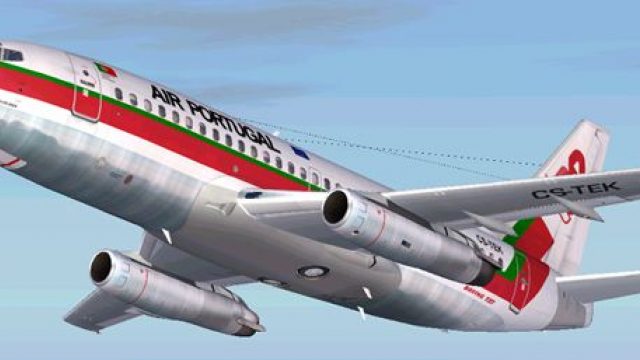
TAP’s classic Boeing 737-200 comes to life with era-accurate markings, crisp exterior detailing, and a period-correct analog virtual cockpit for Microsoft Flight Simulator 2004. Tuned flight dynamics capture JT8D spool-up, approach behavior, and handling that suit the early 737’s character, while core animations cover flaps, spoilers, gear, and thrust reversers.
 Rate
Rate
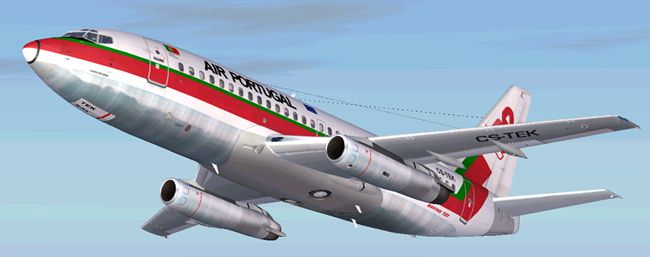
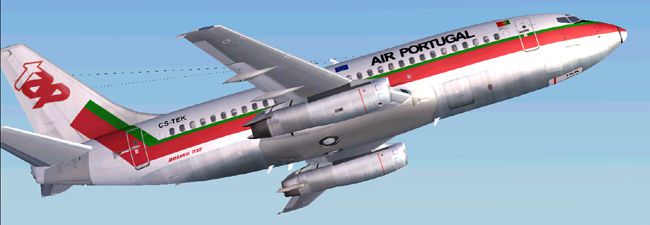
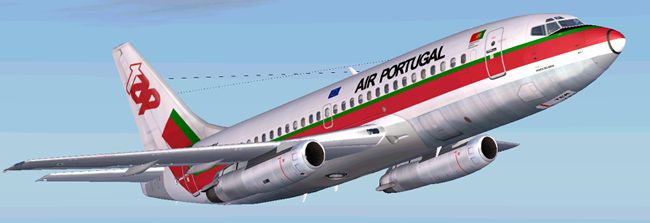
This package showcases a classic Boeing 737-200 configured with TAP (Transportes Aéreos Portugueses) markings for Microsoft Flight Simulator 2004. The included files incorporate Erick Cantu’s base model, flight tuning by Mike Baumann, and exterior refinements by Henry William. The final result accurately recreates a nostalgic livery once flown by Portugal’s flag carrier on short-to-medium routes.
The underlying Boeing 737-200 framework was originally developed as a robust narrow-body jet offering seating for around 100 to 130 passengers. This rendition integrates the characteristic short fuselage and the low-bypass JT8D turbofans that powered the early generation 737 family. Henry William’s repaint meticulously replicates the TAP color scheme, delivering precise font styling and subtle details such as natural-looking door outlines, fuselage stripes, and airline-specific logos.
Mike Baumann’s flight dynamics enhancements (commonly referred to as FDE) align the aircraft’s handling with real-world performance benchmarks. Engine spool times, thrust output, and approach behavior reflect the unique feel of the older Boeing airframe. Pilots using this add-on in FS2004 (also known as Microsoft Flight Simulator 2004) will notice flight characteristics tailored to replicate the 737-200’s early-generation aerodynamic design, requiring careful speed management during descent and approach phases.
TAP, the national airline of Portugal, actively operated early 737 variants for inter-European and domestic services. This specific repaint pays homage to that operational era, emphasizing the airline’s distinctive branding of the time. TAP’s fleet choices have evolved significantly since then, yet this repaint captures the essence of the Boeing 737-200’s prominent role in years past.
Erick Cantu’s original 737-200 model ensures detailed geometry, such as accurately contoured engine intakes and well-defined wing shapes. Aerodynamic nuances, flaps, and landing gear animations are included to maintain an immersive environment. Inside the virtual cockpit, instrumentation reflects the analog flight deck style typical of this generation, showcasing classic gauges and simpler navigation systems.
All essential animations function reliably, including correct flap settings, thrust reversers, and spoiler deployments, paralleling real-world checklists. Leveraging Baumann's flight data adjustments, this platform balances performance across typical flight envelopes. Engine thrust, fuel consumption, and weight distribution marry realism with stable flight simulation, appropriate for short or mid-range virtual routes.

Screenshot of TAP Boeing 737-200 in flight.
This freeware assembly includes the full model by Erick Cantu, aerodynamic configuration by Mike Baumann, and texturing dedicatedly repainted by Henry William. Each individual’s contribution brings the 737-200 to life, creating a reliable companion for enthusiasts seeking to revisit the legacy of TAP’s jetliner operations within Microsoft Flight Simulator 2004.
Free for all simmers · 2.9 MB · Scanned clean Oct 2026
Download speed: Free tier is capped at 0.5 Mbps. PRO members download at full line speed.
FS9\Aircraft\, FS9\Addon Scenery\, FS9\Gauges\, or FS9\Effects\.readme.txt or README file. It tells you exactly where files go, what dependencies are needed, and any quirks specific to this add-on.The archive air732pg.zip has 31 files and directories contained within it.
This list displays the first 500 files in the package. If the package has more, you will need to download it to view them.
| Filename/Directory | File Date | File Size |
|---|---|---|
| AIRCRAFT.CFG | 04.05.04 | 16.36 kB |
| 7372.air | 11.06.03 | 8.17 kB |
| SMOKE_JT8D.fx | 02.23.04 | 1.87 kB |
| readme.txt | 07.03.04 | 251 B |
| texture | 07.03.04 | 0 B |
| 732_B_T.BMP | 02.21.04 | 256.07 kB |
| 737INTERIOR_T.BMP | 12.31.03 | 1.00 MB |
| B732FUSE_L.bmp | 03.09.04 | 1.00 MB |
| b732fuse_t.bmp | 07.03.04 | 4.00 MB |
| B737TAIL_L.BMP | 02.23.04 | 64.07 kB |
| b737tail_t.bmp | 07.02.04 | 1.00 MB |
| ENGINES_L.BMP | 02.23.04 | 64.07 kB |
| engines_t.bmp | 03.22.04 | 1.00 MB |
| MISC_L.BMP | 02.23.04 | 4.07 kB |
| WINGS_L.BMP | 02.23.04 | 256.07 kB |
| misc_t.bmp | 07.03.04 | 1.00 MB |
| wings_t.bmp | 07.03.04 | 4.00 MB |
| Model | 07.03.04 | 0 B |
| B737_200.mdl | 02.21.04 | 1.31 MB |
| MODEL.CFG | 02.08.03 | 25 B |
| sound | 07.03.04 | 0 B |
| sound.cfg | 03.16.03 | 31 B |
| panel | 07.03.04 | 0 B |
| panel.cfg | 03.16.03 | 30 B |
| 3.jpg | 07.03.04 | 83.71 kB |
| 1.jpg | 07.03.04 | 79.10 kB |
| 2.jpg | 07.03.04 | 77.74 kB |
| small.gif | 07.03.04 | 3.86 kB |
| Boeing 737-200 TAP | 07.03.04 | 0 B |
| flyawaysimulation.txt | 10.29.13 | 959 B |
| Go to Fly Away Simulation.url | 01.22.16 | 52 B |
Only PRO members can place votes.
More FS2004 add-ons hand-picked based on this download.
FS2004 Civil Jet Aircraft
Experience an expertly crafted freeware Boeing 727-200 package featuring TAP’…
 FS2004 Civil Jet Aircraft
This freeware Boeing 727-200 package, crafted for Microsoft Flight Simulator …
 FS2004 Civil Jet Aircraft
A repaint of the default B737 in TAP's 1980's livery. Screenshot of TAP Air P…
 FS2004 Civil Jet Aircraft
CFM delux pack update, for use with A320TAP5.ZIP. Some bugs were fixed on the…
 FS2004 Civil Jet Aircraft
TAP Airbus A320-200 CFM56-5B4. A compilation of best modules of A320 availabl…
 FS2004 Civil Jet Aircraft
Designed to cut into the 747 market share, the Lockheed L-1011 did so in the …
 FS2004 Civil Jet Aircraft
This file belongs to a six file pack (A320TAP8.ZIP, A319TAP8.ZIP, A321TAP8.ZI…
 FS2004 Civil Jet Aircraft
For use with 304AIBV2.ZIP by Harald Nehring or with the SSW Airbus Master's E…
Be the first to leave a comment on this download.
Be the first to share your thoughts on this download.