

 FSX Utilities
Info For Passengers Reloaded
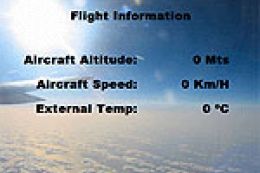
For cockpit builders now you can show to your passengers the plane's altitude…
FS Landing Info Utility tracks landing performance in FSX by polling the sim and logging each touchdown with an instant summary, including multiple entries for bounces. A live readout also monitors key flight parameters such as angle of attack, pitch, roll, yaw, drift, heading, track, and vertical speed, and requires .NET v2.
 Rate
Rate
This program's main purpose is to provide landing performance information. It polls FSX every 100 milliseconds and if it detects that the aircraft has landed a number of flight characteristics are displayed in the FS Landing Info screen. By Steven White.
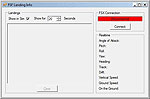
Screenshot of FS Landing Info window.
I have wanted a program to check my landings for some time and while there are a few program around that do it they only provide basic information. I had a skeleton SimConnect program laying around from a little tool I wrote to randomly create failures so I converted that the FS Landing Info.
The software and source code it provided "as-is" and if you use any of it you do so at your own risk. As the source code is trivial the source code is released without restriction EXCEPT copies of this program and source code must remain freeware.
.NET v2 is required to run this program and a C# compiler is required to recompile the source code.
FSX Connection Panel - This panel connects and disconnects FS Landing Info to FSX.
Landings Panel - This panel is updated each time the aircraft lands so if you land five times there will be five landing summaries. If you bounce down the runway there may be more than one landing summary for that landing.
When the Show in Sim check-box is checked then a landing summary will also be provided in the simulator window at the top of the screen. The Show For number represents the number of seconds that the landing summary will be displayed.
Realtime Panel - This panel is updated continuously during flight. The available values are:
Installation/Use:
Free for all simmers · 142.7 KB · Scanned clean Oct 2026
Download speed: Free tier is capped at 0.5 Mbps. PRO members download at full line speed.
SimObjects\Airplanes\, Addon Scenery\, Effects\, or Gauges\.readme.txt or README file. It tells you exactly where files go, what dependencies are needed, and any quirks specific to this add-on.The archive fslandin.zip has 38 files and directories contained within it.
This list displays the first 500 files in the package. If the package has more, you will need to download it to view them.
| Filename/Directory | File Date | File Size |
|---|---|---|
| FSLandingInfo | 10.04.08 | 0 B |
| FSFLandingInfo.exe | 10.04.08 | 32.00 kB |
| FSFLandingInfo.sln | 10.04.08 | 930 B |
| FSFLandingInfo.suo | 10.04.08 | 57.50 kB |
| FSLandingInfo | 10.04.08 | 0 B |
| bin | 10.04.08 | 0 B |
| Debug | 10.04.08 | 0 B |
| FSFLandingInfo.exe | 10.04.08 | 32.00 kB |
| FSFLandingInfo.pdb | 10.04.08 | 29.50 kB |
| FSFLandingInfo.vshost.exe | 10.04.08 | 5.50 kB |
| Microsoft.FlightSimulator.SimConnect.dll | 09.26.07 | 106.06 kB |
| frmMain.cs | 10.04.08 | 12.09 kB |
| frmMain.Designer.cs | 10.04.08 | 20.00 kB |
| frmMain.resx | 10.04.08 | 5.68 kB |
| FSFLandingInfo.csproj | 10.04.08 | 4.38 kB |
| FSFLandingInfo.csproj.user | 10.04.08 | 588 B |
| obj | 10.04.08 | 0 B |
| Debug | 10.04.08 | 0 B |
| FSFLandingInfo.csproj.GenerateResource.Cache | 10.04.08 | 844 B |
| FSFLandingInfo.exe | 10.04.08 | 32.00 kB |
| FSFLandingInfo.frmMain.resources | 10.04.08 | 180 B |
| FSFLandingInfo.pdb | 10.04.08 | 29.50 kB |
| FSFLandingInfo.Properties.Resources.resources | 10.04.08 | 180 B |
| ResolveAssemblyReference.cache | 10.04.08 | 3.40 kB |
| TempPE | 10.04.08 | 0 B |
| FSFLandingInfo.csproj.FileListAbsolute.txt | 10.04.08 | 1.08 kB |
| Program.cs | 10.04.08 | 405 B |
| Properties | 10.04.08 | 0 B |
| AssemblyInfo.cs | 10.04.08 | 1.25 kB |
| Resources.Designer.cs | 10.04.08 | 2.79 kB |
| Resources.resx | 05.24.08 | 5.22 kB |
| Settings.Designer.cs | 10.04.08 | 1.07 kB |
| Settings.settings | 05.24.08 | 249 B |
| Readme.rtf | 10.05.08 | 1.16 MB |
| Readme.txt | 10.05.08 | 2.43 kB |
| FILE_ID.DIZ | 10.16.08 | 293 B |
| flyawaysimulation.txt | 10.29.13 | 959 B |
| Go to Fly Away Simulation.url | 01.22.16 | 52 B |
Only PRO members can place votes.
More FSX & P3D add-ons hand-picked based on this download.
FSX Utilities
For cockpit builders now you can show to your passengers the plane's altitude…
 FSX Utilities
FS Texture Replacement Utility v1.0.1. If you ever wanted to update textures …
 FSX Utilities
FSX FS Earth Demo. This program acts as an interface between Flight Simulator…
 FSX Utilities
This application allows users of FSDS 3.5.1 to add various tweaks to their mo…
 FSX Utilities
If your FSX logbook crashed, and hundreds or thousands hours were lost, use t…
 FSX Utilities
This program acts as an interface between Flight Simulator X and Google Earth…
 FSX Utilities
New to Traffic_Sounds_FSX is the FS Live Traffic Alias Installer. This instal…
 FSX Utilities
The FSX Reg Utility was prepared especially for users with custom setups or w…
Read what other simmers think, or add your own.

I cannot get this to work. I am using FSX SE, simconnect is installed, of course, and an error pops up when trying to start the application which says it cannot load simconnect.