

 FSX Missions
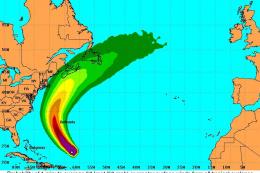
Find Hurricane Bill Mission
Find Hurricane Bill and others. This mission will allow pilots to search for …
Hurricane Landing Mission recreates the tense Airbus A320 flight from Munich to Hamburg in severe storm conditions inspired by the March 1, 2008 LH044 incident, with structured ATC, checklists, POI triggers, and included reference materials for a realistic approach. Built for FSX, it requires the bundled Project Airbus A320 and optionally supports Groundhandling5.
 Rate
Rate
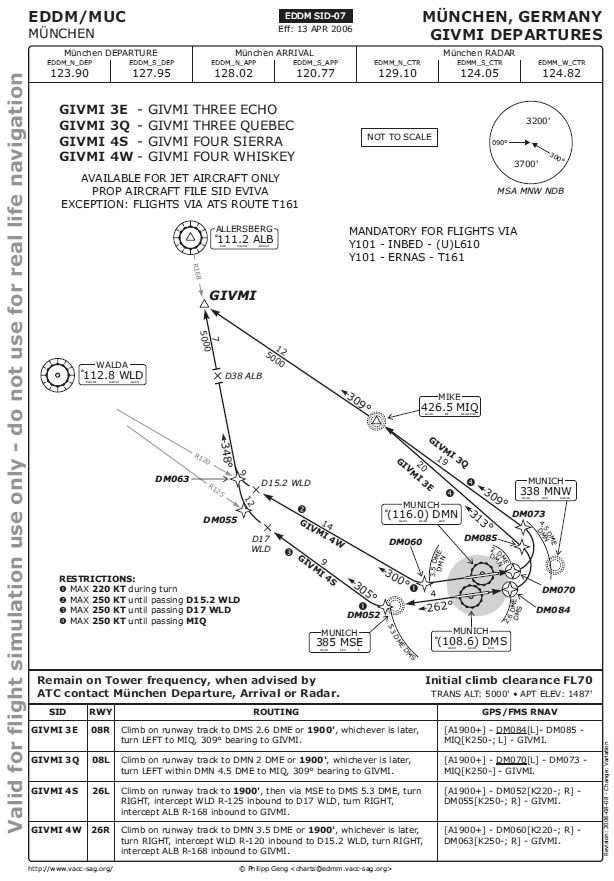
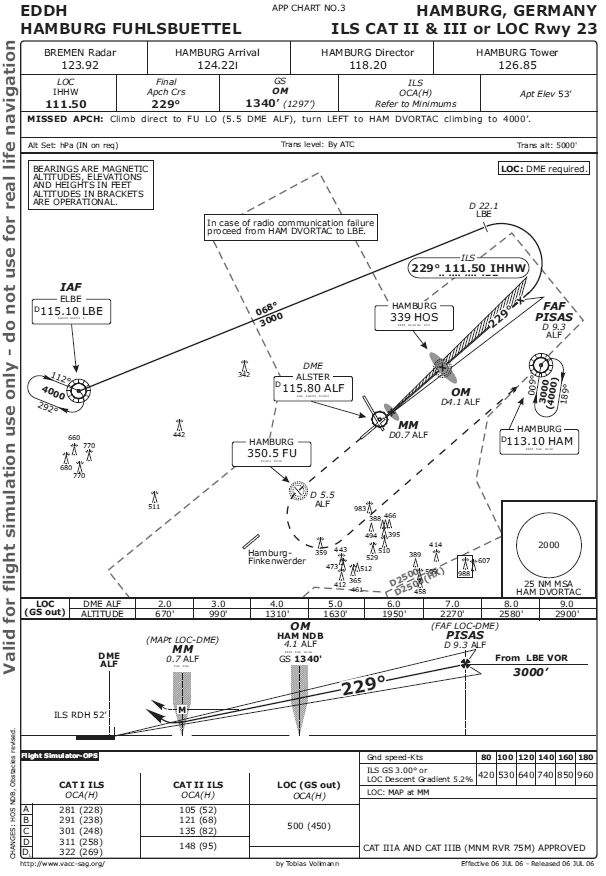
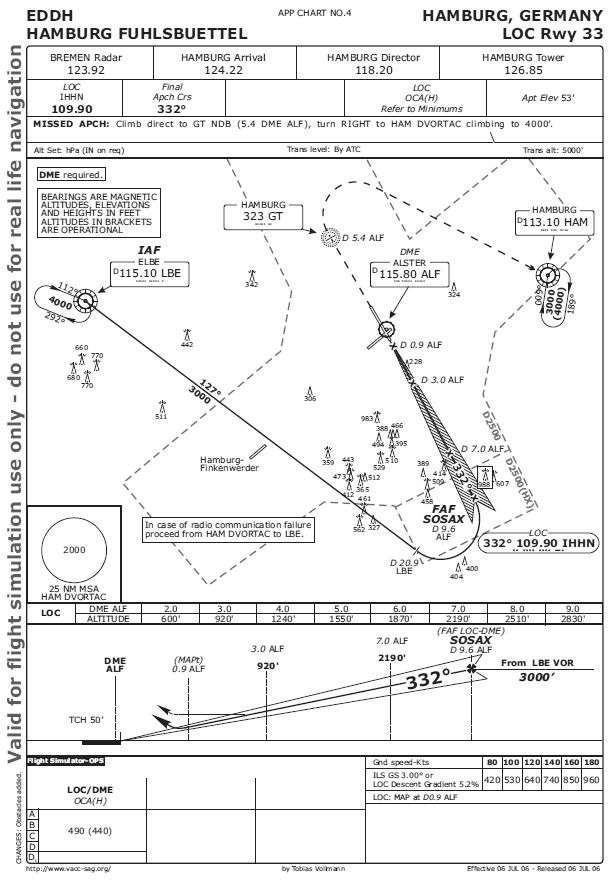
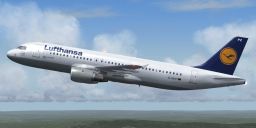
Hurricane Landing. Your task is to fly an Airbus A320 from Munich to Hamburg during a heavy storm. Weather conditions are modelled to closely resemble those on March 1st 2008, when Lufthansa flight 044 almost crashed at Hamburg airport. By Robin Hutter.
Hurricane Landing Mission.
INSTALLATION:
=============
1. Extract the contents of Emma.zip to a temporary directory. Be sure to have the "Use folder names" (or whatever this is called by your ZIP program) active to create the appropriate subdirectories.
2. Copy or move the files in the folder "A320-211 Project Airbus\effects" to your Effects folder ([FSX_root]\Effects)
2. Copy or move the folder "A320-211 Project Airbus" to your Airplanes folder ([FSX_root]\SimObjects\Airplanes\)
3. [Optional] Install the Groundhandling5 package (rcbgh-50.zip) available on www.flightsim.com or www.avsim.com. It is not necessary, but it surely adds a more realistic touch to your flying experience. - And it allows you to make pushback turns, which I can't using the standard Shift-P pushback.
The Airbus_A320 panel included in this archive already has the Groundhandling5 panel installed.
4. Move or copy the "Emma" directory to your [FSX_root]\Missions\Airline Pilot\ folder.
5. Move or copy the content of the "Rewards" folder to your FSX rewards folder [FSX_root]\Rewards.
6. Start FSX. From "Missions" choose "Hurricane landing" using the "Airline pilot" category and the "Advanced" level to narrow the list down, if it is too long.
Now I hope everything works and you have fun.
SOME (HOPEFULLY) HELPFUL REMARKS:
=================================
Please note that the plane's chronograph is showing UTC (Z) time, i.e. you have to add one hour to get the Central European Time (CET) used by "normal people".
In this first phase of the mission the "glass panel" with the secondary ECAMs (Shift-8 with its sub-panels) is quite helpful.
When you receive ATIS information you will notice that in German ATC air pressure values are named "QNH" (instead of "altimeter") and measured in hPa (mbar). So use the appropriate switch to swap units.
If you are using the Groundhandling5 package, a turn angle of 60 degrees and a pushback distance of 0 will bring you to a suitable position to start taxiing.
For a realistic taxi experience, taxi at 15 knots while passing the gates and accelerate to 25 knots on the long taxiway parrallel to the runway. Decrease speed again on turns and approaching the runway. If things happen too fast (especially during the checklists), you may use the pause function pressing "P" to give you more time. You can also review past messages by pressing Shift-F10 and choosing the "Messages" tab.
During gate parking and/or taxi you will have time to set the values for the autopilot: Speed 240 knots (recommended as the wind gusts will easily make you overspeed), heading 260, initial altitude 10,000 feet. Please note that German airspace structure differs from the US structure and from what you might be used to from other FSX flights. In German airspace transition altitude is not 18,000 feet, but usually 5,000 feet. So 10,000 feet is actually FL100 and the standard pressure (1013 hPa) has to be set quite early.
A climb rate of 1800 fpm will bring you to your cruising altitude just about at your first major waypoint VOR ALB.
A word on the POIs: Most POIs are not really necessary for successful completion of the mission. However some of the POIs trigger important messages. So try not to miss them. Especially in the approach phase sticking to the controllers' orders should be sufficient to keep you inside the limits, but strong, variable winds and unpredictable speed and altitude of your aircraft may make some corrections necessary. Don't forget to take the strong crosswinds into account! Setting your heading exactly towards the POI will almost certainly make you miss it... If you use the mission pointer, passing a POI within 2 miles distance should be safe.
After passing FL100 you may accelerate. To save fuel it is recommended not to fly faster than 300 knots. But you can also choose to catch up a bit of the delay. - Your choice, captain...
Cruising at FL260 may be a bit boring to you. For those of you that need it: you can use the "r+" sequence to accelerate the simulation rate. ;) At turns a higher simulation rate may cause problems, so try to be no faster than 4x at sharper turns.
A hint for descending: The autothrottle on the A320 is reacting quite slowly, so you might consider switching speed control off on starting a new descent stage, set N1 to idle manually and then activate the SPD button again! Sometimes using the speed brakes will be necessary.
You can't set the autobrakes on the gear panel (Shift-6), but setting the speed brakes at ca. 40-50% will activate the autobrakes as well.
ADDITIONAL MATERIAL:
====================
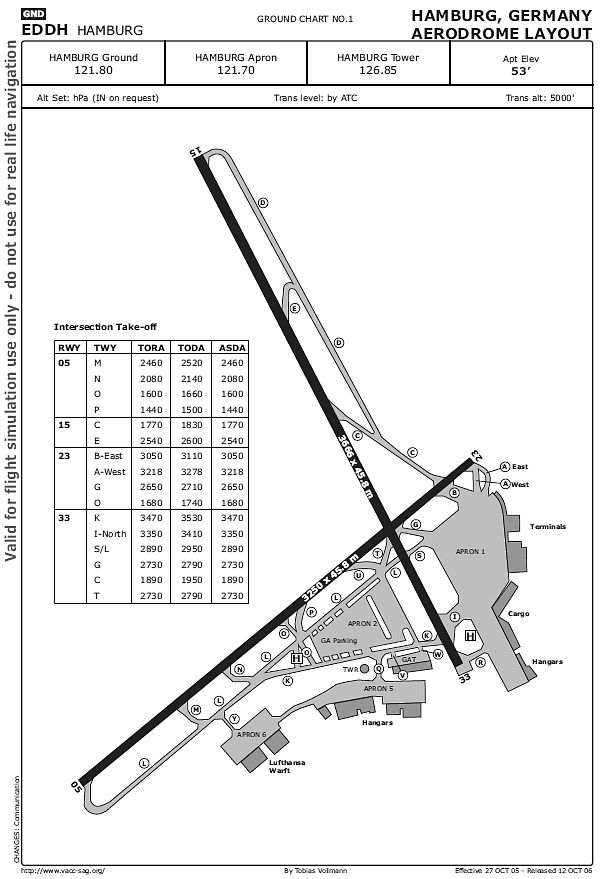
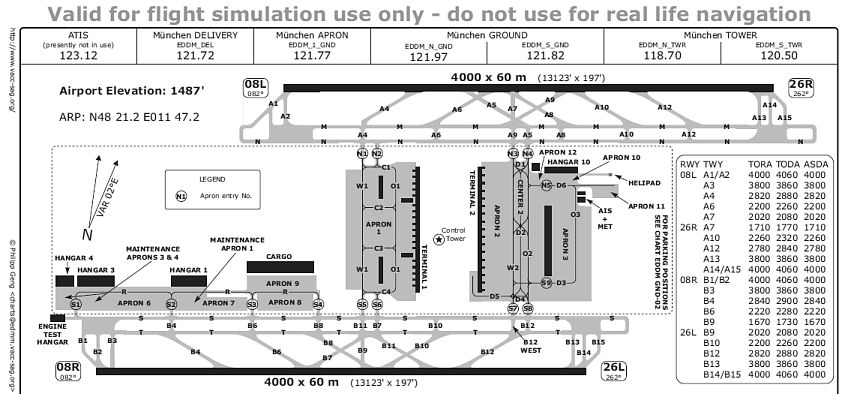
I have tried to make the mission as close to reality as possible. For this reason it is very helpful if you make use of the additional material supplied. It contains airport charts, departure and arrival diagrams and other useful information.
Note that the A320 is class "D" for the LOC and/or ILS approach. Visibility was good enough on March 1st 2008 to have a CAT II ILS for the A320. So the decision height (DH = height over ground measured by the radar altimeter displayed in the HSI below 2500 feet) was 95 feet for the ILS approach on runway 23. In the localizer approach on runway 33, an obstacle clearing altitude (OCA = barometric altitude displayed on the altimeter to the right of the HSI and the analog altimeter) of 490 feet.
God bless,
Wolfgang <><
Free for all simmers · 47.36 MB · Scanned clean Oct 2026
Download speed: Free tier is capped at 0.5 Mbps (this file takes approximately 13 mins at the cap). PRO members download at full line speed.
This add-on may require the following files to function properly. If this is a repaint, the dependency below is likely the base aircraft package.
FSX\Missions\ as a sub-folder. The folder must contain an XML file describing the mission.readme.txt or README file. It tells you exactly where files go, what dependencies are needed, and any quirks specific to this add-on.The archive emma-1.zip has 291 files and directories contained within it.
This list displays the first 500 files in the package. If the package has more, you will need to download it to view them.
| Filename/Directory | File Date | File Size |
|---|---|---|
| texture.DLH | 06.27.08 | 0 B |
| Airbus | 01.31.09 | 0 B |
| Background.htm | 01.02.09 | 1.92 kB |
| Background_Tab.htm | 06.10.08 | 6.26 kB |
| Charts.htm | 01.02.09 | 1.45 kB |
| Charts_Tab.htm | 06.09.08 | 6.26 kB |
| Details.htm | 07.25.08 | 2.42 kB |
| Details_Tab.htm | 06.09.08 | 6.26 kB |
| Emma.FLT | 02.10.09 | 11.01 kB |
| emma.xml | 02.03.09 | 287.13 kB |
| IFR Munich to Hamburg GIVMI4W.PLN | 01.03.09 | 6.97 kB |
| IFR Munich to Hamburg.PLN | 06.21.08 | 5.88 kB |
| images | 02.17.09 | 0 B |
| 04_07a.jpg | 06.09.08 | 1.12 kB |
| Eddh_gnd.gif | 01.12.09 | 64.59 kB |
| eddm_taxi.gif | 01.02.09 | 95.07 kB |
| givmi.gif | 01.02.09 | 91.99 kB |
| ils23.gif | 01.02.09 | 80.90 kB |
| loc33.gif | 01.02.09 | 74.06 kB |
| overview_01.jpg | 06.09.08 | 3.40 kB |
| Thumbs.db | 07.14.08 | 41.00 kB |
| ImgM_c.bmp | 06.12.08 | 87.15 kB |
| ImgM_i.bmp | 06.12.08 | 87.15 kB |
| Kneeboard.htm | 01.03.09 | 1.95 kB |
| Material | 02.17.09 | 0 B |
| Overview.htm | 01.31.09 | 2.55 kB |
| Overview_Tab.htm | 06.09.08 | 6.27 kB |
| Rewards | 07.16.08 | 0 B |
| sound | 02.17.09 | 0 B |
| 10.wav | 07.22.08 | 1.55 kB |
| 100.WAV | 07.22.08 | 3.21 kB |
| 10000.wav | 01.01.09 | 13.84 kB |
| 10000_down.wav | 01.02.09 | 45.34 kB |
| 10000_down_220.wav | 07.22.08 | 44.56 kB |
| 1000_23.wav | 08.20.08 | 24.84 kB |
| 1000_33.wav | 08.23.08 | 22.84 kB |
| 20.wav | 07.22.08 | 2.07 kB |
| 200.WAV | 07.22.08 | 3.26 kB |
| 20000.wav | 07.22.08 | 51.58 kB |
| 23wp1.wav | 01.03.09 | 60.34 kB |
| 23wp2.wav | 01.03.09 | 68.59 kB |
| 23wp3.wav | 01.03.09 | 159.59 kB |
| 2500.wav | 07.23.08 | 6.03 kB |
| 250knots.wav | 07.23.08 | 17.20 kB |
| 260.wav | 10.01.08 | 32.12 kB |
| 30.wav | 07.23.08 | 1.96 kB |
| 300.WAV | 07.23.08 | 3.30 kB |
| 40.wav | 07.23.08 | 2.00 kB |
| 400.WAV | 07.23.08 | 3.30 kB |
| 50.wav | 07.23.08 | 1.93 kB |
| 500.WAV | 07.23.08 | 3.44 kB |
| 80knots.wav | 07.23.08 | 4.14 kB |
| after_ga.wav | 01.02.09 | 172.84 kB |
| after_landing_checklist.wav | 01.02.09 | 300.09 kB |
| approach_check.wav | 01.02.09 | 714.09 kB |
| approach_gate.wav | 07.23.08 | 15.52 kB |
| appr_brief_33.wav | 01.02.09 | 271.34 kB |
| appr_decision_height.wav | 09.11.08 | 68.11 kB |
| appr_gate.wav | 12.30.08 | 17.55 kB |
| appr_oca.wav | 09.11.08 | 50.79 kB |
| before_taxi_checklist.wav | 12.29.08 | 287.32 kB |
| both_engines_running.wav | 09.18.08 | 18.98 kB |
| cabinclear.wav | 01.02.09 | 8.29 kB |
| check_wingstrike.wav | 01.02.09 | 137.59 kB |
| climb_checklist.wav | 12.30.08 | 316.09 kB |
| cross23.wav | 09.11.08 | 66.34 kB |
| cruising.wav | 01.03.09 | 245.84 kB |
| decision_height.wav | 12.29.08 | 31.87 kB |
| descent_check.wav | 12.29.08 | 201.97 kB |
| doors_in_flight.wav | 01.02.09 | 39.28 kB |
| down_fl180.wav | 01.03.09 | 107.59 kB |
| eddh_atis.wav | 09.12.08 | 148.85 kB |
| eddm_atis.wav | 12.29.08 | 465.19 kB |
| eddm_clearance.wav | 09.16.08 | 124.34 kB |
| eddm_ground1.wav | 07.23.08 | 19.29 kB |
| eddm_ground2.wav | 07.23.08 | 103.23 kB |
| eddm_takeoff.wav | 09.10.08 | 28.34 kB |
| engine2running.wav | 09.18.08 | 19.51 kB |
| engine_start1.wav | 12.29.08 | 92.11 kB |
| engine_start2.wav | 09.10.08 | 43.40 kB |
| exit_runway.wav | 09.11.08 | 72.59 kB |
| final_landing_check.wav | 12.29.08 | 261.39 kB |
| flaps_up.wav | 07.23.08 | 3.81 kB |
| gate_dep_checklist.wav | 01.01.09 | 614.09 kB |
| gear_up.wav | 07.23.08 | 8.08 kB |
| gnd_eddh.wav | 09.11.08 | 12.59 kB |
| going_around1.wav | 01.02.09 | 24.09 kB |
| going_around2.wav | 09.11.08 | 92.09 kB |
| going_around3.wav | 09.11.08 | 32.59 kB |
| got_atis.wav | 07.23.08 | 15.61 kB |
| got_atis2.wav | 01.02.09 | 98.04 kB |
| ham_conditions.wav | 01.07.09 | 279.59 kB |
| handoff_muc_center.wav | 10.01.08 | 79.36 kB |
| here_we_go.wav | 07.23.08 | 12.31 kB |
| hs23.wav | 02.17.09 | 79.38 kB |
| landing2crew.wav | 01.02.09 | 16.59 kB |
| landing_check.wav | 01.02.09 | 754.09 kB |
| landing_check33.wav | 01.02.09 | 661.09 kB |
| landing_decision1.wav | 01.03.09 | 69.59 kB |
| land_clear_23.wav | 12.29.08 | 151.21 kB |
| land_clear_33.wav | 09.11.08 | 49.59 kB |
| No_fo.wav | 01.02.09 | 636.09 kB |
| no_takeoff_clearance.wav | 07.23.08 | 16.91 kB |
| no_taxi.wav | 07.23.08 | 19.07 kB |
| oca.wav | 12.29.08 | 29.59 kB |
| om23.wav | 12.29.08 | 125.08 kB |
| parking.wav | 01.02.09 | 84.34 kB |
| regular.wav | 09.18.08 | 74.98 kB |
| rotate.wav | 07.23.08 | 3.81 kB |
| route.wav | 01.03.09 | 210.34 kB |
| routing.wav | 09.18.08 | 152.42 kB |
| sosax.wav | 01.02.09 | 209.19 kB |
| switch_bremen_center.wav | 12.29.08 | 219.80 kB |
| switch_ham_appr.wav | 01.03.09 | 213.09 kB |
| switch_muc_dep.wav | 10.01.08 | 83.06 kB |
| takeoff_checklist.wav | 12.29.08 | 547.53 kB |
| taxi_to_gate.wav | 01.12.09 | 61.09 kB |
| toga.wav | 09.11.08 | 83.09 kB |
| transition_up.wav | 12.29.08 | 59.72 kB |
| u_turn_33.wav | 01.02.09 | 244.09 kB |
| v1.wav | 07.23.08 | 3.44 kB |
| v2.wav | 07.23.08 | 3.42 kB |
| wait_for_747.wav | 09.10.08 | 59.09 kB |
| welcome.wav | 01.01.09 | 281.02 kB |
| wt874_clear.wav | 12.29.08 | 31.85 kB |
| wt874_num2.wav | 12.29.08 | 217.19 kB |
| Emma | 02.17.09 | 0 B |
| eddh_ils_23_2008_06_13.pdf | 12.30.08 | 53.15 kB |
| eddh_info_2008_08_18.pdf | 12.30.08 | 44.18 kB |
| eddh_loc_33_2008_06_13.pdf | 12.30.08 | 51.27 kB |
| eddh_park_2008_06_05.pdf | 12.30.08 | 30.47 kB |
| EDDM_GND-01_TAXI_-_FS2004_20060808.pdf | 08.10.06 | 43.76 kB |
| EDDM_SID-07_GIVMI_20060808.pdf | 08.09.06 | 42.89 kB |
| Emma.WX | 08.25.08 | 294.32 kB |
| texture.LH | 01.31.09 | 0 B |
| AirbusA320_check.htm | 06.21.08 | 9.72 kB |
| AirbusA320_ref.htm | 06.21.08 | 5.48 kB |
| Aircraft.cfg | 02.17.09 | 15.81 kB |
| effects | 02.17.09 | 0 B |
| fx_beacon3202pa.fx | 07.24.02 | 3.03 kB |
| fx_beacon320pa.fx | 07.24.02 | 3.01 kB |
| fx_contrail_320.fx | 07.24.02 | 1.17 kB |
| fx_navgre320pa.fx | 07.24.02 | 4.56 kB |
| fx_navred320pa.fx | 07.24.02 | 4.56 kB |
| fx_navwhi320pa.fx | 07.24.02 | 3.03 kB |
| fx_strobe2320pa.fx | 07.24.02 | 2.44 kB |
| fx_strobe320pa.fx | 07.24.02 | 4.80 kB |
| fx_tchdwn320.fx | 07.24.02 | 4.54 kB |
| intelliscene.cfg | 06.24.07 | 142 B |
| model.200_CFM | 02.17.09 | 0 B |
| A320_200_CFM_NoVC.mdl | 01.30.09 | 2.04 MB |
| Airbus_A321_interior.mdl | 08.22.07 | 1.06 MB |
| Model.cfg | 01.30.09 | 67 B |
| pa320-cfm56-2.air | 06.18.07 | 8.76 kB |
| pa320-v2527.air | 06.13.07 | 8.80 kB |
| panel | 02.17.09 | 0 B |
| Airbus_A321.cab | 09.26.07 | 2.72 MB |
| airbus_a321_panel_background.bmp | 05.12.06 | 769.05 kB |
| airbus_a321_panel_background_night.bmp | 05.12.06 | 769.05 kB |
| panel.cfg | 03.03.08 | 6.01 kB |
| Readme.pdf | 06.23.07 | 57.34 kB |
| Readme.txt | 06.23.07 | 6.26 kB |
| sound | 02.17.09 | 0 B |
| a321_abuzz.wav | 08.01.06 | 542.26 kB |
| a321_an11.wav | 08.01.06 | 160.58 kB |
| a321_an12.wav | 08.01.06 | 111.41 kB |
| a321_an13.wav | 08.01.06 | 115.19 kB |
| a321_an14.wav | 08.01.06 | 114.41 kB |
| a321_an1strt.wav | 08.01.06 | 1.30 MB |
| a321_an21.wav | 08.01.06 | 207.00 kB |
| a321_an22.wav | 08.01.06 | 256.92 kB |
| a321_an23.wav | 08.01.06 | 147.36 kB |
| a321_an24.wav | 08.01.06 | 162.15 kB |
| a321_an2shut.wav | 08.01.06 | 1.00 MB |
| a321_an2strt.wav | 08.01.06 | 297.20 kB |
| a321_an2t.wav | 08.01.06 | 450.59 kB |
| a321_bbuzz.wav | 08.01.06 | 542.26 kB |
| a321_bn11.wav | 08.01.06 | 186.51 kB |
| a321_bn12.wav | 08.01.06 | 107.45 kB |
| a321_bn13.wav | 08.01.06 | 107.70 kB |
| a321_bn14.wav | 08.01.06 | 117.23 kB |
| a321_bn1strt.wav | 08.01.06 | 1.52 MB |
| a321_bn21.wav | 08.01.06 | 206.17 kB |
| a321_bn22.wav | 08.01.06 | 247.70 kB |
| a321_bn23.wav | 08.01.06 | 150.48 kB |
| a321_bn24.wav | 08.01.06 | 165.92 kB |
| a321_bn2shut.wav | 08.01.06 | 1.00 MB |
| a321_bn2strt.wav | 08.01.06 | 297.20 kB |
| a321_bn2t.wav | 08.01.06 | 450.59 kB |
| baapdis.wav | 06.23.06 | 13.69 kB |
| baglide.wav | 06.23.06 | 7.19 kB |
| ban1shut.wav | 06.23.06 | 206.75 kB |
| ban1strt.wav | 06.23.06 | 389.31 kB |
| ban2shut.wav | 06.23.06 | 259.75 kB |
| ban2strt.wav | 06.23.06 | 62.25 kB |
| baover.wav | 06.23.06 | 22.23 kB |
| bbn1shut.wav | 06.23.06 | 212.25 kB |
| bbn1strt.wav | 06.23.06 | 342.81 kB |
| bbn2shut.wav | 06.23.06 | 254.25 kB |
| bbn2strt.wav | 06.23.06 | 50.25 kB |
| bmflaps.wav | 06.23.06 | 73.81 kB |
| bmgeardn.wav | 06.23.06 | 119.19 kB |
| bmgearup.wav | 06.23.06 | 122.19 kB |
| bmgwarn.wav | 06.23.06 | 14.73 kB |
| door_large_close.wav | 06.23.06 | 131.81 kB |
| door_large_open.wav | 06.23.06 | 116.30 kB |
| Sound.cfg | 06.23.06 | 20.23 kB |
| xa321a-n1f01.wav | 06.23.06 | 165.15 kB |
| xa321a-n1f02.wav | 06.23.06 | 199.32 kB |
| xa321a-n1f03.wav | 06.23.06 | 122.38 kB |
| xa321a-n1f04.wav | 06.23.06 | 133.14 kB |
| xa321a-n2r01.wav | 06.23.06 | 182.89 kB |
| xa321a-n2r02.wav | 06.23.06 | 144.77 kB |
| xa321a-n2r03.wav | 06.23.06 | 135.38 kB |
| xa321a-n2r04.wav | 06.23.06 | 160.90 kB |
| xa321b-n1f01.wav | 06.23.06 | 165.15 kB |
| xa321b-n1f02.wav | 06.23.06 | 199.32 kB |
| xa321b-n1f03.wav | 06.23.06 | 122.38 kB |
| xa321b-n1f04.wav | 06.23.06 | 133.14 kB |
| xa321b-n2r01.wav | 06.23.06 | 182.89 kB |
| xa321b-n2r02.wav | 06.23.06 | 144.77 kB |
| xa321b-n2r03.wav | 06.23.06 | 135.38 kB |
| xa321b-n2r04.wav | 06.23.06 | 162.78 kB |
| xa321_an1shut.wav | 06.23.06 | 212.25 kB |
| xa321_an1strt.wav | 06.23.06 | 496.81 kB |
| xa321_an2shut.wav | 06.23.06 | 227.75 kB |
| xa321_an2strt.wav | 06.23.06 | 496.81 kB |
| xa321_an2t.wav | 06.23.06 | 108.81 kB |
| xa321_bn1shut.wav | 06.23.06 | 220.25 kB |
| xa321_bn1strt.wav | 06.23.06 | 460.81 kB |
| xa321_bn2shut.wav | 06.23.06 | 217.75 kB |
| xa321_bn2strt.wav | 06.23.06 | 460.81 kB |
| xa321_bn2t.wav | 06.23.06 | 119.31 kB |
| xban1shut.wav | 06.23.06 | 212.25 kB |
| xban1strt.wav | 06.23.06 | 496.81 kB |
| xban2shut.wav | 06.23.06 | 227.75 kB |
| xban2strt.wav | 06.23.06 | 60.75 kB |
| xbbn1shut.wav | 06.23.06 | 220.25 kB |
| xbbn1strt.wav | 06.23.06 | 460.81 kB |
| xbbn2shut.wav | 06.23.06 | 217.75 kB |
| xbbn2strt.wav | 06.23.06 | 58.25 kB |
| soundai | 02.17.09 | 0 B |
| soundai.cfg | 05.12.06 | 34 B |
| texture.LH | 02.17.09 | 0 B |
| A320_1_l.bmp | 03.31.06 | 4.00 MB |
| A320_1_t.bmp | 01.30.09 | 4.00 MB |
| A320_2_l.bmp | 03.30.06 | 1.00 MB |
| A320_2_t.bmp | 07.07.07 | 4.00 MB |
| A320_fuse_1_l.bmp | 08.11.07 | 4.00 MB |
| A320_fuse_1_t.bmp | 01.30.09 | 4.00 MB |
| A320_fuse_2_l.bmp | 08.13.07 | 4.00 MB |
| A320_fuse_2_t.bmp | 07.08.07 | 4.00 MB |
| A320_fuse_3_l.bmp | 07.07.07 | 4.00 MB |
| A320_fuse_3_t.bmp | 01.30.09 | 4.00 MB |
| A320_misc_1.bmp | 04.11.06 | 1.00 MB |
| A320_misc_2.bmp | 07.08.07 | 4.00 MB |
| A320_misc_2_t.bmp | 07.08.07 | 4.00 MB |
| A320_wing_1_l.bmp | 03.31.06 | 1.00 MB |
| A320_wing_1_t.bmp | 07.07.07 | 4.00 MB |
| A320_wing_2_l.bmp | 03.31.06 | 1.00 MB |
| A320_wing_2_t.bmp | 07.07.07 | 4.00 MB |
| A321_1_T.dds | 09.04.06 | 1.33 MB |
| A321_1_T_Bump.dds | 09.04.06 | 1.00 MB |
| A321_1_T_LM.dds | 09.04.06 | 170.79 kB |
| A321_1_T_spec.dds | 09.04.06 | 1.33 MB |
| A321_2_T.dds | 09.04.06 | 1.33 MB |
| A321_2_T_Bump.dds | 09.04.06 | 1.00 MB |
| A321_2_T_LM.dds | 09.04.06 | 170.79 kB |
| A321_2_T_spec.dds | 09.04.06 | 1.33 MB |
| A321_Interior_T.dds | 09.04.06 | 341.45 kB |
| A321_reflection.dds | 09.04.06 | 170.79 kB |
| Airbus_A321_1_C.dds | 09.04.06 | 682.79 kB |
| Airbus_A321_1_night_C.dds | 09.04.06 | 682.79 kB |
| Airbus_A321_2_C.dds | 09.04.06 | 682.79 kB |
| Airbus_A321_2_night_C.dds | 09.04.06 | 682.79 kB |
| Airbus_A321_3_C.dds | 09.04.06 | 682.79 kB |
| Airbus_A321_3_night_C.dds | 09.04.06 | 682.79 kB |
| Airbus_A321_4_C.dds | 09.04.06 | 682.79 kB |
| Airbus_A321_4_night_C.dds | 09.04.06 | 682.79 kB |
| Airbus_Pilots.dds | 09.04.06 | 42.79 kB |
| Fresnel_Ramp.dds | 09.04.06 | 640 B |
| texture.cfg | 08.14.06 | 137 B |
| thumbnail.jpg | 07.08.07 | 13.15 kB |
| A320-211 Project Airbus | 02.17.09 | 0 B |
| toga.pk | 02.13.09 | 5.14 kB |
| emma_reward.RWD | 07.11.08 | 120.34 kB |
| Rewards | 07.16.08 | 0 B |
| ReadMe.txt | 02.17.09 | 5.80 kB |
| FILE_ID.DIZ | 02.17.09 | 272 B |
| emma.gif | 02.17.09 | 11.65 kB |
| flyawaysimulation.txt | 10.29.13 | 959 B |
Only PRO members can place votes.
More FSX & P3D add-ons hand-picked based on this download.
FSX Missions
Find Hurricane Bill and others. This mission will allow pilots to search for …
 FSX Missions
Hairy Landing At PAKP. Fly a Civil Air Patrol mission in Alaska. Aircraft: Ma…
 FSX Missions
Space Shuttle Landing. Requires Captain Sim Space Shuttle. By Dennny Puka.
 FSX Missions
Foggy Landing at KLPR. A flight file for FSX: A recreation of the final 20 mi…
 FSX Missions
Madagascar Mission. The Madagascarian Military pays you for a transport fligh…
 FSX Missions
Experience a daring alpine approach with this immersive mission set amid the …
 FSX Missions
Discover a daring and immersive freeware add-on that challenges your landing …
 FSX Missions
The Most Dangerous Airports: Lukla. The next in The Most Dangerous Airport Mi…
Read what other simmers think, or add your own.


I did it (changed aircraft to 737) but cannot find the gate I'm supposed to park, so failed anyway.

Hi
I downloaded everything as said and the mission does not show in FSX, anyone else having this problem?

Fantastic mission so far I paused midway to comment... Anyone else catch The Beatles 'Here Comes The Sun' playing around FL190 on the climb? Or am I just crazy?

congratulations. very nice mission. don't forget you HAVE TO mess up the first landing and fly over the runway with a little touch and go.

I saved at WP1, then flew it several times, got 2 pics. you have to be at 4000 at WP3 and also do a missed approach at rwy23 and go around to the other one. Awesome cross winds there. Excellent mission, listen to the ATC...

Hi im a real world pilot in Srilankan airlines. i landed the aircarft from the first attempt and it was easy... and i didnt get the message "Mission Success". Instead of that i got a pic '' Hamburger michel'' as a reward.
''FSX Hurricane Landing Mission'' yeah even i like this mission alot. :)

Great mission...except after a successful landing I didn't not get the "Mission Success" message. landed and right through the POI and taxied back to it. Nothing... Otherwise it was great.
