

 FSX Utilities
Traffic Sounds FSX Ultimate Traffic 2
Traffic Sounds FSX Ultimate Traffic 2 Alias Installer. By Alan Constable. Cov…
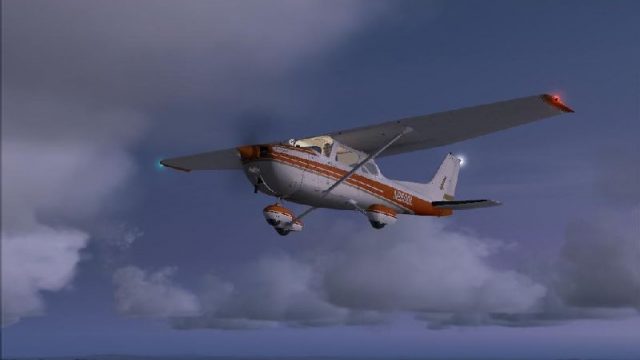
Soft Horizons refines Flight Simulator X daylight sky textures to soften the horizon line and make clouds blend more naturally into the distance. The package replaces 110 bitmaps for varied, realistic skyscapes while leaving the default night set untouched, delivering a smoother atmosphere without changing core simulator behavior.
 Rate
Rate
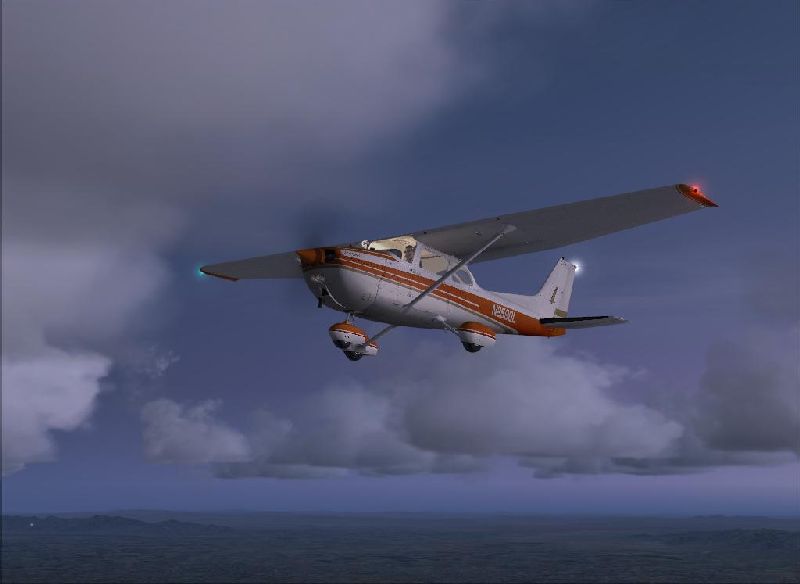
This is a texture package which smoothens the transition between sky and ground for Flight Simulator X. This package may not work with other sky environment add-ons. By John Cillis.
Cover image for Soft Horizons, showing the softer horizon line.
"Soft Horizons" is my effort to make the transition between sky and ground less extreme for Flight Simulator X users. It is modeled after my similar package for Flight Simulator 9 and is essentially the same set of textures, converted to a format Flight Simulator X requires. The biggest difference you will see between "Soft Horizons" and the default texture is in the cloud realism--clouds almost seamlessly blend into the Horizon. It consists of 110 bitmaps, which are used by Flight Simulator X to provide a varied and spectacular skyscape during the daylight hours. The remaining 30 bitmaps used by Flight Simulator X for nighttime hours are unchanged.
Please note Several add-on packages which change the sky color or Flight Simulator X environment also use these bitmaps. Replacing them with my set without first doing a backup may damage such packages. Backup the sky set using either my included batch file or through manual means (via explorer)
Also, Flight Simulator X models the environment into space. To achieve the effect Soft Horizons originally had for Flight Simulator 9, the smooth transition between the atmosphere and space is lost. If you never fly Flight Simulator X beyond 45K feet, this probably won't be noticeable to you but if you fly often outside of the atmosphere, I would suggest skipping install of this add-on.
To install:
If for any reason you wish to return to your previous sky set, copy the files from the backup folder created in step #1 to the Microsoft Flight Simulator X/Texture subfolder.
Free for all simmers · 190.74 KB · Scanned clean Oct 2026
Download speed: Free tier is capped at 0.5 Mbps. PRO members download at full line speed.
SimObjects\Airplanes\, Addon Scenery\, Effects\, or Gauges\.readme.txt or README file. It tells you exactly where files go, what dependencies are needed, and any quirks specific to this add-on.The archive soft_fsx.zip has 116 files and directories contained within it.
This list displays the first 500 files in the package. If the package has more, you will need to download it to view them.
| Filename/Directory | File Date | File Size |
|---|---|---|
| FILE_ID.DIZ | 01.24.09 | 211 B |
| readme.txt | 01.24.09 | 3.08 kB |
| skyback.cmd | 05.29.05 | 3.55 kB |
| sky_afternoon_0.bmp | 01.21.09 | 4.07 kB |
| sky_afternoon_1.bmp | 01.21.09 | 4.07 kB |
| sky_afternoon_2.bmp | 01.21.09 | 4.07 kB |
| sky_afternoon_3.bmp | 01.21.09 | 4.07 kB |
| sky_afternoon_4.bmp | 01.21.09 | 4.07 kB |
| sky_afternoon_5.bmp | 01.21.09 | 4.07 kB |
| sky_afternoon_6.bmp | 01.21.09 | 4.07 kB |
| sky_afternoon_7.bmp | 01.21.09 | 4.07 kB |
| sky_afternoon_8.bmp | 01.21.09 | 4.07 kB |
| sky_afternoon_9.bmp | 01.21.09 | 4.07 kB |
| sky_dawn_0.bmp | 01.21.09 | 4.07 kB |
| sky_dawn_1.bmp | 01.21.09 | 4.07 kB |
| sky_dawn_2.bmp | 01.21.09 | 4.07 kB |
| sky_dawn_3.bmp | 01.21.09 | 4.07 kB |
| sky_dawn_4.bmp | 01.21.09 | 4.07 kB |
| sky_dawn_5.bmp | 01.21.09 | 4.07 kB |
| sky_dawn_6.bmp | 01.21.09 | 4.07 kB |
| sky_dawn_7.bmp | 01.21.09 | 4.07 kB |
| sky_dawn_8.bmp | 01.21.09 | 4.07 kB |
| sky_dawn_9.bmp | 01.21.09 | 4.07 kB |
| sky_morning_0.bmp | 01.21.09 | 4.07 kB |
| sky_morning_1.bmp | 01.21.09 | 4.07 kB |
| sky_morning_2.bmp | 01.21.09 | 4.07 kB |
| sky_morning_3.bmp | 01.21.09 | 4.07 kB |
| sky_morning_4.bmp | 01.21.09 | 4.07 kB |
| sky_morning_5.bmp | 01.21.09 | 4.07 kB |
| sky_morning_6.bmp | 01.21.09 | 4.07 kB |
| sky_morning_7.bmp | 01.21.09 | 4.07 kB |
| sky_morning_8.bmp | 01.21.09 | 4.07 kB |
| sky_morning_9.bmp | 01.21.09 | 4.07 kB |
| sky_noon_0.bmp | 01.21.09 | 4.07 kB |
| sky_noon_1.bmp | 01.21.09 | 4.07 kB |
| sky_noon_2.bmp | 01.21.09 | 4.07 kB |
| sky_noon_3.bmp | 01.21.09 | 4.07 kB |
| sky_noon_4.bmp | 01.21.09 | 4.07 kB |
| sky_noon_5.bmp | 01.21.09 | 4.07 kB |
| sky_noon_6.bmp | 01.21.09 | 4.07 kB |
| sky_noon_7.bmp | 01.21.09 | 4.07 kB |
| sky_noon_8.bmp | 01.21.09 | 4.07 kB |
| sky_noon_9.bmp | 01.21.09 | 4.07 kB |
| sky_postdawn1_0.bmp | 01.21.09 | 4.07 kB |
| sky_postdawn1_1.bmp | 01.21.09 | 4.07 kB |
| sky_postdawn1_2.bmp | 01.21.09 | 4.07 kB |
| sky_postdawn1_3.bmp | 01.21.09 | 4.07 kB |
| sky_postdawn1_4.bmp | 01.21.09 | 4.07 kB |
| sky_postdawn1_5.bmp | 01.21.09 | 4.07 kB |
| sky_postdawn1_6.bmp | 01.21.09 | 4.07 kB |
| sky_postdawn1_7.bmp | 01.21.09 | 4.07 kB |
| sky_postdawn1_8.bmp | 01.21.09 | 4.07 kB |
| sky_postdawn1_9.bmp | 01.21.09 | 4.07 kB |
| sky_postdawn2_0.bmp | 01.21.09 | 4.07 kB |
| sky_postdawn2_1.bmp | 01.21.09 | 4.07 kB |
| sky_postdawn2_2.bmp | 01.21.09 | 4.07 kB |
| sky_postdawn2_3.bmp | 01.21.09 | 4.07 kB |
| sky_postdawn2_4.bmp | 01.21.09 | 4.07 kB |
| sky_postdawn2_5.bmp | 01.21.09 | 4.07 kB |
| sky_postdawn2_6.bmp | 01.21.09 | 4.07 kB |
| sky_postdawn2_7.bmp | 01.21.09 | 4.07 kB |
| sky_postdawn2_8.bmp | 01.21.09 | 4.07 kB |
| sky_postdawn2_9.bmp | 01.21.09 | 4.07 kB |
| sky_postsunset1_0.bmp | 01.21.09 | 4.07 kB |
| sky_postsunset1_1.bmp | 01.21.09 | 4.07 kB |
| sky_postsunset1_2.bmp | 01.21.09 | 4.07 kB |
| sky_postsunset1_3.bmp | 01.21.09 | 4.07 kB |
| sky_postsunset1_4.bmp | 01.21.09 | 4.07 kB |
| sky_postsunset1_5.bmp | 01.21.09 | 4.07 kB |
| sky_postsunset1_6.bmp | 01.21.09 | 4.07 kB |
| sky_postsunset1_7.bmp | 01.21.09 | 4.07 kB |
| sky_postsunset1_8.bmp | 01.21.09 | 4.07 kB |
| sky_postsunset1_9.bmp | 01.21.09 | 4.07 kB |
| sky_predawn2_0.bmp | 01.21.09 | 4.07 kB |
| sky_predawn2_1.bmp | 01.21.09 | 4.07 kB |
| sky_predawn2_2.bmp | 01.21.09 | 4.07 kB |
| sky_predawn2_3.bmp | 01.21.09 | 4.07 kB |
| sky_predawn2_4.bmp | 01.21.09 | 4.07 kB |
| sky_predawn2_5.bmp | 01.21.09 | 4.07 kB |
| sky_predawn2_6.bmp | 01.21.09 | 4.07 kB |
| sky_predawn2_7.bmp | 01.21.09 | 4.07 kB |
| sky_predawn2_8.bmp | 01.21.09 | 4.07 kB |
| sky_predawn2_9.bmp | 01.21.09 | 4.07 kB |
| sky_presunset1_0.bmp | 01.21.09 | 4.07 kB |
| sky_presunset1_1.bmp | 01.21.09 | 4.07 kB |
| sky_presunset1_2.bmp | 01.21.09 | 4.07 kB |
| sky_presunset1_3.bmp | 01.21.09 | 4.07 kB |
| sky_presunset1_4.bmp | 01.21.09 | 4.07 kB |
| sky_presunset1_5.bmp | 01.21.09 | 4.07 kB |
| sky_presunset1_6.bmp | 01.21.09 | 4.07 kB |
| sky_presunset1_7.bmp | 01.21.09 | 4.07 kB |
| sky_presunset1_8.bmp | 01.21.09 | 4.07 kB |
| sky_presunset1_9.bmp | 01.21.09 | 4.07 kB |
| sky_presunset2_0.bmp | 01.21.09 | 4.07 kB |
| sky_presunset2_1.bmp | 01.21.09 | 4.07 kB |
| sky_presunset2_2.bmp | 01.21.09 | 4.07 kB |
| sky_presunset2_3.bmp | 01.21.09 | 4.07 kB |
| sky_presunset2_4.bmp | 01.21.09 | 4.07 kB |
| sky_presunset2_5.bmp | 01.21.09 | 4.07 kB |
| sky_presunset2_6.bmp | 01.21.09 | 4.07 kB |
| sky_presunset2_7.bmp | 01.21.09 | 4.07 kB |
| sky_presunset2_8.bmp | 01.21.09 | 4.07 kB |
| sky_presunset2_9.bmp | 01.21.09 | 4.07 kB |
| sky_sunset_0.bmp | 01.21.09 | 4.07 kB |
| sky_sunset_1.bmp | 01.21.09 | 4.07 kB |
| sky_sunset_2.bmp | 01.21.09 | 4.07 kB |
| sky_sunset_3.bmp | 01.21.09 | 4.07 kB |
| sky_sunset_4.bmp | 01.21.09 | 4.07 kB |
| sky_sunset_5.bmp | 01.21.09 | 4.07 kB |
| sky_sunset_6.bmp | 01.21.09 | 4.07 kB |
| sky_sunset_7.bmp | 01.21.09 | 4.07 kB |
| sky_sunset_8.bmp | 01.21.09 | 4.07 kB |
| sky_sunset_9.bmp | 01.21.09 | 4.07 kB |
| SOFTHr.jpg | 01.24.09 | 25.81 kB |
| flyawaysimulation.txt | 10.29.13 | 959 B |
| Go to Fly Away Simulation.url | 01.22.16 | 52 B |
Only PRO members can place votes.
More FSX & P3D add-ons hand-picked based on this download.
FSX Utilities
Traffic Sounds FSX Ultimate Traffic 2 Alias Installer. By Alan Constable. Cov…
 FSX Utilities
FSUIPC, standing for Flight Simulator Universal Inter-Process Communication, …
 FSX Utilities
FSX and FS2004 World-of-AI Installer. This is the World-of-AI Installer versi…
 FSX Utilities
Airport Design Editor (ADE) is a graphical design tool to create and enhance …
 FSX Utilities
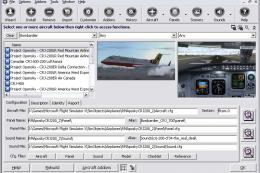
Addit! Pro gives you the power to fully manage all of your Flight Simulator X…
 FSX Utilities
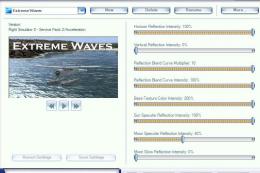
This shader control utility will allow you to change the FSX water shader ton…
 FSX Utilities
This module adds improved recording and replay features to FS. It can record …
 FSX Utilities
FSX Aircraft Installer - This program can install your aircrafts and rotorcra…
Read what other simmers think, or add your own.

I hope this is helpful: The atmosphere is divided into; the troposphere (approx. 36.000 feet, where most of the flying takes place, it is also in this boundary where the weather occurs), the stratosphere (approx. 164.000 feet), the Mesosphere (approx. 262.000 feet) and the ionosphere, which is divided into four layers and extends to about 700 kilometers. That´s approx. 2296700 Feet.
When you leave the ionosphere, you´re out of the atmosphere!
