

 X-Plane Light General Aviation Aircraft
C172 Skyhawk N8470S 2.0
This is a repaint for the default X-Plane 11 Cessna 172. Download and unzip t…
Cessna 172 Skyhawk livery C-BVGT refreshes the default trainer with crisp new colors and faithful registration markings, bringing a clean, modern look to the exterior and matching details in the virtual cockpit for consistent immersion. Designed for X-Plane 11, it requires the default Cessna 172.
 Rate
Rate
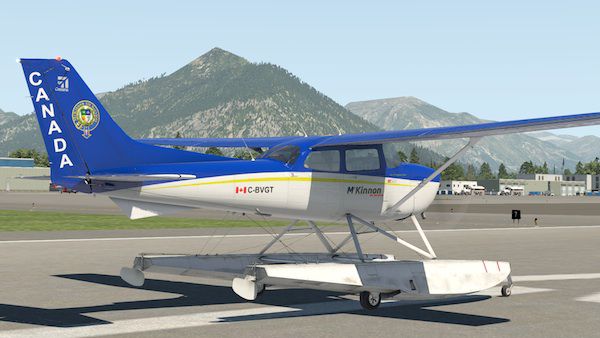
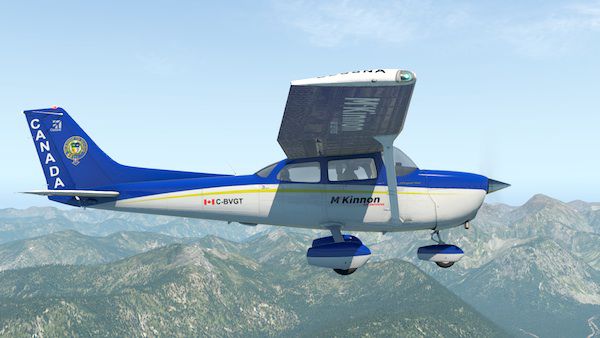
This is a repaint for the default X-Plane 11 Cessna 172.
 Download and unzip the file named McKinnon CBVGT, then open and copy the folder 'C-BVGT' into your Cessna 172 liveries folder.
By James Lambe.
Free for all simmers · 14.68 MB · Scanned clean Oct 2026
Download speed: Free tier is capped at 0.5 Mbps (this file takes approximately 4 mins at the cap). PRO members download at full line speed.
{aircraft-folder}/liveries/.readme.txt or README file. It tells you exactly where files go, what dependencies are needed, and any quirks specific to this add-on.The archive mckinnon_cbvgt.zip has 18 files and directories contained within it.
This list displays the first 500 files in the package. If the package has more, you will need to download it to view them.
| Filename/Directory | File Date | File Size |
|---|---|---|
| McKinnon CBVGT | 06.29.17 | 0 B |
| C-BVGT | 05.24.17 | 0 B |
| Cessna_172SP_icon11.png | 05.24.17 | 197.78 kB |
| Cessna_172SP_icon11_thumb.png | 05.24.17 | 13.78 kB |
| Cessna_172SP_seaplane_icon11.png | 05.24.17 | 188.09 kB |
| Cessna_172SP_seaplane_icon11_thumb.png | 05.24.17 | 14.17 kB |
| objects | 05.24.17 | 0 B |
| broken.dds | 05.19.17 | 1.33 MB |
| cockpit.dds | 05.24.17 | 21.33 MB |
| cockpit_LIT.dds | 05.24.17 | 21.33 MB |
| fuselage.dds | 05.24.17 | 21.33 MB |
| fuselage_LIT.dds | 05.19.17 | 10.67 MB |
| wings.dds | 05.23.17 | 5.33 MB |
| wings_LIT.dds | 05.19.17 | 2.67 MB |
| image1.jpg | 06.29.17 | 67.95 kB |
| image2.jpg | 06.29.17 | 70.24 kB |
| flyawaysimulation.txt | 10.29.13 | 959 B |
| Go to Fly Away Simulation.url | 01.22.16 | 52 B |
Only PRO members can place votes.
More X-Plane add-ons hand-picked based on this download.
X-Plane Light General Aviation Aircraft
This is a repaint for the default X-Plane 11 Cessna 172. Download and unzip t…
 X-Plane Light General Aviation Aircraft
Experience a finely detailed exterior paint scheme for the well-known high-wi…
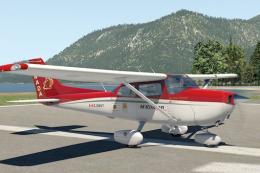 X-Plane Light General Aviation Aircraft
This new texture set provides a specialized Canadian registration scheme (C-G…
 X-Plane Light General Aviation Aircraft
This package introduces a vivid French-inspired paint scheme for the default …
 X-Plane Light General Aviation Aircraft
Experience an enhanced visual take on the classic Cessna 172 in X-Plane 11 wi…
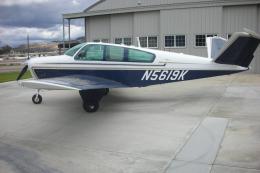 X-Plane Light General Aviation Aircraft
The Beechcraft Bonanza is an American general aviation aircraft introduced in…
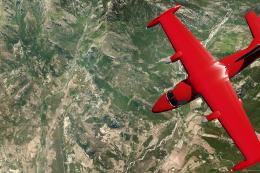 X-Plane Light General Aviation Aircraft
This package includes a highly detailed Mitsubishi MU-2 Solitaire model for X…
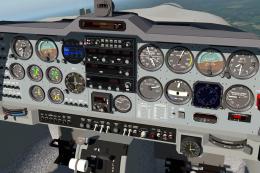 X-Plane Light General Aviation Aircraft
The Grob Tutor 115 E is a single engine two seat side by side training aircra…
Read what other simmers think, or add your own.

How do you open and fly a plane? I keep downloading planes the 172 Cessna... it downloads but what next?