


 United States of America
  FSX Scenery
Midway Atoll (Midway Islands) Photoreal
Midway Atoll (Midway Islands) Photoreal Scenery. Midway Atoll - or Midway Isl…
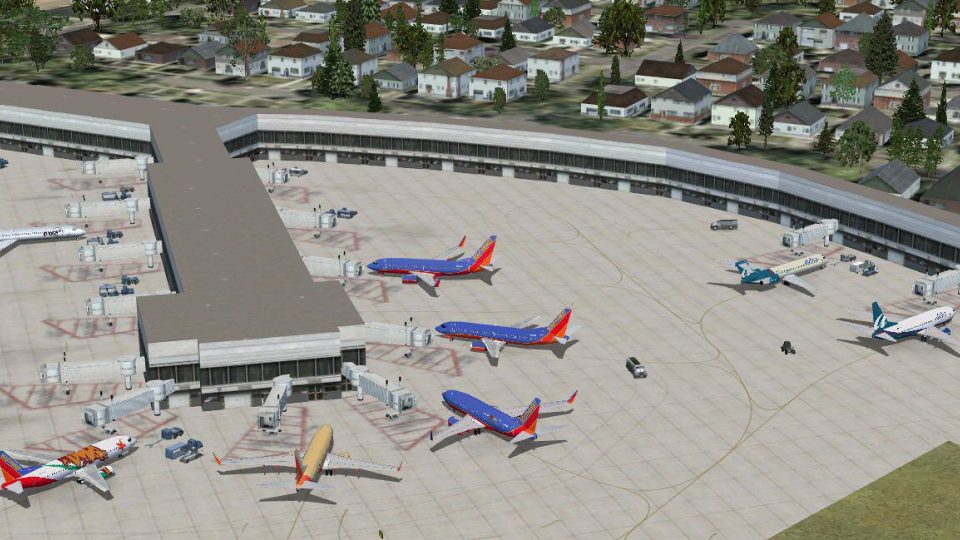
Chicago Midway International Airport (KMDW) scenery refreshes the field in FSX with six added jetways to match gate coverage, airline-assigned parking, and an expanded terminal section including gates A4A and A4B. Rebuilt service-vehicle paths keep traffic off taxiways, resized ramp areas improve parking flow, and crosswind runway operations enhance ATC realism.
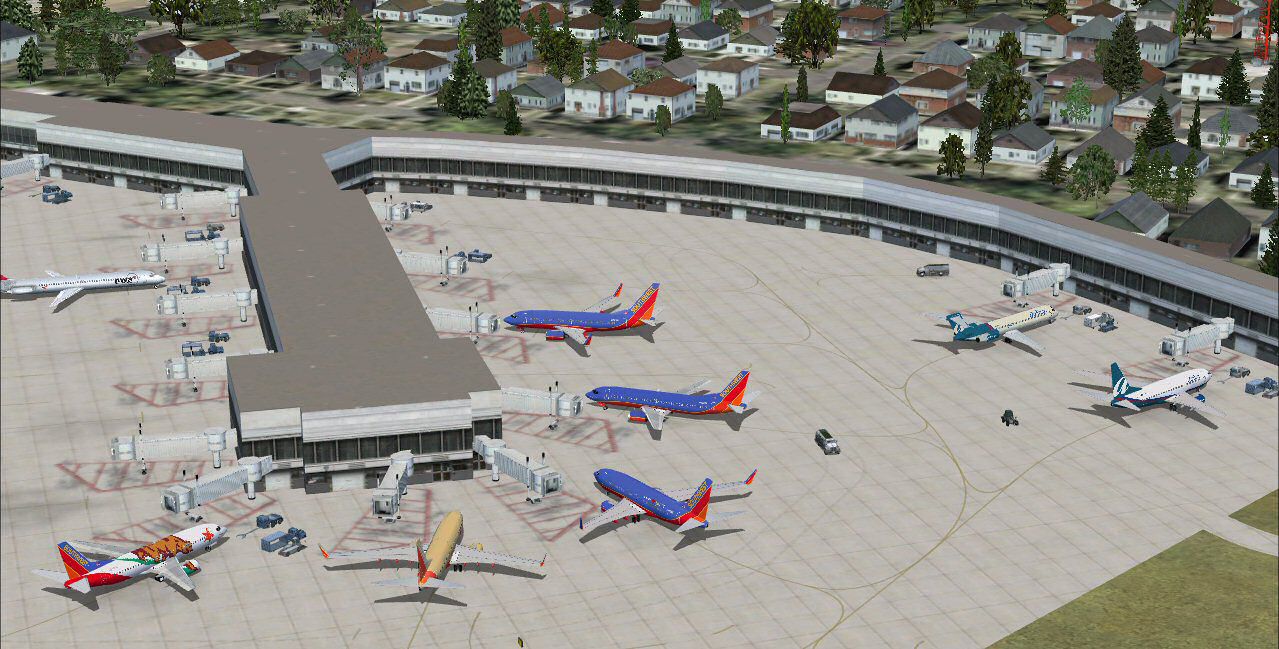
Chicago Midway Int'l Airport (KMDW), Illinois (IL). Several improvements have been made, including the addition of six jetways to now include all gates as at the real life airport; assigning all gates to specific airlines using AFCAD2; adding on to the default terminal to include gates A4A and A4B, as this part was not included in FSX; the rebuilding of vehicle paths, which prevents airport vehicles from accessing the taxiways, which can result in traffic delays; and activation of the crosswind runways. By Patrick Finch.
Chicago Midway Int'l Airport Scenery.
Hi, and thanks for choosing my latest project for FSX, Chicago Midway Intl. Airport. Here are the improvements which have been made:
1. Six jetways have been added to include the same number of gates as the real airport has.
2. All gates have been assigned to specific airlines using Afcad2.
3. An addition has been added to the terminal to include gates A4A and A4B as at the real airport.
4. The vehicle paths have been rebuilt so as to prevent airport vehicles from accessing the taxiways, which can cause traffic delays.
5. The crosswind runways have been activated.
6. Some ramp areas have been resized.
Some Important Notes:
The terminal addition curves around a bit more than does the real life one. This is because there is a road which runs very close to the airport in FSX, and I had to run the building directly alongside it but avoid crossing over it.
Gate A4A and A4B at the terminal addition could not be identified by their real gate numbers. This because MSFS will not identify a gate number correctly if a number is followed by a letter. So these gates are identified as Gates 1 and 2.
All of the jetways will not be in the exact spots as at the real life airport. In order to fit all of the gates into the B Concourse, I had to enlarge and add gates to the building which connects Concourses B and C.
In order to activate the crosswind runways, additional runways must be created, which are not actually used. ATIS will call out these runways. There is no way to avoid this.
Although I tested everything thouroughly, there may be a problem or two which shows up by disassembling the FSX scenery to be opened with Afcad2 and then converting the resulting work back to the FSX format. Let me know if there are any problems.
This file is for FSX ONLY. It will not work properly in FS9.
Installation InstructionS:
Simply extract the KMDW_FSX.bgl file to your FSX\Addon Scenery\Scenery folder. That's it.
Credits:
To Burkhard Renk for his X2AF2X and APXshredder programs.
To Winfried Orthmann, author of BglAnalyzeX and Newbglanalyse.
To Lee Swordy, creator of Afcad2.
Anyone who wants to edit the enclosed KMSY_FSX.bgl file for their own use is welcome to do so, but this file is the sole property of the author, so it may not be redistributed without express permission from the author.
This scenery is entirely FREEWARE. It may not be distributed on the Internet for fees.
That's about it. I hope everyone enjoys the enhancements I have made.
Patrick
Free for all simmers · 202.93 KB · Scanned clean Oct 2026
Download speed: Free tier is capped at 0.5 Mbps. PRO members download at full line speed.
FSX\Addon Scenery\ containing scenery and texture sub-folders.readme.txt or README file. It tells you exactly where files go, what dependencies are needed, and any quirks specific to this add-on.Use these coordinates to fly directly to this location once the mod is installed.
41.78680000,-87.75220000
Launch FSX or Prepar3D and use Flights → Load to open the downloaded .pln file. Your aircraft will be positioned at this location.
The archive kmdw_fsx.zip has 5 files and directories contained within it.
This list displays the first 500 files in the package. If the package has more, you will need to download it to view them.
| Filename/Directory | File Date | File Size |
|---|---|---|
| KMDW_FSX.bgl | 04.24.07 | 48.14 kB |
| kmdw_fsx.jpg | 04.26.07 | 186.79 kB |
| README.txt | 04.26.07 | 2.68 kB |
| flyawaysimulation.txt | 10.29.13 | 959 B |
| Go to Fly Away Simulation.url | 01.22.16 | 52 B |
Only PRO members can place votes.
More FSX & P3D add-ons hand-picked based on this download.
FSX Scenery
Midway Atoll (Midway Islands) Photoreal Scenery. Midway Atoll - or Midway Isl…
 FSX Scenery
Scenery Chicago Midway Airport (KMDW), Illinois (IL). Remodelling of FSX vers…
 FSX Scenery
Scenery Chicago Midway International Airport (KMDW), Illinois (IL). This is a…
 FSX Scenery
FSX Midway Carrier Patch. A patch for Yanco San's WWII Midway Carrier Battle …
 FSX Scenery
Merrill C. Meigs Field Airport, IATA: CGX, ICAO: KCGX, was a single strip air…
 FSX Scenery
FSX Atlanta Int'l Airport. Scenery for Hartsfield - Jackson Atlanta Internati…
 FSX Scenery
Vienna Schwechat Int'l Airport (LOWW), Austria. Features Skylink terminal, fi…
 FSX Scenery
Denver Int'l Airport (KDEN), Colorado (CO). Features added jetways, expanded …
Be the first to leave a comment on this download.
Be the first to share your thoughts on this download.