

 FS2004 Civil Jet Aircraft
THY Boeing 737-800 TC-JFE
Textures only for the Kittyhawk B737-800. Repaint by Selcuk Oral. Move the fo…
Turkish Airlines Boeing 737-800 livery for registration TC-JFE brings crisp logos, accurate markings, and a clean finish to the Next Generation narrowbody in Microsoft Flight Simulator 2004. The repaint focuses on authentic airline branding for short- and medium-haul routes and requires the Kittyhawk Productions 737-800 base model.
 Rate
Rate
Elevate your Microsoft Flight Simulator 2004 experience with this Turkish Airlines Boeing 737-800 (registration TC-JFE) repaint created by Selcuk Oral. These textures are meticulously designed to reflect authentic airline markings and require the base model by Kittyhawk Productions. The Boeing 737-800 belongs to the Next Generation series, favored by numerous carriers worldwide for its range and reliability. In real-world operations, Turkish Airlines has utilized this type extensively for both short-haul and medium-haul services, connecting key destinations across continents under the carrier’s well-known flag.
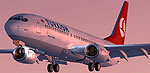
Above: A glimpse of the Turkish Airlines 737-800 during final approach phase.
Extract the texture.pegasus_apu folder into your primary Kittyhawk 737-800 directory. Then, incorporate these lines into the aircraft.cfg file, replacing the “x” in [fltsim.x] with the correct sequence number. These entries ensure the simulator correctly references the new textures:
[fltsim.x]
title=Boeing 737-800 Pegasus TC-APU
sim=737800
model=
panel=
sound=
texture=pegasus_apu
kb_checklists=Boeing737-400_check
kb_reference=Boeing737-400_ref
atc_id=TC-APU
atc_airline=sunturk
atc_flight_number=348
ui_manufacturer=Boeing
ui_type=737-800
ui_variation=Pegasus Airlines TC-APU
description=Repaint by Selcuk Oral.

Kittyhawk Studios 737-800
atc_heavy=0
visual_damage=1
With these textures, you will notice crisp liveries closely representing Turkish Airlines’ official branding, including logos and fuselage artwork. The 737’s efficient wing design paired with the livery’s color scheme provides a visually captivating experience throughout all phases of flight.
Free for all simmers · 1.92 MB · Scanned clean Oct 2026
Download speed: Free tier is capped at 0.5 Mbps. PRO members download at full line speed.
This add-on may require the following files to function properly. If this is a repaint, the dependency below is likely the base aircraft package.
FS9\Aircraft\, FS9\Addon Scenery\, FS9\Gauges\, or FS9\Effects\.readme.txt or README file. It tells you exactly where files go, what dependencies are needed, and any quirks specific to this add-on.The archive kh738jfe.zip has 17 files and directories contained within it.
This list displays the first 500 files in the package. If the package has more, you will need to download it to view them.
| Filename/Directory | File Date | File Size |
|---|---|---|
| texture.thy_jfe | 06.02.04 | 0 B |
| 737INTERIOR_L.bmp | 03.18.04 | 256.07 kB |
| 737INTERIOR_T.BMP | 12.31.03 | 1.00 MB |
| 737_B_L.BMP | 06.01.04 | 1.00 MB |
| 737_B_T.BMP | 06.01.04 | 4.00 MB |
| 738_FUSE_L.BMP | 03.23.04 | 256.07 kB |
| 738_FUSE_T.BMP | 06.02.04 | 4.00 MB |
| ENGINES_L.BMP | 03.18.04 | 256.07 kB |
| ENGINES_T.BMP | 05.31.04 | 4.00 MB |
| WINGLET_L.bmp | 03.28.04 | 16.07 kB |
| WINGLET_T.BMP | 03.28.04 | 257.05 kB |
| WINGS_L.bmp | 03.18.04 | 256.07 kB |
| WINGS_T.BMP | 05.28.04 | 4.00 MB |
| okubeni.txt | 06.02.04 | 2.17 kB |
| readme.txt | 06.02.04 | 900 B |
| flyawaysimulation.txt | 10.29.13 | 959 B |
| Go to Fly Away Simulation.url | 01.22.16 | 52 B |
Only PRO members can place votes.
More FS2004 add-ons hand-picked based on this download.
FS2004 Civil Jet Aircraft
Textures only for the Kittyhawk B737-800. Repaint by Selcuk Oral. Move the fo…
 FS2004 Civil Jet Aircraft
Model by Kittyhawk Productions. Livery by Selcuk Oral. Screenshot of Cyprus T…
 FS2004 Civil Jet Aircraft
This freeware repaint for Microsoft Flight Simulator 2004 offers a detailed P…
 FS2004 Civil Jet Aircraft
This freeware repaint package offers a detailed SunExpress Boeing 737-800 (re…
 FS2004 Civil Jet Aircraft
Model by FlightFX. Screenshot of Turkish Boeing 737-800 on runway. After rele…
 FS2004 Civil Jet Aircraft
With winglets. Textures only for the PMDG model. By Zafer Ozsoy. Screenshot o…
 FS2004 Civil Jet Aircraft
Turkish Airlines Boeing 737-400 "Canakkale", registration TC-JET. Textures on…
 FS2004 Civil Jet Aircraft
The B737-400 default airplane in realistic Turkish Airlines decals and colors…
Read what other simmers think, or add your own.
