

 FS2004 Civil Jet Aircraft
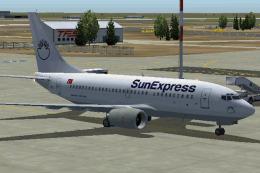
SunExpress Boeing 737-700
This freeware package showcases a detailed SunExpress repaint applied to a hi…
SunExpress Boeing 737-800 TC-SUC brings a crisp, airline-accurate repaint to the Kittyhawk 737-800, with sharp exterior markings, detailed winglets and control surfaces, and smooth performance for everyday regional operations in Microsoft Flight Simulator 2004. Requires the KH737800 base model, offering a polished look for Turkish and European route flying.
 Rate
Rate
This freeware repaint package offers a detailed SunExpress Boeing 737-800 (registration TC-SUC) specifically crafted for Microsoft Flight Simulator 2004. In this rendition, you will find a faithfully recreated exterior color scheme developed by Selcuk Oral, utilizing the acclaimed Kittyhawk model by Kittyhawk Productions. It aims to enrich virtual flight experiences by delivering accurate visual details, while maintaining smooth performance and user-friendly install procedures.
The Boeing 737-800 belongs to the popular 737 Next Generation family, recognized worldwide for its versatile short-to-medium haul capabilities. The Kittyhawk Productions’ rendition ensures that essential aerodynamic elements and control surfaces operate with realistic fidelity, such as dynamically rendered ailerons and carefully depicted winglets. SunExpress, the airline featured here, is known for serving destinations across Europe and beyond, offering a dependable platform for sim pilots eager to explore diverse flight routes in Turkey and neighboring regions.
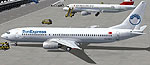
Screenshot depicting the SunExpress Boeing 737-800 resting at the ramp.
This add-on supplies liveries only, so you will require the main KH737800.ZIP base files from Kittyhawk Productions. Once you have the essential content installed, follow these steps to introduce the SunExpress repaint:
Below is an example of the necessary aircraft.cfg entry to integrate the livery:
[fltsim.x]
title=Boeing 737-800 Pegasus TC-APU
sim=737800
model=
panel=
sound=
texture=pegasus_apu
kb_checklists=Boeing737-400_check
kb_reference=Boeing737-400_ref
atc_id=TC-APU
atc_airline=sunturk
atc_flight_number=348
ui_manufacturer=Boeing
ui_type=737-800
ui_variation=Pegasus Airlines TC-APU
description=Repaint by Selcuk Oral.
Kittyhawk Studios 737-800
atc_heavy=0
visual_damage=1
Many simmers appreciate the 737-800’s robust systems and reliable handling, making it a favored choice for both short domestic hops and extended regional routes. By combining Kittyhawk’s accurate framework with Selcuk Oral’s precise texturing, flight simulation enthusiasts can enjoy an immersive representation of SunExpress’s distinctive livery. Pegasus Airlines references are also included, allowing you to switch variations if desired. Both carriers, popular in Turkey’s aviation market, rely on the 737-800 for wide-ranging operations.
This coating was created by Selcuk Oral in conjunction with the Kittyhawk Productions model, ensuring top-notch 3D geometry and well-executed textures. This dedicated team’s work enhances the visual experience in Microsoft Flight Simulator 2004 without sacrificing performance. It remains a freeware product, supporting the community’s passion by offering a high-caliber, no-cost upgrade.
Free for all simmers · 1.69 MB · Scanned clean Oct 2026
Download speed: Free tier is capped at 0.5 Mbps. PRO members download at full line speed.
This add-on may require the following files to function properly. If this is a repaint, the dependency below is likely the base aircraft package.
FS9\Aircraft\, FS9\Addon Scenery\, FS9\Gauges\, or FS9\Effects\.readme.txt or README file. It tells you exactly where files go, what dependencies are needed, and any quirks specific to this add-on.The archive kh738suc.zip has 17 files and directories contained within it.
This list displays the first 500 files in the package. If the package has more, you will need to download it to view them.
| Filename/Directory | File Date | File Size |
|---|---|---|
| texture.sunexpress_suc | 06.02.04 | 0 B |
| 737INTERIOR_L.bmp | 03.18.04 | 256.07 kB |
| 737INTERIOR_T.BMP | 12.31.03 | 1.00 MB |
| 737_B_L.BMP | 06.01.04 | 1.00 MB |
| 737_B_T.BMP | 06.02.04 | 4.00 MB |
| 738_FUSE_L.BMP | 03.23.04 | 256.07 kB |
| 738_FUSE_T.BMP | 06.02.04 | 4.00 MB |
| ENGINES_L.BMP | 03.18.04 | 256.07 kB |
| ENGINES_T.BMP | 06.01.04 | 4.00 MB |
| WINGLET_L.bmp | 03.28.04 | 16.07 kB |
| WINGLET_T.BMP | 05.31.04 | 4.00 MB |
| WINGS_L.bmp | 03.18.04 | 256.07 kB |
| WINGS_T.BMP | 06.01.04 | 4.00 MB |
| okubeni.txt | 06.02.04 | 2.18 kB |
| readme.txt | 06.02.04 | 900 B |
| flyawaysimulation.txt | 10.29.13 | 959 B |
| Go to Fly Away Simulation.url | 01.22.16 | 52 B |
Only PRO members can place votes.
More FS2004 add-ons hand-picked based on this download.
FS2004 Civil Jet Aircraft
This freeware package showcases a detailed SunExpress repaint applied to a hi…
 FS2004 Civil Jet Aircraft
This freeware repaint for Microsoft Flight Simulator 2004 offers a detailed P…
 FS2004 Civil Jet Aircraft
Elevate your Microsoft Flight Simulator 2004 experience with this Turkish Air…
 FS2004 Civil Jet Aircraft
Textures only for the Kittyhawk B737-800. Repaint by Selcuk Oral. Move the fo…
 FS2004 Civil Jet Aircraft
Model by Kittyhawk Productions. Livery by Selcuk Oral. Screenshot of Cyprus T…
 FS2004 Civil Jet Aircraft
Model by Eric Cantu of Flight-FX. US Air force repaint by Bill Kovatchev. Use…
 FS2004 Civil Jet Aircraft
This is a repaint of OK-TVC, one of the Boeing 737-800 leased from Travel Ser…
 FS2004 Civil Jet Aircraft
This complete freeware package for Microsoft Flight Simulator 2004 features a…
Be the first to leave a comment on this download.
Be the first to share your thoughts on this download.