

 FSX General Aviation Aircraft
Cessna 208B For FSX Carrier
After publishing my FSX AI Carrier package, I had several people contact me a…
Nardi FN-333 Riviera brings a rare Italian-style four-seat amphibian to Microsoft Flight Simulator X, with crisp exterior modeling, a photoreal virtual cockpit and cabin, and convincing water handling aided by a reversible propeller. Animated landing gear, retractable pontoons, doors, dampers, propellers, and control surfaces pair with dynamic clickable controls and custom effects.
 Rate
Rate
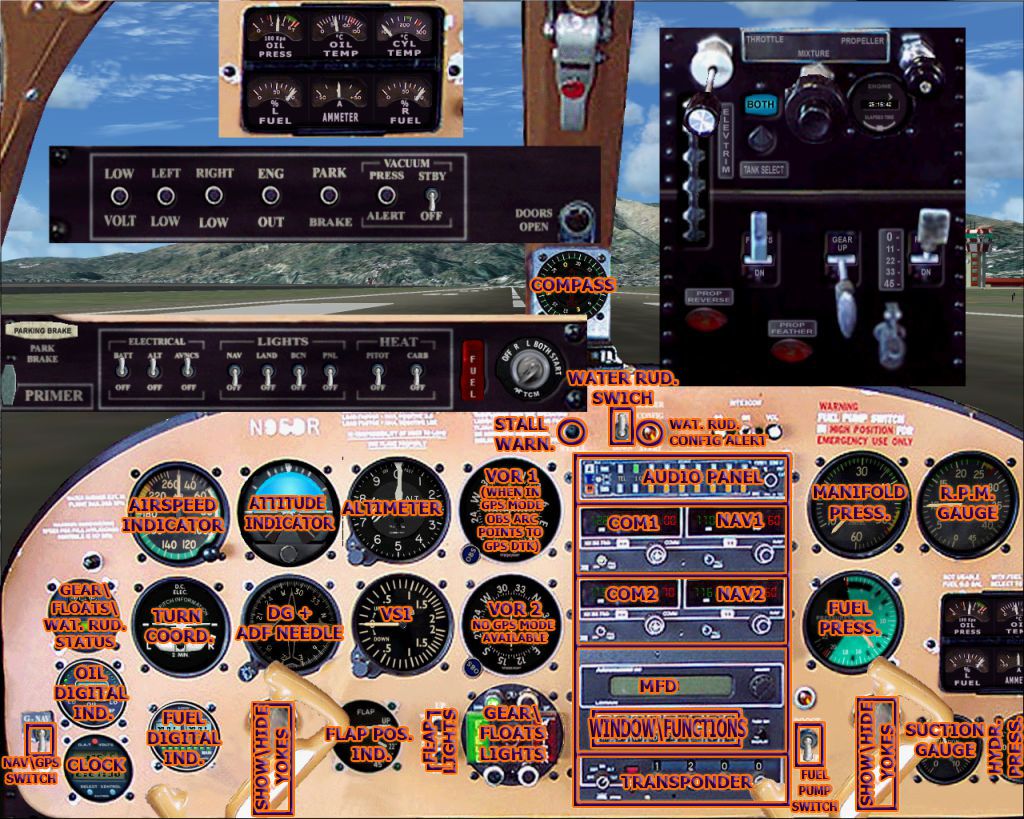
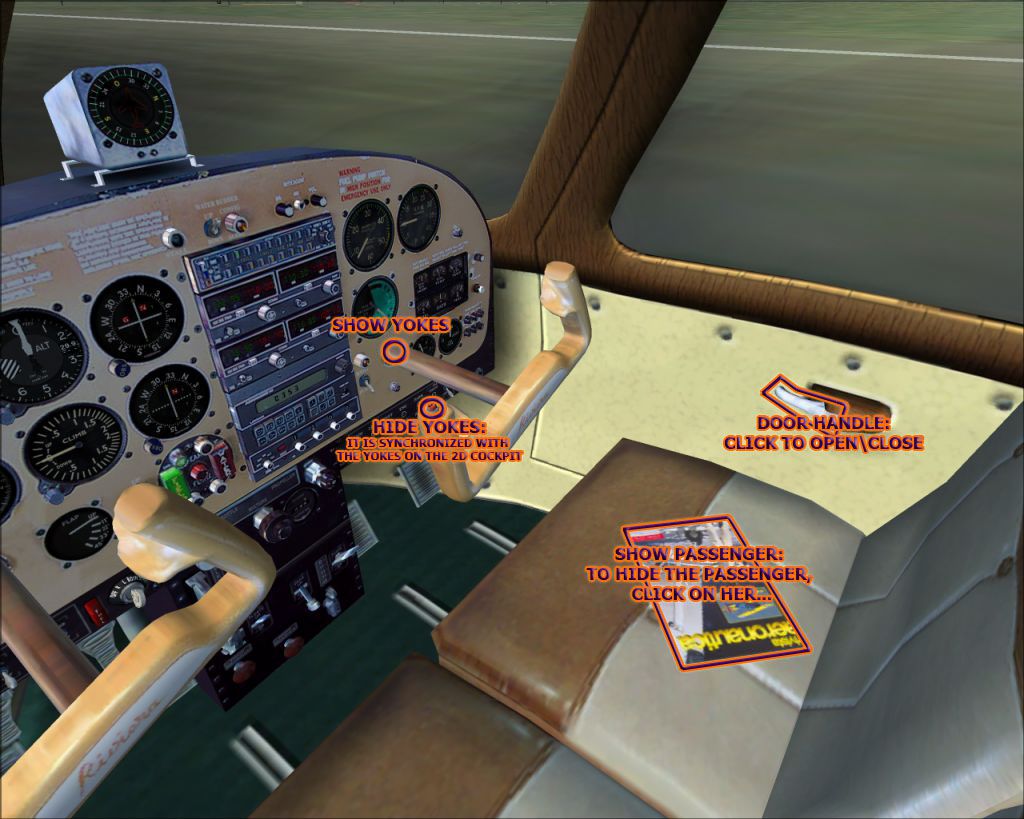


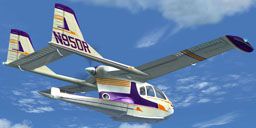

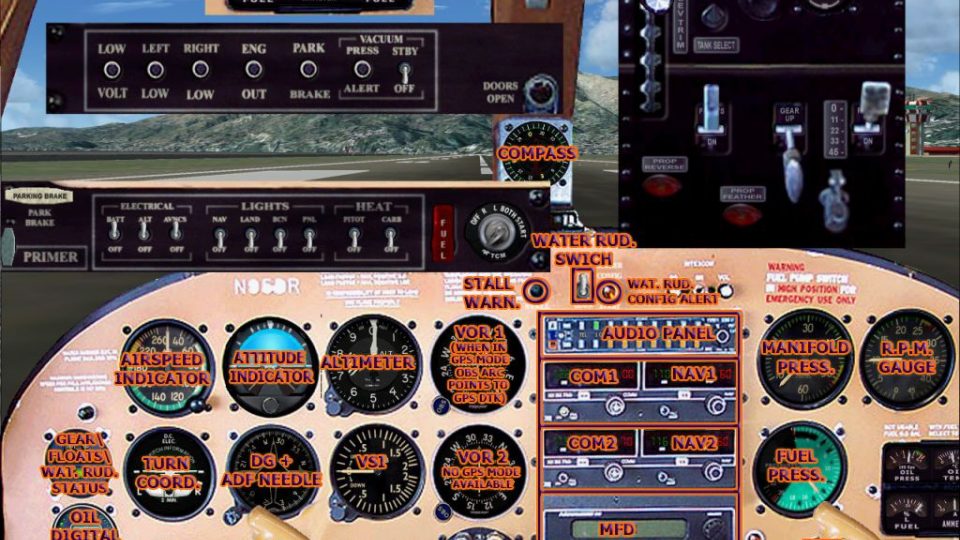
Nardi FN-333 Riviera v1.0. The classy looking Riviera amphibian is "Seabee" in Italian style. Built by Nardi and Siai-Marchetti, supposedly only 23 were built during the early 1960s, the majority of them being sold to America. Features animated landing gear, dampers, propellers, doors, and control surfaces. Also dynamic clickable VC. By Mario Noriega.
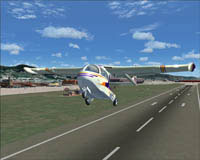
Nardi FN-333 Riviera taking off.
Nardi FN-333 Riviera
*** FS-X EDITION ***
VERSION 1.0
***************************************************************************************
Design & Artwork by Mario Noriega 2007
***************************************************************************************
Animted gears, dampers, propellers, doors, and control surfaces, Dynamic Clickable VC
***************************************************************************************
Description:
The classy looking Riviera amphibian is "Seabee" in Italian style... Built by Nardi and Siai-Marchetti, supposedly only 23 were built during the early 1960ies by Siai-Marcheti, the majority of them being sold to America. As every italian design, it is built to go fast. It seats 4 people including the pilot, the reversible propeller gives it superb manouverability in water (and taxi). It is a high-wing anphibian aircraft with double tailfin and pusher propeller. Read notes before flying! (FN333_check.htm, FN333_ref.htm & panel_FN333.htm, plus the document you are currently reading.
This model features advanced flight dynamics, detailed external model, detailed photreal virtual cockpit and virtual cabin with night lighting, custom effects, etc.
Software Requirements
To use this plane you NEED :
Microsoft Flight Simulator X
(This is the FS-X edition, a FS-2004 version is also available)
Winzip
Installation:
simply decompress in your FS-X main directory. That's it! Select aircraft, then Nardi, FN-333 Riviera, Done!...before flying, read your reference and checklist in the kneeeboard (without doing so, you may experience problems...)
Known bugs
No bugs known by me
Author: Mario Noriega
FS-2004 vs. FS-X versions:
In Fs-2004, there's no support for retractable wing pontoons, so what extending pontoons does is only adding a little drag... Plus FS-2004 water is known to behave "sticky", meaning you will need lots of engine power just to start moving, and it stops you very quickly when you land on it. In FS-X all this appears to be solved, so not extending pontoons in FS-X will end in ditching one wing into the weater. Plus water is no longer behaving like yoghurt, so you no longer need lots of power to start it moving. the FS-2004 and the FS-X edition will not work properly if installed in the wrong sim. apart from incorrect floating behaviour (FS-9 version under FS-X will not make use of the retractable pontoons function and will always stay afloat erect, but somewhat sunken, while FS-X version in FS-9 may have catastrophic and demential behaviour if landing on water...) some gauges will not work properly.
THIS IS THE FS-X EDITION
Credits
Martin Wright, author of DXTBMP
Microsoft for the FS (-:
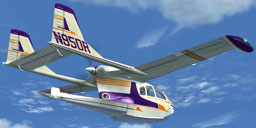
Nardi FN-333 Riviera in flight.
Free for all simmers · 14.65 MB · Scanned clean Oct 2026
Download speed: Free tier is capped at 0.5 Mbps (this file takes approximately 4 mins at the cap). PRO members download at full line speed.
SimObjects\Airplanes\, Addon Scenery\, Effects\, or Gauges\.readme.txt or README file. It tells you exactly where files go, what dependencies are needed, and any quirks specific to this add-on.The archive mnfn333x.zip has 113 files and directories contained within it.
This list displays the first 500 files in the package. If the package has more, you will need to download it to view them.
| Filename/Directory | File Date | File Size |
|---|---|---|
| fx_FN333_beacon.fx | 09.29.07 | 3.02 kB |
| FX_FN333_ll.fx | 09.30.07 | 2.48 kB |
| fx_FN333_navgre.fx | 09.29.07 | 4.56 kB |
| fx_FN333_navred.fx | 09.29.07 | 4.56 kB |
| fx_FN333_navwhi.fx | 09.30.07 | 4.56 kB |
| fx_FN333_StartUp.fx | 09.29.07 | 2.37 kB |
| fx_FN333_vclight.fx | 09.28.07 | 1.30 kB |
| texture | 10.07.07 | 0 B |
| Beacon.bmp | 04.01.06 | 65.07 kB |
| NAV_Green.bmp | 03.16.06 | 65.05 kB |
| NAV_Red.bmp | 03.16.06 | 65.05 kB |
| NAV_White.bmp | 03.17.06 | 65.07 kB |
| effects | 10.07.07 | 0 B |
| Airplanes | 10.07.07 | 0 B |
| FN-333 | 10.07.07 | 0 B |
| Aircraft.cfg | 10.07.07 | 11.62 kB |
| Docs_files | 10.07.07 | 0 B |
| ADF_help.jpg | 10.06.07 | 47.88 kB |
| docbkg.jpg | 09.30.07 | 34.70 kB |
| FN333_checklist.jpg | 09.30.07 | 23.95 kB |
| FN333_climb.jpg | 09.30.07 | 25.19 kB |
| FN333_cruise.jpg | 09.30.07 | 27.03 kB |
| FN333_dvc.jpg | 10.06.07 | 182.97 kB |
| FN333_floating.jpg | 09.30.07 | 28.80 kB |
| FN333_landing.jpg | 09.30.07 | 30.57 kB |
| FN333_panel.jpg | 10.06.07 | 332.76 kB |
| FN333_splash.jpg | 09.30.07 | 21.57 kB |
| FN333_splas_off.jpg | 09.30.07 | 28.20 kB |
| FN333_startup.jpg | 09.30.07 | 23.69 kB |
| FN333_takeoff.jpg | 09.30.07 | 24.38 kB |
| FN333_taxi.jpg | 09.30.07 | 26.84 kB |
| FN333_turn.jpg | 09.30.07 | 28.10 kB |
| Fuel_Digi_Bkg.gif | 10.06.07 | 20.13 kB |
| GEARFLOATWR_back.gif | 10.06.07 | 16.05 kB |
| gearfloat_status.gif | 10.06.07 | 11.90 kB |
| Oil_Digi_Bkg.gif | 10.06.07 | 21.96 kB |
| riviera_sticker.gif | 10.06.07 | 7.14 kB |
| signature_forum.gif | 10.06.07 | 10.67 kB |
| FN-333.air | 09.29.07 | 11.41 kB |
| FN333_check.htm | 10.07.07 | 14.85 kB |
| FN333_ref.htm | 10.07.07 | 21.69 kB |
| model | 10.07.07 | 0 B |
| FN-333_FSX.mdl | 09.29.07 | 2.62 MB |
| model.cfg | 09.17.07 | 29 B |
| panel | 10.07.07 | 0 B |
| compass.bmp | 08.07.07 | 23.55 kB |
| DVCL.bmp | 09.01.07 | 1.00 MB |
| DVCR.bmp | 09.29.07 | 1.00 MB |
| ENGINE_GAUGES_PANEL.bmp | 09.29.07 | 59.55 kB |
| MN_FN333_FSX.cab | 09.30.07 | 1.56 MB |
| Palette.BMP | 08.01.99 | 1.06 kB |
| panel.cfg | 09.30.07 | 8.75 kB |
| panel_2D.bmp | 07.27.07 | 1.25 MB |
| SWITCHES_PANEL.bmp | 09.29.07 | 90.90 kB |
| throttle_panel.bmp | 08.05.07 | 165.08 kB |
| throttle_panel_VC.bmp | 08.31.07 | 165.08 kB |
| WARNINGS_PANEL.bmp | 07.30.07 | 78.09 kB |
| panel_FN333.htm | 10.06.07 | 11.55 kB |
| README.txt | 10.07.07 | 4.50 kB |
| sound | 10.07.07 | 0 B |
| c172_gyro.wav | 08.14.01 | 4.48 MB |
| c172_noncombustion1.wav | 08.28.01 | 279.12 kB |
| c172_noncombustion2.wav | 08.28.01 | 292.12 kB |
| c172_prop1a.wav | 06.30.01 | 59.29 kB |
| c172_prop1b.wav | 06.30.01 | 63.79 kB |
| c172_prop2a.wav | 06.30.01 | 65.29 kB |
| c172_prop2b.wav | 06.30.01 | 86.79 kB |
| door_small_close.wav | 04.09.03 | 55.99 kB |
| door_small_open.wav | 04.09.03 | 59.98 kB |
| ext_1500.wav | 06.06.06 | 107.58 kB |
| ext_2400.wav | 06.05.06 | 127.23 kB |
| ext_3400.wav | 08.06.06 | 24.46 kB |
| EXT_idle.wav | 08.06.06 | 67.93 kB |
| ext_shutdown.wav | 08.06.06 | 50.96 kB |
| ext_startup.wav | 08.06.06 | 33.29 kB |
| FN-333_FLAPS.wav | 09.16.07 | 319.35 kB |
| FN-333_GEAR-DOWN.wav | 09.16.07 | 912.21 kB |
| FN-333_GEAR-UP.wav | 09.16.07 | 969.89 kB |
| FN-333_STALL.wav | 11.15.03 | 104.00 kB |
| in_1500.wav | 06.06.06 | 93.40 kB |
| in_2400.wav | 02.05.06 | 127.24 kB |
| in_3400.wav | 06.06.06 | 69.86 kB |
| in_idle.wav | 08.06.06 | 81.95 kB |
| in_shutdown.wav | 08.06.06 | 55.09 kB |
| in_startup.wav | 08.06.06 | 42.88 kB |
| sound.cfg | 09.26.07 | 8.70 kB |
| starter_EXT.wav | 06.06.06 | 110.51 kB |
| starter_IN.wav | 06.06.06 | 104.69 kB |
| waterloop.wav | 03.01.02 | 704.18 kB |
| xc172_noncombustion1.wav | 06.30.01 | 132.49 kB |
| xc172_noncombustion2.wav | 06.30.01 | 158.64 kB |
| xc172_prop1a.wav | 06.30.01 | 78.29 kB |
| xc172_prop1b.wav | 06.30.01 | 66.79 kB |
| xc172_prop2a.wav | 06.30.01 | 70.29 kB |
| xc172_prop2b.wav | 06.30.01 | 86.79 kB |
| Texture | 10.07.07 | 0 B |
| compass_L.bmp | 09.28.07 | 16.07 kB |
| DVCL_L.bmp | 09.28.07 | 256.07 kB |
| DVCR_L.bmp | 09.29.07 | 256.07 kB |
| FN333_C1.bmp | 09.28.07 | 1.00 MB |
| FN333_C2.bmp | 09.28.07 | 1.00 MB |
| FN333_Lfuselage.bmp | 09.27.07 | 1.00 MB |
| FN333_Lwing.bmp | 09.27.07 | 1.00 MB |
| FN333_rfins.bmp | 09.28.07 | 1.00 MB |
| FN333_Rfuselage.bmp | 09.27.07 | 1.00 MB |
| FN333_rwing.bmp | 09.27.07 | 1.00 MB |
| FN333_T1.bmp | 09.28.07 | 1.00 MB |
| prop_FN333.bmp | 08.03.06 | 64.07 kB |
| throttle_panel_L.bmp | 09.28.07 | 64.07 kB |
| thumbnail.jpg | 10.07.07 | 25.97 kB |
| SimObjects | 10.07.07 | 0 B |
| flyawaysimulation.txt | 10.29.13 | 959 B |
| Go to Fly Away Simulation.url | 01.22.16 | 52 B |
Only PRO members can place votes.
More FSX & P3D add-ons hand-picked based on this download.
FSX General Aviation Aircraft
After publishing my FSX AI Carrier package, I had several people contact me a…
 FSX General Aviation Aircraft
Christen Eagle Gauge Fix For FSX SP2. This is one small file to improve the w…
 FSX General Aviation Aircraft
Extra 300s For FSX DTT. This is a repaint of the default Extra 300S for a new…
 FSX General Aviation Aircraft
Canadair CL215 v3.0X Multirole amphibious aircraft. Tested with FSX SP1 but w…
 FSX General Aviation Aircraft
Cirrus SR22-GTS Turbo G3. This is Wolfram Beckert and Guenter Kraemer's Cirru…
 FSX General Aviation Aircraft
The Edgley EA-7 Optica, designed by John Edgley and built by Brooklands Aeros…
 FSX General Aviation Aircraft
Explore the skies with the meticulously crafted Piper Arrow III Pack, a premi…
 FSX General Aviation Aircraft
Piper PA28-180 Cherokee. This file contains the default FS2004 PA28-180 with …
Read what other simmers think, or add your own.

Thanks. Stumbled across this plane and was pleasantly surprised. Looks good and flies good.