

 FSX General Aviation Aircraft
Flight Design CTsw
This float-equipped Light Sport Aircraft (LSA) add-on brings a fully realized…
Flight Design’s CTsw on wheels brings light-sport efficiency to Microsoft Flight Simulator X with a composite-inspired airframe and performance tuned around the Rotax 912S. A custom panel, dedicated sounds, and a high-fidelity virtual cockpit capture the CTsw’s spacious cabin layout and real-world handling for crisp, low-drag touring and training flights.
 Rate
Rate


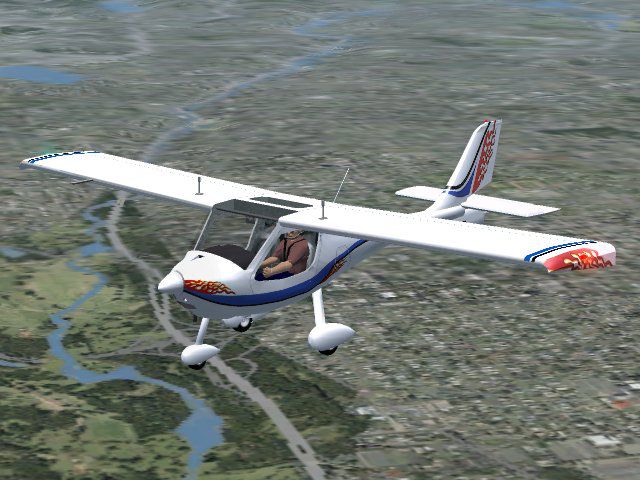

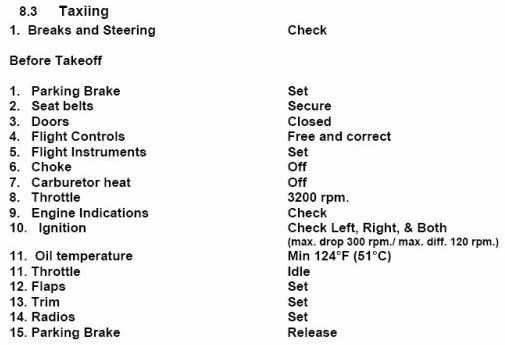

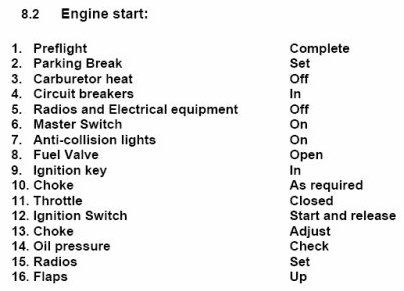
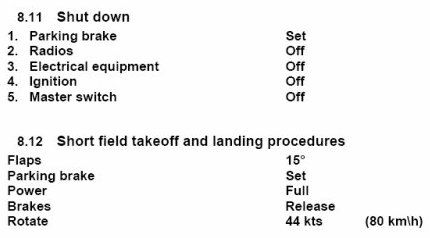
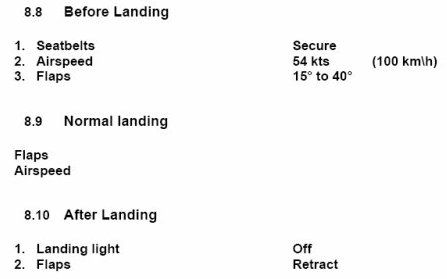
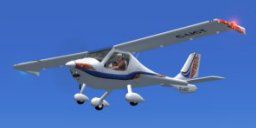
This add-on provides a faithful representation of Flight Design’s unique CTsw light sport aircraft variant with wheels, ready for installation in Microsoft Flight Simulator X. Its carbon fiber and Kevlar construction balances durability and minimal air resistance. This package was meticulously developed by Premier Aircraft Design, with contributions from Barry Blaisdell, Jean-Pierre Brisard, Bob May, Kevin Pardy, and Danny Crance, ensuring every detail closely aligns with real-world specifications. Included are a customized panel, dedicated sounds, and a high-fidelity virtual cockpit.
[Composite Materials] in aviation refer to advanced blends of components such as carbon fiber and Kevlar that create structures both robust and streamlined. In this particular light sport category, the CTsw reaches impressive performance largely thanks to these carefully engineered materials. The fuselage design significantly reduces aerodynamic drag while offering generous cabin space. The aircraft has been in ongoing production for more than two decades, finding popularity among pilots globally.
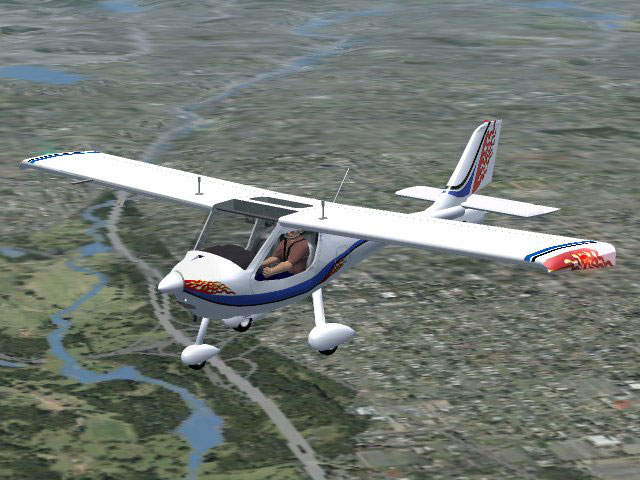
Flight Design CTsw for Microsoft Flight Simulator X.
This package accurately reflects the original CTsw’s key measurements. Expect a 28-foot wingspan with a wing area of approximately 107 square feet. Its airframe typically weighs about 685 lbs while allowing up to 1,320 lbs for takeoff. A 100-horsepower Rotax 912S engine propels the model, and it carries up to 34 US gallons of fuel. Cruising around 112 knots indicated airspeed (IAS) is typical, but top speeds can near 120 knots IAS, with a never-exceed threshold of around 145 knots IAS.
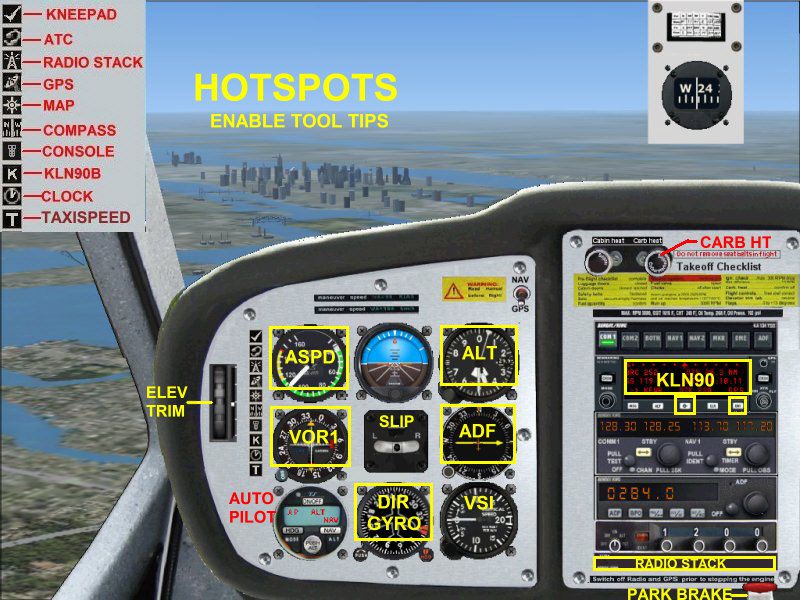
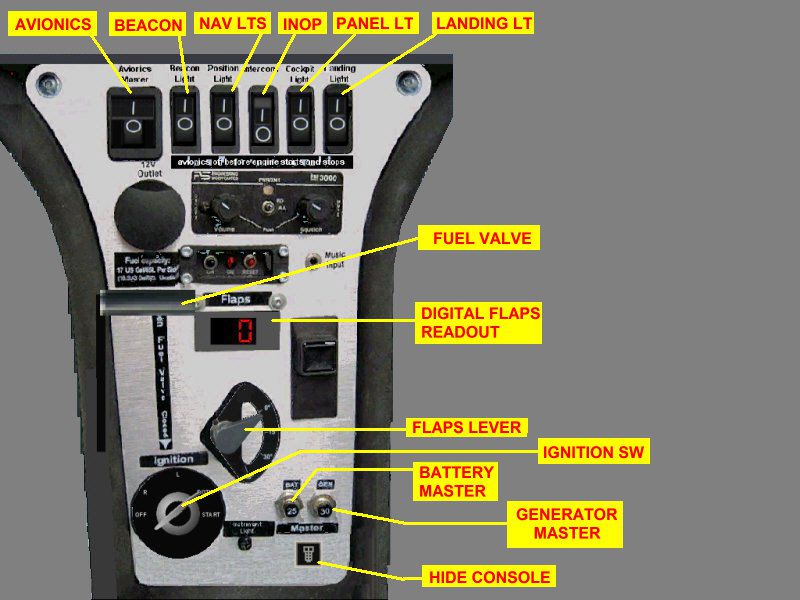
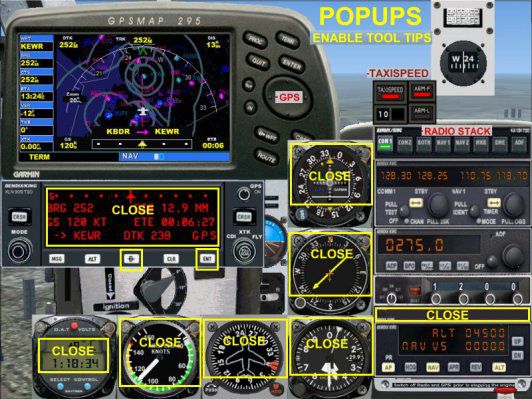
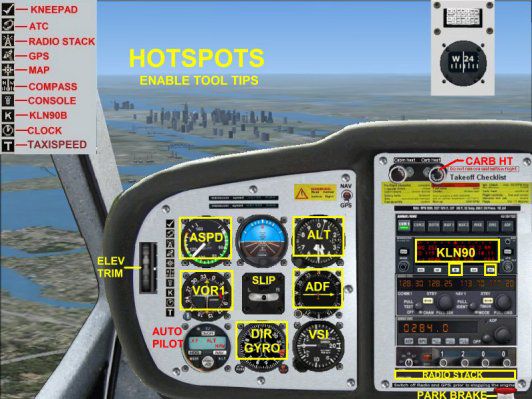
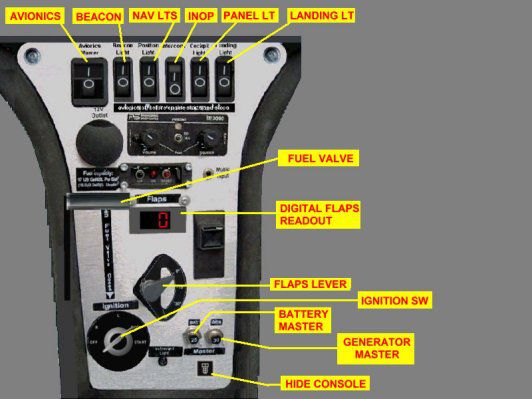
Premier Aircraft Design has included a well-modeled interior featuring accurate gauge layouts, clearly labeled controls, and an intuitive panel flow that aligns with the real CTsw. That attention to detail enhances immersion by closely approximating in-flight handling and monitoring tasks.
All materials are compressed into the XCTSW_IJ.ZIP file but have been laid out so that users can install by simply extracting the files into the main simulator directory. Pay close attention to any instructions regarding folder paths within the zip software—ticking the “Use Folder Names” option is essential to place every file in its correct location. In general, allow files to overwrite when prompted to ensure the complete add-on is properly set up.
Special gratitude is extended to Roger Heller for providing high-quality photographs of his own CTsw aircraft, enabling a more precise reproduction within the simulator. This release represents a culmination of dedicated work by the Premier Aircraft Design team, including Barry Blaisdell, Jean-Pierre Brisard, Bob May, Kevin Pardy, and Danny Crance. Enthusiasts who install this modification in Microsoft Flight Simulator X can explore a refined, well-documented portrayal of this lightweight yet capable aircraft.
Free for all simmers · 8.91 MB · Scanned clean Oct 2026
Download speed: Free tier is capped at 0.5 Mbps (this file takes approximately 2 mins at the cap). PRO members download at full line speed.
SimObjects\Airplanes\, Addon Scenery\, Effects\, or Gauges\.readme.txt or README file. It tells you exactly where files go, what dependencies are needed, and any quirks specific to this add-on.The archive xctsw_ij.zip has 91 files and directories contained within it.
This list displays the first 500 files in the package. If the package has more, you will need to download it to view them.
| Filename/Directory | File Date | File Size |
|---|---|---|
| Airplanes | 09.06.07 | 0 B |
| Flight_Design_CTSW_C-IJCT | 09.06.07 | 0 B |
| aircraft.cfg | 09.05.07 | 13.08 kB |
| beforeTO.jpg | 07.30.07 | 28.74 kB |
| CT-sw.air | 08.12.07 | 10.50 kB |
| CT-SW_Analog2_ref.htm | 09.04.07 | 6.42 kB |
| CT-SW_check.htm | 07.30.07 | 1.98 kB |
| CTSW.jpg | 09.04.07 | 71.54 kB |
| EngStart.jpg | 07.30.07 | 24.13 kB |
| Install_Help.jpg | 08.14.07 | 203.24 kB |
| landing.jpg | 07.30.07 | 13.26 kB |
| model | 09.06.07 | 0 B |
| CTSW_ver13.mdl | 08.02.07 | 1.02 MB |
| CTSW_ver13.OUT | 09.02.07 | 40.74 kB |
| Model.cfg | 08.02.07 | 29 B |
| panel.Analog2 | 09.06.07 | 0 B |
| CTAP2.CAB | 09.03.07 | 158.42 kB |
| CTSWpanel3A.bmp | 08.13.07 | 1.18 MB |
| CTSWpnl_A2.bmp | 09.02.07 | 2.25 MB |
| CTSWstack.bmp | 07.28.07 | 236.03 kB |
| CT_COMPASS.bmp | 05.24.07 | 113.49 kB |
| FDCT2.CAB | 09.03.07 | 1.08 MB |
| frame3.bmp | 09.25.03 | 155.48 kB |
| Panel.cfg | 09.05.07 | 12.83 kB |
| PANEL.jpg | 09.04.07 | 62.06 kB |
| PANEL2.jpg | 09.04.07 | 76.63 kB |
| PANEL3.jpg | 08.11.07 | 42.62 kB |
| PANEL_DOCS | 09.06.07 | 0 B |
| CONSOLE.jpg | 08.11.07 | 115.18 kB |
| HOTSPOTS.jpg | 09.04.07 | 158.67 kB |
| kln90bgpsreadout.pdf | 07.07.02 | 59.29 kB |
| POPUPS.jpg | 09.04.07 | 198.01 kB |
| vc.jpg | 09.03.07 | 65.41 kB |
| ReadMe_First.txt | 09.04.07 | 3.64 kB |
| shutdn.jpg | 07.30.07 | 16.84 kB |
| SOUND | 09.06.07 | 0 B |
| Sound.cfg | 07.30.07 | 34 B |
| texture.IJCT | 09.06.07 | 0 B |
| chrome.bmp | 10.13.05 | 64.07 kB |
| CTSW_console.bmp | 05.18.07 | 512.07 kB |
| CTSW_Elevator.bmp | 05.01.07 | 256.07 kB |
| CTSW_fuse.bmp | 08.13.07 | 1.00 MB |
| CTSW_interiors.bmp | 07.05.07 | 512.07 kB |
| CTSW_Panels.bmp | 09.02.07 | 512.07 kB |
| CTSW_pilote.bmp | 06.28.07 | 32.07 kB |
| CTSW_Seats.bmp | 07.26.07 | 512.07 kB |
| CTSW_Wings.bmp | 08.13.07 | 1.00 MB |
| prop_TBX.bmp | 10.26.06 | 256.07 kB |
| roue2.bmp | 01.10.07 | 65.05 kB |
| thumbnail.jpg | 09.02.07 | 4.90 kB |
| TO-CLB-CRS-DES.jpg | 07.30.07 | 27.62 kB |
| fsfsconv | 09.06.07 | 0 B |
| Rotax_Snd | 09.06.07 | 0 B |
| door_small_close.wav | 04.09.03 | 55.99 kB |
| door_small_open.wav | 04.09.03 | 59.98 kB |
| rotax_apdisconnect.wav | 06.29.01 | 169.80 kB |
| rotax_flaps.wav | 08.27.01 | 225.90 kB |
| rotax_noncombust.wav | 02.01.03 | 35.63 kB |
| rotax_prop1a.wav | 08.15.01 | 60.75 kB |
| rotax_prop1b.wav | 08.15.01 | 68.25 kB |
| rotax_prop2a.wav | 08.15.01 | 62.75 kB |
| rotax_prop2b.wav | 08.15.01 | 73.25 kB |
| rotax_rpm1.wav | 04.17.01 | 58.29 kB |
| rotax_rpm2.wav | 05.12.06 | 617.25 kB |
| rotax_rpm3.wav | 05.12.06 | 544.90 kB |
| rotax_rpm4.wav | 05.12.06 | 383.12 kB |
| rotax_shutdown.wav | 05.13.03 | 314.04 kB |
| rotax_stallhorn.wav | 06.29.01 | 237.68 kB |
| rotax_starter.wav | 05.13.03 | 25.75 kB |
| rotax_startup.wav | 05.13.03 | 110.15 kB |
| Sound.cfg | 08.12.07 | 8.67 kB |
| xrotax_noncombust.wav | 02.01.03 | 16.45 kB |
| xrotax_prop.wav | 03.18.03 | 262.17 kB |
| xrotax_rpm1.wav | 05.12.06 | 217.49 kB |
| xrotax_rpm2.wav | 05.12.06 | 226.46 kB |
| xrotax_rpm3.wav | 05.12.06 | 262.45 kB |
| xrotax_rpm4.wav | 05.12.06 | 237.50 kB |
| xrotax_shutdown.wav | 02.20.03 | 71.65 kB |
| xrotax_starter.wav | 05.13.03 | 15.66 kB |
| xrotax_startup.wav | 04.03.03 | 181.63 kB |
| SimObjects | 11.05.06 | 0 B |
| BK_Radio.gau | 08.31.06 | 296.00 kB |
| cad_kln901brored.gau | 07.19.02 | 144.00 kB |
| cad_kln902brored.gau | 07.18.02 | 144.00 kB |
| cad_kln90brored.gau | 07.18.02 | 144.00 kB |
| gauges | 09.06.07 | 0 B |
| fx_PADbeaconh.fx | 09.02.06 | 4.75 kB |
| fx_vclightwhite.fx | 05.12.06 | 1.31 kB |
| Effects | 09.06.07 | 0 B |
| flyawaysimulation.txt | 10.29.13 | 959 B |
| Go to Fly Away Simulation.url | 01.22.16 | 52 B |
Only PRO members can place votes.
More FSX & P3D add-ons hand-picked based on this download.
FSX General Aviation Aircraft
This float-equipped Light Sport Aircraft (LSA) add-on brings a fully realized…
 FSX General Aviation Aircraft
New updated version 3.0 contains revised textures, model and Flight Dynamics …
 FSX General Aviation Aircraft
New updated version 3.0. contains revised textures, models and Flight Dynamic…
 FSX General Aviation Aircraft
KLM Flight School Beechcraft Baron 58. A repaint for the default Beech Baron …
 FSX General Aviation Aircraft
Flight Replicas Super Cub Extreme. A paint scheme for a 180 hp bush type airp…
 FSX General Aviation Aircraft
Repaint textures for the Just Flight freeware Cessna 152, depicting real worl…
 FSX General Aviation Aircraft
Japanese Red Cross Flight Corps Mitsubishi MU-2 Solitaire (including panel re…
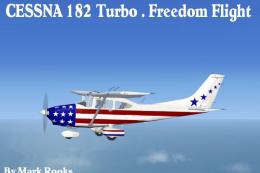 FSX General Aviation Aircraft
This package introduces a revitalized take on the default Cessna C-182 in Mic…
Read what other simmers think, or add your own.

Looks quite nice but virtual cockpit view is appalling. Very low res unless I'm doing something wrong it's totally unusable from this view.