

 FSX Scenery
Dublin Airport EIDW 2010
This is a complete package of Dublin 2010 for FSX/P3D. This package includes …
Enniskillen/St Angelo Airport (EGAB) 2010 scenery refreshes Northern Ireland’s regional field with updated taxiways A through F, accurate parking layout, tower frequency, and corrected runway length for more authentic operations. Built for Microsoft Flight Simulator X, it enhances ground navigation and realism for GA flights and regional traffic alike.
 Rate
Rate
 United Kingdom
Scenery Enniskillen/St Angelo Airport 2010, Northern Ireland, UK (EGAB). Includes taxiways (A, B, C (C1, C2), D (D1, D2, D3, D4), F), parking, tower frequency and correct runway length By Padraic O hEithir.
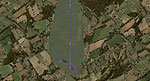
Overview of Enniskillen/St Angelo Airport.
compatible only.
INSTALLATION:
Just copy and paste the file into your Microsoft Flight Simulator X\Addon scenery\scenery folder.
This file should not damage your computer, but in the unlikely case that they do I accept no liability.
These files are freeware. Under no circumstance should they be modified without the author's written permission or sold as payware.
Created using ADEX v01.47.07
Pádraic Ó hEithir
Free for all simmers · 2.34 MB · Scanned clean Oct 2026
Download speed: Free tier is capped at 0.5 Mbps. PRO members download at full line speed.
FSX\Addon Scenery\ containing scenery and texture sub-folders.readme.txt or README file. It tells you exactly where files go, what dependencies are needed, and any quirks specific to this add-on.Use these coordinates to fly directly to this location once the mod is installed.
54.39860000,-7.65170000
Launch FSX or Prepar3D and use Flights → Load to open the downloaded .pln file. Your aircraft will be positioned at this location.
The archive enniskillen2010.zip has 7 files and directories contained within it.
This list displays the first 500 files in the package. If the package has more, you will need to download it to view them.
| Filename/Directory | File Date | File Size |
|---|---|---|
| FILE_ID.DIZ.txt | 10.17.10 | 250 B |
| Readme.txt | 10.17.10 | 919 B |
| EGAB_ADEX_PAD_CVX.bgl | 10.17.10 | 356 B |
| EGAB_ADEX_PAD.BGL | 10.17.10 | 4.77 kB |
| EGAB.BMP | 10.17.10 | 3.52 MB |
| flyawaysimulation.txt | 10.29.13 | 959 B |
| Go to Fly Away Simulation.url | 01.22.16 | 52 B |
Only PRO members can place votes.
More FSX & P3D add-ons hand-picked based on this download.
FSX Scenery
This is a complete package of Dublin 2010 for FSX/P3D. This package includes …
 FSX Scenery
Scenery Van Ferit Melen Airport 2010 (LTCI) in east of Turkey. Update LTCI200…
 FSX Scenery
KORD 2010, O'Hare International Airport, Illinois (IL). An update with new ru…
 FSX Scenery
Scenery Reunion/St. Denis Airport. The scenery is made using ADE9x for Reunio…
 FSX Scenery
FSX Minneapolis/St. Paul (KMSP) Update. An updated Minneapolis/St. Paul, Minn…
 FSX Scenery
A major enhancement of the base scenery of Newquay Airport, formerly RAF St. …
 FSX Scenery
Scenery St Gallen Altenrhein Airport (LSZR), Sankt Gallen, Switzerland. Uses …
 FSX Scenery
Lambert–St. Louis International Airport (KSTL) in Missouri is a significant a…
Be the first to leave a comment on this download.
Be the first to share your thoughts on this download.