
20+ Best Microsoft Flight Simulator (MSFS) 2020 Payware Add-ons
Elevate your MSFS 2020 flights with these advanced, thoroughly tested payware expansions. Each offers heightened authenticity, dynamic…
 Ian Stephens
It wasn’t too long ago that flight simulation joysticks were simple: Right, Left. Forward, Backward. But just like the advances in flight simulation software, joysticks have come a long way.
Now you can choose between a basic joystick with simple buttons to full-blown flightsticks that have multiple configurable buttons, read-out displays and designs that look like they just came off an intergalactic battle cruiser. Here are 5 different joysticks that will help you get more out of Microsoft FSX, X-Plane, and other top flight simulators.
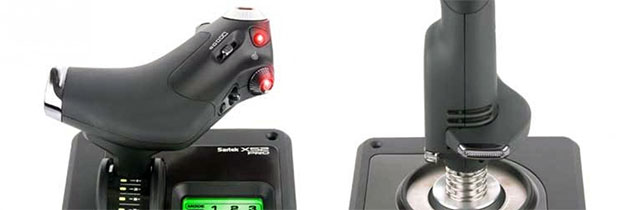
The Saitek X52 Pro is a significant improvement over the original X52; better quality, better spring tension in the stick (due to dual springs), more metallic parts, and more sensors. The improvements bring this model in about $60 more.
With a HOTAS controller, users do not have to take their hands off the throttle or stick. The X52 Pro looks a little overwhelming to newbies, but they quickly adapt to it.
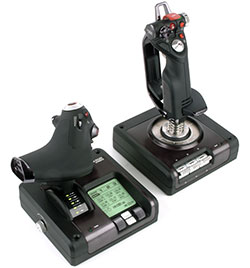 It can take a while to set up the buttons with a particular flight sim, but once it's done it is comfortable and familiar. Profiles can be created for different programs and users. Macros can also be programmed. These are useful because one button can be used for many effects, handy when a maneuver has several facets that follow one right after another.
The stick may seem loose--too loose. But this is because it is very precise. Cheaper models are too stiff and require too much effort. The X52 Pro has a lot of touch and maneuverability. The initial setup is like a fighter plane, with the throttle on the left and the stick on the right. Users can switch it around like a general aircraft, with the stick on the left.
The controller uses a PS2 connection. One warning: The connection comes loose easily. If it comes out completely, it might reset the calibration settings, or even restart the game.
The multi-function display on the throttle (MFD) shows important game play information in real time. Buttons, switches and controls can be programmed although the documentation on how to do it properly is a little thin.
The throttle is well designed for both maximum comfort on long flights and speedy response for sport or combat flying. There are two buttons set aside for MFD as well as two rotary dials with buttons that can be set to control game functions.
The data for the MFD comes directly from the game itself (including the Radio Stack in Flight Simulator 9 and 10). Want to create a custom program? Don’t worry--gearheads can use the Software Development Kit to create their own programs that communicate with the MFD.
The joystick has a centering mechanism complete with non-contact construction on both the X-axis and Y-axis. The constant spring force keeps the action smooth and tight, providing accurate control and a longer life—no more watching the joystick droop over after a few months of hard flying.
The joystick has four fire buttons. There is also a missile launcher that comes complete with a spring-loaded safety cover which makes it easy to access quickly. A pinky switch allows the user to utilize twice the number of programmable commands.
In addition, there are two 8-way hat switches, a rotary mode selector with LED indicators, three base-mounted toggles with up to six programmable commands, a handle adjustment that fits all different hand sizes and a 3-D rudder twist. There is a 2-stage metal trigger on the joystick as well as easy access to two primary buttons.
The throttle tension can be adjusted to individual settings, and has detents for idle and afterburner as well as two fire buttons. There is a scroll wheel with a button built-in, eight way hat switch, slider control, a mouse controller/hat switch with left mouse button functionality, and two rotary controls.
There is also a clutch button that allows the user to enter in "safe mode," which allows profile selection in flight, or to figure out which button does what without actually activating any of them.
The Saitek X52 Pro is approved for Windows versions including XP, XP64, all versions of Vista and Windows 7. It is a great blend of ergonomics, technology, aesthetics and value pricing. It will provide lots of flying fun for many years.
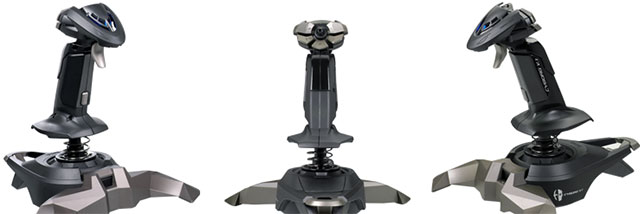
The Mad Catz V.1 Stick is a great-looking basic joystick that provides plenty of control at a reasonable price. The ergonomic stick has a trigger and five buttons that are positioned for rapid access. It can be handled with either hand with equal effectiveness.
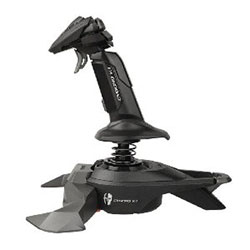 Users can change cockpit views to keep track of enemy combatants with a quick flick of the POV switch. Control of the engine is smooth and easy with the throttle lever. Rudder control is handled with a simple twist action.
While much lighter than many of its competitors, its rubber pads effectively keep it stuck in place. The legs can be removed from the unit and store easily.
The unit is very lightweight, has precise controls and a rapid-fire trigger. The rudder (Z-axis) works by rotating the stick to each side. You cannot configure the twist action, but the other controls are easy to adjust. The spring is a little stiff but becomes less so over time.
With plenty of buttons, it performs exceptionally. There are seven buttons across the top, with access to 13 using the pinky button as a shift control. There is no extra clutter and users have convenient access to the buttons.
The throttle lever is on the base. It is very sensitive and does not take much effort to regulate. There is a hat switch in the middle and buttons positioned out around the thumb. This layout will not appeal to those who prefer the buttons on the base. Also, the pinky button is a little too easy to bump accidentally.
The unit is compatible with all Windows configurations including XP, XP 64, Vista, Windows 7 and Windows 8. It comes complete with Saitek SST software, which allows extensive array of programming options.
While there are more expensive options, the Mad Catz V.1 Stick is an excellent basic joystick for flight simulation. It is durable; made with tough plastic and good quality construction.
This is the perfect introductory-level stick for flight simulation like Microsoft FSX and X-Plane--it works with many popular flight simulation titles. With a comfortable grip, useful software, sleek design and great price, the Mad Catz V.1 Stick should be on every flight simmer’s short list.
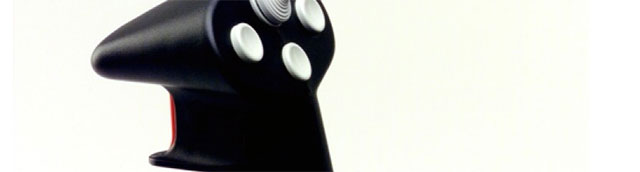
The CH Products FlightStick Pro USB is great for flight simmers looking for something a little better than an entry level product, but without breaking the bank. This is high-quality mid-range joystick that offers maximum value.
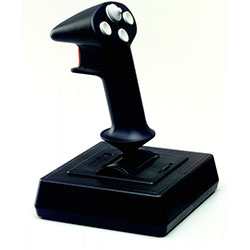 It has four push buttons and one 8-way POV hat switch. The control manager software provides 22 different programmable functions. The grip can be used effectively with either left or right hands, and works right away as soon as is it is unpackaged. Users do not need to download drivers or add any other software.
It is a plug-and-play system. Unlike other flight sticks, the base is heavy enough that the unit will not move around on the table or desk. At the same time it is small enough that it can be set aside without taking up too much room.
With an exact amount of spring load, it fits perfectly in the hand, and is very tactile and precise. The buttons are responsive and within easy reach of fingers. One drawback for some users may be that there is not a twist access for rudder.
CH Products flight sticks are very stable. They do not need a lot of calibration and do not lose their settings. It takes almost no effort to get response along both the X and Y axes. With simple, solid quality, this is one of the few mid-range joysticks that is equally comfortable in either hand.
The CH Products Flight Stick Pro USB is made of quality construction, tough material and is compatible with Windows versions 98, and ME, 2000, XP, Vista and Windows 7 on the PC as well as Mac OS 8.6 with Input Sprockets 1.7 X for Mac.
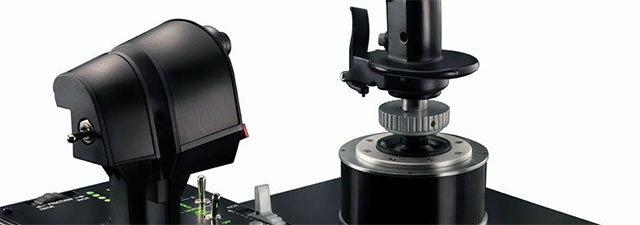
How is this for user involvement in product development? Thrustmaster teamed up with some of their loyal customers, working with their suggestions and feedback to create the Hotas Warthog, a replica of the A10C, an attack plane in the U.S. Air Force. The result is a top-of-the-line flightstick for serious flight simmers that want the best.
Unlike most gaming joysticks, the Warthog is heavy. Tipping the scales at more than 14 pounds, the throttle handles, base and joystick are all made of metal. There are two four-direction hat switches and 55 action buttons that are completely programmable by the user.
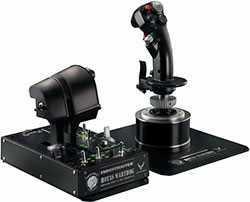 The joystick itself has 19 action buttons, as well as a hat dedicated to POV. The magnetic sensor system provides extreme touch and precision. It is designed to reflect the actual pressure a pilot would use on the buttons, switches and triggers in the actual aircraft.
The joystick handle is completely detachable. This allows users to place it on the base of the HOTAS Cougar, another Thrustmaster product. The base also comes off the unit as well, making it simple to drop the joystick in a cockpit.
The dual throttle has a locking system that allows the user to keep the throttles together or work them independently. Magnetic sensors on each throttle provide unparalleled precision. The afterburner can be disengaged. This lets the user adapt the throttle to each different aircraft. The throttles are packed with 17 action buttons, a "mouse hat/slew control" and a POV hat.
The control panel has a wide variety of controls including a friction wheel, back lighting for functions and five programmable LED lights which are very useful in lowlight operating conditions. The base of the unit has 15 action buttons and the trim wheel.
One of the most powerful features of the warthog is the TARGET (Thrustmaster Advanced Programming Graphical Editor) software. It lets users configure each Thrustmaster controller, primarily the Warthog but also the HOTAS Cougar, MFD Cougar and the T.16000. Three distinct programming configurations include Basic Advanced and Script, a scripting language that provides unlimited functionality.
This flightstick was designed by simmers, for simmers. For users that have cut their teeth and are ready to move up, the Warthog is ready and waiting.
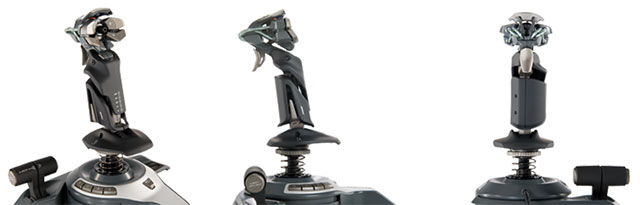
A significant upgrade from earlier models, the F.L.Y 5 Flight Stick provides even more functionality, configurability and performance. The high-quality, three-toned matte plastic and stainless steel is an indication of the commitment to excellence behind its construction.
It features twin throttles with fully programmable controls. The length and tilt of both the joystick and head can be manipulated to help find the perfect setting for different seating positions and hand size.
The base has pads for gripping; however the unit is very light. The joystick centers itself smoothly every time thanks to a shallow disk located inside a central cone, which provides even movement on both the X and Y axes. The joystick handle can be removed which makes it easier to store the unit.
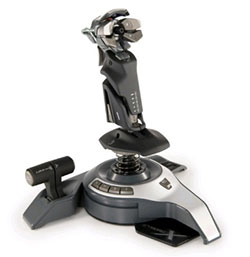 The twin throttle lets users assign different engines to each throttle, or program the unit so that one throttle lever manipulates a function such as flap control or elevator trim. The POV hat switches are completely adjustable as is the joystick handle height, which can be raised or lowered to fit different and sizes. The handle angle can be adjusted for players that prefer it stands straight up during play, or leans forward.
There are 12 buttons readily available which include all the central combat and flying commands, and a rotating trim wheel located near the weapon switches. Rudders are controlled by twisting the stick itself.
Using the Saitek SST software, users can increase the number of programmable buttons. The buttons can be used to configure throttling, brakes, lights, view switching, flap adjustments, landing gear and more.
The trigger and four thumb buttons are configured at the top of the stick, as are a scroll wheel and hat switch. There are four additional buttons on the base which are manipulated by the left thumb. The Shift button, located directly behind the stick, is a little harder to get to. It allows users to alter layouts and assign additional commands to buttons.
The joystick itself has forward, backward and twist axes. The thick spring takes a little effort to put into position, which may take a little getting used to for some users. A strong screw collar keeps the whole spring unit in place.
There are four adjustments that can be made to adapt the joystick to that. This high level of customization helps the F.L.Y 5 stand out from its competition. Users can change the overall angle up to 40° forward. The joystick length can be increased 20 cm. The head tilt can be adjusted 30° backwards.
In addition, the buttons on the head unit slide forwards and backwards, and can be locked down with a screw once the optimal position is located. The adjustments are made with a small adjustment tool that is essentially a hex screwdriver with a special pin on one end. It stores right in the base of the unit.
It is unusual to see dual throttles on a joystick of this price range. Two throttles are handy in many situations--in helicopter flying where one of the throttles can be used instead of foot pedals, for example.
The F.L.Y 5 Flight Stick works extremely well with FSX. System requirements include USB 1.1/2.0 ports on Windows XP, XP 64, Vista or Windows 7 platforms.
Following several comments on this article and another, I have chosen to list the famous Microsoft Sidewinder Force Feedback 2 joystick in this list too. So there are now actually 6 controllers on this list, not 5. I didn't list this joystick initially because I only wanted to focus on controllers currently in production (which the Sidewinder isn't as Microsoft no longer manufactures it).
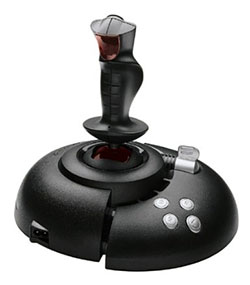 The Sidewinder Force Feedback 2 was lucky enough to have USB connectivity in its last model, which is so much more improved over COM port or GAME PORT interfaces. At least with USB connectivity, it has support for modern machines as I don't believe many are built with COM or GAME PORT these days - however you'll always find a USB port on your machine.
The Sidewinder Force Feedback 2 was a very popular joystick among flight simulation fans as it was reasonably priced and had great functionality - and it was one of the first force feedback joysticks of its time, which also lead to its popularity.
From what I've read, I'm pretty sure this joystick will run from Windows as early as '98 all the way up to Windows 8 of current day. In fact, anything above XP and I don't think you'll need the drivers disk either. It is fully supported in FS2002/FS2004/FSX with force feedback (rumble) mode activated. It's quite a nice feeling rolling down the runway, you can "feel" the ground beneath you. It also features a twistable grip - which is perfect for rudder use (although you can assign it to other things).
In total there are 16 programmable buttons, albeit 8 of them are in the hat switch (which is great for using as a view changing switch) although you can assign each of the hat directions to any function you desire. The joystick is well made and rugged and the new version (2) doesn't include the most annoying "power brick" that previous versions came with (correct me if I'm wrong in the comments below).
As they are no longer being manufactured, it's becoming increasingly hard to get hold of this particular joystick. They sometimes pop up on eBay, but I've had most luck finding them on Amazon. For some reason, when I looked I found a new one available for $599... this may have been a typing mistake or perhaps new ones are really that expensive to purchase as they are as rare as rocking horse poop. However, you can usually pick up a second hand one for anywhere between $80 and $150.
The right joystick adds a lot of fun and excitement to flight simulation. At the same time, it helps users improve their flying skills by providing fast access to common functions, macro functions to speed up critical events, and incredible feedback to enhance feel and control. Whatever the price range, one of the joysticks in our list will make everyone a better pilot.
These are a few (6) of my favorite sticks, however there are many more available.
Comments below please people! Let me know what stick you have, what stick you'd dream of having and reviews of the sticks above if you own them!
 Don't forget... We have a huge selection (over 24,000 files) of free mods and add-ons for MSFS, FSX, P3D & X-Plane in the file library. Files include aircraft, scenery, and utilities All are free-to-download and use - you don't even need to register. Browse on down to the file library here.

Ian Stephens is a flight simulation industry expert with over 20 years of experience and also has a keen interest in aviation and technology. Ian spends a lot of his time experimenting with various simulator packages but has a love for Microsoft Flight Simulator X because of the huge selection of add-ons available. However, Ian also has copies of Prepar3D and X-Plane installed.
Ian has been writing for Fly Away Simulation for over 9 years. Should you wish, you can contact Ian via email at ian.stephens@flyawaysimulation.com.
Elevate your MSFS 2020 flights with these advanced, thoroughly tested payware expansions. Each offers heightened authenticity, dynamic…

Unearth a thorough critique from a seasoned flight-sim devotee, spotlighting Microsoft Flight Simulator 2020’s hyper-realistic scenery,…

Experience next-level authenticity in X-Plane 11 and 12 with this comprehensive 2024 round-up featuring an array of free expansions. From…

Explore a comprehensive selection of photoreal environment expansions for X-Plane 12 and 11, featuring meticulously captured ortho imagery…

Uncover a comprehensive selection of top-tier freeware expansions for Microsoft Flight Simulator, spanning intricately detailed aircraft…
Upgrade your virtual aviation experience with these meticulously refined freeware add-ons, showcasing advanced aircraft models,…
31 comments
Leave a ResponseThe content of the comments below are entirely the opinions of the individual posting the comment and do not always reflect the views of Fly Away Simulation. We moderate all comments manually before they are approved.
Ians articles make me Wonder! Not a mention of the Microsoft Sidewinder Force Feedback 2 None of the joysticks above are fit to wipe its boats. Granted it is no longer in production but and this would be almost universally agreed with by Flight Sim enthusiasts of all strips: if you want a joystick look for a used Microsoft Sidewinder Force Feedback 2 (or if you are lucky enough to find a new in box one get it) before you buy any of the above. They are all rubbish by comparison which makes me wonder why nobody has managed to make a better one since? Hint: its not because they can't!
These are all completely useless for flight simming as they have center springs. Real aircraft do not have center sprung controls. If you use these ridiculous toys and then fly a real aircraft you will likely have an accident. The best joystick I found so far is the MS FF2, which isn't great. Or remove the center springs and add dampers.
Thanks Ian for the joystick article. I enjoy your columns. My kit has been the X52 Pro for about 3 years now, as I built a sim based on dimensions of CF-18 cockpit and so wanted HOTAS with separate throttle and rudder pedals. The one thing I have really missed is the immersion factor of Force Feedback. This Saitek kit is getting worn out (I fly a lot) and would definitely be looking for force feedback in the future....have Searched a lot but nothing satisfactory shows up. Do you have any insight on this?
Hello:
It never fails, when someone wants to "... Best ...." of something; they never quantify the comparisons. The term best (Of the most excellent, effective, or desirable type or quality) is greatly offended.
When I do comparisons, I list pro's, con's, features that can be compared. Joysticks and their many variations are not "all suitable" for all programs.
The importance of quantifying (category, or applicable use) is most important to the reader.
I have been looking for a good joystick for the last ten years. One of the first things I do when researching a joystick is to look at the "bad" reviews. To immediately know the short comings of the device is a prime part of my selection.
Some of the joysticks listed here have terrible reviews of some of their versions, including POOR vendor support, most used functions (switches) that break, fail, fail to operate, can not be programmed.
The panacea of the manufacturer is to tout the device's use in a specific program, and to allude to functionality in others. And when you call, or email support .... we are informed "We are working on that."
While this presentation is good, it is by no means complete. My search is never ending....
These joysticks may look impressive with all the gadgets and lcd readouts but won't come anywhere near the Microsoft Force Feedback 2 as mentioned by others. I have tried numerous models of these type of sticks with centre springs and ended up getting rid of them. I bought my Microsoft stick second hand on eBay many years ago and is still serving me well. Unfortunately, they are nigh on impossible to find now. Why MS discontinued them or why someone has never made a similar one I don't know.
What about helicopter simulation? None of the joysticks seems suitable as a helicopter cyclic. Is there a reasonably priced joystick that works for helicopter flying in X-Plane? I've tried the CH Flightstick with Saitek rudder pedals, and the result is barely flyable, with hovering nearly impossible. Any suggestions?
I use the "Thrustmaster" "T.Flight Hotas X" that I do not know whether it is professional or not, but has the major advantage that it costs a lot less than everyone else!
I have a Hotas Cougar which works great on my PC. When I try to install my Thrustmaster Warthog, it will not allow my computer to start........HELP
@David McClean - Article updated, Microsoft Sidewinder 2 included!
Try Logitech Force 3D PRO, about $60 Australian.
Can anyone tell me why I can't download my FSX? When the download is just about finished, I get this "1722 error" message. I'm using WIN 8... Is this the problem, or what? Got the sim from Ireland known as a redistrubutal, tried getting through to Micro since it's their sim... Harder than pulling teeth. Any help appreciated, gimme a yell! (railroader9@rcn.com). Thanks.
Can't think of a single aircraft whose rudder is controller by twisting the stick. Where did that come from?
Ian,
You patched in the mighty MS FFB2, but said little about how valuable the FFB aspect really is. (in regards to the player's ability to feel their aircraft's energy within the controls) I dunno how anybody can get anywhere in a combat flight sim without!
~Tiny
I currently have the Saitek X52 which is AMAZING! But, even with its like 32 buttons, my favorite over it was the FIRST Microsoft Sidewinder Force Feedback. I used to LOVE the feedback while playing Mechwarrior/Battlemech, and starfighting in Star Wars Galaxies. That joystick would really hammer from yor hands when your ship shields were gone & you got hit. Unfortunately Microsoft/Windows decided that after they switched to Windows 7 they no longer supported that joystick and absolutely REFUSED to update it or the software for it. I wish they had.
I have also Microsoft Frcefeedback2. I think it feels very good, because it drives by motor not spring. By the way, if you know how to use this contoroller on Windows 7. I changed from XP to Win7 recently.
I have the Saitek X52 Pro. It *feels* solid in the hand, but personally I've had heaps of problems with its software as well as its unreliable electronics. Within a year, the displays were flickering constantly, and the text displayed on them became a jumbled mess. Still usable though, but the software and electronics need work.
Hey all, I just found an old Logitech Wingman Force 3D joystick in my closet. Can someone recommend a good (preferably combat) flight simulator that will work with this joystick under Windows Vista?
Word of caution on the warthog: "Unlike most gaming joysticks, the Warthog is heavy. Tipping the scales at more than 14 pounds, the throttle handles, base and joystick are all made of metal. There are two four-direction hat switches and 55 action buttons that are completely programmable by the user." The throttles are NOT metal. The main mechanical parts in the throttles are 100% plastic. Metal is bolted on for looks and weight without adding any real strength to the throttle levers.
Have Microsoft Forcefeedback 2,cant get to operate on Windows 7 ?????
Can anyone say whether these controllers will work on windows 8 or not
Hey i wanna fly a 777( pmdg)
I thought about getting a saitek yoke cause well the 777 is a boeing, but now just to get to know fsx i wanna get a joystick and throttle.
For a big passenger plane what joystick should i get, that is not to expensive??
Can the Saitek X52 and/or the Thrustmaster Wart Hog be used on a Mac or PS3?
If not, is there a quality joystick that can be used on either or both?
Appreciate any advice!
Thanks!
...John
I'm new to the flight sim scene and I'm looking to get myself a joystick. I have a Windows 7 system and I'm running the MS Flight Simulator X Steam Edition. I'm looking for a good entry-level controller that will handle the basic control functions.
What are your recommendations?
Thanks for your advice. I had a force feed sidewinder in my closet for few years and was going to discard it and buy a new joy stick. Not now
Hallo,Sir.I am a simmer from the Seychelles islands and I have only one Extreme 3d PRO of logitech stick which I use with my FSX/FS2004 too.Please,sir.I don't know which if these joystick above is the BEST for me to use with FSX/FS2004 and I just want to ask you which one is the best for me and in my island there's NO FS shop there and how can I get it.Thank you in advance sir.Bye...
To those looking for a low cost option, the Thrustmaster T.Flight Hotas X is a good cheap stick, in my eyes.
Take into consideration I only have about 100 hours total flight sim time, and most of that was using an Xbox controller. But for those of us who can't commit hundreds of dollars into flight sim, I'd recommend it.
Hi I have the Thurstmaster Hotas Warthog stick and throttle Iam have trouble setting up buttons video dosn't show how to setup does anyone have a profile for FSX need some help new to this . let me know Thankyou
want to buy one of your joysticks but cannot find any place on ur website to purchase. Lot of info bit I guess you are not selling????
I've been flying the Mad Catz Fly 5 for many, many years now, and aside from one of the buttons breaking and falling off, I haven't had any issues with it.
I have made a couple of modifications. Get rid of the centering spring if you're flying helicopters, and, if you're flying helicopters, forget the twist grip and get some rudder pedals.
I have the cheapest CH rudder pedals I could find on New Egg, and they work just fine. I have no problems with hovering or any other maneuvering with just the Fly 5 and the CH pedals. I should also add, they do work in Windows 10, as long as Windows 10 is working, (which isn't 100 percent yet.
The twin throttles work great setting one up as a throttle, and the other as a collective for helicopters, although, I found out the throttle does work the hard way.
I bumped it during my first flight with my Dreamfoil 407 and it suddenly lost all engine power. Thanks, Hovercontrol for all that auto-rotation practice. It really came in handy and it was instinctive when all the alarms started going off in the cockpit.
A nicely written article that is aimed for game players, not sadly, flight sim enthusiasts.
Any joystick using a SPRING to return it to the centre is a toy and as such, should be described as. In any older airplane, the wires and surfaces the joystick, or, control yoke, attaches to, keep it in its 'center', and that force changes as the air over those surfaces changes. To add a spring into the mix is patently stupid as the active forces that cause deformation of spring, are nothing like that force curve we would see if we were connected to flight surfaces. Force Feedback sticks, like the older Microsoft joystick, emulate that feeling by constructing those forces, and there is nothing 'springy' about it. TLDR: If it has a spring for centering, it is a toy and not for use by flight sim enthusiasts.
Usually, I do not leave many comments, however in this case I must. X52 was the worse investment I have made to date. Paid around 150 bucks, and now it's close to 300. Ouch! Don't waste your money. At Heritage VA, our experience is well over 15 years, and this stick is the worst yet. Don't ask me, ask my Pilots.
The Throttle: There is a "Wedge" embedded into the throttle towards the center, thus making it want to lock in the center position. NOT for flight sims, period. Of course, I've removed it completely, and yet the throttle is like trying to slide up and down a kid's playground slide with cement glue. You're kidding me, right? I've quickly gone back to my Saitek Throttle system.
The joystick on the other side does NOT hold calibration for any length of time. 3 Flights at best maybe. The spring directly under the Joystick handle is very weak, and just after 3 months of very normal use, I've had to re-vamp the spring. Of course, all of these modifications obviously voided any warranty, so don't do what I've done people. Well, there is a lot more to this for sure. My advice, for the price, they should be ashamed of themselves. One thing is for sure, I will never buy anything from this company ever again.