


 United States of America
  FSX Scenery
Lukla V2
This is the second version of Lukla, located in the mountainous terrain of Ne…
One World Trade Center rises over Lower Manhattan with an evolving construction-stage model that refreshes the New York City skyline for realistic VFR landmarks and urban flyovers. Built for Microsoft Flight Simulator X, it features accurate placement, detailed geometry and textures, plus custom night lighting that makes the tower easy to spot after dusk.
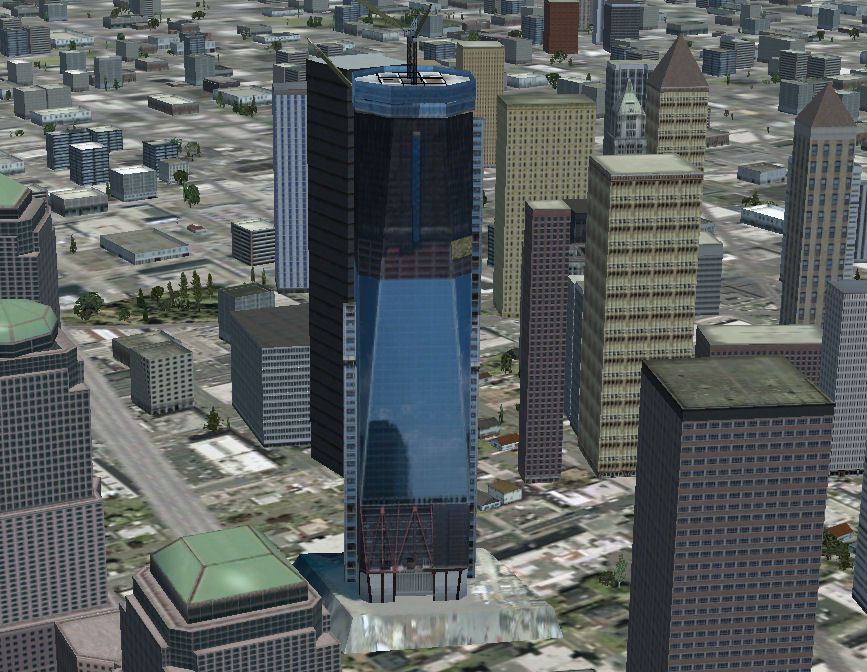
This freeware scenery enhancement places an evolving version of One World Trade Center in the heart of Lower Manhattan, offering a detailed landmark for those who navigate the virtual skies over New York City. Created by Andy Johnston, this add-on modifies the skyline to reflect the construction phase of the tower near the tenth anniversary of the tragic September 11th events.
The tallest building in the United States, One World Trade Center stands at approximately 1,776 feet (541 meters) in reality. In this flight simulation package, its textures and geometry are modeled to match the tower’s partially completed status during development. Additionally, the integrated lighting features help pilots identify this modern architectural piece during evening and nighttime flights.
This add-on seamlessly blends into Microsoft Flight Simulator X scenery, injecting a modern silhouette where older stock data might otherwise display a blank space or incomplete model. By incorporating precise details, including the steel spire and glass façade, virtual aviators can enjoy a more realistic urban environment when conducting instrument or visual approaches over the New York Harbor.
Users will find that Manhattan’s iconic silhouette appears more authentic with this structure in place. The updated scenery emphasizes the ever-evolving face of the city and adds depth for any low-altitude flyover or helicopter tour. With bustling traffic below, the visual reference of One World Trade Center aids navigation and showcases the significance of this modern landmark.
Andy Johnston’s work focuses on delivering authentic geometry aligned with the actual construction progress of the tower at the time. This scenery includes advanced building textures, custom night lighting, and accurate placement within the simulator's regional mesh. Pilots can also benefit from improved realism around Lower Manhattan’s waterfront, creating enhanced immersion without compromising performance.
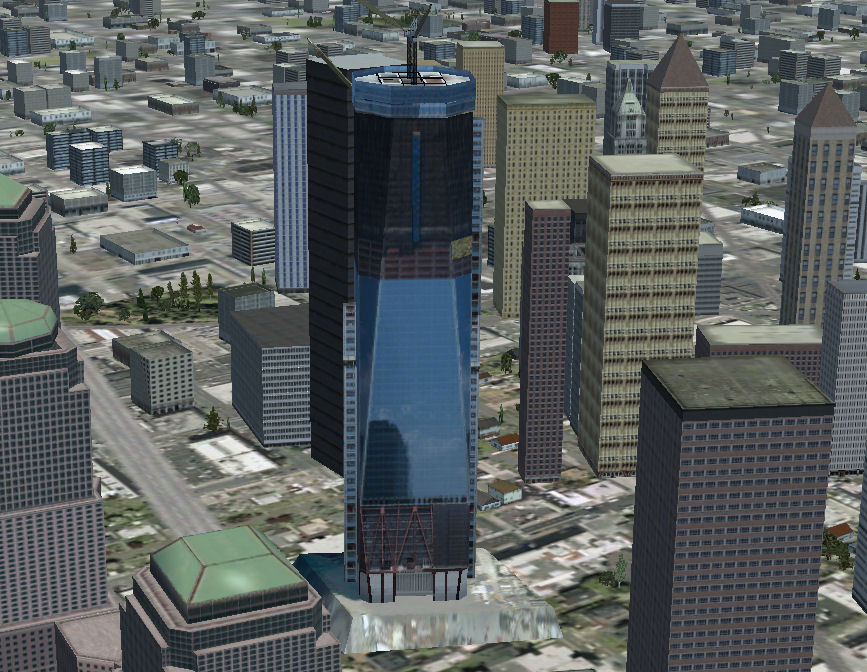
Screenshot showcasing One World Trade Center in-game.
All essential elements in this scenery are provided at no cost and aim to reflect the changing skyline of New York City during a period of great historical and architectural relevance.
Free for all simmers · 2.85 MB · Scanned clean
Download speed: Free tier is capped at 0.5 Mbps. PRO members download at full line speed.
FSX\Addon Scenery\ containing scenery and texture sub-folders.readme.txt or README file. It tells you exactly where files go, what dependencies are needed, and any quirks specific to this add-on.Use these coordinates to fly directly to this location once the mod is installed.
40.71300000,-74.01300000
Launch FSX or Prepar3D and use Flights → Load to open the downloaded .pln file. Your aircraft will be positioned at this location.
The archive 1wtcv2-aj.zip has 103 files and directories contained within it.
This list displays the first 500 files in the package. If the package has more, you will need to download it to view them.
| Filename/Directory | File Date | File Size |
|---|---|---|
| 1WTC.jpg | 09.05.11 | 160.10 kB |
| file_id.diz | 09.05.11 | 181 B |
| scenery | 09.05.11 | 0 B |
| 1wtc.BGL | 09.05.11 | 204.70 kB |
| texture | 09.05.11 | 0 B |
| 1wtc0.dds | 09.05.11 | 170.79 kB |
| 1wtc1.dds | 09.05.11 | 10.75 kB |
| 1wtc10.dds | 09.05.11 | 10.75 kB |
| 1wtc11.dds | 09.05.11 | 10.75 kB |
| 1wtc12.dds | 09.05.11 | 85.45 kB |
| 1wtc13.dds | 09.05.11 | 42.79 kB |
| 1wtc14.dds | 09.05.11 | 2.78 kB |
| 1wtc15.dds | 09.05.11 | 42.79 kB |
| 1wtc16.dds | 09.05.11 | 42.79 kB |
| 1wtc17.dds | 09.05.11 | 800 B |
| 1wtc18.dds | 09.05.11 | 800 B |
| 1wtc19.dds | 09.05.11 | 42.79 kB |
| 1wtc2.dds | 09.05.11 | 10.75 kB |
| 1wtc20.dds | 09.05.11 | 448 B |
| 1wtc21.dds | 09.05.11 | 448 B |
| 1wtc22.dds | 09.05.11 | 2.78 kB |
| 1wtc23.dds | 09.05.11 | 1.44 kB |
| 1wtc25.dds | 09.05.11 | 1.44 kB |
| 1wtc26.dds | 09.05.11 | 42.79 kB |
| 1wtc27.dds | 09.05.11 | 42.79 kB |
| 1wtc28.dds | 09.05.11 | 2.78 kB |
| 1wtc29.dds | 09.05.11 | 10.79 kB |
| 1wtc3.dds | 09.05.11 | 10.75 kB |
| 1wtc30.dds | 09.05.11 | 10.79 kB |
| 1wtc31.dds | 09.05.11 | 1.44 kB |
| 1wtc32.dds | 09.05.11 | 85.45 kB |
| 1wtc33.dds | 09.05.11 | 170.79 kB |
| 1wtc34.dds | 09.05.11 | 2.79 kB |
| 1wtc35.dds | 09.05.11 | 85.45 kB |
| 1wtc36.dds | 09.05.11 | 170.79 kB |
| 1wtc37.dds | 09.05.11 | 341.45 kB |
| 1wtc38.dds | 09.05.11 | 21.45 kB |
| 1wtc39.dds | 09.05.11 | 341.45 kB |
| 1wtc4.dds | 09.05.11 | 10.79 kB |
| 1wtc40.dds | 09.05.11 | 5.45 kB |
| 1wtc41.dds | 09.05.11 | 2.79 kB |
| 1wtc42.dds | 09.05.11 | 2.79 kB |
| 1wtc43.dds | 09.05.11 | 2.79 kB |
| 1wtc44.dds | 09.05.11 | 1.45 kB |
| 1wtc45.dds | 09.05.11 | 1.45 kB |
| 1wtc46.dds | 09.05.11 | 21.44 kB |
| 1wtc47.dds | 09.05.11 | 21.45 kB |
| 1wtc48.dds | 09.05.11 | 10.79 kB |
| 1wtc49.dds | 09.05.11 | 42.79 kB |
| 1wtc5.dds | 09.05.11 | 10.75 kB |
| 1wtc50.dds | 09.05.11 | 2.78 kB |
| 1wtc51.dds | 09.05.11 | 42.79 kB |
| 1wtc52.dds | 09.05.11 | 448 B |
| 1wtc53.dds | 09.05.11 | 2.79 kB |
| 1wtc54.dds | 09.05.11 | 2.79 kB |
| 1wtc55.dds | 09.05.11 | 1.45 kB |
| 1wtc56.dds | 09.05.11 | 2.79 kB |
| 1wtc57.dds | 09.05.11 | 1.45 kB |
| 1wtc58.dds | 09.05.11 | 5.45 kB |
| 1wtc59.dds | 09.05.11 | 1.45 kB |
| 1wtc6.dds | 09.05.11 | 2.79 kB |
| 1wtc60.dds | 09.05.11 | 2.79 kB |
| 1wtc61.dds | 09.05.11 | 1.45 kB |
| 1wtc62.dds | 09.05.11 | 2.79 kB |
| 1wtc63.dds | 09.05.11 | 2.79 kB |
| 1wtc64.dds | 09.05.11 | 5.45 kB |
| 1wtc65.dds | 09.05.11 | 1.45 kB |
| 1wtc66.dds | 09.05.11 | 1.45 kB |
| 1wtc67.dds | 09.05.11 | 2.79 kB |
| 1wtc68.dds | 09.05.11 | 2.79 kB |
| 1wtc69.dds | 09.05.11 | 2.79 kB |
| 1wtc7.dds | 09.05.11 | 85.45 kB |
| 1wtc70.dds | 09.05.11 | 5.45 kB |
| 1wtc71.dds | 09.05.11 | 170.78 kB |
| 1wtc72.dds | 09.05.11 | 170.78 kB |
| 1wtc73.dds | 09.05.11 | 170.78 kB |
| 1wtc74.dds | 09.05.11 | 85.44 kB |
| 1wtc75.dds | 09.05.11 | 42.79 kB |
| 1wtc76.dds | 09.05.11 | 85.45 kB |
| 1wtc77.dds | 09.05.11 | 21.45 kB |
| 1wtc78.dds | 09.05.11 | 2.79 kB |
| 1wtc79.dds | 09.05.11 | 1.45 kB |
| 1wtc8.dds | 09.05.11 | 10.79 kB |
| 1wtc80.dds | 09.05.11 | 21.45 kB |
| 1wtc81.dds | 09.05.11 | 1.45 kB |
| 1wtc82.dds | 09.05.11 | 1.45 kB |
| 1wtc83.dds | 09.05.11 | 1.45 kB |
| 1wtc84.dds | 09.05.11 | 1.45 kB |
| 1wtc85.dds | 09.05.11 | 21.45 kB |
| 1wtc86.dds | 09.05.11 | 2.79 kB |
| 1wtc87.dds | 09.05.11 | 1.45 kB |
| 1wtc88.dds | 09.05.11 | 21.45 kB |
| 1wtc89.dds | 09.05.11 | 85.44 kB |
| 1wtc9.dds | 09.05.11 | 2.75 kB |
| 1wtc90.dds | 09.05.11 | 2.79 kB |
| 1wtc91.dds | 09.05.11 | 1.45 kB |
| 1wtc92.dds | 09.05.11 | 85.45 kB |
| 1wtc93.dds | 09.05.11 | 2.79 kB |
| 1wtc94.dds | 09.05.11 | 1.45 kB |
| 1wtc95.dds | 09.05.11 | 170.78 kB |
| 1wtc96.dds | 09.05.11 | 85.45 kB |
| flyawaysimulation.txt | 10.29.13 | 959 B |
| Go to Fly Away Simulation.url | 01.22.16 | 52 B |
More FSX & P3D add-ons hand-picked based on this download.
FSX Scenery
This is the second version of Lukla, located in the mountainous terrain of Ne…
 FSX Scenery
FSX World Wide Coverage SRTM 3, version 2, mesh of Europe. Includes the compl…
 FSX Scenery
Airport EDDS Stuttgart / Germany. The gates have gate signs to show the numbe…
 FSX Scenery
Naples Capodichino Italy, LIRN-X v0.2. Napulevola released Napoli Capodichino…
 FSX Scenery
Indira Gandhi International Airport (VIDP), Delhi, India, v2. Runway 11-29 in…
 FSX Scenery
Nancy, France, version 2. Major update of v1 of LFSN airport landclass redraw…
 FSX Scenery
Scenery Orlando International Airport (KMCO), Orlando, Florida (FL), v2.0. Th…
 FSX Scenery
Zurich Airport (LSZH), Switzerland. This is a puristic, frame rate friendly s…
Read what other simmers think, or add your own.

Is there ANYONE out there willing to design a scenery update for FSX, featuring the WTC Twin Towers for NYC? Or, someone who wouldn't mind teaching me how to build such a mod? Can anyone help? That's my wish list...

It's time we see the whole tower completed. without the cranes and the naked steel. great job but let's update.