


 United States of America
  FSX Scenery
Princess Juliana International Airport
Princess Juliana International Airport (TNCM) in Saint Marteen, Netherlands A…
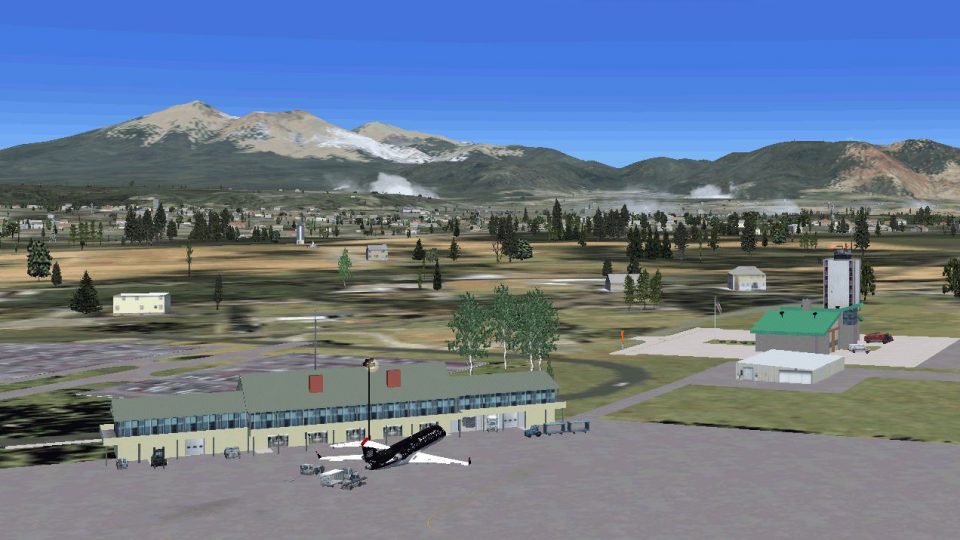
Flagstaff Pulliam Airport (KFLG) scenery refreshes the Arizona field in FSX with a rustic terminal, new fire station, FBO details, corrected taxiway signs, an ice cream cone factory, and realistic fuel service for jets and GA, plus a revised AFCAD with gate assignments. Requires EZ Scenery and Runway 12 libraries.
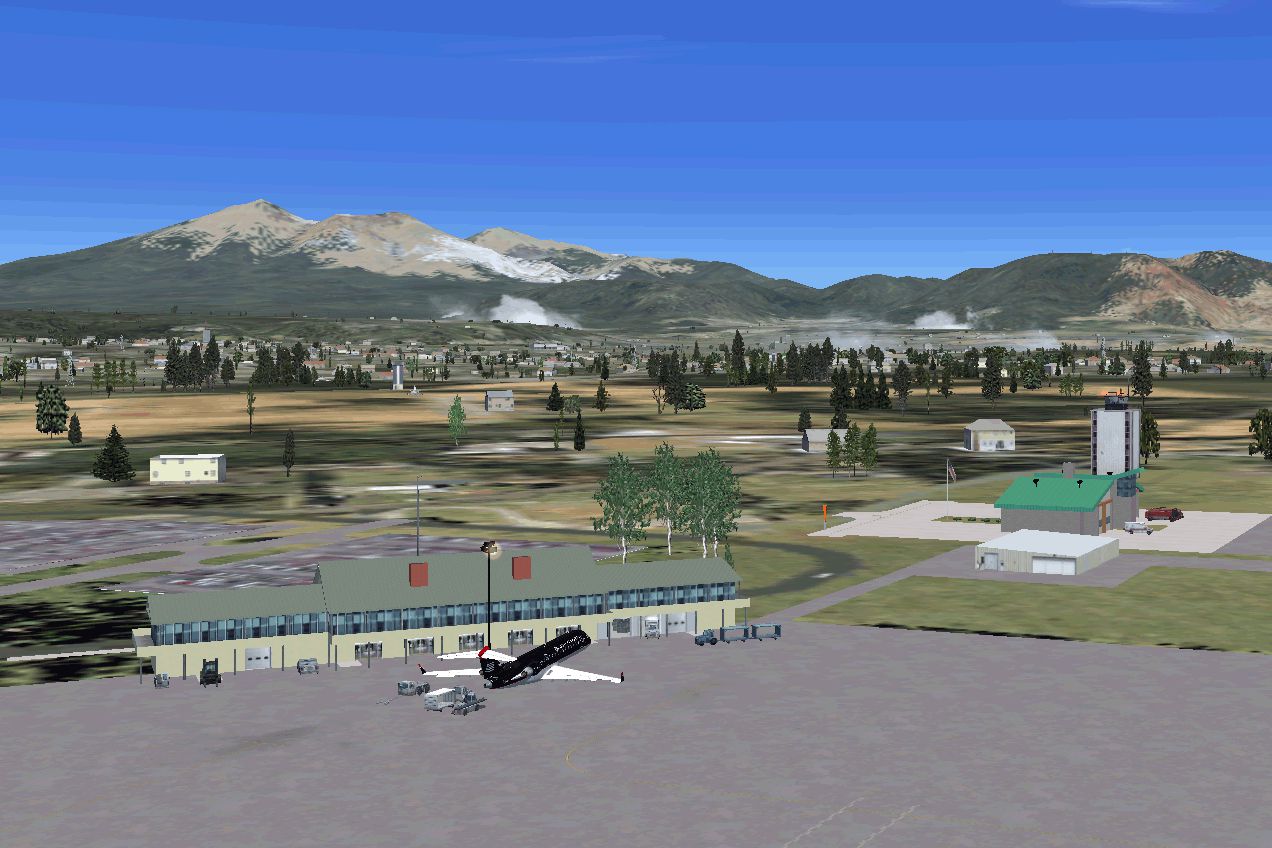
Flagstaff Pulliam Airport (KFLG) AZ. Scenery for Pulliam Airport, Flagstaff, Arizona. Includes new terminal, fire station, corrected taxiway signs, FBO, and a nearby ice cream cone factory. A fuel truck has been added to service your jets plus a fueling station by the FBO for small GA aircraft. Revised AFCAD included. EZ scenery, and Rwy12 libraries required. By Dan French.
Screenshot of Flagstaff Pulliam Airport.
Scenery for the modern Flagstaff Pulliam Airport using a modified default AFCAD. Gates are set up for US Air, US Air Express, and Horizon. The rustic looking terminal, new fire station, and a nearby ice cream cone factory are represented. New taxiway signs are installed. NOTE: The scenery was designed around Ultimate Terrain X and FSGenesis terrain mesh. Should work OK with default. A library of models is included if you wish to place your own.
REQUIREMENTS:
This scenery requires The following free downloadable libraries for some things to show up:
1. EZ Scenery libraries (David Grindele's all-inclusive available for free download ez_1.zip)
2. Runway 12 libraries (rw12l112.zip, rw12l212.zip, rw12l312.zip)
INSTALLATION:
1. Download the kflg_flagstaffairportFSX.zip file to a temporary folder and extract all the files.
2. Place or copy the entire folder "KFLG Flagstaff AZ" into your FSX/Addon Scenery folder.
3. Turn on Flight Simulator FSX.
4. At the main menu, click on and open the SETTINGS button.
6. Under "Other Settings" click on and open the "Scenery Library".
7. Click on "Add Area", then navigate to "Addon Scenery". Double click to open, select the "KFLG Flagstaff AZ" folder you added above and click the "OK" button.
8. At this point, the titles of both folders should appear in the "Area List" menu of Flight Simulator with a red check mark in the "Enabled" column.
9. Click "OK" button and exit. The next time you fly, the airport should be in place.
SPECIAL NOTES:
1. Make sure any other AFCAD or AFX files for KFLG are removed or turned off lest strange things happen at the airport. They are usually in the FSX/ Addon Scenery/ scenery folder labelled ADE_KFLG or AFX_KFLG or something similar.
2. Turn off any previous KFLG scenery folders in the FSX Scenery Library window (described above).
3. You can turn off the airport by going to settings/scenery library and unchecking the enabled boxes.
4. ALWAYS make backup copies in separate folders of anything you remove or replace so you can restore your originals if you wish.
CREDITS:
Ramplights and some vehicles and buildings from EZ Scenery.
Lights SS V2 FS9 scenery objects by Sidney Schwartz.
Airport surfaces created with AFX.
Models created in Google Sketchup and converted with the invaluable Model ConverterX.
Placement using Google Earth.
Free for all simmers · 921 KB · Scanned clean
Download speed: Free tier is capped at 0.5 Mbps. PRO members download at full line speed.
FSX\Addon Scenery\ containing scenery and texture sub-folders.readme.txt or README file. It tells you exactly where files go, what dependencies are needed, and any quirks specific to this add-on.Use these coordinates to fly directly to this location once the mod is installed.
35.13850000,-111.67100000
Launch FSX or Prepar3D and use Flights → Load to open the downloaded .pln file. Your aircraft will be positioned at this location.
The archive kflg_flagstaffairportfsx.zip has 55 files and directories contained within it.
This list displays the first 500 files in the package. If the package has more, you will need to download it to view them.
| Filename/Directory | File Date | File Size |
|---|---|---|
| FILE_ID.DIZ | 03.20.12 | 393 B |
| kflg flagstaff airport READ ME.txt | 03.20.12 | 3.57 kB |
| KFLG Flagstaff AZ | 03.18.12 | 0 B |
| scenery | 03.18.12 | 0 B |
| AFX_KFLG.bgl | 03.20.12 | 19.21 kB |
| dlf_lib_Flagstaff.bgl | 03.18.12 | 1.01 MB |
| dlf_lib_Flagstaff.txt | 03.18.12 | 305 B |
| IS_KFLG_bldgs.bgl | 03.18.12 | 3.61 kB |
| texture | 03.18.12 | 0 B |
| Asphalt.dds | 03.12.12 | 2.79 kB |
| Berber.dds | 03.16.12 | 808 B |
| Berber15_LM.dds | 03.16.12 | 296 B |
| Brick_RedRoughFaded.dds | 03.16.12 | 2.79 kB |
| BrickBeige.dds | 02.21.12 | 10.79 kB |
| BrickDkBrwn.dds | 02.29.12 | 10.79 kB |
| CargoDoors3.dds | 03.16.12 | 21.44 kB |
| CargoDrs3forLMrender.dds | 03.16.12 | 10.78 kB |
| CargoDrs3forLMrender_LM.dds | 03.16.12 | 10.78 kB |
| Carpet_Berber_Pattern_Gray_.dds | 03.16.12 | 42.79 kB |
| CeilingTileLights.dds | 12.05.11 | 10.79 kB |
| CeilingTileLights_LM.dds | 12.05.11 | 2.79 kB |
| Concrete_Form.dds | 03.16.12 | 2.79 kB |
| Concrete_Form_LM.dds | 03.16.12 | 808 B |
| Doors_auto.dds | 12.05.11 | 42.79 kB |
| Doors_auto_LM.dds | 12.05.11 | 10.79 kB |
| Doors2dark.dds | 12.07.11 | 10.79 kB |
| Doors2dark_LM.dds | 12.07.11 | 2.79 kB |
| Flagstaff_Airport.dds | 03.17.12 | 10.79 kB |
| GarageDoor.dds | 02.29.12 | 10.79 kB |
| GarageDoor_LM.dds | 02.29.12 | 10.79 kB |
| GarageTan.dds | 03.17.12 | 1.45 kB |
| GarageTan_LM.dds | 03.17.12 | 1.45 kB |
| GreenwRafters.dds | 03.17.12 | 21.45 kB |
| GreenwRafters_LM.dds | 03.17.12 | 10.79 kB |
| KSATCntrlTwrBldgRfmid_90R.dds | 03.18.12 | 5.45 kB |
| LoadDock3Door.dds | 03.03.12 | 5.45 kB |
| LoadDock3Door_LM.dds | 03.03.12 | 5.45 kB |
| Metal_Corrogated.dds | 12.05.11 | 10.79 kB |
| Roofing_Slate_Rounded_.dds | 03.16.12 | 2.79 kB |
| RoofShingles.dds | 03.02.12 | 10.79 kB |
| SidingTurq.dds | 03.01.12 | 10.79 kB |
| StEPkLotC.dds | 03.03.12 | 42.79 kB |
| StEPkLotC_LM.dds | 03.03.12 | 42.79 kB |
| Tan_Stucco.dds | 03.16.12 | 2.79 kB |
| TanStucco.dds | 12.07.11 | 42.79 kB |
| Windows3Gray.dds | 03.18.12 | 10.78 kB |
| Windows3Gray_LM.dds | 03.18.12 | 5.45 kB |
| Wndw3pane.dds | 03.16.12 | 10.79 kB |
| Wndw3pane_LM.dds | 03.16.12 | 10.79 kB |
| Wood_beam2.dds | 03.18.12 | 21.45 kB |
| Wood_Floor.dds | 03.17.12 | 2.79 kB |
| wood4.dds | 03.16.12 | 1.45 kB |
| kflg_flagstaffairportFSX.gif.gif | 03.18.12 | 269.12 kB |
| flyawaysimulation.txt | 10.29.13 | 959 B |
| Go to Fly Away Simulation.url | 01.22.16 | 52 B |
More FSX & P3D add-ons hand-picked based on this download.
FSX Scenery
Princess Juliana International Airport (TNCM) in Saint Marteen, Netherlands A…
 FSX Scenery
Los Angeles Airport Scenery v3, California (CA). This photoreal scenery is a …
 FSX Scenery
Barbados International Airport (TBPB). Grantley Adams International Airport f…
 FSX Scenery
Paris Charles de Gaulle Airport (CDG, LFPG), France. The entire airport has b…
 FSX Scenery
John F. Kennedy Airport (KJFK), New York, NYU. This is a photoreal scenery re…
 FSX Scenery
Dubai International Airport (OMDB), Dubai. Includes a new passenger terminal …
 FSX Scenery
Soekarno-Hatta International Airport (WIII), Jakarta, Indonesia. An update to…
 FSX Scenery
San Diego International Airport, California (CA), USA. This photoreal scenery…
Be the first to leave a comment on this download.
Be the first to share your thoughts on this download.