



JSG Panels Releases Boeing 747-8 Panel For FSX
Buckle up for the newly revamped JSGPanels Boeing 747-8 panel for FSX, featuring meticulously modeled PFD, MFD, and EICAS displays…
 Ian Stephens
 Did you ever wonder why the MSFS franchise didn't include widescreen panel support for its 2-D panels? FS2004 is arguably the best Flight Simulation product to date, but for whatever reason Microsoft chose not to add widescreen monitor support for the use of any of its 2-D panels.
Instead, the FS enthusiast ends up with "stretched-out" versions of default panels when viewing them on widescreen monitors. Being only slightly annoying, the stretched 2-D panels may have led more enthusiasts to try out and switch to the updated level of detail that's present within the virtual cockpit environment. However, the frequent need to zoom in and out just to read specific gauges has kept intact the need for quality 2-D panels. The ability to open an easy to read 2-D panel is still a favorite way to fly for many that use Flight Simulator... if only they came with widescreen support.
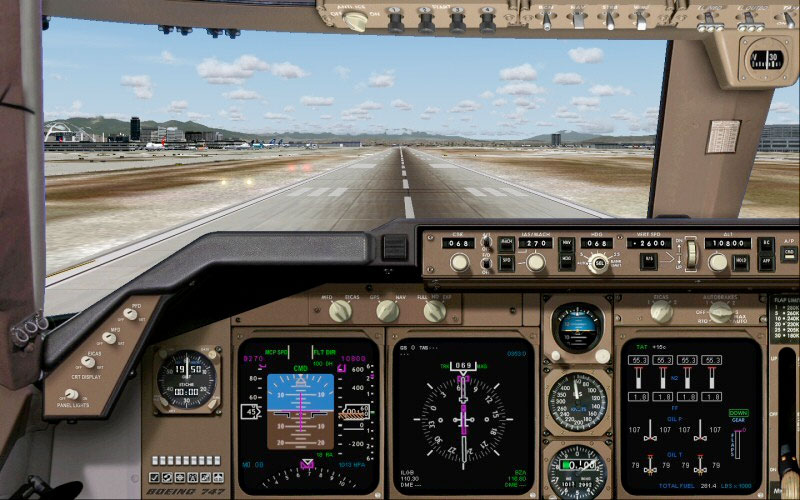
Boeing 747 2D cockpit panel view in FS2004.
Well, SkyDecks Panel Design has now brought about a widescreen solution for three of the most popular 2-D panels used in FS2004. The Boeing Jets, Widescreen Panel Pack, is the beginning of this work. The new widescreen panels brings about new detail and realism to the widescreen 2-D panel environment. Included in the package are the Boeing 737-400, the Boeing 747-400 and the Boeing 777-300. With detailed panel backgrounds and the utilization of many standard gauges, the newer widescreen versions of the Boeing airliners are true replacements for the default 2-D panel configurations found within FS2004.
Not only do they look good, you'll find that our newer widescreen panels can be used and function just the same as their 4:3 originals, along with some value added points as well. At installation, you'll have the option of using one of two aspect ratios for widescreen monitor support: 16:10, 1440 x 900 (1.6:1) or 16:9, 1920 x 1080 (1.78:1). The 16:10 configuration is most popular for widescreen computer monitors, while 16:9 is used with most HDTV monitors. Say goodbye to those horizontally stretched 2-D panels once and for all!
Upgrade Microsoft Flight Simulator, FSX, P3D & X-Plane in minutes with our curated file library packed with aircraft, scenery, liveries, and utilities.
Ready to upgrade your hangar?
Browse the free file library
Ian Stephens is a flight simulation industry expert with over 20 years of experience and also has a keen interest in aviation and technology. Ian spends a lot of his time experimenting with various simulator packages but has a love for Microsoft Flight Simulator X because of the huge selection of add-ons available. However, Ian also has copies of Prepar3D and X-Plane installed.
Ian has been writing for Fly Away Simulation for over 9 years. Should you wish, you can contact Ian via email at ian.stephens@flyawaysimulation.com.
Buckle up for the newly revamped JSGPanels Boeing 747-8 panel for FSX, featuring meticulously modeled PFD, MFD, and EICAS displays…

Flight sim enthusiasts can now experience elevated realism with Turboprop Sim’s latest Boeing 737-800 sound pack for FSX, meticulously…
-400.jpg)
Elevate your FSX experience with the iFly Jets 747-400, a meticulously crafted add-on that integrates advanced flight management features,…
Experience the freshly updated FS Panel Studio, now fully compatible with FS2004 and designed to support older sims like FS98 and CFS2,…

GLB Flight Products unveils its innovative 737NG overhead panel, delivering a realistic and modular solution for flight simulation…
FS Panel Studio X now extends its comprehensive panel editing features to Microsoft Flight Simulator X, giving both newcomers and seasoned…