

 FS2004 Civil Jet Aircraft
Royal Brunei Boeing 737-200
A repaint of Erick Cantu's B737-200 in the old colors of Royal Brunei Airline…
Royal Boeing 737-200 AI aircraft brings a classic early-series twinjet to busy schedules in FS2004, built for smooth performance with multiple LODs and crisp exterior detailing. Animated control surfaces, landing gear, and thrust reversers add believable ramp and in-flight motion, with an optional reflective model variant.
 Rate
Rate
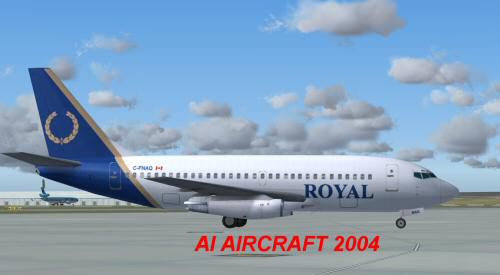
This freeware release of the Royal Boeing 737-200 showcases a classic twinjet from the early 737 family, specifically crafted for AI use within FS2004. Created by AI Aardvark and painted by Shane Strong, this package includes multiple levels of detail aimed at superior performance, as well as animated control surfaces and gear to bring authentic motion to your virtual skies. Enthusiasts will appreciate how this model seamlessly fits both at the gate and in flight, all while maintaining a minimal impact on system resources.
Moving Surfaces and interactive animations (in brackets, these refer to components such as flaps, spoilers, and thrust reversers) give pilots a genuine sense of the real Boeing 737-200’s functionality. Antennas, flap fairings, and simulated landing-gear compartments also enrich the visuals while preserving efficient frame rates. Specular highlights are integrated, enhancing the polished appearance without causing performance bottlenecks.
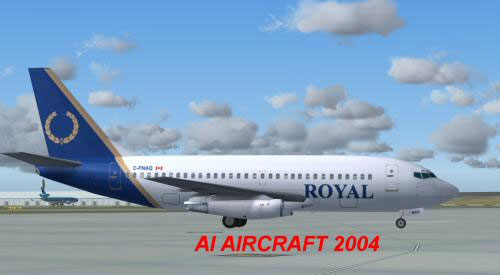
Screenshot of Royal Boeing 737-200 on the ground.
This aircraft features references to five or even six LOD (Level of Detail) configurations, allowing the simulator to swap to simpler shapes when viewed from afar. That approach maintains a sharp look up close while reducing the overall polygon load from distant models. In other words, when numerous AI jets line up for takeoff, your system remains fluid and reliable.
To begin, place the AIA_737_200_ALASKA folder directly into your FS2004 aircraft directory. After that, associate the model with an existing or newly created flightplan. If you are unsure how to integrate it, consult the available documentation or help resources related to AI traffic management.
This package defaults to a non-reflective model. However, those who prefer a reflective exterior can open the aircraft.cfg file and change the corresponding line from model=no_refl to model=reflective. Despite this selection, the current texture might not have a reflective channel, so any difference may remain minimal. Still, the option is there if you wish to experiment with reflective liveries in the future.
The flight dynamics have been carefully balanced so that your AI traffic behaves realistically. This FDE design (Flight Dynamics Engineering) ensures jets will touch down near the start of the runway and quickly taxi away, preventing lengthy queues and runaway sim performance dips. If you desire more float during touchdown, consider fine-tuning the cruise_lift, parasite_drag, or induced_drag values in the aircraft.cfg file.
Boeing’s 737-200, dating back to the late 1960s, remains a celebrated variant in aviation history. Many carriers worldwide, including those operating under “Royal” branding, took advantage of its balance between passenger capacity and fuel consumption. This particular add-on channels authentic design characteristics so you can admire the airframe’s distinctive silhouette as it traverses your virtual routes.
Free for all simmers · 352.42 KB · Scanned clean Oct 2026
Download speed: Free tier is capped at 0.5 Mbps. PRO members download at full line speed.
FS9\Aircraft\, FS9\Addon Scenery\, FS9\Gauges\, or FS9\Effects\.readme.txt or README file. It tells you exactly where files go, what dependencies are needed, and any quirks specific to this add-on.The archive 737royal.zip has 12 files and directories contained within it.
This list displays the first 500 files in the package. If the package has more, you will need to download it to view them.
| Filename/Directory | File Date | File Size |
|---|---|---|
| 737roy.gif | 10.30.03 | 4.86 kB |
| 737roy.jpg | 10.30.03 | 16.91 kB |
| aia_737_XXX.air | 06.12.03 | 7.36 kB |
| Aircraft.cfg | 10.30.03 | 9.68 kB |
| FILE_ID.diz | 10.30.03 | 315 B |
| aia_737_200.mdl | 10.23.03 | 324.18 kB |
| model.cfg | 04.08.03 | 28 B |
| README.txt | 10.30.03 | 4.35 kB |
| aia_737_200_l.bmp | 05.23.03 | 256.07 kB |
| AIA_737_200_t.bmp | 10.29.03 | 1.00 MB |
| flyawaysimulation.txt | 10.29.13 | 959 B |
| Go to Fly Away Simulation.url | 01.22.16 | 52 B |
Only PRO members can place votes.
More FS2004 add-ons hand-picked based on this download.
FS2004 Civil Jet Aircraft
A repaint of Erick Cantu's B737-200 in the old colors of Royal Brunei Airline…
 FS2004 Civil Jet Aircraft
This all-in-one freeware package offers a robust Royal Cargo Boeing 737-200 s…
 FS2004 Civil Jet Aircraft
Fly one of the most pervasive jets in history with this file for Microsoft Fl…
 FS2004 Civil Jet Aircraft
Textures only. Model by Project Open Sky. Livery by Dario Carbone. Screenshot…
 FS2004 Civil Jet Aircraft
A repaint of the Vistaliners B727. Textures only; requires B72720VL.ZIP. Repa…
 FS2004 Civil Jet Aircraft
KLM Royal Dutch Airlines (new colors) textures for the Tsutomu Urakawa Boeing…
 FS2004 Civil Jet Aircraft
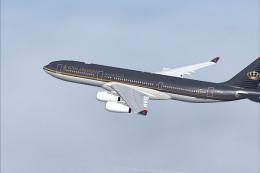
This freeware add-on provides a meticulously crafted Airbus A340-200 in Royal…
 FS2004 Civil Jet Aircraft
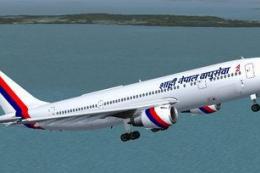
The SGA Airbus A300B4-200 repainted in the Royal Nepal Airlines livery (Naray…
Be the first to leave a comment on this download.
Be the first to share your thoughts on this download.