

 FSX General Aviation Aircraft
Cessna 208B For FSX Carrier
After publishing my FSX AI Carrier package, I had several people contact me a…
Corby CJ-1 Starlet brings a classic 1960s single-seat homebuilt to FSX, modeled with its wood-and-fabric character and faithful proportions. Enjoy smooth control-surface animations, a detailed virtual cockpit with 3D gauges, and crisp baked textures that suit everything from circuit work to relaxed VFR touring.
 Rate
Rate
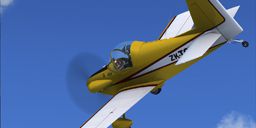



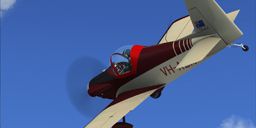

A single seat, amateur-built aeroplane designed in the 1960s by Australian aeronautical engineer John Corby. The structure is primarily wood and fabric. The prototype first flew in 1967. It is a popular design built by enthusiasts in many countries. Full animations, 3D gauges and baked textures. By Craig Richardson.

Screenshot of Corby CJ-1 Starlet in flight.
Installation instructions:
Unzip into a temporary directory, then cut and paste into your SimObjects Directory.
I've Included Banana Bob's ENV textures, read the readme file and backup you original files!
Free for all simmers · 22.55 MB · Scanned clean Oct 2026
Download speed: Free tier is capped at 0.5 Mbps (this file takes approximately 6 mins at the cap). PRO members download at full line speed.
SimObjects\Airplanes\, Addon Scenery\, Effects\, or Gauges\.readme.txt or README file. It tells you exactly where files go, what dependencies are needed, and any quirks specific to this add-on.The archive corby_starlet.zip has 142 files and directories contained within it.
This list displays the first 500 files in the package. If the package has more, you will need to download it to view them.
| Filename/Directory | File Date | File Size |
|---|---|---|
| Corby Starlet | 09.02.12 | 0 B |
| aircraft.cfg | 09.02.12 | 13.54 kB |
| Corby.aam1.air | 09.02.12 | 11.08 kB |
| Corby.aam2.air | 09.02.12 | 11.08 kB |
| Corby.aam3.air | 09.02.12 | 11.08 kB |
| Corby.aam4.air | 09.02.12 | 11.08 kB |
| Corby.aam5.air | 09.02.12 | 11.08 kB |
| Corby.air | 09.02.12 | 11.08 kB |
| FILE_ID.DIZ | 09.02.12 | 366 B |
| model | 09.02.12 | 0 B |
| Corby_ext.MDL | 09.02.12 | 1.84 MB |
| Corby_int.MDL | 09.02.12 | 1.68 MB |
| model.cfg | 08.29.12 | 46 B |
| panel | 08.15.12 | 0 B |
| panel.cfg | 08.21.12 | 706 B |
| starlet | 08.15.12 | 0 B |
| starlet.CAB | 08.12.11 | 258.87 kB |
| radio.bmp | 05.26.07 | 38.55 kB |
| radio.xml | 05.26.07 | 972 B |
| sinn nabo bezel.bmp | 07.30.10 | 263.72 kB |
| sinn nabo clock hour.bmp | 07.30.10 | 29.74 kB |
| sinn nabo clock minute.bmp | 07.30.10 | 29.74 kB |
| sinn nabo panel.bmp | 05.11.11 | 263.73 kB |
| sinn nabo pnl.xml | 07.30.10 | 5.13 kB |
| sinn nabo ring.bmp | 07.30.10 | 263.72 kB |
| sinn nabo scale.bmp | 05.16.11 | 263.73 kB |
| sinn nabo timer hour.bmp | 07.30.10 | 11.19 kB |
| sinn nabo timer minute.bmp | 07.30.10 | 29.74 kB |
| sinn nabo timer second.bmp | 07.30.10 | 29.74 kB |
| sinn nabo.xml | 07.30.10 | 5.13 kB |
| ReadMe.txt | 09.02.12 | 348 B |
| sound | 02.24.12 | 0 B |
| c172_apdisconnect.wav | 05.12.06 | 169.80 kB |
| c172_falsestart.wav | 05.12.06 | 241.62 kB |
| c172_flaps.wav | 05.12.06 | 225.90 kB |
| c172_gyro.wav | 05.12.06 | 4.48 MB |
| c172_noncombustion1.wav | 05.12.06 | 279.12 kB |
| c172_noncombustion2.wav | 05.12.06 | 292.12 kB |
| c172_prop1a.wav | 05.12.06 | 59.29 kB |
| c172_prop1b.wav | 05.12.06 | 63.79 kB |
| c172_prop2a.wav | 05.12.06 | 65.29 kB |
| c172_prop2b.wav | 05.12.06 | 86.79 kB |
| c172_rpm1.wav | 05.12.06 | 494.55 kB |
| c172_rpm2.wav | 05.12.06 | 453.61 kB |
| c172_rpm3.wav | 05.12.06 | 512.55 kB |
| c172_rpm4.wav | 05.12.06 | 497.09 kB |
| c172_shutdown.wav | 05.12.06 | 233.92 kB |
| c172_stallhorn.wav | 05.12.06 | 237.68 kB |
| c172_starter.wav | 05.12.06 | 174.12 kB |
| c172_startup.wav | 05.12.06 | 381.53 kB |
| c172_switch1.wav | 05.12.06 | 6.42 kB |
| c172_switch2.wav | 05.12.06 | 2.71 kB |
| c172_switch3.wav | 05.12.06 | 2.89 kB |
| c4wind4.wav | 07.07.06 | 274.56 kB |
| cagear.wav | 05.12.06 | 31.23 kB |
| door_small_close.wav | 05.12.06 | 55.99 kB |
| door_small_open.wav | 05.12.06 | 59.98 kB |
| GA_wind.wav | 07.07.06 | 123.24 kB |
| sound.cfg | 07.07.06 | 12.38 kB |
| wind_general.wav | 07.07.06 | 269.64 kB |
| xc172_falsestart.wav | 05.12.06 | 156.62 kB |
| xc172_Frpm1.wav | 07.10.06 | 245.78 kB |
| xc172_Frpm2.wav | 07.10.06 | 226.58 kB |
| xc172_Frpm3.wav | 07.10.06 | 238.34 kB |
| xc172_Frpm4.wav | 07.10.06 | 255.60 kB |
| xc172_noncombustion1.wav | 05.12.06 | 132.49 kB |
| xc172_noncombustion2.wav | 05.12.06 | 158.64 kB |
| xc172_prop1a.wav | 05.12.06 | 78.29 kB |
| xc172_prop1b.wav | 05.12.06 | 66.79 kB |
| xc172_prop2a.wav | 05.12.06 | 70.29 kB |
| xc172_prop2b.wav | 05.12.06 | 86.79 kB |
| xc172_Rrpm1.wav | 07.10.06 | 245.78 kB |
| xc172_Rrpm2.wav | 07.10.06 | 226.58 kB |
| xc172_Rrpm3.wav | 07.10.06 | 238.34 kB |
| xc172_Rrpm4.wav | 07.10.06 | 255.60 kB |
| xc172_shutdown.wav | 05.12.06 | 163.04 kB |
| xc172_starter.wav | 05.12.06 | 62.20 kB |
| xc172_startup.wav | 05.12.06 | 159.46 kB |
| texture | 09.02.12 | 0 B |
| texture.1 | 09.02.12 | 0 B |
| Starlet1.dds | 08.30.12 | 1.33 MB |
| Starlet2.dds | 08.30.12 | 1.33 MB |
| Starlet3.dds | 08.30.12 | 1.33 MB |
| Starlet4.dds | 08.30.12 | 1.33 MB |
| Starlet6.dds | 08.30.12 | 1.33 MB |
| texture.cfg | 10.13.11 | 42 B |
| thumbnail.jpg | 09.02.12 | 30.71 kB |
| texture.2 | 09.02.12 | 0 B |
| Decal_Corby.dds | 09.02.12 | 341.48 kB |
| Starlet1.dds | 09.02.12 | 1.33 MB |
| Starlet2.dds | 08.31.12 | 1.33 MB |
| Starlet3.dds | 08.31.12 | 1.33 MB |
| Starlet4.dds | 09.01.12 | 1.33 MB |
| texture.cfg | 10.13.11 | 42 B |
| thumbnail.jpg | 09.02.12 | 35.39 kB |
| texture.3 | 09.02.12 | 0 B |
| Decal_Corby.dds | 09.02.12 | 341.48 kB |
| Starlet1.dds | 09.01.12 | 1.33 MB |
| Starlet2.dds | 09.01.12 | 1.33 MB |
| Starlet3.dds | 09.01.12 | 1.33 MB |
| Starlet4.dds | 09.01.12 | 1.33 MB |
| texture.cfg | 10.13.11 | 42 B |
| thumbnail.jpg | 09.02.12 | 33.12 kB |
| texture.4 | 09.02.12 | 0 B |
| Decal_Corby.dds | 09.02.12 | 341.48 kB |
| Starlet.dds | 09.01.12 | 1.33 MB |
| Starlet1.dds | 09.02.12 | 1.33 MB |
| Starlet2.dds | 09.01.12 | 1.33 MB |
| Starlet3.dds | 09.01.12 | 1.33 MB |
| Starlet4.dds | 09.02.12 | 1.33 MB |
| Starlet6.dds | 09.01.12 | 1.33 MB |
| texture.cfg | 10.13.11 | 42 B |
| thumbnail.jpg | 09.02.12 | 36.47 kB |
| texture.5 | 09.02.12 | 0 B |
| Decal_Corby.dds | 09.02.12 | 341.48 kB |
| Starlet.dds | 09.02.12 | 1.33 MB |
| Starlet1.dds | 09.02.12 | 1.33 MB |
| Starlet2.dds | 09.02.12 | 1.33 MB |
| Starlet3.dds | 09.02.12 | 1.33 MB |
| Starlet4.dds | 09.02.12 | 1.33 MB |
| Starlet6.dds | 09.01.12 | 1.33 MB |
| texture.cfg | 10.13.11 | 42 B |
| thumbnail.jpg | 09.02.12 | 33.51 kB |
| texture.shared | 09.02.12 | 0 B |
| Decal_Corby.dds | 09.02.12 | 341.48 kB |
| Fresnel_Ramp.dds | 09.04.06 | 640 B |
| gauges.dds | 08.23.12 | 1.33 MB |
| pilot.dds | 08.14.12 | 1.33 MB |
| prop.dds | 09.26.11 | 85.46 kB |
| Starlet.dds | 08.29.12 | 1.33 MB |
| Starlet5.dds | 08.29.12 | 1.33 MB |
| Starlet6.dds | 08.29.12 | 1.33 MB |
| Decal_Corby.dds | 09.02.12 | 341.48 kB |
| Starlet1.dds | 09.02.12 | 1.33 MB |
| Starlet2.dds | 08.29.12 | 1.33 MB |
| Starlet3.dds | 08.29.12 | 1.33 MB |
| Starlet4.dds | 09.02.12 | 1.33 MB |
| texture.cfg | 10.13.11 | 42 B |
| thumbnail.jpg | 09.02.12 | 34.65 kB |
| thumbnail.jpg | 09.02.12 | 35.39 kB |
| flyawaysimulation.txt | 10.29.13 | 959 B |
| Go to Fly Away Simulation.url | 01.22.16 | 52 B |
Only PRO members can place votes.
More FSX & P3D add-ons hand-picked based on this download.
FSX General Aviation Aircraft
After publishing my FSX AI Carrier package, I had several people contact me a…
 FSX General Aviation Aircraft
Christen Eagle Gauge Fix For FSX SP2. This is one small file to improve the w…
 FSX General Aviation Aircraft
Extra 300s For FSX DTT. This is a repaint of the default Extra 300S for a new…
 FSX General Aviation Aircraft
Canadair CL215 v3.0X Multirole amphibious aircraft. Tested with FSX SP1 but w…
 FSX General Aviation Aircraft
Cirrus SR22-GTS Turbo G3. This is Wolfram Beckert and Guenter Kraemer's Cirru…
 FSX General Aviation Aircraft
The Edgley EA-7 Optica, designed by John Edgley and built by Brooklands Aeros…
 FSX General Aviation Aircraft
Explore the skies with the meticulously crafted Piper Arrow III Pack, a premi…
 FSX General Aviation Aircraft
Piper PA28-180 Cherokee. This file contains the default FS2004 PA28-180 with …
Read what other simmers think, or add your own.

Years ago, when I was painting my Corby Starlet G-CCXO after a major upgrade, I spotted it flying on the internet. Amazing - it hadn't yet flown in real life! I then realized it was a flight sim model, made from photos of XO I had placed on my website. I considered it a compliment.
I downloaded the model and flew it on FSX. It was pretty good, but not perfect in terms of flight dynamics. I had some correspondence with the model writer to discuss these differences. He welcomed my first-hand knowledge and made adjustments to make match my aircraft (rate of climb, control response rate, glide angle, etc) and finally, I found it a very good simulation of my aircraft.
I've stopped full-size flying now as my age advances, and I sold my aircraft in 2022 and started simming again. I have FSX and FS2020 on my new flight sim computer. Alas, I can't get this model to work in FS2020. Can anyone help me to convert it? Or is there a suitable model I can get? I'd really like to get XO flying in FS2020, I miss it! It is a brilliant little aircraft.
Hi guys,
I owned Starlet G-CCXO and was surprised when I saw images of it flying on the internet before I'd finsished it and given it its first flight!! Turned out you'd spotted my photos of it on my web site. I flew it on FSX many times, it was great.
Alas a couple of years ago I gave up flying light aircraft and sold both my Starlet and Alpi P300. Recently I decided to get FS2020 and a gaming PC. That's working now, but I can't seem to load the Starlet onto it. Please would you tell me how to get my delightful little Starlet onto FS2020?
Many thanks,
Stuart


I fly "lo n slo" just as I did in the "real" world. My First was a Quicksilver UL (I cannot find a sim model) then a Corbin Ace, Fisher Koala, and last, a Teenie Two ( can't find?) I downloaded a CORBY CJ 1, which is now my favorite sim plane to fly. It handles and flies like the real thing; a lot like my teenie 2 did. Whoever did this one really deserves an A+. It doesn't slide around on taxi, and handles great......thanx... Mr Skip