

 FS2004 AFCAD Files
EDDF, AFCAD2 File
Frankfurt/Main Airport, Germany, for use with AMEDDF11.ZIP. Should solve most…
LSGY Yverdon, Switzerland gets a refined AFCAD2 airport layout tuned for the CH04-GY.ZIP scenery, delivering corrected parking stands, accurate taxiway geometry, and smoother ground operations for reliable AI and offline traffic flow in Microsoft Flight Simulator 2004. Requires Lee Swordy’s AFCAD2 workflow to match the intended airport data and markings.
 Rate
Rate
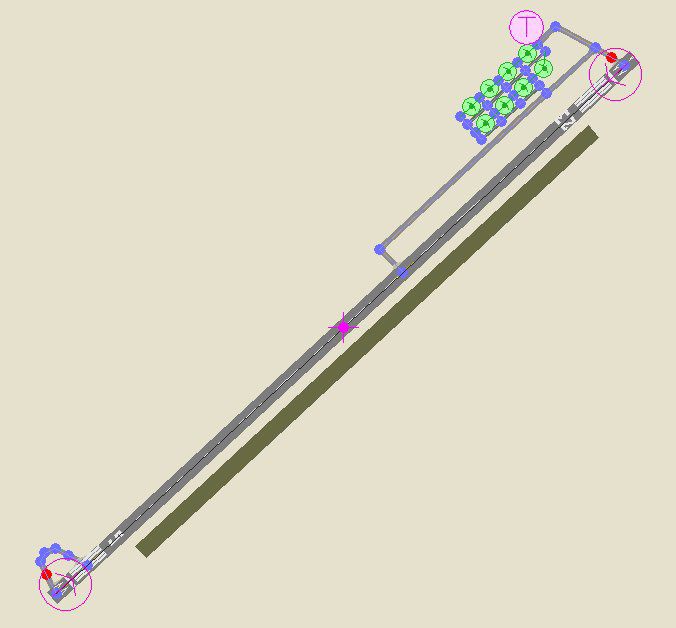
This refined AFCAD2 release updates the airfield at LSGY in Yverdon, Switzerland for usage with the corresponding CH04-GY.ZIP environment. Designed by Daniel Perret, this specialized file integrates smoothly with Microsoft Flight Simulator 2004 to deliver accurate ramp positions, taxiway alignments, and detailed airport elements. It reflects close collaboration with Daniel Gauthier—renowned for his outstanding Swiss scenery enhancements—and relies on Lee Swordy’s powerful AFCAD2 software.
The Yverdon complex, situated in the canton of Vaud near Lake Neuchâtel, benefits from this meticulous layout which ensures optimal navigation. Its aprons, runways, and ground markings align with real-world dimensions to immerse virtual pilots in the authentic Swiss flying experience. Aircraft parking coordinates match known stands, ensuring that traffic flows properly in both offline and AI-controlled scenarios.
Overview of Yverdon, Switzerland.
Thanks are extended to Daniel Gauthier for his remarkable Swiss airfield landscapes, which served as a template for exact integration. Lee Swordy’s AFCAD2 utility also proves indispensable for its advanced capability in refining airport data. The combined effort results in a seamless merge of Yverdon’s aesthetic details with precise technical design.
For immediate activation, place the included BGL file into the “Addon Scenery/Scenery” folder of Microsoft Flight Simulator 2004. Afterward, ensure the simulator’s scenery library is refreshed so the new layout loads correctly. Once completed, Yverdon’s airport environment will reflect the updated features and structured parking parameters.
Free for all simmers · 28.22 KB · Scanned clean Oct 2026
Download speed: Free tier is capped at 0.5 Mbps. PRO members download at full line speed.
FS9\Aircraft\, FS9\Addon Scenery\, FS9\Gauges\, or FS9\Effects\.readme.txt or README file. It tells you exactly where files go, what dependencies are needed, and any quirks specific to this add-on.The archive af2_lsgy.zip has 5 files and directories contained within it.
This list displays the first 500 files in the package. If the package has more, you will need to download it to view them.
| Filename/Directory | File Date | File Size |
|---|---|---|
| AF2_LSGY.bgl | 01.10.04 | 2.19 kB |
| ReadMe_LSGY.txt | 01.04.04 | 1.20 kB |
| AF2_LSGY-1.jpg | 01.11.04 | 30.34 kB |
| flyawaysimulation.txt | 10.29.13 | 959 B |
| Go to Fly Away Simulation.url | 01.22.16 | 52 B |
Only PRO members can place votes.
More FS2004 add-ons hand-picked based on this download.
FS2004 AFCAD Files
Frankfurt/Main Airport, Germany, for use with AMEDDF11.ZIP. Should solve most…
 FS2004 AFCAD Files
FS2004 AFCAD2 File For RCKH and RCSS, Taipei Sungshan Airport and Kaohsiung A…
 FS2004 AFCAD Files
Tokyo Narita Airport (RJAA), Japan (not for the default FS2004 airport; detai…
 FS2004 AFCAD Files
Updated gates and taxiways for Amsterdam Schiphol Int'l Airport, The Netherla…
 FS2004 AFCAD Files
WSSS for Samsoft's Singapore Changi scenery (not for the default FS2004 airpo…
 FS2004 AFCAD Files
An AFCAD2 file for Soekarno-Hatta Airport, Jakarta, Indonesia (WIII) for use …
 FS2004 AFCAD Files
An AFCAD2 file for Ngurah Rai Int'l Airport, Denpasar Bali, Indonesia (WRRR),…
FS2004 AFCAD Files
Dubai Int'l Airport, United Arab Emirates. Upgrades the stock airport to prov…
Be the first to leave a comment on this download.
Be the first to share your thoughts on this download.