

 FS2004 AFCAD Files
AFCAD2 Files For Italian Airports
Includes most airports in Italy: LIRF (Rome, Fiumicino) LIMC (Milan, Malpensa…
KNBC Marine Corps Air Station Beaufort gets refreshed ramp flow and parking layout with AFCAD2 updates tailored for active Hornet-style operations, offering clearly positioned spots by aircraft type for believable traffic and ground handling in FS2004. It requires AFCAD 2.21 for further edits and integrates cleanly with the default scenery.
 Rate
Rate
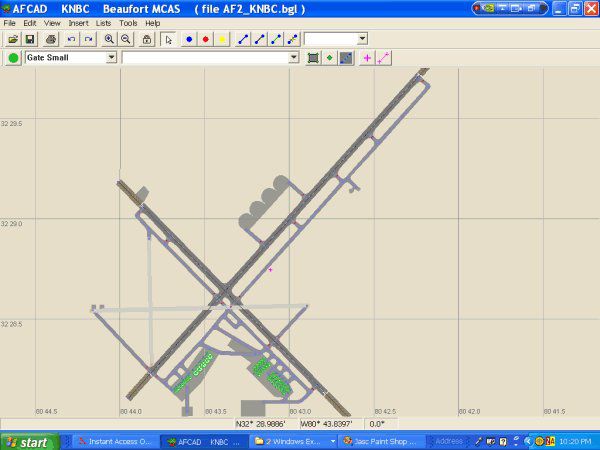
KNBC, Marine Corps Air Station Beaufort, South Carolina (SC), USA. This file is only a close rendition of the real MCAS Beaufort. It does not reflect authenticity in the exact number of parking assignments. However it offers a good snapshot of all the various parking assignments by type and positioning. By Keith Guillory.
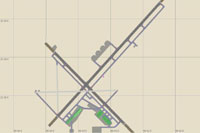
Overview of KNBC, Marine Corps Air Station Beaufort.
Feel free to modify and develop your own air operations for F/A-18 Hornets at this facility.
Now also available by me are AI flight plans to be used for this MCAS as well as KNKT - MCAS Cherry Point, NC; KNTU - NAS Oceana; KMGE - Dobbins JRB, Georgia; 12NC - Marine Corps Outlying Field MCOLF Atlantic; and KNJM - Marine Corps Auxillary Field MALF Bogue. Please utilize each of these downloads as well as the flightplans download called "Marines_Eastcoast part1".
Installation and deletion of these files:
To install the AFCAD2 file AF2_KNBC.bgl Copy to your addon scenery\scenery folder within Flight Simulator 9 and it will be incorporated into your scenery upon restart of Flight Simulator 9. Use AFCAD 2.21 By Lee Swordy to modify and improve this product. This is designed to work into your default scenery.
To remove the AFCAD2 file AF2_KNBC.bgl, when you no longer desire to have this in your Flight Simulator 9 scenery, simply delete from the addon scenery\scenery folder and this will restore your default scenery for MCAS Beaufort, South Carolina.
Free for all simmers · 78.11 KB · Scanned clean Aug 2026
Download speed: Free tier is capped at 0.5 Mbps. PRO members download at full line speed.
FS9\Aircraft\, FS9\Addon Scenery\, FS9\Gauges\, or FS9\Effects\.readme.txt or README file. It tells you exactly where files go, what dependencies are needed, and any quirks specific to this add-on.The archive mcasbeau.zip has 8 files and directories contained within it.
This list displays the first 500 files in the package. If the package has more, you will need to download it to view them.
| Filename/Directory | File Date | File Size |
|---|---|---|
| MCAS Beaufort | 01.05.05 | 0 B |
| AF2_KNBC.bgl | 01.03.05 | 10.29 kB |
| KNBC AFCAD 2 README.txt | 01.05.05 | 1.51 kB |
| KNBC1.gif | 01.03.05 | 12.08 kB |
| MCAS Beaufort SC.jpg | 01.05.05 | 43.10 kB |
| Thumbs.db | 01.05.05 | 34.50 kB |
| flyawaysimulation.txt | 10.29.13 | 959 B |
| Go to Fly Away Simulation.url | 01.22.16 | 52 B |
Only PRO members can place votes.
More FS2004 add-ons hand-picked based on this download.
FS2004 AFCAD Files
Includes most airports in Italy: LIRF (Rome, Fiumicino) LIMC (Milan, Malpensa…
FS2004 AFCAD Files
Files included are for Eleftherios Venizelos International Airport, Athens (L…
 FS2004 AFCAD Files
Included are some new apron areas, taxiways, helipads, military parking posit…
 FS2004 AFCAD Files
AFCAD2 files for Spanish airports to use with the default scenery. Includes t…
FS2004 AFCAD Files
United Kingdom and Irish Airports v1. Files attached based on British Civil A…
FS2004 AFCAD Files
Files attached are for Cape Town (FACT), George (FAGG), Port Elizabeth (FAPE)…
FS2004 AFCAD Files
Here are the AFCAD2 files for most of the Philippine Airport Sceneries. File …
FS2004 AFCAD Files
Includes Gardemoen Airport (ENGM), Torp Airport (ENTO), Vaernes Air Base, Tro…
Be the first to leave a comment on this download.
Be the first to share your thoughts on this download.