

 FSX Civil Aircraft
Avior Boeing 737-200 ADV YV488T
This freeware release features a detailed repaint of the Boeing 737-200 ADV i…
Avior Airlines’ Boeing 737-200 ADV in registration YV-1576 arrives as a detailed livery repaint, matching authentic fuselage titles, tail emblem, and JT8D engine coloring, with refined gloss, rivet lines, and panel shading for convincing metal sheen in FSX. Requires the freeware FAIB Boeing 737-200 base model.
 Rate
Rate
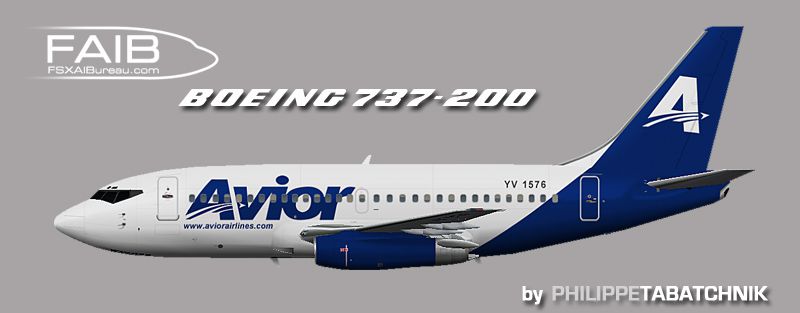
Enhance your virtual hangar with a meticulously crafted recreation of Avior’s distinctive Boeing 737-200 ADV in FSX. This repaint captures the signature livery adorning registration YV-1576, thoughtfully developed by Philippe Tabatchnik for the freeware FAIB base model (file name: FAIB_B7372.ZIP). Avior Airlines, operating from Venezuela, is known for its domestic and regional services using reliable classic jets like the 737-200, a staple in short-to-medium-range commercial flight for many years.

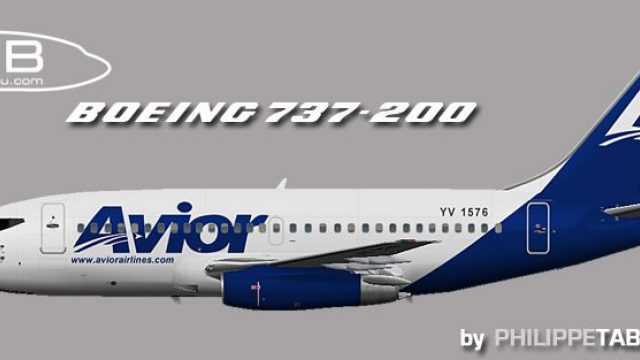
Profile view of Avior Boeing 737-200 ADV.
To integrate this repaint into your simulator, you must acquire the freeware FAIB Boeing 737-200 base model. This version is specifically designed for FSX and is essential because this download only contains the textures referencing the original model geometry and default animations. The base package is typically available in the Fly Away Simulation mod library.
This repaint offers realistic detail and an immersive representation of Avior’s Boeing 737-200 ADV, letting you simulate countless domestic and regional routes across Venezuela or anywhere else in your virtual sky. All work is credited entirely to Philippe Tabatchnik, who meticulously created the livery for enthusiasts seeking an authentic Avior experience in FSX.
Free for all simmers · 812.6 KB · Scanned clean Oct 2026
Download speed: Free tier is capped at 0.5 Mbps. PRO members download at full line speed.
This file is a repaint — the package below is the base model it paints onto. Install it first, or the textures will have nothing to load onto.
texture.{airline}) inside FSX\SimObjects\Airplanes\{base-aircraft}\.aircraft.cfg in Notepad. Add a new [fltsim.X] section per the readme.readme.txt or README file. It tells you exactly where files go, what dependencies are needed, and any quirks specific to this add-on.The archive faib_732_roi_1576_fsx.zip has 8 files and directories contained within it.
This list displays the first 500 files in the package. If the package has more, you will need to download it to view them.
| Filename/Directory | File Date | File Size |
|---|---|---|
| FAIB_737_200_L.bmp | 04.03.12 | 4.00 MB |
| FAIB_737_200_T.bmp | 04.03.12 | 4.00 MB |
| faib_732_roi_1576.gif | 03.31.12 | 4.56 kB |
| faib_732_roi_1576.jpg | 03.31.12 | 80.00 kB |
| ReadMe.txt | 03.31.12 | 3.38 kB |
| fltsim.txt | 03.31.12 | 356 B |
| flyawaysimulation.txt | 10.29.13 | 959 B |
| Go to Fly Away Simulation.url | 01.22.16 | 52 B |
Only PRO members can place votes.
More FSX & P3D add-ons hand-picked based on this download.
FSX Civil Aircraft
This freeware release features a detailed repaint of the Boeing 737-200 ADV i…
 FSX Civil Aircraft
This freeware repaint brings the distinctive Avior Airlines color scheme to t…
 FSX Civil Aircraft
This detailed freeware repaint offers flight simmers a precise reflection of …
 FSX Civil Aircraft
Avior Boeing 737-200, registration YV491T. Complete pack. Textures for the mo…
 FSX Civil Aircraft
Avior Airlines Boeing 737-200 (new colors). Model by Erick Cantu / Kittyhawk …
 FSX Civil Aircraft
Includes all seven aircraft currently operating in Avior's fleet. They operat…
 FSX Civil Aircraft
Avior Airlines Boeing 737-800. Model by Project Open Sky. Repaint by Carlos E…
 FSX Civil Aircraft
This repaint set brings a vivid Avior Airlines Boeing 737-400 livery, adorned…
Be the first to leave a comment on this download.
Be the first to share your thoughts on this download.