

 FSX Civil Aircraft
Avior Boeing 737-200 ADV YV488T
This freeware release features a detailed repaint of the Boeing 737-200 ADV i…
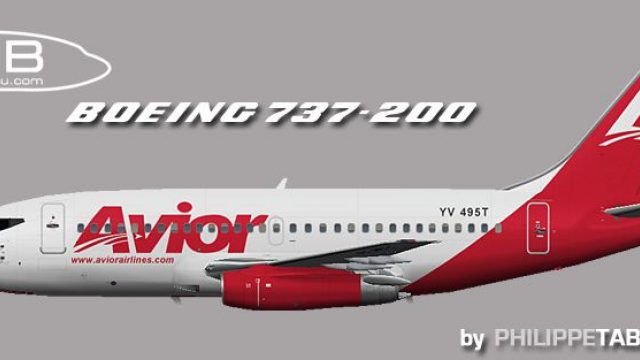
Avior Airlines’ Boeing 737-200 Advanced livery brings registration YV495T to life with accurate markings, clean panel lines, and well-aligned door and fuselage details for convincing regional operations. Designed for Microsoft Flight Simulator X, it requires the FAIB 737-200 base model, making it ideal for immersive AI traffic or hands-on classic jet flying.
 Rate
Rate

This freeware repaint brings the distinctive Avior Airlines color scheme to the classic Boeing 737-200 Advanced series, specifically registration YV495T. It was produced to enhance immersion for those who appreciate Venezuelan aviation, and it seamlessly integrates with the FAIB base model developed by Philippe Tabatchnik. Although this package is solely a livery, it incorporates authentic markings for real-world realism when flying shorter routes or regional hops in Microsoft Flight Simulator X.
The Boeing 737-200 Advanced (often referred to as the -200 ADV) stands out for its uprated engines and improved aerodynamics compared to earlier variants. Avior Airlines, based in Venezuela, utilizes this versatile narrow-body jet for both domestic and nearby international segments. In this repaint, subtle details like specific panel lines and door outlines (all integrated into the texture mapping layers) help reflect the real-life appearance of YV495T as it operates throughout the region.

Profile render highlighting the registration, YV495T, on the fuselage.
[fltsim.x] entry for this new livery, making sure you keep the sequence numbering accurate (e.g., [fltsim.0], [fltsim.1], etc.). Avoid skipping or repeating index numbers.This repaint is a standalone texture set built for the FAIB 737-200 series courtesy of Philippe Tabatchnik. It does not bundle the core model, so you will need to download the necessary base package from Fly Away Simulation’s mod library. These textures will then overlay the default aircraft geometry, providing a faithful depiction of Avior’s livery in your simulator of choice.
Avior Airlines has long utilized Boeing 737 variants for domestic connectivity across Venezuela, valued for their robust performance on short and intermediate routes. This repaint captures that operational flair, so flight sim enthusiasts can recreate typical schedules or experiment with their own flight itineraries. Whether you are running AI traffic or manually flying this workhorse, the uniform paint lines and carefully placed airline decals represent the real-world aesthetic of the YV495T registration.
Free for all simmers · 824.84 KB · Scanned clean Oct 2026
Download speed: Free tier is capped at 0.5 Mbps. PRO members download at full line speed.
This file is a repaint — the package below is the base model it paints onto. Install it first, or the textures will have nothing to load onto.
texture.{airline}) inside FSX\SimObjects\Airplanes\{base-aircraft}\.aircraft.cfg in Notepad. Add a new [fltsim.X] section per the readme.readme.txt or README file. It tells you exactly where files go, what dependencies are needed, and any quirks specific to this add-on.The archive faib_732_roi_495_fsx.zip has 8 files and directories contained within it.
This list displays the first 500 files in the package. If the package has more, you will need to download it to view them.
| Filename/Directory | File Date | File Size |
|---|---|---|
| faib_732_roi_495.jpg | 03.31.12 | 83.97 kB |
| FAIB_737_200_L.bmp | 04.03.12 | 4.00 MB |
| FAIB_737_200_T.bmp | 04.03.12 | 4.00 MB |
| faib_732_roi_495.gif | 03.31.12 | 4.50 kB |
| ReadMe.txt | 03.31.12 | 3.38 kB |
| fltsim.txt | 03.31.12 | 356 B |
| flyawaysimulation.txt | 10.29.13 | 959 B |
| Go to Fly Away Simulation.url | 01.22.16 | 52 B |
Only PRO members can place votes.
More FSX & P3D add-ons hand-picked based on this download.
FSX Civil Aircraft
This freeware release features a detailed repaint of the Boeing 737-200 ADV i…
 FSX Civil Aircraft
Enhance your virtual hangar with a meticulously crafted recreation of Avior’s…
 FSX Civil Aircraft
This detailed freeware repaint offers flight simmers a precise reflection of …
 FSX Civil Aircraft
Avior Boeing 737-200, registration YV491T. Complete pack. Textures for the mo…
 FSX Civil Aircraft
Avior Airlines Boeing 737-200 (new colors). Model by Erick Cantu / Kittyhawk …
 FSX Civil Aircraft
Includes all seven aircraft currently operating in Avior's fleet. They operat…
 FSX Civil Aircraft
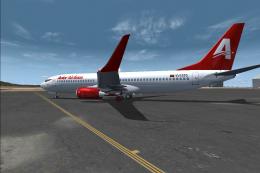
Avior Airlines Boeing 737-800. Model by Project Open Sky. Repaint by Carlos E…
 FSX Civil Aircraft
This repaint set brings a vivid Avior Airlines Boeing 737-400 livery, adorned…
Be the first to leave a comment on this download.
Be the first to share your thoughts on this download.