

 FSX Missions
Carrier Ops Mission
Carrier Ops. Flights that let you take off and land on a static aircraft carr…
Carrier Ops Recon F-18 P-2 puts the default F/A-18 into a dusk carrier launch off Iraq, flying as Viper-2 in tight formation while Viper-1 photographs Basrah and Shaibah airfields amid nearby anti-aircraft threats. Built for FSX, it requires the Acceleration pack and includes voice-guided cues, deck traffic, and optional recovery on the carrier or Kuwait.
 Rate
Rate
Carrier Ops Recon F-18 P-2. F18 Hornet carrier recon mission using FSX Acceleration default F/A-18 and high definition landable carrier. Off the Coast of Iraq, you will be flying wingman for Viper-1. Your mission is to stay with Viper-1 while he gets recon photos of Basrha Int'l, and Shaibah Airports. Easy flight we hope. It is dusk and there is enemy anti-aircraft positions surrounding the airports. Be on your toes, stay tight with Viper-1, be prepared for anything. FSX Acceleration required. By Ed Olander.
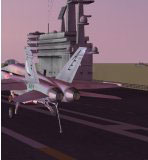
Carrier Ops Recon F-18 P-2 Mission.
Briefing-
Starting off the deck of the stationary Carrier, listen and wait for instructions to get clearence for Cat3. All the Traffic on the deck will takeoff. Once they have you will be instructed to start your engines. Start your engines and lower you wings. When instructed drive to Cat3, Cat3 will be highlighted with a Green Arrow or look for the Cat with a Flashing White Light. Press Shift-U to Lower the Launch Bar followed by a Shift-I to Raise the Blast Shield. When given Clearence Full Throttle and press Shift + the Space Bar, to Launch the Cat. Once off the carrier, Viper 1 will be coming on your six, get and stay within 0.7 NM of Viper 1 the entire flight or as long as poosible. I'm not a carrier expert just having fun, Enjoy, everything is Fictional.
Hopefully everything is in-tact, just unzip the compressed Folder to a Temp Directory. Place the CarrierOpsReconf18 Directory into your Mission Directory under the Military folder, ie, /Microsoft Flight Simulator X/Missions/Military/, you should have a Directory called CarrierOpsReconf18. Make sure to move the rewards from the Rewards Directory to your FSX/root/Rewards.
Be sure to adjust your sounds within FSX to get the best effects and to hear the voices.
Requirements-
FSX, and the Acceleration Pack. Uses all FSX Aircraft and Scenery, Aircraft and Effects.
Voices - All me (Morphed, resampled).
No Music..
Used the Great tool FSX Mission Maker by Jim Keir to Help with Building.
*Note to the User -
This mission as are all my Missions are purley Fictional. I have no Experience in Air Traffic Communication nor do I fly Aircraft for Real life. Everything is WysiWyg. Everything I do is Free, Do with it What you want but please keep it Free.
*Note
When a Green Arrows appears as a Point of Interest, Drive to the Green Arrow and stop. Also you control your own Crash Behavior. Pressing the 'U' key controls the on screen Compass and Arrow indicators.
*Note, it is possible to put out any Engines Fires with in the Cokcpit of the F-18. Look around the Left side of the Cockpit, by pressing the Master Caution Light when lite, twice, then press the Fire Extinquisher once, Engine 1 Fire should go out.
My Scenery Settings where set to just High when making the Mission.
Mission Sequence of Events -
# You are Viper 2 - Parked on the deck next to Viper 1.
# Wait until given instructions to start the Engines.
# Blackops 1 & 2 will get clearence and takeoff from the Deck.
# Viper 1 will be given clearence to takeoff from Cat4.
# When Viper 1 attaches to Cat4, you will be given clearence to start Engines.
# Start Engines, Lower Wings, Lower Flaps.
# Go to Cat3, Shift-U(Lower Bar), Shift-I(Raise Blast Sheild).
# Full Throttle - Shift + Scpace Bar Releases Cat.
# Viper 6 will approach you from your 6, Get a Lock on Viper 1.
# Fly with Viper 1 the Entire flight stay within 0.7 NM.
# When Told to you can land on the Carrier ot Kuwait Intl to Complete the Mission.
# 3-Possible Rewards.
Cheers Have Fun -
Free for all simmers · 3.35 MB · Scanned clean Oct 2026
Download speed: Free tier is capped at 0.5 Mbps. PRO members download at full line speed.
FSX\Missions\ as a sub-folder. The folder must contain an XML file describing the mission.readme.txt or README file. It tells you exactly where files go, what dependencies are needed, and any quirks specific to this add-on.The archive caroprec.zip has 83 files and directories contained within it.
This list displays the first 500 files in the package. If the package has more, you will need to download it to view them.
| Filename/Directory | File Date | File Size |
|---|---|---|
| CarrierOpsReconf18 | 04.05.09 | 0 B |
| Briefing.htm | 04.05.09 | 3.13 kB |
| caropsrecf18.FLT | 03.29.09 | 9.89 kB |
| caropsrecf18.WX | 03.27.09 | 178.84 kB |
| caropsrecf18_profile.xml | 04.04.09 | 140 B |
| carreceh1.FSR | 03.28.09 | 621.56 kB |
| carreceh2.FSR | 03.28.09 | 616.34 kB |
| carrecf181.FSR | 03.28.09 | 1.03 MB |
| CarrierOpsReconF18.spb | 04.05.09 | 84.51 kB |
| CarrierOpsReconF18.xml.layout | 04.05.09 | 949 B |
| f18recdone.bmp | 04.03.09 | 171.33 kB |
| f18recsuc.bmp | 04.03.09 | 171.33 kB |
| Images | 04.03.09 | 0 B |
| f18recht.jpg | 04.03.09 | 5.03 kB |
| Install.txt | 04.05.09 | 3.54 kB |
| Kneeboard.htm | 03.09.09 | 1.13 kB |
| MissionProfile.xsl | 04.04.09 | 558 B |
| Readme.txt | 02.28.09 | 71 B |
| Rewards | 04.04.09 | 0 B |
| f18recbadge.RWD | 04.04.09 | 182.65 kB |
| f18reckwrw.RWD | 04.04.09 | 163.95 kB |
| f18rewph.RWD | 04.04.09 | 170.29 kB |
| Sound | 04.05.09 | 0 B |
| da_2minutes.wav | 04.02.09 | 27.09 kB |
| da_anti_air.wav | 04.02.09 | 70.13 kB |
| da_cable1.wav | 04.02.09 | 20.12 kB |
| da_cable2.wav | 04.02.09 | 17.83 kB |
| da_cable3.wav | 04.02.09 | 15.76 kB |
| da_cable4.wav | 04.02.09 | 22.19 kB |
| da_clearence_to_land.wav | 04.02.09 | 41.36 kB |
| da_ctrl_shift_f1.wav | 04.02.09 | 65.77 kB |
| da_ct_call_ball.wav | 04.02.09 | 18.81 kB |
| da_ct_cleared_to_land.wav | 04.02.09 | 24.91 kB |
| da_ct_eh1_takeoff_clear.wav | 04.02.09 | 37.00 kB |
| da_ct_eh2_takeoff_clear.wav | 04.02.09 | 39.07 kB |
| da_ct_f181_cleared.wav | 04.02.09 | 39.51 kB |
| da_ct_f181_cleared_cat4.wav | 04.02.09 | 32.54 kB |
| da_ct_kuwait_viper_cleared.wav | 04.02.09 | 26.98 kB |
| da_ct_shaibah.wav | 04.04.09 | 54.44 kB |
| da_ct_user_cleared.wav | 04.02.09 | 30.80 kB |
| da_ct_user_cleared_cat3.wav | 04.02.09 | 24.91 kB |
| da_ct_viper_return.wav | 04.02.09 | 81.56 kB |
| da_eh1_ready_takeoff.wav | 04.02.09 | 41.80 kB |
| da_eh2_ready_takeoff.wav | 04.02.09 | 40.05 kB |
| da_engine_fire.wav | 04.04.09 | 58.57 kB |
| da_f181_ready_on_cat4.wav | 04.02.09 | 35.37 kB |
| da_f181_req_clear.wav | 04.02.09 | 39.62 kB |
| da_failed_cat3.wav | 04.02.09 | 30.25 kB |
| da_failed_clearence.wav | 04.02.09 | 38.64 kB |
| da_falling_back.wav | 04.02.09 | 20.01 kB |
| da_flaps_down.wav | 04.03.09 | 18.38 kB |
| da_good_distance.wav | 04.02.09 | 16.64 kB |
| da_good_landing.wav | 04.02.09 | 15.66 kB |
| da_goto_cat3.wav | 04.02.09 | 76.12 kB |
| da_kuwait_landed.wav | 04.05.09 | 40.28 kB |
| da_lock_on_f18f.wav | 04.02.09 | 22.84 kB |
| da_not_cat3.wav | 04.02.09 | 22.19 kB |
| da_ok_start_engines.wav | 04.02.09 | 15.66 kB |
| da_ready_takeoff.wav | 04.03.09 | 53.24 kB |
| da_roger_eh1.wav | 04.02.09 | 16.20 kB |
| da_roger_eh2.wav | 04.02.09 | 15.11 kB |
| da_roger_f181.wav | 04.02.09 | 13.91 kB |
| da_roger_user.wav | 04.02.09 | 14.67 kB |
| da_shftu_shfti.wav | 04.02.09 | 59.23 kB |
| da_standby_for_clearence.wav | 04.02.09 | 27.10 kB |
| da_too_far.wav | 04.02.09 | 21.10 kB |
| da_user_ready_on_cat3.wav | 04.02.09 | 33.63 kB |
| da_user_req_takeoff_clear.wav | 04.02.09 | 37.88 kB |
| da_viper1_bailing.wav | 04.02.09 | 19.36 kB |
| da_viper1_basrha_appr.wav | 04.02.09 | 22.08 kB |
| da_viper1_camshot.wav | 04.02.09 | 23.17 kB |
| da_viper1_hit.wav | 04.02.09 | 47.68 kB |
| da_viper1_six.wav | 04.02.09 | 34.06 kB |
| da_viper2_appr_shaibah.wav | 04.04.09 | 38.42 kB |
| da_viper2_shaibah.wav | 04.04.09 | 28.84 kB |
| da_viper_ditched.wav | 04.02.09 | 70.01 kB |
| da_viper_request_kuwait.wav | 04.02.09 | 39.19 kB |
| da_welcome.wav | 04.02.09 | 119.48 kB |
| da_we_are_viper2.wav | 04.03.09 | 88.65 kB |
| da_where_hit.wav | 04.02.09 | 21.10 kB |
| da_extinq_fire.wav | 04.05.09 | 54.33 kB |
| flyawaysimulation.txt | 10.29.13 | 959 B |
| Go to Fly Away Simulation.url | 01.22.16 | 52 B |
Only PRO members can place votes.
More FSX & P3D add-ons hand-picked based on this download.
FSX Missions
Carrier Ops. Flights that let you take off and land on a static aircraft carr…
 FSX Missions
Acceleration Multiplayer Carrier Ops. Use the FSX Acceleration carrier in mul…
 FSX Missions
Start off in Dino Cattaneo's F-14 Tomcat on Javiers(Thrawns) CV69-12 Busy Car…
 FSX Missions
F18 Hornet Carrier Mission, using FSX Acceleration default F/A-18 Hornet and …
 FSX Missions
Acceleration T-45C And Nimitz Carrier Mission. Takeoff and land five times in…
 FSX Missions
Madagascar Mission. The Madagascarian Military pays you for a transport fligh…
 FSX Missions
Experience a daring alpine approach with this immersive mission set amid the …
 FSX Missions
Discover a daring and immersive freeware add-on that challenges your landing …
Read what other simmers think, or add your own.

This is the second carrier mission of yours I've downloaded. Thanks for the hard work you put into making these missions, they are a lot of fun to fly. I'm especially thankful as there is no one else, that I know of, currently creating carrier missions for fsx. My only comment is this, as good as the missions are they are ruined by the very poor mock radio communication audio effects. In both missions, I have to pull up the message board so I can read what is being said as the speech is very garbled. if you plan on doing additional missions, and I hope you do, consider removing about 60% of the distortion effect.