

 FSX Missions
Mission--Madagascar Mission
Madagascar Mission. The Madagascarian Military pays you for a transport fligh…
Varadero Crosswind Mission challenges pilots with a 737-style certification finale: a demanding landing at Varadero, Cuba, featuring fierce crosswinds and downdrafts, with Spanish and English briefings in one package. Designed for FSX, it requires the SimVar extension and rewards precise control, runway discipline, and calm decision-making.
 Rate
Rate
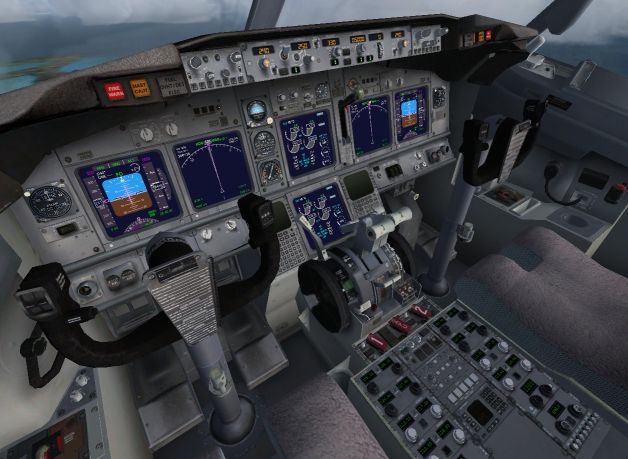
Varadero Crosswind; Spanish and English versions in the same download. Almost ready for your 737 certification, your last flight is a landing with dreadful crosswinds at Varadero, Cuba. You'll feel for yourself some of the infamous weather tricks: downdrafts. You'll need all your skills and more, and quite a bucket of cold blood to finish happily. You'll get your reward if you manage to land on the runway and stay there fully. By Jose Enrique Arino.
Varadero Crosswind Mission.
Installation: Extract and run the .msi file (FSX must be closed).
This package will install ( if you don't have it ), the simvar extension.The first time that you start FSX, program will ask you if you want to allow install the simvar extension. Say yes.
Please configure sound voices at maximum.Rest of sounds about 10%.
Mission will appears in Challenges category.
Enjoy!
Jose Enrique Ariño
Free for all simmers · 6.29 MB · Scanned clean Oct 2026
Download speed: Free tier is capped at 0.5 Mbps (this file takes approximately 2 mins at the cap). PRO members download at full line speed.
FSX\Missions\ as a sub-folder. The folder must contain an XML file describing the mission.readme.txt or README file. It tells you exactly where files go, what dependencies are needed, and any quirks specific to this add-on.The archive varadero-1.zip has 7 files and directories contained within it.
This list displays the first 500 files in the package. If the package has more, you will need to download it to view them.
| Filename/Directory | File Date | File Size |
|---|---|---|
| instalacion.txt | 04.10.09 | 870 B |
| VaraderoSpanish.msi | 04.01.09 | 3.07 MB |
| VaraderoEnglish.msi | 04.10.09 | 3.34 MB |
| readme.txt | 04.10.09 | 459 B |
| Varadero sm.jpg | 04.10.09 | 213.39 kB |
| flyawaysimulation.txt | 10.29.13 | 959 B |
| Go to Fly Away Simulation.url | 01.22.16 | 52 B |
Only PRO members can place votes.
More FSX & P3D add-ons hand-picked based on this download.
FSX Missions
Madagascar Mission. The Madagascarian Military pays you for a transport fligh…
 FSX Missions
Experience a daring alpine approach with this immersive mission set amid the …
 FSX Missions
Discover a daring and immersive freeware add-on that challenges your landing …
 FSX Missions
The Most Dangerous Airports: Lukla. The next in The Most Dangerous Airport Mi…
 FSX Missions
Hurricane Landing. Your task is to fly an Airbus A320 from Munich to Hamburg …
 FSX Missions
Welcome, Sir. In this mission you try to get from Gatwick to Dublin. It's ver…
 FSX Missions
Fly your Brussels Airlines 737-800 from Brussels National airport to Rome Fiu…
 FSX Missions
The year is 1994 and you are a captain for America West airlines called Capta…
Read what other simmers think, or add your own.

Very cool and easy install. Very hard mission.
Is the landing gear broken?