


 FSX Civil Aircraft
FedEx Airbus A300-600R repaint for Overland A300-600
FSX FedEx Airbus A300-600R. Textures only for the payware Overland A300-600 m…
Royal Jordanian’s Airbus A300-600R arrives in FSX with a carefully aligned repaint that matches the wide-body’s contours, from crisp fuselage titles to accurate tail and engine markings, for a convincing classic airline look in the virtual cockpit and external views. Requires the Thomas Ruth A300-600R freeware base package.
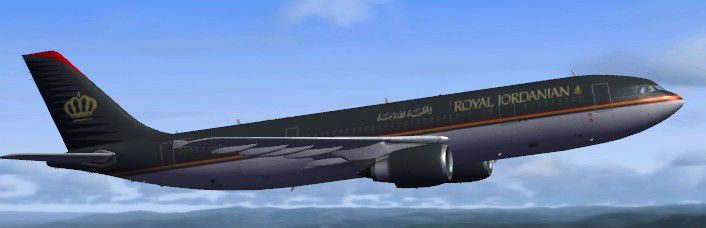
Immerse yourself in a nuanced representation of Royal Jordanian’s wide-body operations with this specialized repaint designed for Microsoft Flight Simulator X. This free add-on integrates the airline’s distinctive graphics onto the reliable Airbus A300-600R platform, allowing virtual pilots to explore a faithful reproduction of Royal Jordanian’s design elements while experiencing the proven performance characteristics of this advanced airframe. The repaint has been meticulously assembled by Christophe Bonneville, while the core model itself comes courtesy of Thomas Ruth. To activate this livery, ensure you have the freeware base package (TOM306R.ZIP) already installed, which you can locate within the Fly Away Simulation mod library.
The livery seamlessly aligns with the Airbus A300-600R’s physical contours, highlighting the carrier’s iconic color scheme. Each fuselage marking maintains proper proportions, adding a layer of authenticity to the aircraft’s extensive fuselage. Engine nacelles retain correct logos and tonal shades, and the horizontal stabilizer upholds the hallmark tail design, ensuring a visually balanced appearance from every vantage point.
Royal Jordanian, recognized as the flag carrier of Jordan, has long employed various Airbus jets for medium- to long-haul routes, capitalizing on their robust operating efficiencies. The A300-600R variant, a twin-engine wide-body airliner, is celebrated for its spacious cabin layout, pioneering flight deck instrumentation (referring to the advanced cockpit displays and systems), and dependable operational performance. This repaint captures those elements in a manner that respects both the airline’s branding and the aircraft’s aerodynamic profile.
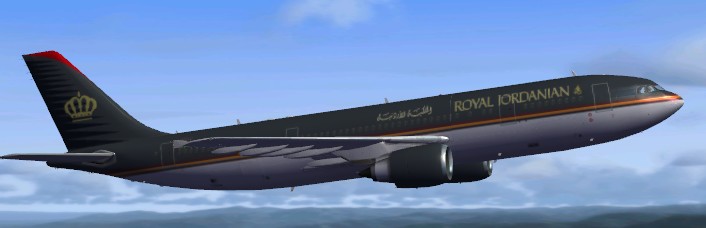
Royal Jordanian Airbus A300-600R.
Below is the necessary aircraft.cfg entry to append into your simulator’s configuration file, ensuring the repaint is appropriately recognized and selectable:
[fltsim.xx]

title=Royal Jordanian A300-600R

sim=TomA306

model=RGE

panel=306GE

sound=

texture=rj

kb_checklists=

kb_reference=

atc_id=N70074

atc_airline=Royal Jordanian

atc_flight_number=1124

atc_heavy=1

ui_manufacturer=Airbus

ui_typerole=Commercial Airliner

ui_createdby=Thomas Ruth

ui_type=A300-600R

ui_variation=Royal Jordanian
This add-on enriches your library with a refined rendition of one of Jordan’s flagship carriers, maintaining the visual and operational standards demanded by dedicated flight sim enthusiasts. By merging Thomas Ruth’s dependable model with Christophe Bonneville’s tailored repaint, you can confidently take on both regional and international flights under the Royal Jordanian banner.
Free for all simmers · 4.07 MB · Scanned clean
Download speed: Free tier is capped at 0.5 Mbps (this file takes approximately 1 min at the cap). PRO members download at full line speed.
This add-on may require the following files to function properly. If this is a repaint, the dependency below is likely the base aircraft package.
FSX\SimObjects\Airplanes\. The folder must contain an aircraft.cfg file. Effects go into FSX\Effects\; gauges go into FSX\Gauges\.readme.txt or README file. It tells you exactly where files go, what dependencies are needed, and any quirks specific to this add-on.The archive royaljordanian.zip has 33 files and directories contained within it.
This list displays the first 500 files in the package. If the package has more, you will need to download it to view them.
| Filename/Directory | File Date | File Size |
|---|---|---|
| texture.rj | 02.08.10 | 0 B |
| glass.dds | 11.14.09 | 64.12 kB |
| glass_spec.dds | 11.24.08 | 4.12 kB |
| main.dds | 02.08.10 | 5.33 MB |
| main_bump.dds | 11.12.09 | 4.00 MB |
| main_light.dds | 11.14.09 | 1.00 MB |
| main_spec.dds | 11.13.09 | 1.00 MB |
| texture.cfg | 10.17.09 | 137 B |
| thumbnail.jpg | 02.08.10 | 27.71 kB |
| vc01.dds | 01.17.10 | 1.00 MB |
| vc01_L.dds | 01.17.10 | 1.00 MB |
| vc02.dds | 01.11.10 | 1.00 MB |
| vc02_L.dds | 01.16.10 | 1.00 MB |
| vc03.dds | 01.13.10 | 1.00 MB |
| vc03_L.dds | 01.14.10 | 1.00 MB |
| vc04.dds | 01.11.10 | 1.00 MB |
| vc04_L.dds | 02.02.10 | 1.00 MB |
| vc05.dds | 01.13.10 | 1.00 MB |
| vc05_L.dds | 01.15.10 | 1.00 MB |
| vc2_L.dds | 01.23.10 | 256.12 kB |
| vc3_L.dds | 01.23.10 | 256.12 kB |
| VCblend.dds | 01.15.10 | 1.12 kB |
| vcreflect.dds | 01.13.10 | 384.12 kB |
| vc_L.dds | 01.23.10 | 1.00 MB |
| wingbump_l.dds | 11.11.09 | 1.00 MB |
| wingbump_r.dds | 11.11.09 | 1.00 MB |
| wingspec_l.dds | 11.11.09 | 256.12 kB |
| wingspec_r.dds | 11.11.09 | 256.12 kB |
| wing_l.dds | 11.16.09 | 1.00 MB |
| wing_r.dds | 11.16.09 | 1.00 MB |
| Aircraft.txt | 02.08.10 | 345 B |
| flyawaysimulation.txt | 10.29.13 | 959 B |
| Go to Fly Away Simulation.url | 01.22.16 | 52 B |
More FSX & P3D add-ons hand-picked based on this download.
FSX Civil Aircraft
FSX FedEx Airbus A300-600R. Textures only for the payware Overland A300-600 m…
 FSX Civil Aircraft
Airbus A300-600R. American Airlines plus Thai Air classic Airbus model for FS…
 FSX Civil Aircraft
Iran Air Airbus A300-600R. Model by Thomas Ruth. Repaint by Peyman Javanbakht…
 FSX Civil Aircraft
This repaint features United Parcel Services (UPS) markings on the Airbus A30…
 FSX Civil Aircraft
Airbus A300-600R Chinese Operators Package. After the closedown of China Nort…
 FSX Civil Aircraft
This repaint package brings Lufthansa’s iconic Airbus A300-600R to Microsoft …
 FSX Civil Aircraft
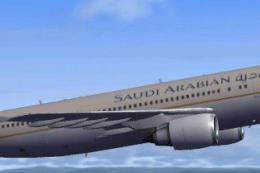
This highly detailed repaint showcases the distinctive Saudia (Saudi Arabian …
 FSX Civil Aircraft
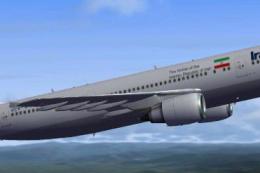
This freeware repaint brings an Iran Air Airbus A300-600R rendition into Micr…
Be the first to leave a comment on this download.
Be the first to share your thoughts on this download.