
 Ian Stephens
This article documents some great tips and tweaks for speeding up your copy of Flight Simulator X. The original document was published by Greg Germanowski and sources from many of the FS community websites. Thank you, Greg, for compiling the list, we have published it here in HTML format for ease of use.
This is quite a lengthy article so you may jump to individual sections using the links below;
- Introduction
- What to Expect from Tweaking
- How to Check FPS (Frames per Second)
- In-Game Settings
- Community Tips and Tricks
- HIGHMEMFIX Tweak
- Tweaking BUFFERPOOLS
- Additional Changes
Introduction
Welcome to my Tips and Tweaks guide to Microsoft Flight Simulator X with SP2. This is a compilation of various ideas, tips, configuration changes, and tweaks which may (or may not!) improve your experience with FSX. Like its predecessors, FSX is very demanding of your hardware. Unfortunately, we virtual pilots are very demanding of our simulators! This creates a bit of a problem because as of this writing, no single desktop hardware platform can run FSX at its most lush settings at a reasonably acceptable degree of smoothness.
With the introduction of Service Pack 1 (SP1) in May 2007 and Acceleration/SP2 in XXX 2008, FSX has become much more manageable for many users. The list of fixes and performance improvements is lengthy, but needless to say your FIRST tweak for FSX should be to obtain and install SP1 and SP2, or purchase and install the Acceleration add-on pack.
(If you buy Acceleration, it contains SP1 and SP2 in it – you do not need to install either of them individually)
This document may help you tweak you FSX install on your existing hardware to try to get the best presentation possible. FSX is such a rich and capable platform, it would be a shame to purchase the simulation only to cast it aside in frustration from the performance.
For the sake of any personal examples, my relevant PC specs at the time of writing were... AMD Athlon 64 x2 3800+, 2 GB of reasonably generic RAM, and an Nvidia 7900GT 256 MB card.
fsx.cfg Location
If you installed FSX to the C: drive, the fsx.cfg file is located in C:/Users/[youruser]/AppData/Roaming/Microsoft/FSX
This location is the same for all installations, including the Steam Edition.
What to Expect from Tweaking
The art of tweaking depends entirely upon your expectations for performance. Some folks are more interested in great image quality, and less interested in smoothness – others are solely focused on smoothness at the expense of visual detail... most of us fall somewhere in between – interested in trading off some visuals for some performance to achieve a happy medium.
When tweaking FSX, patience is a key. There doesn’t seem to be a single magic bullet that will cure all your ills – when we jumped from FS2004 to FSX, we gained huge improvements to the visual systems which provide major improvements to the visual world. Unfortunately, these huge changes cost a lot when it comes to processor time. Yes, the ACES development team spent hundreds of hours on optimizing the simulation engine and visual system, but even the most expert of optimization cannot make up for sheer processing power – and that’s what FSX is ready to use down the road.
Any way you slice it, the fact this document exists is a testament to those intrepid explorers who went out, experienced FSX, and found ways to help improve the experience for everyone else.
Quick Note on FSX Service Packs and Expansion Packs
Service Pack 2 was released concurrently with the Acceleration add-on pack. Because SP2 is included in the Acceleration add-on, users who have purchased Acceleration will also have all SP2 items.
How to Check FPS
There is a very simple way to check the current FPS (frames per second) in FSX before you apply and test any tweaks in this document.
- You should have a flight loaded and the aircraft placed at the location you wish to check the frame rate for.
- You should then press
SHIFT + Zto load up the informational display at the top of the screen. This will likely show the coordinates of your current location. - Press
SHIFT + Zonce more - you should now be able to see your current frame rate in FPS.
You can view the full selection of keyboard commands on our reference page here.
In-Game Settings
Understanding and properly setting the in-game system sliders is the foundation for nearly all tips and tricks for FSX performance. With that in mind, I thought it best to briefly go over some of the performance-related settings and sliders with their capabilities.
Graphics Tab
Target Frame Rate:
The target frame rate is thought of as the FPS lock. FSX does much more than just display pretty pictures on the screen – it needs to calculate your location, weather effects, system states, and a slew of other items in order to determine what to show on the screen. If you set the Target Frame Rate slider to an appropriate setting, you can give the sim the breathing room it needs for all the other calculations before it gets to rendering graphics. By locking at a reasonable rate, you also take steps to prevent wild FPS fluctuations, such as going from high detail to low detail areas when flying.
Important Notes – Does the FPS Lock cause more harm than good? Some users have indicated that when they lock their FPS, stuttering and *lower* than expected framerates seem to creep in. When they unlock their rates, smooth flying returns along with higher rates. I experimented with this and found there is some truth to it. Your mileage may vary, of course.
Filtering: (Bilinear, Trilinear, Anisotropic)
The filtering selection sets up what texture filtering mode will be used by your video system. Bilinear is nice, Trilinear is usually better, and Aniso proves best – One word of caution, though. Users have experienced slowdowns when selecting Aniso, so perhaps it’s best to use Bi- or Tri-.
Most users are finding the best performance is gained by setting this at Bi or Tri and using your video card’s drivers to "force"-adjust the Anisotropic settings.
Anti-aliasing: (On/Off)
This turns the sim-driven antialiasing mode on and off. It is often recommended to turn AA (OFF) in this location and use your video card driver settings to turn AA on. This will give you more control over which AA mode to use and may result in both better image quality and frame rates.
Note on Filtering and Anti-Aliasing: It is recommended that you set your video card drivers to "Application Controlled" for AA and AS, and use FSX’s in-game settings to turn the features on and off. This is opposite what was ideal for FS2004, but most users are finding superior performance with in-game control over these graphics quality items rather than in-driver.
Note on Filtering and Anti-Aliasing:
It is recommended that you set your video card drivers to "Application Controlled" for AA and AS, and use FSX’s in-game settings to turn the features on and off. This is opposite what was ideal for FS2004, but most users are finding superior performance with in-game control over these graphic quality items rather than in-driver.
Global Texture Resolution: (Very Low / Low / Medium / High / Very High)
Your preferred setting may vary, but I tend to keep this at High or better. Very High allows for the largest possible texture sizes, stepping downward cuts back into smaller textures helping to free video memory and texture swapping resources, benefiting performance. This setting matches the custom texture resize process that some tweakers are using, but it does it without actually resizing.
Lens Flare: (On/Off)
Turns the lens flare effect on and off. This imposes a slight performance hit and sometimes is considered a nuisance (as you usually don’t get lens flare when looking out the window of a real airplane). From my experience, this poses only a small performance impact and is a pleasing effect, so it remains on.
Light Bloom: (On/Off)
Turns the blooming effect on and off. Light bloom is a new feature with FSX and displays a dynamic halo around bright lights and bright reflections. Bloom looks gorgeous but imposes a high-performance penalty – especially with mid-to-low end graphics cards. Bloom requires the graphics system to draw the screen image twice, hence the slowdown. Faster video cards may yield better results. I fly with bloom off, but I may sacrifice some AA or AS settings on the video driver settings to see if I can make it workable.
Advanced Animations: (On/Off)
I fly with this on but haven’t compared performance with it off to know if there is any difference.
DX10 Preview Mode: (On/Off) (SP2 and Vista with DX10 capable hardware only)
Turns the DX10 preview mode on and off. Most people recommend keeping this off, as it has a tendency to break add-on airplanes. DX10 preview is a sneak peek into some things that MSFS can do in the future, but it fell short of some individuals performance expectations. Microsoft included it for you to check out, however, you might experience some hiccups and problems along the way.
Aircraft Tab
High Resolution 3D virtual cockpits: (On/Off)
This probably adjusts the detail level of the VC textures. I’ve left mine on, but haven’t done a comparison with it off. I tend to fly in the 2D cockpits more, so VC hasn’t garnered much attention from me. If you are an exclusive 2D pilot, you may be inclined to move this to off to potentially save some resources. If you are an exclusive 3D pilot, you will be best served to turn this on.
2D Panel Transparency: (0-100%)
This allows you to see through a 2D panel. A neat feature if you fly in high console cockpits in the 2D mode. I haven’t seen any performance impact with it off or at any "on" setting.
Aircraft Casts Shadows On Ground: (On/Off)
I always leave this on – if flying in spot view and attempting a landing, the shadow gives vital altitude information that I can’t sacrifice.
Aircraft Casts Shadows on Self: (On/Off)
New for FSX, aircraft can now shadow themselves! I haven’t turned this option on, so I cannot speak to its impact.
Aircraft Landing Lights Illuminate Ground: (On/Off)
Just as the text reads – I turn this on for an air of realism. I’ve never tested performance with it turned off.
Scenery Tab
Level of Detail Radius: (Small/Medium/Large)
This slider adjusts how far out detailed textures extend from the airplane. Smaller values use a smaller ring, larger values use a larger ring.
Mesh Complexity: (0-100%)
This determines the amount of detail used when rendering terrain (hills and mountains). A higher figure will use the better detail available, a lower figure will "smooth out" some of the samples in order to reduce processor loads. If you fly low and slow in mountainous areas, you may wish to keep this setting high to retain the grandeur of valley flying. If you primarily fly in flat areas, reducing this setting may lower the workload the sim has to do for you. Some users do report good gains in performance by bringing this setting lower.
Mesh Resolution:
This setting restricts the maximum level of detail the terrain engine would try to display if the above Mesh Complexity setting was at 100%. Mesh resolution varies from stock to vendor supplied, so pick the detail level appropriate for your flying needs. The more detailed the mesh, the more performance impact it may have. I believe FSX ships with at best 38M mesh, and that would be a good starting setting. If you have higher detail 3rd party mesh, be certain to adjust your resolution to match the best available resolution of your addon. (I haven’t seen anything better than 10m as of 2008)
Texture Resolution:
Like the above Mesh Resolution setting, this setting controls the best possible texture resolution. You can customize the setting here – move it to 4m to provide you with FS2004-era textures (and save some processing power), or move it to 1m for FSX-supplied stock textures. The more detailed settings in the centimeter range will have no effect right now, but they will be used down the road should an add-on vendor release scenery using VERY high-resolution images.
Water Effects:
Shader Model 3 in effect here! Water details and reflectivity are controlled with this setting. Users are reporting they get the best performance with the OFF-High 1 setting. Moving into the 2x settings requires more video processing power, and many users report slower performance at those settings.
Scenery Complexity:
This controls the number of scenery objects your system will display in detailed cities and around airports. The higher the slider, the more objects are displayed. This does have a bearing on performance, especially near high-detail airports. For best performance, keep this slider low, in the Normal area. Ultra-fast processors may be able to work at a higher level.
Autogen Density:
Like the Scenery Complexity setting, this slider controls the amount of Autogen scenery in the world. High settings have an EXTREME impact on performance, so it is advised that you keep Autogen turned low. This isn’t all that bad, because FSX has introduced a much higher density of Autogen overall – FS2004’s "High" setting is comparable to FSX’s "Sparse" setting! Users have also reported that due to FSX’s improved stock textures, Autogen isn’t as needed to give a good illusion of flight. They turn Autogen off, and fly "barren", but they reap in the benefits of not having to draw Autogen objects.
Ground Scenery Shadows: (On/Off)
As the checkmark says, it causes ground objects to cast a shadow. This is another option I leave off, but your preference may vary. Untested performance impact.
Special Effects Detail:
How much detail is in the water spray, waves, dust from a grass landing? This slider determines it. I haven’t tested its performance impact, but I run mine at Medium. Your preference may vary.
Weather Tab
Cloud Draw Distance:
Clouds have a significant performance impact on the simulator, especially detailed clouds (see below). By adjusting the distance they are drawn in, you can adjust your system’s performance. I usually notch this one click above the lowest (70mi?), but some users may prefer to have this higher.
Thermal Visualization: (None/Natural/One Other)
Depending on your flight location, turning off thermal visualizations may improve your performance. This would be bad if you fly gliders, however since most of us don’t glide on a regular basis, this may be best to keep off. Users report a 3.0 to 0.5 FPS improvement with the settings change.
Cloud Detail (Simple/Detailed)
Simple clouds will bring you back to the old FS2002 days with 2D looking clouds. Detailed clouds are equivalent to FS2004-style detailed clouds which have a volumetric look and feel. Moving to simple clouds will give you a major performance improvement, however, it does impact the look of the simulator in a fairly large way. If you are experiencing bad performance under heavy weather, you may wish to look into this setting. In later tips and tricks, you may see that it’s possible to change out the cloud textures which may help cloud rendering.
Cloud Coverage Density (Only available with detailed clouds)
Detailed clouds can be adjusted in density. The denser they are, the more cloud "objects" are used when rendering the skies. Obviously, the higher the slider, the worse the performance. I usually keep this slider higher than the midpoint because I appreciate the cloudy skies. In later tips and tricks, you may see that it’s possible to change out the cloud textures which may help cloud rendering.
Traffic Tab
Airline Traffic Density
General Aviation Density
Airport Vehicle Density
-and-
Road Vehicles
Ships and Ferries
Leisure Boats
As you probably imagined, the traffic density sliders adjust how many objects are up in the skies, on the ground, or in the water as you fly. Each one could have a major or minor impact on your performance. Airplane traffic still imposes a performance hit, although most users haven’t commented as to whether it is a greater hit than in FS2004. (This leads me to believe it’s less than or equal to the FS2004 hit). ROAD traffic is the new problem! While adding a significant realism option with cars and trucks moving on the highways, all those little 3D objects in motion hit your processor like a ton of bricks. Unless you can cut back on other settings to make up for it, it is recommended that you scale back your road traffic to regain CPU cycles. Page
Community Tips and Tricks
And now for the fun! This section goes over the various changes and settings alterations that can be made to FSX in order to further customize your simulator experience. Keep in mind that you should always back up any files or settings you are changing here, in the event that something goes horribly wrong. Additionally, because this is a static document, some of these tips and tricks may have updated information, not in this document – I’ve included the original thread or source link so that you can check for updates.
Service Pack Installation
Credit To: ACES Team, AVSIM members. The flight sim community has had great success with the SP1/SP2 and Acceleration service releases. It is strongly recommended that you install all available updates to FSX before flying. SP2 is also the benchmark release for developers – many newer add-ons and airplanes may be written against SP2 and require it for proper use.
Autogen Performance - Editing the Default.xml File
Credit To: Many in the FS2004 days, along with Matt Fox & Richard Ludlow Back in the FS2004 days, it was found that there was a problem with the "custom" Autogen used in the simulator. All those chicken restaurants, gas stations, power substations, etc. etc. were draining resources. The fix was to remove or rename the (fs2004)Autogendefault.xml, thus disabling this type of Autogen object. The actual bug was fixed in the 9.1 patches, but many users chose to keep this file renamed or removed because of the performance benefit it imposed. Fast forward to today – FSX’s default.xml file contains many entries, many of which are now "standard". Removing this file is not recommended anymore due to the severe impact it may have on your autogen scenery. Editing it is another story though... Check on various flight sim websites for edited default.xml files. Some were done by Matt Fox, and AVSIM user "Rhumbafloppy" in the early days of FSX, and may still be available today.
Autogen Performance - Customizing Autogen Densities
Credit To: Paul (ACES) Adding two lines to your FSX.CFG file in the [Terrain] section allows you to customize the density and balance of autogen objects. The following lines are the "default" values that populate the variables when the lines are not in the config file. Increasing the number will increase the number of objects of a type, decreasing the number will lessen the count. This config change works in conjunction with the Autogen slider – for example, if you decrease the numbers below, the max slider setting will display less than originally designed, and the sparse slider setting will display less than originally designed.
[Terrain]
TERRAIN_MAX_AUTOGEN_TREES_PER_CELL=4500
TERRAIN_MAX_AUTOGEN_BUILDINGS_PER_CELL=3000
(Max possible for either = 6000)
Keep in mind that you probably shouldn’t use this tweak to lower BOTH values unless you find that the lowest slider isn’t low enough. Best use of these config lines would be to shift the balance of the two Autogen object types to your liking. Some users may want Autogen trees only, so they would lower buildings to zero. Others may want mostly buildings and very few trees, so they would lower trees to say, 500. I’d recommend NOT using the settings below as a substitute for the Autogen slider – this may lead to confusion down the road if you forget that you have adjusted the config file, and can’t understand why your Autogen slider is giving you so few objects... just a thought!
Various threads are indicating a sweet spot of 3000 and 1500 respectively as being worthwhile settings to try for improvements...
Texture Performance - Autogen Tree Texture Replacements
Credit To: Mike Kelly, Aimé Leclercq Mike took the time to cut the Autogen tree bitmaps in half, thus halving the video memory needed to generate Autogen. From there, Aimé took it one step further and decided to entirely rework the textures for both EULA compliance as well as improving the stock textures. This resulted in Aimé’s TreeX package. (Currently on V.2) TreeX is a great freeware utility which will automatically replace your autogen tree textures with some that are both beautiful, and efficient – and in three different texture sizes for performance tuning. TreeX is a great extension to have, and can indeed help the texture footprint of the autogen trees. There are other, additional tree texture packs now in existence. You may wish to research and find the best option for you.
You can download TreeX here:
https://flyawaysimulation.com/downloads/files/1564/fsx-treex-enhanced-trees/
Texture Performance - Cloud Texture Replacements
Credit To: Mike Kelly, and FS2004 experience SP1 Impact: This tweak will assist the system by lowering the memory footprint of cloud textures. Its impact may not be as great in the post-SP1 world, but it is still worth considering. As above AND as it was in FS2004, Mike applied the texture reduction idea to the FSX cloud textures. FSX uses aggressively sized textures for clouds in order to bring you a vivid flying experience. Unfortunately, the textures may be a little too big for some systems. Visit the above link to find the adjusted files. Your mileage may vary, but generally, this tweak will further reduce the video memory footprint used by textures, and this may assist with frame rates and/or blurries. The file in the thread may be considered a violation of the EULA, so look to the thread for information on how to do this yourself should it have been removed. In addition, certain payware offerings now exist such as Flight Environment X which can provide you with lower-resolution cloud textures. Be certain to explore!
Texture Performance - Pops and Stutters During Panning
Credit To: Brian (ACES)
If you're getting stutters or "pops" during turns or when pan your view around, try adding this to your fsx.cfg file:
[BufferPools]
PoolSize=5000000
This line will go in the [BufferPools] section – if it isn’t there, you may have to create it. The default pool size is 1,000,000 but sometimes (If a lot of things are drawing like autogen) that isn't enough. Increasing it to 5 or even 10 million trades off some of your video memory against having to re-allocate these things all the time.
The buffer pool is (apparently) the amount of memory used by the system to quickly reintroduce textures. You can scale this setting to your liking – perhaps halving the amount suggested by Brian (2500000) in order to balance memory needs.
You can read more about BufferPools in the dedicated section below.
Blurries – How to Balance Blurries with Framerates
SINGLE CORE MACHINES ONLY – NOT EFFECTIVE ON MULTICORE MACHINES
Credit To: Adam (ACES) REQUIRED READING – Read the thread AND the knowledgebase articles above. They give pertinent and worthwhile information on the topic. Take your time, as they have important concepts which need to be understood before moving onto tackle blurries.
Blurries – no single word evokes more exhausted emotion in the Flight Sim community than blurries. (Except perhaps your least favorite add on a developer, but we’ll leave that to another guide). Blurries are a fact of life in MSFS due to the way the on-screen graphics are drawn. Simply put, blurries occur when the simulator doesn’t have enough processor time to process and draw the outdoor textures, and has to spend its time working on other aspects of the simulation like "where am I" and "where is the AI traffic", etc. etc. Adam wrote a very good guide to blurries, why they exist, and what can be done to customize things – see the above link. Rather than detail the tweak here, I’ll leave that to the above link, both at AVSIM and to the MS Knowledgebase. The fact that Microsoft has placed an article about this in the knowledge base is evidence enough that the blurries issue is both important and known to the MS engineers, so for now, we have to deal with the MSFS architecture provided to us. In short, you will need to add this line on your single core machine:
FIBER_FRAME_TIME_FRACTION=0.33
...to your FSX.cfg file in the [MAIN] section. The higher this fractional number goes, the more time is dedicated to the terrain/texture engine. If you go too high, you’ll get FPS problems – too low, and you’ll get blurry problems. In essence, it’s a manual slider to help you balance how much time the ground textures get. 0.33 is the default setting.
Users in the forums are indicating that they have brought the setting down to as low as 0.10 with little ill effects, but I would imagine blurries would creep in at those settings. Your mileage, as always, may vary!
Blurries - Texture Bandwidth Tweak
Credit To: A great many folks from back in the FS2004 days Back in the FS2004 days, blurry textures were the biggest complaint from users. Flying low and fast would quickly muddy textures and cause a generally poor experience. One of the first fixes to come out was adjusting the bandwidth the sim uses for texture loading. This is accomplished with a config file line change. In your FSX.cfg file, there will be a line:
TEXTURE_BANDWIDTH_MULT=30
If you RAISE this number, you will give more bandwidth to the textures. This may lead to fewer blurries, but it also may introduce micro stutters and little hiccups which could upset an otherwise smooth sim experience. I do not know what the "default" value is, but mine was set at 30. I typically bounce this number up by a factor of x3. I have yet to see any adverse effects, but at the same time, I haven’t seen any *observable* benefits. (I tend to make tweaks in one lump, so I’m never certain which tweak is helping the most). Some users in the FS2004 days have set this as high as 400, but users today are mentioning that high settings to this number are imposing FPS hits. This tweak may work in conjunction with Adam’s (ACES) fiber tweak above.
Aesthetics – Narrower Power Line Easements
Credit To: Alex (ACES) via Email One of the landscape items that JUMPED out at me in FSX was the power line easements. I am not sure if it is the textures that they selected for them, or the width, or what – but they seem to be far more visually jarring than they used to be. In my own personal opinion, at least in the fall FSX season in New England, the power line easements are just a little too prominent, and I felt it was the width. You can edit this, however! A quick email to ACES and the "problem" was solved. You will have to edit your terrain.cfg file (located in the root of FSX) As always, BACK UP YOUR ORIGINAL before you go playing!
Search for...
// Misc vector types - utility
[Texture.201]
And in that section, replace the value on this line...
StripWidthMeters=40
...figure with a size of your choosing. I went half, down to 20, and things look better! You should also change the same line in this section...
// Misc vector types - utility
[Texture.202]
...with the same figure. Both config sections should be back-to-back in the terrain.cfg file. Note that there are other settings in this file and texture possibilities, but I haven’t yet become bold enough to see what they do.
Hardware Performance – AGP Aperture Size
For AGP Card Users Only
It has been reported that adjusting your AGP aperture size may be of benefit to you AGP vid card users. The de-facto standard for FS2004 was an aperture of 64 MB. Users who HAVE a 64 MB setting who have changed to 128 or 256 have noted much better texture loading speeds and sharpness. This is likely due to the increased texture size for FSX terrain, and the larger aperture size better handling the textures. Changing your AGP Aperture size is only done in your computer's BIOS, and should only be done if you are comfortable entering the BIOS. (You could really mess up your computer if you go hamming around in there). Chances are, though, if you have an AGP card and you set up a 64 MB aperture, you'll know how to get back in and change it once more.
The HIGHMEMFIX Tweak
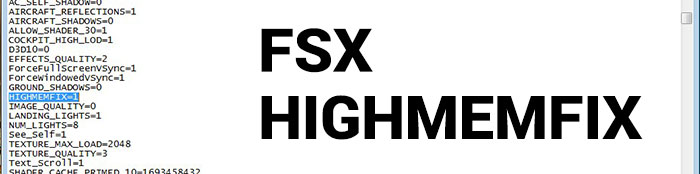
Making the tweak itself is very easy, as all you need to do is go into the fsx.cfg file and look for a line that is called;
[GRAPHICS]
Underneath this line, you want to include a basic code that reads;
HIGHMEMFIX=1
HIGHMEMFIX allows FSX to use more memory on the GPU side of things. This option enables you to use more of your GPU memory if you have a graphics card with greater than 1 GB of memory. If you have less or equal to 512 MB of graphics card memory then this command will not benefit you at all. This also fixes a common error where FSX reports out-of-memory errors. It is recommended when you are using third-party add-ons that may use textures greater than the FSX default.
Tweaking BUFFERPOOLS Settings
Many users report massive increases in performance by tweaking the BUFFERPOOLS setting in the fsx.cfg configuration file.
Have you ever noticed that the closer to busy and intricate detail that you fly, the more drawn in and challenged the performance becomes? It’s incredibly hard for a flight simulator to keep up with this change and development in graphical density in a dynamic format, and therefore it can cause a bit of a serious slowdown as you fly.
Unless you are using something that is designed exclusively for full power gaming, you are more than likely not going to have a PC that is capable of managing the complete strength of FSX without some hardware adjustments.
That being said, many change and additions can be made in the form of the fsx.cfg file. This is, without a doubt, one of the most important parts of flight simulation modification and getting it just right will make the aircraft that you are flying, and indeed the world around you, look better and load faster than before. The problem is finding the right way to reduce performance lag whilst maintaining a high level of visual detail – and for some people, the solution for improving their flight quality is to turn to the popular editing of the numbers under the [BUFFERPOOLS] section in the config file.
Since the autogen feature that comes in FSX has a default buffer of 4,000,000, you can see almost immediately from changing this number to something higher or lower has a drastic change to the overall level of detail that you are getting out of your simulator.
Changing this number to something else, typically, give you license to make some rather unique adjustments along the way that will make it so much easier to manage the settings of the simulator. Without a doubt, though, one of the biggest alterations will likely come from changes to this setting.
It helps to manage the buffer provided to your simulator as it can help you change the way that graphics are being drawn and manipulated. Instead of saving what has been, if you like, stored by the buffer, you make it easier for the hardware to work in the way that you had originally intended.
Changing this number higher or lower increases or decreases the overall dependency that your machine has on the graphics cards to provide the juice. At the lowest ratings – a 0 – this effectively means that your FSX is running everything entirely from the power of your GFX card.
What makes them so useful?
Naturally, the most useful addition that is brought to the table here is the ability to give people the help that they need in making the simulator far more fluid. We want to look at how you can achieve this, but it’s important to have the background information on the actual changes first – uninformed changes in a flight simulation config file is just asking for trouble! Therefore, knowing what you are changing and the expected changes that will come from this is going to be incredibly important, especially if you change something like the Bufferpools setting in here.
Typically, you will find that bufferpools are going to be managed so that you can help to do one of two things;
-
Decrease the number to make your texture buffer come entirely from the memory on your video card instead of anywhere else, or using any of the buffers that has been saved up. This makes a rather big difference to performance for many people but it can also produce serious spikes in performance at random moments so it’s a change that has to be considered and looking at quite closely before making any decisions
-
Your other option is to do the opposite – increase the number and take on more of a burden from the buffer instead of video card memory. This will make the game perhaps a tad slower (for some people) but it can help to make a very consistent and secure level of performance in comparison to if you were to decide to increase the number drastically
The most important thing that you can do with using the Bufferpools change is to make sure that you don’t hide and that you experiment as much as you possibly can. This allows you to really see the scale of the changes that are being made.
Another important factor is to remember that these are useful for finding a better level of graphical quality, at the same time. If you have a very high level of performance and can probably even use some extra memory elsewhere to put more into the graphical qualities of the simulator without hampering performance too much, then this is very much worth your while due to the increased level of potential that awaits you.
However the decision really does come down to the individual machine – it may help, it may not be enough to improve performance.
How can I use them to my advantage?
The first thing that you need to know about using bufferpool changes is that they are quite dependent on your system. If you are willing to make these adjustments then they can require a fair amount of juice from your system, and this can make it a bit of a challenge to put things into the right level of quality needed – you need to be able to work with a machine that has strong and varied hardware in each section.
Your processor, RAM, graphics card, etc. all have to be up to a high standard to really get the benefit from this if you are going for the visual point of view.
Make sure that you are using a high-end graphics card if you want to reduce the number in Bufferpools, and in return, you will get a far crisper and more realistic look to the world around you. You will run into some severe problems with stability if you go too low for your card to handle, though, so be aware of this as it can be a big problem if you don’t monitor the issue – make sure that you do these changes with extensive testing.
Basically, the math here is that simply need to have more video memory if you want to take the number down. The higher that you go, though, you can probably start to notice performance improvements on lower-end machines. Just remember, though, that many lower end machines will simply not have the capacity to run FSX at high levels of detail without a large number of changes being put in place.
If the machine is not at a high enough standard to manage FSX and all that it entails then making config adjustments is not going to make a considerable difference.
Instead, you should be looking to make an array of adjustments that will really help you sort the situation out – if you want to use these features to your advantage you need to be working with hardware that can actually take the hit in the first place. Make sure that you do this by picking up some hardware adjustments if need be – there is no point trying these tricks if you were struggling to run FSX on the more basic side of the settings as it can be hard to get the balance that a correct number in here can make.
Understanding Bufferpool Numbers
The first thing that you need to do before you undertake any of these changes, though, is to make sure that you fully understand just what you are doing to make these changes. The numbers and the variations that you might try within the Bufferpool section can be so different to what might be used elsewhere that you can find that knowing the basic routes and numbers that people will try for can be a big help to making the right call.
Finding that balance in numbers is so important here, and you will find that going with one of the following is going to be the most preferable choice for you in terms of seeing some genuine results.
Throughout the process, you will be dealing with something known as Poolsize = X. The X is what you change and will likely be a specific number at present – you just need to change it to fit with anything that is suggested below as a potential route to go down;
Poolsize=490000000
This change puts you right to the highest limit that most people are willing to go to, and will make a very big change to performance in general. However, it can make greenery and scenery, in general, go absolutely crazy – thing can start appearing as if they reach a way up into the sky, causing a rather distracting look. It’s one side of the spectrum that most users of FSX will avoid.
Poolsize=39000000
This setting can be a bit like the above for some people, but the majority will find that this setting is probably their best bet at “happiness” within FSX. it’s got a huge amount of smoothness added to it and will make FSX run really well on machines that aren’t hooked up to superb graphics cards and the like.
However, from a performance perspective, many people found that this was probably the most enjoyable setting for them – we would probably recommend this for most people, it seemed to be the most accurate option. However, be prepared for stuttering in airports if you are on a lower-end machine – however, nothing can really be done about this if you want overall performance adjustments here.
Poolsize=200000000
This poolsize is one that can be very good, but it seems to be almost dependent on the scenery type. Whilst some forms would load up and look absolutely spectacular, others were a shadow of their former – slow loading – selves. It might improve loading times slightly for some people but the overall look is very grimy and hard to actually stay with, we found. It seems to be a very selective setting that if you do find any problems with, will need to be adjusted once again. It’s a useful setting but don't become overly attached to it!
Poolsize=120000000
This was probably the worst setting that we have regularly seen offered by people as “the solution”. It’s very jagged and poor in performance and made no real improvements anywhere –things seemed to be so much more stutter than they were in the past which obviously kind of ruined the enjoyment of the flight. Worth trying out, we guess, but it’s one that we rarely see people – or ourselves – heralding often.
Poolsize=0
Seen by many people as the go-to change that offers the insight and helps that you need to make the changes as effectively as possible, this setting basically tells your FSX software to reserve no video memory whatsoever. Please note that by using this you need water settings to be at least 2X.
It creates a very smooth level of performance but it can make the entire world a bit too distracting for some people – it has a tendency, on some machines, to leave what is known as “artifacts” behind which will make your entire viewing experience so much worse. If you use this, you need to have the right machine as it’s a real marmite change to go through; some love it, and many others hate it!
The video below demonstrates how to tweak FSX correctly. It also discussed bufferpools - it's a very interesting video to watch.
Using PoolSize=0
Many users are reporting, especially if they have a modern-day graphics card (which is most of us since FSX was released in 2006) that setting their PoolSize to 0 greatly increases performance. Apparently, the tweak tells FSX not reserve any video memory at all but it still uses it. The tweak seems to work because it disables FSX from managing the video memory and moves it directly to the graphics card to manage. This setting is best used on a graphics card with 1 GB+ of internal memory. Graphics cards with less memory may have issues with this setting but feel free to modify the fsx.cfg and try. This tweak isn't official and some people are reporting worse performance but it's worth a try if your system permits.
How to tweak BUFFERPOOLS
The actual process for putting it all together and making this work for you is incredibly simple – you just need to follow some very basic steps and you will find that adjusting the number is going to be a whole lot easier. All you need to do is;
- Find the folder that you installed FSX to, and locate the file which is appropriately named fsx.cfg. This file is where you will find what you are looking to actually change
- Next, hit CTRL + F on your keyboard
- A small search prompt will appear – look for
[BUFFERPOOLS] - It should direct you immediately to what we want to change – which is under Poolsize=X
- However, it can be known as Usepools=X as well, so make sure you keep an eye out for this
- Now, you need to start making some adjustments and changes to the number X and whatever it used to be, try it out as anything that we have suggested above.
Additional Changes
There are many more changes that you can make to the program along the way, too, and many of them are found nearby and close to the Bufferpools section. We recommend taking a further look at these kinds of changes in the future as they can usually offer some very useful clues for what to change. If you are looking for a rough idea of what other parts of the config file may do, for example, you’ll find that various changes in specific areas will include;
-
Changing FSX to run on quad cores – this is done through the Jobscheduler section and should be looked into further if you are using a quad-core processor
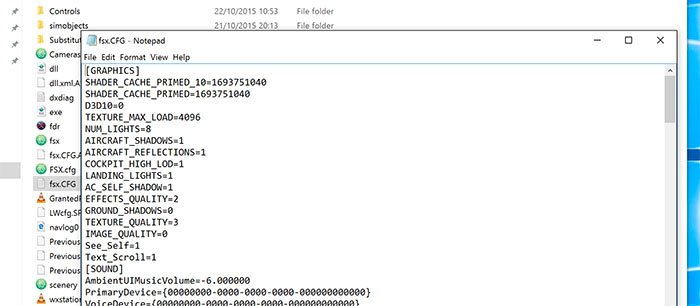
-
The maximum load of textures – If you change a feature called TEXTURE_MAX_LOAD to the value of 4096, you can get full HD textures. Keep in mind that this will dampen the overall performance level if you are not capable of such feats, so make sure that this is a service that you can actually benefit from
-
UPPER_FRAMERATE_LIMIT can be changed, too to make sure that you can get a quality frame rate. Many people will go with 30FPS by the way, as it offers a fine balance. If you find that things like Bufferpools aren’t making the solid performance dent that you hoped for, you can potentially smoothen the performance further by making a change to this setting as well
-
FIBER_FRAME_TIME_FRACTION is another hugely useful tool and can be used to help find a greater balance in your simulator between performance and style. Depending on the number in here – usually starting at 0.33 – you will find that changes up or down can help to make the performance more balanced at the cost of optimal graphical output – if you are not bothered about that, it’s a useful compromise to work with.
Easy to use software for boosting FSX Performance
You can now purchase an FSX performance booster program created by developer FSPS. For more information on this product, with immediate download after purchase, please click here.
 Don't forget... We have a huge selection (over 24,000 files) of free mods and add-ons for MSFS, FSX, P3D & X-Plane in the file library. Files include aircraft, scenery, and utilities All are free-to-download and use - you don't even need to register. Browse on down to the file library here.



25 comments
Leave a ResponseThe content of the comments below are entirely the opinions of the individual posting the comment and do not always reflect the views of Fly Away Simulation. We moderate all comments manually before they are approved.
Newbie. Cannot find FSX standard instructions for: 1. Lowering the sim rate 2. Slew
Either the fps lock is a beneficial rate limiter that improves averages at the expense of peaks or it is a v-sync. If it's the latter, it should be turned off if you have troubling framerates. If it's the former, it should be turned on. It sounds like FS users are not sure which it is.
I am having trouble with video quality. I have gone to the settings tab, and placed everything to the highest settings possible, but when I start the lessons as a beginner, it loads to a default, very low resolution 1024x800, and looks horrible.
I have saved the advanced settings, and loaded it, but it continue to display at this horrible low setting.
My system is more than capable, i7, 32GB ram, 2x 2GB Radeon HD6970 crossfire....from a 240GT SSD harddrive. What is the problem?
Thanks in advance, Anthony
The guide says to turn Filtering and Anti-Aliasing off in game then turn then on in your graphics card settings. Then in the next paragraph it says it is recommended to set your graphics card to application(game) controlled and adjust them in game. So which is it???
The information in the article though recently updated is still outdated. DirectX 10 after Steve's DX10 Scenery fixer isn't something to be kept off, now it's a real breathe of fresh air.
SLOW FSX PROGRAM STARTING
With nearly 200 add-on's (aircraft and helicopters including most of the newer HD top brands) plus large areas of scenery from Orbx, some Aerosoft and Megascenery 2.0 covering the western USA my start up time in FSX Began to reach up to 25 minutes with FXS Boaster! My answer from what I have learned over a long time, set up a default FSX flight at an Orbx standard airport (I use Fairchild, Washington) with a perfect blend of mountains, water ways out the nearby Pacific Ocean and nearby large airports in a FSX Default Cessna 150 (powered off state) and settings from a PC Pilot Magazine #74, Jul-Aug 2011 compliments of Aerosofts' Mathijs Kok, along with recommended setup for Southern Alaska from Orbx and not using FSX Boaster to launch FSX. The happy result of that is a four and half minute startup, high FPS and sights I had not even seen before, the lights are all much better also. Anyway that is my 2 cents on fixing slow FSX startups. Best Regards!
Cant load gps engine, anyone know how to fix this? Regards Mikael.
I found that the easiest way to speed up FSX is to leave it in the box in a closet somewhere. Then I just simply maintain FS2004 on my computer! (:
Excellent article, however, I'm facing a problem that you might be able to help me with.
I am running FSX with the Acceleration Expansion pack and for what ever reason I 1) don't have an "options" menu and 2) there is no setting adjustment to be found that would allow me to adjust my frame rate.
Any thoughts or suggestions will be greatly appreciated.
RAM
Very impresive..............so where is the download so I can install it ???????????
Hello I will try this famous software that you sent me and I'll let you know. thank you.
My fsx.cfg shows no {graphics} header at all.
britvisc...No download, simply type in HIGHMEMFIX=1 inside your fsx.cfg file as described. It works very well. No OOM issues since used a few years ago
I don't know why you say "Although we mentioned above how to install the file" because you didn't refer to installing a 'file anywhere in your report. I dare bet there will be any number of people searching for this 'File' that doesn't exist. You simply alter a line in the cfg with a net result of....nothing that I can see or a lot of other folk too. I'm also having trouble understanding the "'Introducing" bit as this is an old tweak that is pretty poor. But it's easy to do so at least give it a try."
True , this is a fantastic fsx enhancement. The release of the FS Xtreme by FSPS is by far the greatest compilation of fixes for da bugs ive ever seen to this date 2015. The products lines have increased as well as the technical abilities of so many people , business and enthusiasts alike. Its a great time for the simworld, and I cant wait to see where its headed. Im hearing some talk in the back rooms about installing the train simulation into the FSX program. Anyway, great job, give that FS Xtreme a try.
still talking about 64MB cards? my card is 6.4GB...
Excellent article. Great Job!
i think the AI mowing cars on the roads is going to fast 60mils an Our way to fast how do i reduce it
done the whole procedure all 17 of them, but now how do you type highmemfix into that file????
I cant find fsx.cfg file anywhere to use the HIGHMEMFIX=1.......??? I'm using windows 10 I have FSX and SP1 and SP2. I have tried different ways to find the location but without success. can anyone point me in the right direction as it may come up different in W10???
Thanks in advance.
I found the cfg file and have amended it after looking on how to view all hidden files, then ticking and applying that box also. so problem solved!!! lets see if this HIGHMEMFIX=1 works then??? :-)
Dear Ian -
I have enjoyed your articles on flight tuning. I am writing though about 'LimeRock4FSX' , where no real actual fsx.cfg tuning appears to be required, and was wondering if you would like to get in the driver's seat?
In late June, I asked myself, what does FSX have for Lime Rock Race Park? I flew there in a Beach from Sikorsky which is near where I live.
In FSX, there was absolutely nothing there. Having the habit of building things for where ever I go in FSX for the past ten years now, I decided to build Lime Rock and everything that had to go with it. So my wife said let's go visit there and take some pictures !
Frankly, I have never been into games, but a simulation, absolutely. I also prefer the 'photo surreal virtual world' of FSX over my son's racing games when thinking of racing cars -
I reasoned that FSX first being a simulator, I could tailor cars the way I tailor aircraft as well as trains - I could make also really hot cars which also 'now finally have a place to go' !!!
Lime Rock 4 FSX I found Exhilarating while having a low footprint lets say compared to some CityFX package.
With Lime Rock 4 FSX, i discovered a lot of extra FSX horsepower when not needing to eat clouds and land tiles, while coughing on Autogen for my old rig while collapsing from the Blurries.
With Lime Rock 4 FSX, LOD is of no consequence, and focus can be on the immediate virtual world and what you are doing at 190 MPH without OOM or FPS issues.
There is also no boat traffic per se, cars can be set low, and you simply do not have the time to look for aircraft - well, that is if you visit as perhaps like some HAL like a spectator in multiuser?
I hope you get in the driver's seat of many of the fine hot cars in the photo surreal world of LimeRock4FSX, and perhaps your teammates would be interested in joining you in multi-user mode -
Its totally free -
Best Regards,
Orion K. Daley
Thank you for this valuable information. I wonder what it will take to fix the issue of FSX freezing in mid-flight after a while. (Varies between a few minutes and close to an hour.) I have Windows Vista Home Premium with an adequate 3GB equipped HP desktop with an NVIDIA GeForce 8500 GT video processor. From the research I've done, I'm doubting VERY much that replacing, deleting and/or moving the uiautomationcore.dll would help. My FSX installation has had this problem from the get-go, but after three years without use [and many Microsoft auto-updates later], this has turned from an annoyance, to a show stopper. Appreciate any ideas out there...
Why does my aircraft suddenly get TOO large when on the runway or in flight once I use my sim for a long time.It is too big on the Spot and Locked spot mode. Once I quit the SIM and restart it later, it is fine. In other words, the aircraft is 5 times it's original size. I am using the Microsoft flight simulator X Deluxe software. Windows 8.1 64 bit, dual core2.5 Mhz processor, 8Gb RAM Decent GPU. Thank you.
This is my introduction to this site. I have a couple of, what are probably, simple problems.
Interesting eh?? If someone could show me that way to overcome these difficulties it would be appreciated. Thanks again. Jim.