

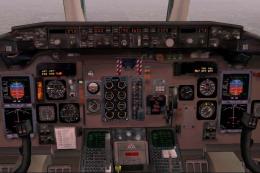
 FS2004 Civil Jet Aircraft
McDonnell Douglas MD-81/MD-82 Fix
Final fix for the panel replacement virtual cockpit textures and gauges (AAMD…
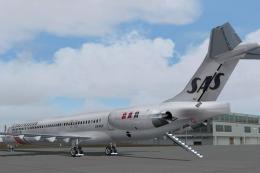
SAS McDonnell Douglas MD-82 repaint brings registration LN-RLR to life with crisp 32-bit textures, accurate logos, and photoreal-inspired markings drawn from real-world references, plus matching flight deck imagery for added immersion in Microsoft Flight Simulator 2004. Optimized DXT3 textures avoid mips for sharp visuals and requires the SGA MD-83 freeware base model.
 Rate
Rate
This high-fidelity repaint, created for Microsoft Flight Simulator 2004 enthusiasts, offers an authentic SAS (Scandinavian Airlines) livery for the McDonnell Douglas MD-80 family. It showcases detailed 32-bit textures on registration LN-RLR, with clean lines and accurate markings that emulate the real-world aircraft closely. The foundation for this repaint is the freeware base model by SGA, which must be present in your simulator installation before use.
Scandinavian Airlines, widely recognized for its regional and long-haul operations, employed the MD-80 series extensively across European routes. This particular texture set reflects the airline’s standard paint scheme, bringing correct placement of logos and precise branding to flight decks worldwide. The repaint is built on SGA’s MD-83 platform, showcasing an MD-82 variant with identical exterior structures. It has been optimized in DXT3 format (without mips) to balance performance and visual clarity.
The cockpit depiction features a photo by Carl H. R. Haugen, providing an interior texture that aligns closely with the real MD-80 flight deck color scheme. It further refines immersion by showcasing distinct shapes and instrumentation shading.
texture.sas or something similar.aircraft.cfg, add the appropriate [flightsim.x] entry, adjusting the numerical sequence to match your existing fleet.Once installed, you can load the SAS repaint in your simulator’s aircraft selection menu and enjoy the thorough attention to detail during taxi, climb, and cruise.
This repaint was assembled by Asbjorn Hansen, drawing on photoreal references for precise alignment and color matching. The cockpit image is courtesy of Carl H. R. Haugen, used with permission. Because these enhancements are textures only, please confirm that you already have the SGA_MD83.ZIP base package in your simulator. Neither the author nor SGA can be held responsible for any issues arising from these files, though they have been rigorously tested without complications.
Enjoy flying under the Scandinavian sun or through Nordic weather patterns with this detailed SAS repaint. Happy flying!
Free for all simmers · 3.37 MB · Scanned clean Oct 2026
Download speed: Free tier is capped at 0.5 Mbps. PRO members download at full line speed.
This file is a repaint — the package below is the base model it paints onto. Install it first, or the textures will have nothing to load onto.
FS9\Aircraft\, FS9\Addon Scenery\, FS9\Gauges\, or FS9\Effects\.readme.txt or README file. It tells you exactly where files go, what dependencies are needed, and any quirks specific to this add-on.The archive sas_md82.zip has 13 files and directories contained within it.
This list displays the first 500 files in the package. If the package has more, you will need to download it to view them.
| Filename/Directory | File Date | File Size |
|---|---|---|
| readme.txt | 12.10.03 | 1.39 kB |
| Dc9_b_t.bmp | 12.18.03 | 4.00 MB |
| DC9xINTERIOR_L.BMP | 11.16.03 | 1.33 MB |
| DC9xINTERIOR_T.BMP | 12.09.03 | 1.00 MB |
| ENGINES_L.BMP | 12.10.03 | 1.00 MB |
| ENGINES_T.bmp | 12.18.03 | 4.00 MB |
| Md83_a_L.bmp | 12.16.03 | 4.00 MB |
| Md83_a_t.bmp | 12.18.03 | 4.00 MB |
| Md83_b_L.bmp | 12.16.03 | 4.00 MB |
| Md83_b_t.bmp | 12.18.03 | 4.00 MB |
| DC9_B_L.BMP | 12.02.03 | 256.07 kB |
| flyawaysimulation.txt | 10.29.13 | 959 B |
| Go to Fly Away Simulation.url | 01.22.16 | 52 B |
Only PRO members can place votes.
More FS2004 add-ons hand-picked based on this download.
FS2004 Civil Jet Aircraft
Final fix for the panel replacement virtual cockpit textures and gauges (AAMD…
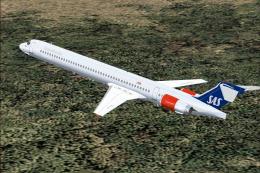 FS2004 Civil Jet Aircraft
Textures only; requires SMD90.ZIP. Model by Mike Stone. Scandinavian Airlines…
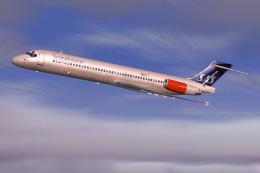 FS2004 Civil Jet Aircraft
Model by SGA. Scandinavian Airlines livery by Daniel Halpern. Screenshot of S…
 FS2004 Civil Jet Aircraft
This package offers a freshly detailed Scandinavian Airlines repaint for the …
 FS2004 Civil Jet Aircraft
Feature full animation, lighting effects and reflective textures. Also includ…
 FS2004 Civil Jet Aircraft
This freeware repaint for Microsoft Flight Simulator 2004 offers a detailed r…
 FS2004 Civil Jet Aircraft
Meridiana McDonnell Douglas MD-82, registration EI-CRW. Textures only for the…
 FS2004 Civil Jet Aircraft
This repaint package for Microsoft Flight Simulator 2004 presents an Alitalia…
Be the first to leave a comment on this download.
Be the first to share your thoughts on this download.