


FS2004 AFCAD2 File For RJTA
NAF Atsugi (RJTA) comes to life with an AFCAD2 layout built from aerial-photo analysis, refining runways, taxiways, and parking to match real-world geometry. Distinct parking areas and updated airport data improve traffic flow and ground operations in FS2004, delivering a more believable ramp environment for both military and civilian activity.
- File: rjta211.zip
- Size:25 KB
- Scan:
Clean (11d)

- Access:Freeware
- Content:Everyone

 Description
 Comments
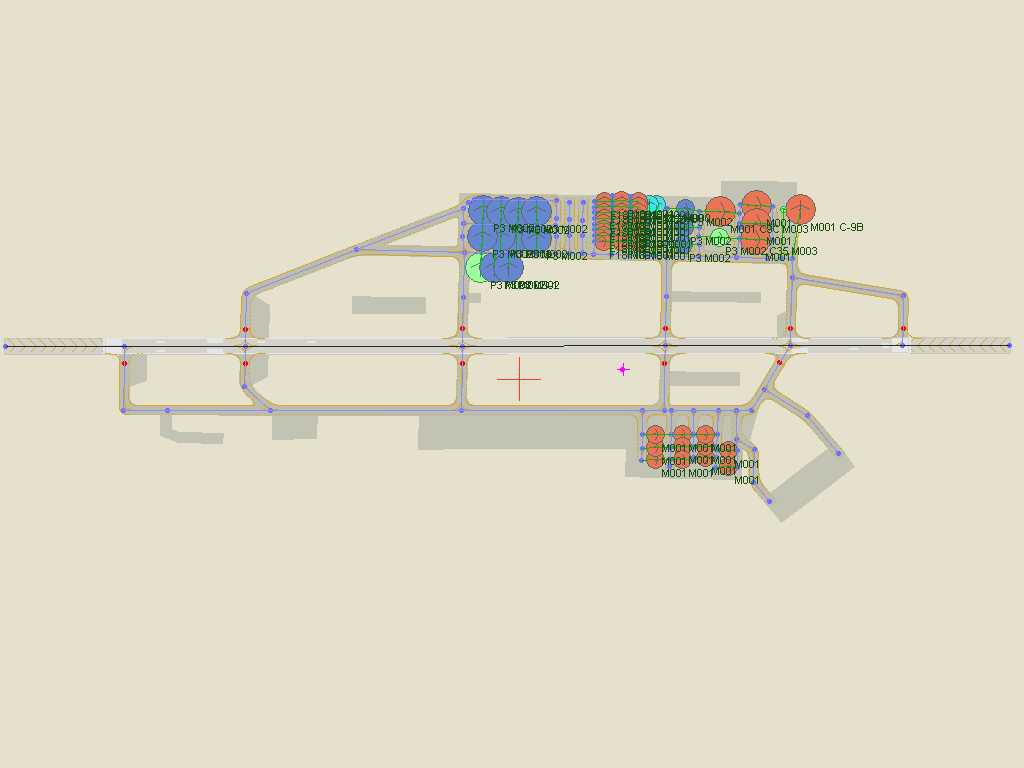
 NAF Atsugi, Japan. Based on an aerial photograph. By Hiroaki Kubota.
Overview of Naval Air Facility, Atsugi.
Installation:
FS9/AddonScenery/Scenery/AF2_RJTA.bgl
I analyzed from the aerial photograph and created newly by V2.11. Since each parking area is distinguished, it is more real.
Images & Screenshots

The archive rjta211.zip has 5 files and directories contained within it.
File Contents
This list displays the first 500 files in the package. If the package has more, you will need to download it to view them.
| Filename/Directory | File Date | File Size |
|---|---|---|
| AF2_RJTA.bgl | 11.30.03 | 12.01 kB |
| rjtaafcad211.jpg | 11.30.03 | 23.96 kB |
| ReadMe.txt | 11.30.03 | 776 B |
| flyawaysimulation.txt | 10.29.13 | 959 B |
| Go to Fly Away Simulation.url | 01.22.16 | 52 B |

Installation Instructions
Most of the freeware add-on aircraft and scenery packages in our file library come with easy installation instructions which you can read above in the file description. For further installation help, please see our Flight School for our full range of tutorials or view the README file contained within the download. If in doubt, you may also ask a question or view existing answers in our dedicated Q&A forum.

0 comments
Leave a Response