

 FS2004 AFCAD Files
Orly LFPO AFCAD2 V2
Orly LFPO AFCAD2 for Orly2004 Scenery, France. A total of 108 gates are avail…
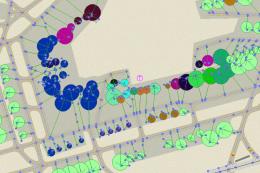
LFPO Paris Orly gets a tighter, more realistic airport layout for FS2004 default scenery, with 107 gates and fully lit centerlines and stop lines for night operations. Added hold-short lighting, holding bays, a helicopter area, refined tower viewpoint, and crossed-wind runway logic, with optional airline-assigned or unassigned gate files.
 Rate
Rate
For FS2004 default scenery, France. A total of 107 gates are available. All gates have their centerlines and stop lines lighted at night. Other features are included such as hold shorts lights, holding bay, helicopter area and realistic tower view point. The "crossed wind technic" is also applied. AFCAD settings are applied to match up takeoff/landing reality as much as possible. There are two AFCAD files, one with unassigned gates and the other one with assigned gates for airlines. By Xavier Ossedat.
There are two AFCADs. One has assigned gates for airlines and not the other one. The one with assigned gates is the "ORY-FS9-PKG.BGL". The one with unassigned gates is "ORY-FS9-NO_PKG.BGL". All particularities described below are the same for both files. According to what you want, you have to install one *or* the other.
Unzip one "bgl" file inside "Your FS9 directory\Addon Scenery\scenery" and that's all. If you have another Orly (LFPO) AFCAD in this folder (or another FS9 one) you should rename it ".bak" or put it outside FS9. This is important because several AFCAD for a single airport may create problems. Re-start FS9 if already launched. If you want to go back to another AFCAD, simply delete mine or put it outside FS9.
I might repeat myself but please, do not install my two AFCADs but only one of them.
Free for all simmers · 57.59 KB · Scanned clean Oct 2026
Download speed: Free tier is capped at 0.5 Mbps. PRO members download at full line speed.
FS9\Aircraft\, FS9\Addon Scenery\, FS9\Gauges\, or FS9\Effects\.readme.txt or README file. It tells you exactly where files go, what dependencies are needed, and any quirks specific to this add-on.The archive ory05_fs.zip has 6 files and directories contained within it.
This list displays the first 500 files in the package. If the package has more, you will need to download it to view them.
| Filename/Directory | File Date | File Size |
|---|---|---|
| ORY-FS9-NO_PKG.bgl | 01.09.05 | 46.45 kB |
| ORY-FS9-PKG.BGL | 01.09.05 | 48.42 kB |
| ReadMe.txt | 01.09.05 | 10.58 kB |
| LisezMoi.txt | 01.09.05 | 12.01 kB |
| flyawaysimulation.txt | 10.29.13 | 959 B |
| Go to Fly Away Simulation.url | 01.22.16 | 52 B |
Only PRO members can place votes.
More FS2004 add-ons hand-picked based on this download.
FS2004 AFCAD Files
Orly LFPO AFCAD2 for Orly2004 Scenery, France. A total of 108 gates are avail…
 FS2004 AFCAD Files
Orly Airport (LFPO), Paris, France. Intended for use with FSFrance Orly 2004 …
 FS2004 AFCAD Files
LFPG Paris CDG, France, for FsFrance RealCDG v3.1 scenery. 271 gates are avai…
 FS2004 AFCAD Files
268 gates are available. Features aprons, blue center line lights and stop li…
FS2004 AFCAD Files
Paris Le Bourget, France (LFPB). For every aviation enthusiast, this classic …
 FS2004 AFCAD Files
Frankfurt/Main Airport, Germany, for use with AMEDDF11.ZIP. Should solve most…
FS2004 AFCAD Files
Includes most airports in Italy: LIRF (Rome, Fiumicino) LIMC (Milan, Malpensa…
FS2004 AFCAD Files
Files included are for Eleftherios Venizelos International Airport, Athens (L…
Be the first to leave a comment on this download.
Be the first to share your thoughts on this download.