

 FS2004 Utilities/Misc
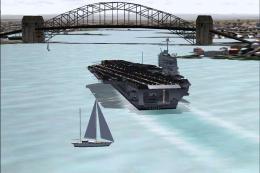
Sailable Nimitz Class Aircraft Carrier
that you can now sail/fly anywhere you like, comes with basic 2D Panel. Made …
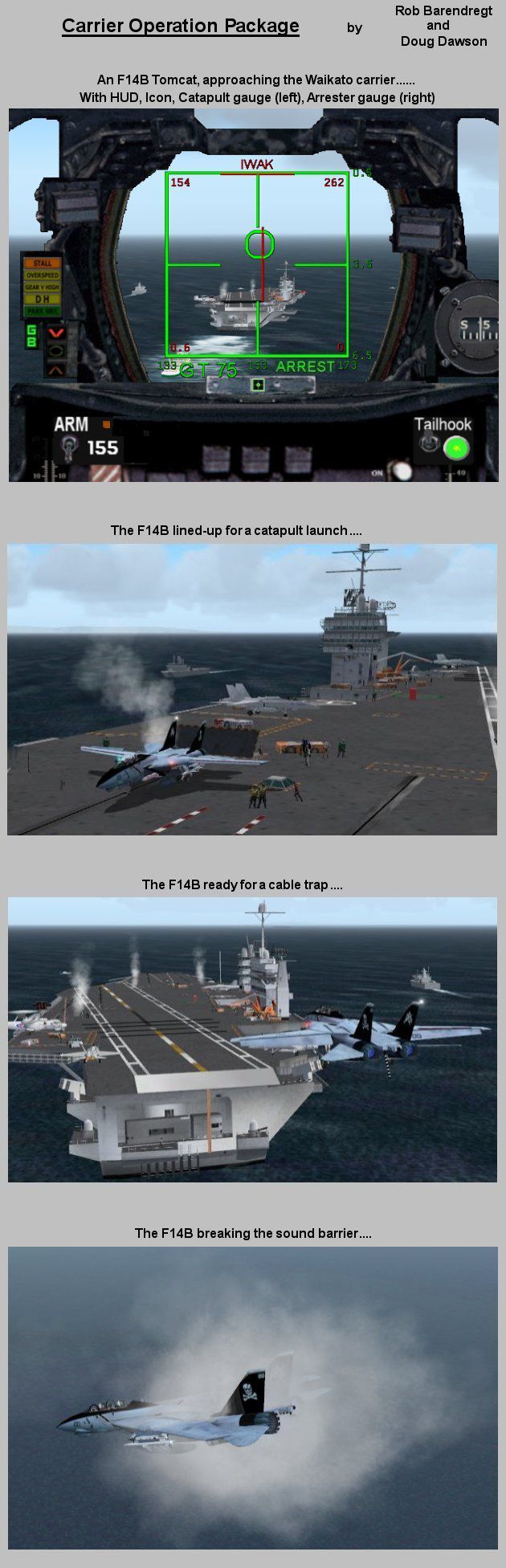
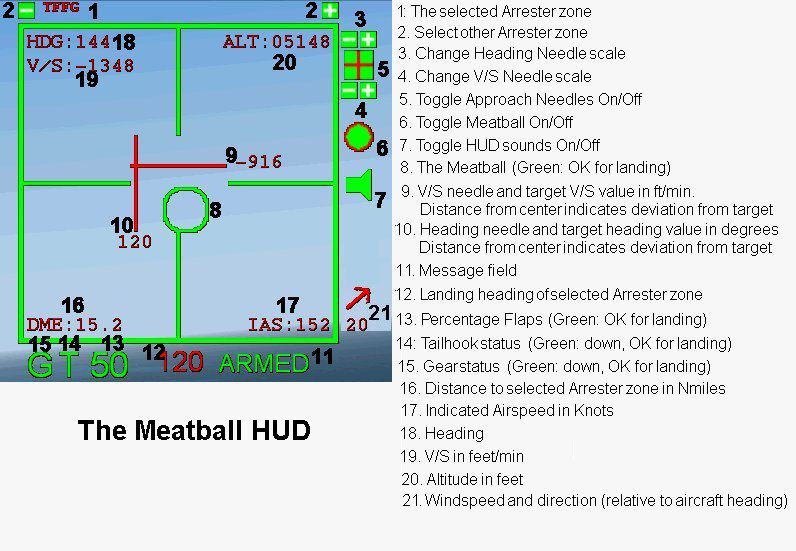
Carrier Operation Package equips military aircraft in FS2004 with catapult launches, arrester-wire traps, and a meatball HUD for precise carrier approaches, plus a sonic boom effect with visual and sound control. Version 2.0 expands catapult and arrester zones and refreshes the HUD, backed by detailed usage notes and aircraft examples.
 Rate
Rate
Free for all simmers · 1.45 MB · Scanned clean Aug 2026
Download speed: Free tier is capped at 0.5 Mbps. PRO members download at full line speed.
FS9\Aircraft\, FS9\Addon Scenery\, FS9\Gauges\, or FS9\Effects\.readme.txt or README file. It tells you exactly where files go, what dependencies are needed, and any quirks specific to this add-on.The archive rcbco-20.zip has 65 files and directories contained within it.
This list displays the first 500 files in the package. If the package has more, you will need to download it to view them.
| Filename/Directory | File Date | File Size |
|---|---|---|
| Scenery | 01.03.05 | 0 B |
| COP_TFFG.bgl | 11.23.04 | 525 B |
| Texture | 01.03.05 | 0 B |
| Arrester.bmp | 11.23.04 | 65.05 kB |
| Catapult.bmp | 11.23.04 | 65.05 kB |
| fx_RCB_machenvlop.fx | 12.30.03 | 41.42 kB |
| COP_config.gau | 12.11.04 | 56.00 kB |
| COP_Sound.gau | 01.03.05 | 76.00 kB |
| dsd_arrester.gau | 12.28.04 | 104.00 kB |
| dsd_arrester_zones.ini | 01.03.05 | 1.04 kB |
| dsd_carrier_zones.gau | 12.14.04 | 88.00 kB |
| dsd_catapult.gau | 11.22.04 | 100.00 kB |
| dsd_catapult_zones.ini | 01.03.05 | 2.08 kB |
| rcb-miljet | 01.03.05 | 0 B |
| Ball.xml | 12.28.04 | 18.00 kB |
| BallBackground.bmp | 12.13.04 | 28.24 kB |
| BallGreen.bmp | 12.13.04 | 566 B |
| BallHorizontalNeedle.bmp | 12.13.04 | 182 B |
| BallInactive.bmp | 12.18.04 | 566 B |
| BallNeedlesOff.bmp | 12.16.04 | 622 B |
| BallNeedlesOn.bmp | 12.16.04 | 622 B |
| BallOff.bmp | 12.16.04 | 382 B |
| BallOn.bmp | 12.16.04 | 382 B |
| BallRed.bmp | 12.13.04 | 566 B |
| BallSoundOff.bmp | 12.16.04 | 382 B |
| BallSoundOn.bmp | 12.16.04 | 382 B |
| BallVerticalNeedle.bmp | 12.13.04 | 358 B |
| BallWindArrow.bmp | 12.19.04 | 262 B |
| CatLaunch.xml | 11.29.04 | 1.58 kB |
| COP_Config.ini | 12.26.04 | 1.72 kB |
| COP_Sound.ini | 11.28.04 | 559 B |
| Documentation COP V2.0 | 01.03.05 | 0 B |
| Adding Catapult or Arrester zones.txt | 12.29.04 | 4.28 kB |
| Changing configuration parameters.txt | 12.21.04 | 3.80 kB |
| FILE_ID.DIZ | 12.24.04 | 882 B |
| HUD overview.jpg | 12.19.04 | 107.61 kB |
| Installation examples.txt | 01.03.05 | 13.36 kB |
| rcbco-20-overview.jpg | 12.18.04 | 176.57 kB |
| rcbco-20.gif | 12.20.04 | 12.15 kB |
| README rcbco-20.txt | 01.03.05 | 28.58 kB |
| Upgrade COP V1.1 to V2.0.txt | 12.30.04 | 4.71 kB |
| Icon_Ball.bmp | 12.06.03 | 1.42 kB |
| Icon_Ball.xml | 12.06.03 | 515 B |
| Icon_Ball_F16KO.xml | 02.07.04 | 1.53 kB |
| Icon_Ball_FA18E.xml | 12.21.04 | 833 B |
| PositionDisplay.xml | 12.16.04 | 2.95 kB |
| PositionDisplayGreen.bmp | 11.29.04 | 6.99 kB |
| PositionDisplayRed.bmp | 11.29.04 | 6.99 kB |
| SonicBoomControl.xml | 11.30.04 | 1.29 kB |
| SpoilersFollowTailhook.xml | 02.07.04 | 989 B |
| FSUIPC.dll | 12.18.04 | 210.32 kB |
| COP | 01.03.05 | 0 B |
| Armed.wav | 11.28.04 | 14.80 kB |
| Countdown.wav | 11.29.04 | 61.12 kB |
| Flaps.wav | 11.29.04 | 28.17 kB |
| Gear.wav | 11.29.04 | 26.50 kB |
| Glideslope.wav | 11.29.04 | 30.95 kB |
| Localiser.wav | 11.29.04 | 33.34 kB |
| SonicBoom.wav | 01.26.04 | 151.62 kB |
| WaveOff.wav | 11.28.04 | 29.41 kB |
| dsd_cable_catch.wav | 01.26.04 | 148.15 kB |
| dsd_cable_rewind.wav | 01.26.04 | 238.41 kB |
| dsd_catapult_launch.wav | 01.26.04 | 212.46 kB |
| flyawaysimulation.txt | 10.29.13 | 959 B |
| Go to Fly Away Simulation.url | 01.22.16 | 52 B |
Only PRO members can place votes.
More FS2004 add-ons hand-picked based on this download.
FS2004 Utilities/Misc
that you can now sail/fly anywhere you like, comes with basic 2D Panel. Made …
 FS2004 Utilities/Misc
3wire Aircraft Carrier Simulator v2. 3wire is an aircraft carrier simulation …
 FS2004 Utilities/Misc
The Nasa Space Challenge is an extremly enjoyable experience for simulating N…
 FS2004 Utilities/Misc
You could have seen these extra-terrestrial ships from the movie "Independenc…
 FS2004 Utilities/Misc
Finally, after god-knows-how-long, the 2002 Enzo Ferrari Package is now relea…
 FS2004 Utilities/Misc
FS2004 Alternative Nav Lights. An additional alternative set of aircraft navi…
 FS2004 Utilities/Misc
04ScenPk.Zip A fully self-contained package for placing FS2004 default librar…
 FS2004 Utilities/Misc
A long time ago in a galaxy far, far away... The Star Wars T-65AC4 X-Wing. Un…
Read what other simmers think, or add your own.

Seems to have a good selection of gadgets for putting together a good cop panel.
One thing I did not like is the documentation was buried three directories, "Gauges/rcb-miljet/Documentation COP V2.0" deep in the zip file instead of being the first thing you see. Egg hunts are not my thing. I was about ready to heave it until I decided to look at every directory.
That said, it isn't a bad package.