

 FSX Civil Aircraft
Airbus A340-500 Arik Air
This complete freeware aircraft package integrates the long-haul Airbus A340-…
Arik Air’s Airbus A330-200 livery comes to life with crisp, accurate textures tailored to the Pratt & Whitney-powered CLS model, capturing the airline’s bold red-and-blue scheme across fuselage, wings, and engine details for convincing long-haul operations. Designed for Microsoft Flight Simulator X and usable in FS2004, requires the CLS Airbus A330-200 payware package.
 Rate
Rate
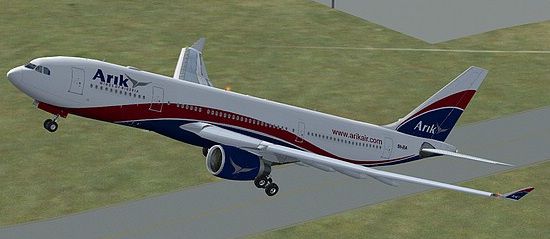
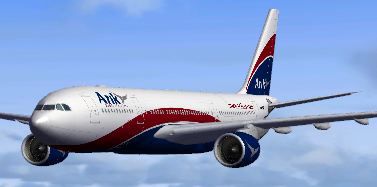
This freeware repaint adds Arik Air’s distinctive Airbus A330-200 livery to the payware Commercial Level Simulations (CLS) model, originally designed for Microsoft Flight Simulator X and also usable in Microsoft Flight Simulator 2004. The textures, crafted by developer Sebastian Szucs, depict the Pratt & Whitney-powered variant of the A330, a twin-engine widebody well-known for its intercontinental range. Arik Air is a major Nigerian carrier that operates multiple domestic and international routes, and this rendition captures the airline’s color scheme in precise detail. This package only includes the repaint files and requires the CLS Airbus A330-200 product (purchased separately) for proper functionality.
The Airbus A330-200 is recognized for its balanced trade-off between capacity and range. In reality, it often relies on powerplants like the Pratt & Whitney PW4000 series, ensuring reliable performance throughout medium- to long-haul flights. This simulated version retains that attention to authenticity by matching the external engine details to the CLS A330-200 PW base model. Both the wings and fuselage textures have been adjusted to integrate seamlessly with Arik Air’s modern paint scheme. The real-world carrier’s bold red-and-blue stripes stand out against the fuselage, reflecting the airline’s brand identity and its hub at Murtala Muhammed International Airport in Lagos.
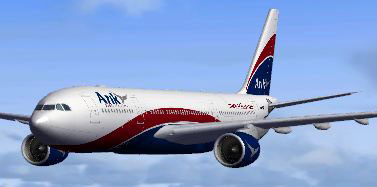
Arik Air Airbus A330-200 in flight.
Below is the suggested entry for your aircraft.cfg file. Adjust the [fltsim.XX] value according to your existing fleet listings:
[fltsim.XX]

productfolder=A330-200-PW

title=Airbus A330-200 Arik Air

sim=CLS-A330-200-PW

model=pw

panel=pw

sound=

texture=arik

kb_checklists=CLS-A330_check

kb_reference=CLS-A330_ref

atc_airline=ARIK

atc_flight_number=

atc_heavy=1

atc_id=5N-EIA

atc_parking_types=GATE, RAMP, CARGO

atc_parking_code=

ui_typerole="Commercial Airliner"

ui_createdby="Commercial Level Simulations"

ui_manufacturer=Airbus

ui_type=A330-200

ui_variation=Arik Air

description=Commercial Level Simulations\nAirbus 330-200\nVersion - 2006.9.0-FSX\n\nFSX and FS2004 Compatible\n\nEngine Types: RR / GE / PW
aircraft.cfg under the appropriate [fltsim.X] segment.[fltsim.XX]” with the correct sequence number so the repaint appears in your aircraft selection.Once the steps are complete, the Airbus A330-200 sporting Arik Air colors should become available in your aircraft library. If you are unfamiliar with mod installation, ensure you have properly installed the CLS A330-200 base product, as this repaint solely supplies textures and is dependent on that payware model.
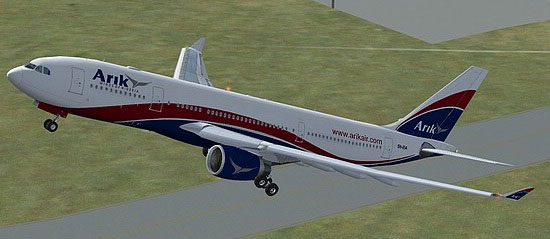
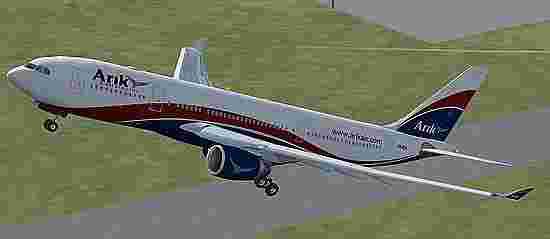
Arik Air Airbus A330-200 taking off.
All repaint content remains the property of Sebastian Szucs, while the original aircraft model is credited to Commercial Level Simulations. The level of detail in the textures showcases authentic transitions between Arik Air’s livery stripes and the A330’s fuselage curves, creating an immersive experience during every stage of flight.
Enjoy your flights!
Free for all simmers · 17.05 MB · Scanned clean Oct 2026
Download speed: Free tier is capped at 0.5 Mbps (this file takes approximately 5 mins at the cap). PRO members download at full line speed.
texture.{airline}) inside FSX\SimObjects\Airplanes\{base-aircraft}\.aircraft.cfg in Notepad. Add a new [fltsim.X] section per the readme.readme.txt or README file. It tells you exactly where files go, what dependencies are needed, and any quirks specific to this add-on.The archive a332_pw_cls_arik.zip has 54 files and directories contained within it.
This list displays the first 500 files in the package. If the package has more, you will need to download it to view them.
| Filename/Directory | File Date | File Size |
|---|---|---|
| a333v2_l.bmp | 02.27.07 | 1.00 MB |
| a333v2_t.bmp | 02.06.08 | 341.43 kB |
| a333v2door_l.bmp | 02.27.07 | 1.00 MB |
| a333v2door_t.bmp | 02.27.07 | 1.00 MB |
| cls_a330vcM_l.bmp | 11.19.07 | 1.33 MB |
| cls_a330vcM_t.bmp | 11.18.07 | 5.33 MB |
| cls_a330vcOHM_l.bmp | 10.21.07 | 1.00 MB |
| cls_a330vcOHM_t.bmp | 10.14.07 | 5.33 MB |
| cls_a330vcP1_l.bmp | 07.09.07 | 4.00 MB |
| cls_a330vcP1_t.bmp | 10.13.07 | 5.33 MB |
| cls_a330vcP2_l.bmp | 10.15.07 | 1.33 MB |
| cls_a330vcP2_t.bmp | 10.15.07 | 1.33 MB |
| cls_a330vcP3_l.bmp | 07.09.07 | 4.00 MB |
| cls_a330vcP3_t.bmp | 07.06.07 | 5.33 MB |
| cls_a330vcP4_l.bmp | 11.19.07 | 1.33 MB |
| cls_a330vcP4_t.bmp | 11.19.07 | 5.33 MB |
| cls_a330vcR_l.bmp | 10.21.07 | 1.00 MB |
| cls_a330vcR_t.bmp | 10.14.07 | 5.33 MB |
| cls_a340vcOHM_l.bmp | 08.16.07 | 1.33 MB |
| cls_a340vcOHM_t.bmp | 08.16.07 | 5.33 MB |
| cls_stairs_l.bmp | 07.09.07 | 16.07 kB |
| cls_stairs_t.bmp | 03.12.07 | 256.07 kB |
| CLSa330_gau_l.bmp | 11.19.07 | 1.33 MB |
| CLSFMC_l.bmp | 11.19.07 | 1.33 MB |
| CLSpush_l.bmp | 07.09.07 | 1.00 MB |
| CLSpush_t.bmp | 07.09.07 | 1.00 MB |
| fuse1and2200l_l.bmp | 05.21.07 | 4.00 MB |
| fuse1and2200l_t.bmp | 02.25.11 | 4.00 MB |
| fuse1and2200r_l.bmp | 05.21.07 | 4.00 MB |
| fuse1and2200r_t.bmp | 02.25.11 | 4.00 MB |
| fusetail200r_l.bmp | 05.21.07 | 4.00 MB |
| fusetail200r_t.bmp | 02.25.11 | 4.00 MB |
| ltwing_l.bmp | 07.09.07 | 1.00 MB |
| ltwing_t.bmp | 04.25.07 | 4.00 MB |
| pwengmisc_l.bmp | 07.17.07 | 1.00 MB |
| pwengmisc_t.bmp | 02.25.11 | 4.00 MB |
| rtwing_l.bmp | 07.09.07 | 1.00 MB |
| rtwing_t.bmp | 04.25.07 | 4.00 MB |
| satcom.bmp | 07.17.07 | 16.07 kB |
| satcom_l.bmp | 06.30.07 | 1.00 MB |
| thumbnail.JPG | 02.26.11 | 18.00 kB |
| vcbutton_l.bmp | 07.09.07 | 1.00 MB |
| vcbutton_t.bmp | 10.14.07 | 341.43 kB |
| vcceil_l.bmp | 10.15.07 | 1.33 MB |
| vcceil_t.bmp | 10.15.07 | 5.33 MB |
| VCswitches_t.bmp | 08.25.07 | 85.43 kB |
| FILE_ID.diz | 03.10.11 | 56 B |
| installerinfo.txt | 03.10.11 | 600 B |
| Readme.txt | 03.10.11 | 313 B |
| Compressed_0030.jpg | 03.10.11 | 208.02 kB |
| Compressed_0015.jpg | 03.10.11 | 45.46 kB |
| Compressed_0091.jpg | 03.10.11 | 8.57 kB |
| flyawaysimulation.txt | 10.29.13 | 959 B |
| Go to Fly Away Simulation.url | 01.22.16 | 52 B |
Only PRO members can place votes.
More FSX & P3D add-ons hand-picked based on this download.
FSX Civil Aircraft
This complete freeware aircraft package integrates the long-haul Airbus A340-…
 FSX Civil Aircraft
Airbus NEO livery for the payware Blackbox Simulations A330 Prologue. This is…
 FSX Civil Aircraft
Air Caraibes Airbus A330-200. A repaint of Tom Ruth's A330-200. Textures only…
 FSX Civil Aircraft
Air France Airbus A330-200 (new livery). Textures only for Thomas Ruth's A330…
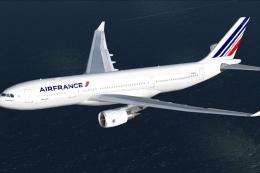 FSX Civil Aircraft
This freeware Airbus A330-200 repaint showcases the modern Air France color s…
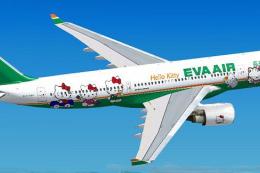 FSX Civil Aircraft
EVA Air Airbus A330-200 "Hello Kitty". Textures only for the Thomas Ruth mode…
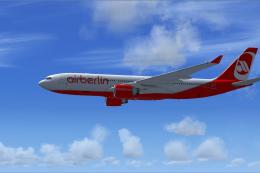 FSX Civil Aircraft
Air Berlin Airbus A330-200. An Air Berlin repaint for the Thomas Ruth A330-20…
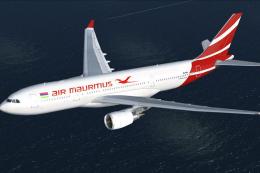 FSX Civil Aircraft
This free repaint offers a fresh take on the iconic Airbus A330-200 as operat…
Be the first to leave a comment on this download.
Be the first to share your thoughts on this download.