

 FSX Civil Aircraft
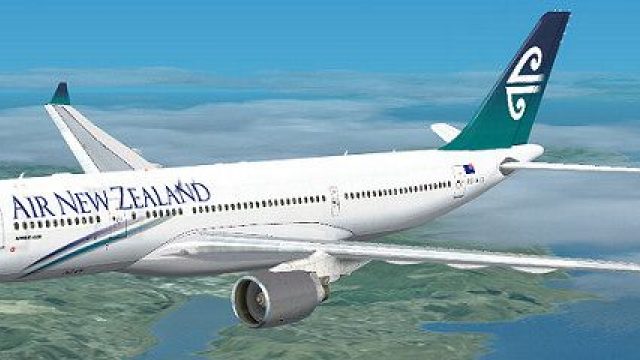
Air New Zealand Airbud A340-200, registration ZK-A34
FSX Air New Zealand Airbud A340-200, registration ZK-A34. Textures only; requ…
Air New Zealand’s Airbus A330-200 ZK-A33 comes to life with a crisp, accurately placed repaint that captures the carrier’s signature branding across fuselage, tail, and wings, delivering a convincing look for long-haul routes in Microsoft Flight Simulator X. Requires the freeware Thomas Ruth A330-200 base model for full use.
 Rate
Rate
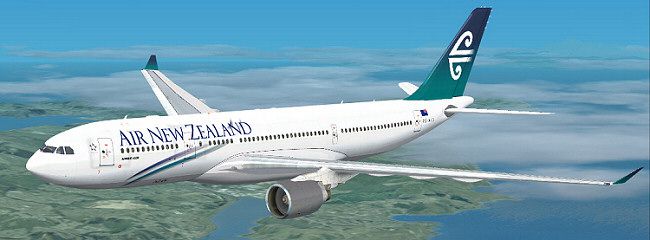
Immerse yourself in an accurately rendered Air New Zealand Airbus A330-200 livery for Microsoft Flight Simulator X, featuring registration ZK-A33. This repaint by Jon Murchison has been carefully handcrafted to reflect the unique Air New Zealand branding across the fuselage, tail, and wing surfaces, seamlessly blending with the base model created by Thomas Ruth. The resulting visual fidelity captures the airline’s recognizable artwork while providing a smooth, realistic flight experience.
The Airbus A330-200 is a wide-body, twin-engine platform recognized for its cost-efficient medium-to-long-haul operations. It typically offers a balanced range-to-payload ratio, combining modern avionics with advanced aerodynamic design. Air New Zealand, the nation’s flag carrier, has long been associated with innovative services and a distinctive aesthetic, making this repaint a perfect match for those eager to replicate authentic transoceanic itineraries in their virtual environment.
Texture.AIRNZ into your aircraft folder, typically found at ...SimObjectsAirplanesTom_A330-200.aircraft.cfg file in a text editor. Append the block below, ensuring the [fltsim.X] entry number follows your existing sequence:[fltsim.X] title=Air New Zealand A330-200 sim=TomA332 model=PW panel= sound= texture=AIRNZ kb_checklists= kb_reference= atc_id=ZK-A33 atc_airline=Air New Zealand atc_flight_number=1124 atc_heavy=1 ui_manufacturer=Airbus ui_type="A330-200" ui_variation="Air New Zealand" description=
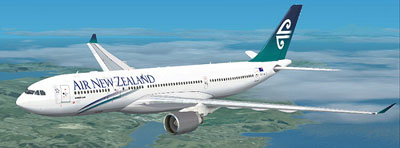
This repaint is exclusively tailored for Microsoft Flight Simulator X and relies on the freeware Thomas Ruth A330-200 base package for optimal functionality. It does not include the core model, so acquiring the original files is essential before adding these textures. Aircraft performance characteristics and flight dynamics still derive from the freeware base model, guaranteeing an authentic handling profile aligned with typical Airbus systems. Through careful attention to detail, the combined repaint package aims to deliver a satisfying Air New Zealand experience for long-haul enthusiasts.
Free for all simmers · 2.01 MB · Scanned clean Oct 2026
Download speed: Free tier is capped at 0.5 Mbps. PRO members download at full line speed.
This file is a repaint — the package below is the base model it paints onto. Install it first, or the textures will have nothing to load onto.
texture.{airline}) inside FSX\SimObjects\Airplanes\{base-aircraft}\.aircraft.cfg in Notepad. Add a new [fltsim.X] section per the readme.readme.txt or README file. It tells you exactly where files go, what dependencies are needed, and any quirks specific to this add-on.The archive airnz-1.zip has 25 files and directories contained within it.
This list displays the first 500 files in the package. If the package has more, you will need to download it to view them.
| Filename/Directory | File Date | File Size |
|---|---|---|
| AIRNZ.jpg | 03.17.09 | 50.07 kB |
| README _INSTALL.txt | 03.17.09 | 1.37 kB |
| A321_1_L.dds | 03.12.09 | 1.00 MB |
| A321_2_L.dds | 03.12.09 | 256.12 kB |
| A330_VC01.dds | 03.12.09 | 1.00 MB |
| A330_VC01L.dds | 03.12.09 | 1.00 MB |
| Airbus_A321_1_L.dds | 03.12.09 | 1.00 MB |
| Airbus_A321_2_L.dds | 03.12.09 | 1.00 MB |
| Airbus_A321_3_L.dds | 03.12.09 | 4.12 kB |
| Airbus_A321_4_L.dds | 03.12.09 | 1.00 MB |
| glass.dds | 03.12.09 | 64.12 kB |
| glass_spec.dds | 03.12.09 | 4.12 kB |
| main.dds | 03.13.09 | 4.00 MB |
| main_bump.dds | 03.12.09 | 4.00 MB |
| main_light.dds | 03.12.09 | 1.00 MB |
| main_spec.dds | 03.12.09 | 64.12 kB |
| texture.cfg | 03.12.09 | 165 B |
| thumbnail.jpg | 03.14.09 | 8.22 kB |
| VCblend.dds | 03.12.09 | 1.12 kB |
| wing_bump.dds | 03.12.09 | 1.00 MB |
| wing_l.dds | 03.13.09 | 1.00 MB |
| wing_r.dds | 03.13.09 | 1.00 MB |
| wing_spec.dds | 03.12.09 | 64.12 kB |
| flyawaysimulation.txt | 10.29.13 | 959 B |
| Go to Fly Away Simulation.url | 01.22.16 | 52 B |
Only PRO members can place votes.
More FSX & P3D add-ons hand-picked based on this download.
FSX Civil Aircraft
FSX Air New Zealand Airbud A340-200, registration ZK-A34. Textures only; requ…
 FSX Civil Aircraft
FSX Air New Zealand Airbus A321, registration ZK-OJA, "Lord Of The "Rings". A…
 FSX Civil Aircraft
This package features a finely detailed Air New Zealand Boeing 747-400 repain…
 FSX Civil Aircraft
This package delivers a meticulously crafted rendition of Air New Zealand’s B…
 FSX Civil Aircraft
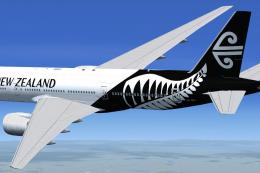
This package offers a freeware rendition of Air New Zealand’s Boeing 777-200E…
 FSX Civil Aircraft
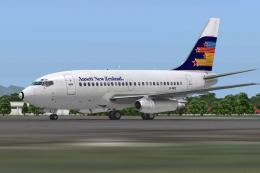
A repaint of the payware Captain Sim B737-100 model in Ansett New Zealand liv…
 FSX Civil Aircraft
FSX Cyprus Airways Airbus A330-200 RR, registration 5B-DBT. Repaint by Andrea…
 FSX Civil Aircraft
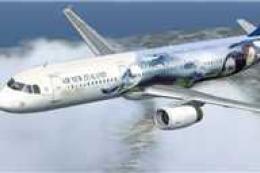
FSX Air New Zealand Airbus A321, registration ZK-OJA, "Lord of the Rings". Te…
Be the first to leave a comment on this download.
Be the first to share your thoughts on this download.