

 FSX Missions
US Navy Pullout (Fix) Mission
US Navy Pullout Fix, for use with USNAVYPL.ZIP. Terrorist factions have taken…
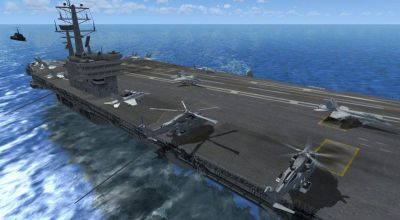
US Navy Pullout Mission delivers a carrier-launched rescue and strike scenario around Sharm El Sheikh, mixing timed helicopter escort, close air support diversions, and an optional F/A-18 runway attack with multiple reward outcomes. Built for Microsoft Flight Simulator X, it requires the Acceleration Pack and includes custom audio, AI deck action, and a static carrier scenery element.
 Rate
Rate
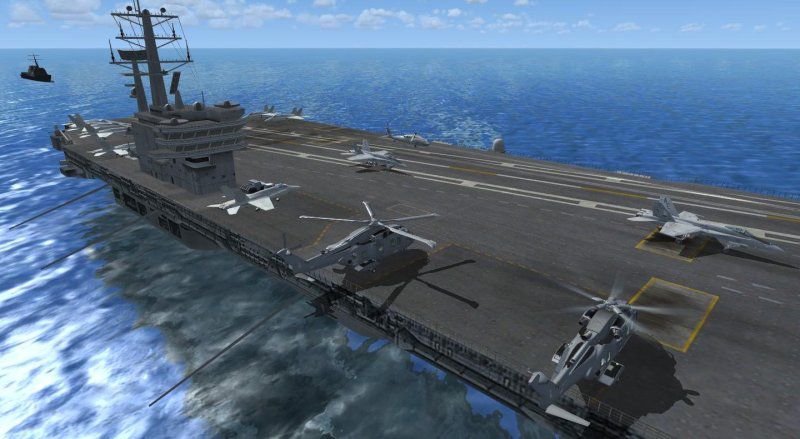
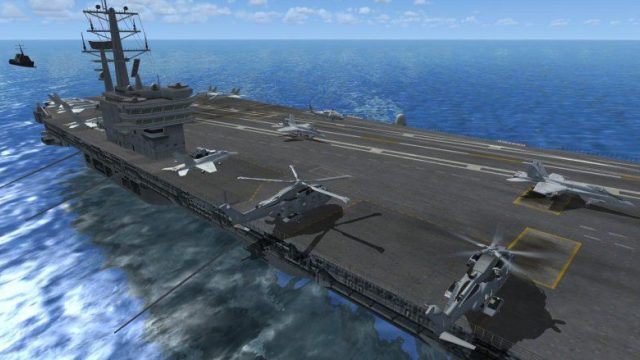
US Navy Pullout. Terrorist factions have taken over Sharm El Sheikh International Airport. Friendlies need extraction immediately. Your mission off the carrier will be to cover BigBird2. BigBird1 will fly out immediatley for a seperate pickup. Eagle1 and Eagle2 will be dropping bombs on the airport to get the terrorist attention and create a diversion. Three rewards possible. Requires FSX Acceleration Pack. By Ed Olander. (See also USNAVYFX.ZIP).
US Navy Pullout Mission.
**Briefing-
Terrorist Factions have taken over (HESH) Sharm El Sheikh International Airport. Friendlies need extraction immediately. Your mission off the Carrier will be to cover BigBird2. BigBird1 will fly out immediatley for a seperate pickup. Eagle1 and Eagle2 will be dropping bombs on the airport to get the terrorist attention and create a diversion. 3-rewards possible. Get a reward for landing the EH101 safely on the Carrier, after your pickup. If you choose to continue, fly the F18 on one last Bombing run to disable the Runway, with a Cluster Bomb. You have two choices of where to land after the Bomb run. Both have a Different Reward, either land on the carrier(Hard) or land at HEGN Airport(Easy). You can fly the mission again to try to accumulate both rewards, I have not been able to land on the Carrier to get my own reward, very sad - :-(. Enjoy, Many Cheers Ed O........:-)
------------------------------------------------------------------------------------
**To Install ->
#1 - Unzip the compressed Folder into your Mission Directory under the Emergency folder, ie, /Microsoft Flight Simulator X/Missions/Emergency/, this should create a Directory called USNavyPullout. Should Show up in the Intermediate.
#2 - Copy the 3-reward files in the Rewards Directory to your Rewards Directory in your FSX root.
#3 _ Very Important, Copy the CarGroup.BGL in the World/Scenery folder to your FSX root/Scenery/World/Scenery Folder. Restart FSX to load the new scenery. You can also create your own directoy and add the scenery manually. is up to you. This loads the static Aircraft Carrier that is used to takeoff and land on. Be kinda of weird without it.
This is my 5th Mission, still learning new things. I did the Camera thingy, but took it out, a little to much bells and whistles in my opinion on makebelieve stuff.
--------------------------------------------------------------------------------------
**Requirements-
FSX, and the Acceleration Pack. Uses the AugustaWestland EH101 Heli and FSX F18. Both Fun Birds. All done with the FSX SDK, Thanks again to Microsoft for a fantastic tool to create fun Missions. Enjoy and have Mucho Fun.
Voices - Ed, Edd, and Eddie, ie. all me.
Gun/Bombs/MachineGun Wav files - Created using Cakewalk and my Keyboard.
Music - Snippets from Enya/Braveheart/remixed(My Favorite), snippet from Ballad of the Green Berets(Old Airborne song been around for ages, we use to sing in the 80-Duece - Para's HooYaaa !!).
-----------------------------------------------------------------------------------------
**Note to the User -
Again, my missions are purley Fictional. (WYSIWYG). I'm just having fun. My missions are not bullet proof, I just try to make them fun, I use only MS FSX SDK to make these mission.
------------------------------------------------------------------------------------------
**Thanks Too -
FSXMission gents for the Flight Recording of AI ideas, Cheers to Gunner for the idea and Gunner/Rightnumberone on the different techniques. This means the Heli are all me flying and the F18's takeoff's.
------------------------------------------------------------------------------------------
**Side Notes -
Pretty simple mission, enjoy the deck action on the carrier, BigBird1 will takeoff first after the little music Intro. Both F18's will take off there after. BigBird2 will takeoff and your Co-Pilot will get clearence from the tower. Stay no less than 20-seconds behind BigBird2 to your first AO(Area of Operation). Also once BigBird2 Lands you have about 20-seconds to land, it is good to land with him, everything is timing on the first leg of the mission, needed to do this. The Co-Pilot & BigBird2 will let you know when to takeoff and give instructions when on site. Lots of action going on in your AO. Enemy is approaching your position. F18's are flying cover dropping bombs. Be carfull not to fly too close to the explosions, debri is flying everywhere, if struck you will crash. When called to help BigBird1, head out, an enemy Stryker is heading towards thier postion and if they get close enough you will fail the mission. When heading back to the carrier, it is up to you to fly with or without BigBird2. Also if you choose the F18 segment, it is all you, drop makebelieve cluster bomb and decisde whether to land on Carrier or the Airport. The F18's will be heading to the airport for a landing, tried to get them to land on the carrier but they kept penetrating the deck and went to china or something.
I tried to get a non static Carrier to work, but had a hard time at it, so rather than get frustrated, I used a Static for the takeoff, still rather fun. I left the landing carrier in there, I could not achieve my own reward for landing on the carrier. I'm terrible in the F18, Bad eye site or somthin. anyways if you get it, let me know if the mission ends properly. Apologies for having you load a Static OBJ.
Cheers Have Fun -
US Navy Pullout Mission.
Free for all simmers · 23.58 MB · Scanned clean Oct 2026
Download speed: Free tier is capped at 0.5 Mbps (this file takes approximately 7 mins at the cap). PRO members download at full line speed.
This add-on may require the following files to function properly. If this is a repaint, the dependency below is likely the base aircraft package.
FSX\Missions\ as a sub-folder. The folder must contain an XML file describing the mission.readme.txt or README file. It tells you exactly where files go, what dependencies are needed, and any quirks specific to this add-on.The archive usnavypl.zip has 100 files and directories contained within it.
This list displays the first 500 files in the package. If the package has more, you will need to download it to view them.
| Filename/Directory | File Date | File Size |
|---|---|---|
| f18takeoff.FSR | 01.16.08 | 665.50 kB |
| f18takeoff2.FSR | 01.17.08 | 1.28 MB |
| heli1.FSR | 01.15.08 | 10.75 MB |
| Heli1down.FSR | 01.18.08 | 1.56 MB |
| heli1return.FSR | 01.17.08 | 9.23 MB |
| Heli2.FSR | 01.17.08 | 1.32 MB |
| install.txt | 01.27.08 | 4.93 kB |
| mis5_1.gif | 01.25.08 | 11.75 kB |
| Rewards | 01.25.08 | 0 B |
| Sound | 01.26.08 | 0 B |
| USNavyPullout.FLT | 01.26.08 | 10.50 kB |
| USNavyPullout.WX | 01.14.08 | 188.91 kB |
| USNavyPullout.xml | 01.27.08 | 292.98 kB |
| USNc.bmp | 01.25.08 | 162.27 kB |
| USNe.bmp | 01.25.08 | 28.47 kB |
| USNe.jpg | 01.25.08 | 6.26 kB |
| USNH.htm | 01.26.08 | 3.74 kB |
| USNi.bmp | 01.25.08 | 162.27 kB |
| USNp.jpg | 01.25.08 | 66.05 kB |
| World | 01.22.08 | 0 B |
| USNavyCarf18.RWD | 01.25.08 | 67.09 kB |
| USNavyCarf18al.RWD | 01.25.08 | 67.46 kB |
| USNavyCarHeli.RWD | 01.26.08 | 66.44 kB |
| begin1.wav | 01.20.08 | 695.90 kB |
| bigb1_1.wav | 01.22.08 | 103.34 kB |
| bigb1_2.wav | 01.22.08 | 44.77 kB |
| bigb1_3.wav | 01.22.08 | 168.80 kB |
| bigb2_1.wav | 01.21.08 | 133.27 kB |
| bigb2_2.wav | 01.21.08 | 61.13 kB |
| bigb2_3.wav | 01.21.08 | 157.50 kB |
| bigb2_4.wav | 01.21.08 | 152.97 kB |
| bigb2_5.wav | 01.21.08 | 187.17 kB |
| bigb2_6.wav | 01.21.08 | 74.10 kB |
| bigb2_7.wav | 01.26.08 | 146.19 kB |
| combatne.wav | 01.20.08 | 1.36 MB |
| combatns.wav | 01.20.08 | 1.52 MB |
| cop1.wav | 01.22.08 | 358.28 kB |
| cop10.wav | 01.25.08 | 462.13 kB |
| cop11.wav | 01.22.08 | 97.73 kB |
| cop12.wav | 01.23.08 | 120.34 kB |
| cop13.wav | 01.22.08 | 146.18 kB |
| cop14.wav | 01.23.08 | 69.74 kB |
| cop15.wav | 01.23.08 | 111.73 kB |
| cop16.wav | 01.23.08 | 149.41 kB |
| cop17.wav | 01.23.08 | 161.26 kB |
| cop18.wav | 01.23.08 | 80.51 kB |
| cop19.wav | 01.25.08 | 187.10 kB |
| cop2.wav | 01.21.08 | 124.00 kB |
| cop20.wav | 01.23.08 | 113.02 kB |
| cop21.wav | 01.23.08 | 300.14 kB |
| cop22.wav | 01.23.08 | 81.58 kB |
| cop23.wav | 01.23.08 | 99.88 kB |
| cop24.wav | 01.24.08 | 96.66 kB |
| cop25.wav | 01.25.08 | 118.19 kB |
| cop26.wav | 01.25.08 | 67.59 kB |
| cop27.wav | 01.25.08 | 88.79 kB |
| cop28.wav | 01.25.08 | 113.95 kB |
| cop29.wav | 01.26.08 | 116.04 kB |
| cop3.wav | 01.21.08 | 217.03 kB |
| cop30.wav | 01.26.08 | 276.46 kB |
| cop31.wav | 01.26.08 | 80.51 kB |
| cop32.wav | 01.26.08 | 68.66 kB |
| cop33.wav | 01.26.08 | 61.99 kB |
| cop4.wav | 01.21.08 | 209.17 kB |
| cop5.wav | 01.21.08 | 72.05 kB |
| cop6.wav | 01.21.08 | 157.49 kB |
| cop7.wav | 01.21.08 | 135.97 kB |
| cop8.wav | 01.21.08 | 117.11 kB |
| cop9.wav | 01.21.08 | 58.54 kB |
| eag1_1.wav | 01.22.08 | 99.89 kB |
| eag1_3.wav | 01.22.08 | 48.21 kB |
| eag1_4.wav | 01.22.08 | 82.28 kB |
| eag1_5.wav | 01.22.08 | 89.56 kB |
| eag1_6.wav | 01.24.08 | 455.72 kB |
| eag1_7.wav | 01.25.08 | 50.37 kB |
| eag2_1.wav | 01.21.08 | 93.00 kB |
| eag2_2.wav | 01.21.08 | 44.77 kB |
| eag2_3.wav | 01.21.08 | 48.21 kB |
| eag2_4.wav | 01.24.08 | 379.06 kB |
| eag2_5.wav | 01.25.08 | 56.83 kB |
| machinegun.wav | 01.20.08 | 472.50 kB |
| SilverWings.wav | 01.25.08 | 258.29 kB |
| tw1.wav | 01.21.08 | 116.03 kB |
| tw10.wav | 01.23.08 | 89.12 kB |
| tw11.wav | 01.24.08 | 106.35 kB |
| tw12.wav | 01.24.08 | 112.80 kB |
| tw13.wav | 01.24.08 | 473.80 kB |
| tw14.wav | 01.25.08 | 72.97 kB |
| tw2.wav | 01.21.08 | 121.42 kB |
| tw3.wav | 01.21.08 | 81.58 kB |
| tw4.wav | 01.21.08 | 131.11 kB |
| tw5.wav | 01.21.08 | 114.96 kB |
| tw6.wav | 01.21.08 | 106.34 kB |
| tw7.wav | 01.21.08 | 112.80 kB |
| tw8.wav | 01.21.08 | 125.72 kB |
| tw9.wav | 01.23.08 | 165.56 kB |
| Scenery | 01.22.08 | 0 B |
| CarGroup.BGL | 01.14.08 | 316 B |
| flyawaysimulation.txt | 10.29.13 | 959 B |
| Go to Fly Away Simulation.url | 01.22.16 | 52 B |
Only PRO members can place votes.
More FSX & P3D add-ons hand-picked based on this download.
FSX Missions
US Navy Pullout Fix, for use with USNAVYPL.ZIP. Terrorist factions have taken…
 FSX Missions
Madagascar Mission. The Madagascarian Military pays you for a transport fligh…
 FSX Missions
Experience a daring alpine approach with this immersive mission set amid the …
 FSX Missions
Discover a daring and immersive freeware add-on that challenges your landing …
 FSX Missions
United States Navy Training Mission. You will be flying the T-45C Goshawk and…
 FSX Missions
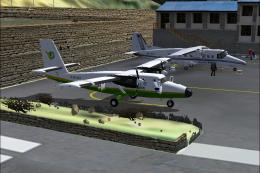
The Most Dangerous Airports: Lukla. The next in The Most Dangerous Airport Mi…
 FSX Missions
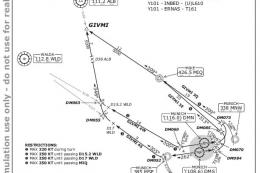
Hurricane Landing. Your task is to fly an Airbus A320 from Munich to Hamburg …
 FSX Missions
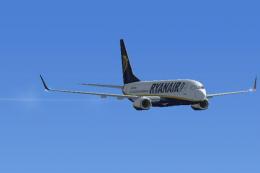
Welcome, Sir. In this mission you try to get from Gatwick to Dublin. It's ver…
Read what other simmers think, or add your own.

I was able to land on moving carrier with F18 cables worked and everything but it fails to recognize that I landed and just sits there with the green arrow.
I took back off and landed 3 times but still fails to notice. ..overall fun mission had a buddy who flew Blackhawks try he was impressed.

I don't think it is possible to land on the carrier since it is static there is no cable for the hook to grab on to

Yeah, I had a problem with this mission, but I managed to put the carrier at static and add the F-14D Super Tomcat as a patrol plane.