


 United States of America
  FSX Scenery
Shuttle Launch
This is the scenery version. Fly into the area of the Cape Canaveral and witn…
Kennedy Space Center Launch Complex 39 for FSX refreshes Cape Canaveral operations with a corrected VAB location, realistic Mobile Launch Platforms, and accurate Atlas-era tower cleanup. The scene adds Orbiter Processing Facilities, supporting complex buildings, and a properly placed helipad by the External Tank wharf, using stock textures for consistent visuals.
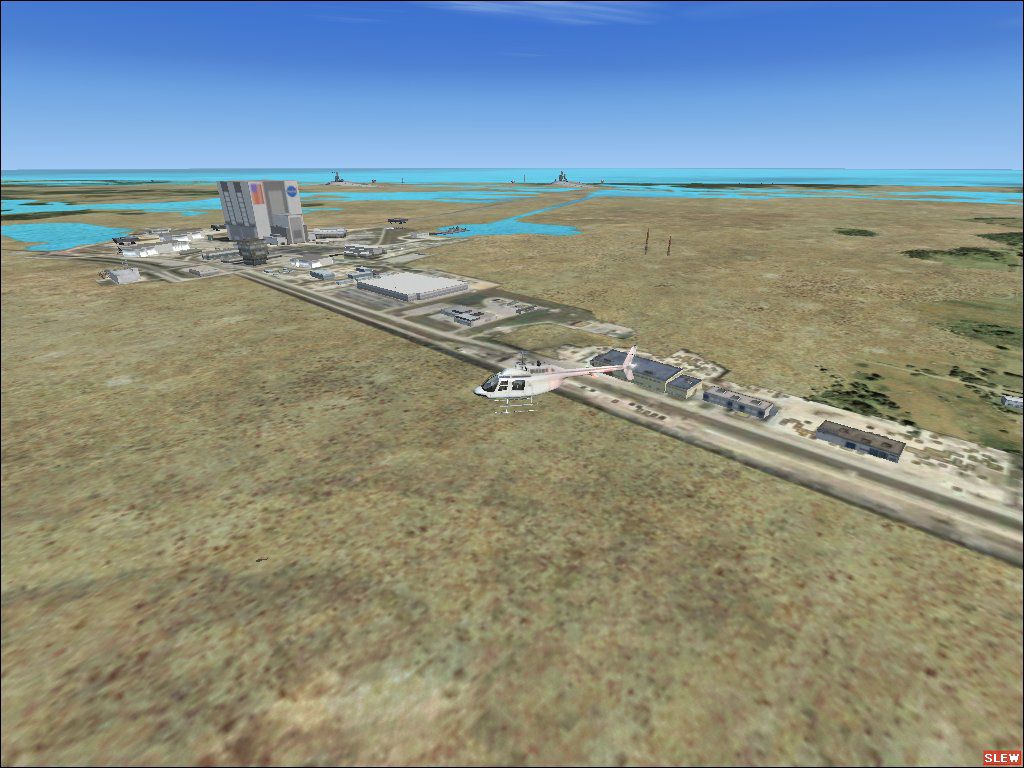
KSC Launch Complex 39, Florida (FL). This is a rebuild of Kennedy Space Center Launch Complex 39 which includes the Vertical Assembly Building (VAB) relocated to its proper location, Photo background, removal of the ficticious Mobile Launch Platforms (MLP's of which there are only three, not five) with the old style Atlas towers, and addition of three realistic MLP's. Orbiter Processing Facilities have been added along with the other LC-39 complex buildings. There is also a helipad adjacent to the External Tank receiving wharf where it belongs. All textures used are original FSX so there are no additional textures to add (the buildings were designed as close a possible to the originals using what is available in FSX).
KSC Launch Complex 39 Scenery.
Installation is a breeze...just unzip to the directory of your choice, then copy the "LC39" folder to your FSX "Addon Scenery" folder. Make sure you go into "settings, scenery, Add scenery", point to the "LC39" folder and hit OK, thats it...Happy flying.
Steve G.
Note: I have an older system and suffered no FPS hit at all with this scenery installed. If you should decide that you don't like the scenery, simply delete the "LC39" folder.
Free for all simmers · 282.41 KB · Scanned clean Oct 2026
Download speed: Free tier is capped at 0.5 Mbps. PRO members download at full line speed.
FSX\Addon Scenery\ containing scenery and texture sub-folders.readme.txt or README file. It tells you exactly where files go, what dependencies are needed, and any quirks specific to this add-on.Use these coordinates to fly directly to this location once the mod is installed.
28.60840000,-80.60420000
Launch FSX or Prepar3D and use Flights → Load to open the downloaded .pln file. Your aircraft will be positioned at this location.
The archive lc39.zip has 12 files and directories contained within it.
This list displays the first 500 files in the package. If the package has more, you will need to download it to view them.
| Filename/Directory | File Date | File Size |
|---|---|---|
| file_id.txt | 01.23.08 | 1.28 kB |
| install.txt | 01.23.08 | 587 B |
| LC-39.jpg | 01.23.08 | 140.60 kB |
| LC39_add.xml | 01.23.08 | 21.75 kB |
| scenery | 01.23.08 | 0 B |
| 000_LC39.BGL | 01.23.08 | 132 B |
| LC39_add.bgl | 01.23.08 | 2.90 kB |
| Photo01.bgl | 01.23.08 | 146.24 kB |
| texture | 01.23.08 | 0 B |
| LC39 | 01.23.08 | 0 B |
| flyawaysimulation.txt | 10.29.13 | 959 B |
| Go to Fly Away Simulation.url | 01.22.16 | 52 B |
Only PRO members can place votes.
More FSX & P3D add-ons hand-picked based on this download.
FSX Scenery
This is the scenery version. Fly into the area of the Cape Canaveral and witn…
 FSX Scenery
FSX Shuttle Launch 07 (updated). Fly into the area of the Cape Canaveral and …
 FSX Scenery
This freeware release provides a sophisticated rendition of Cape Town’s famou…
 FSX Scenery
Baie James Hydroelectric Complex terrain mesh, Quebec, Canada in LOD10 (38m).…
 FSX Scenery
Skara Scenery Bonaire X. Flamingo International Airport or Bonaire Internatio…
 FSX Scenery
Iwo Jima Scenery 1945 Update. This is a complete scenery with added effects a…
FSX Scenery
Kjeller Area Scenery X, Norway. Scenery around Kjeller airport with photoreal…
 FSX Scenery
FSX Loney's Alaska For FSX. This is a compilation of the author's Alaskan sce…
Read what other simmers think, or add your own.

The airport code for the KSC shuttle landing strip is KTTS... there is also the KSC skid strip which is not listed in the FSX d/b.

what airport code is this at i am trying to find it i added the scenery to my game using add area and completed the add in with another add on for the international space station