

 FSX Scenery
KSC Launch Complex 39
KSC Launch Complex 39, Florida (FL). This is a rebuild of Kennedy Space Cente…
Cape Town’s Table Mountain cableway comes alive with animated gondolas, upgraded upper and lower terminals, and refined skyline geometry that improves the sense of scale around the summit in Microsoft Flight Simulator X. It requires Aeroworx or NMG Trading terrain mesh for accurate station placement, and blends cleanly with other Cape Town scenery.
 Rate
Rate
 South Africa
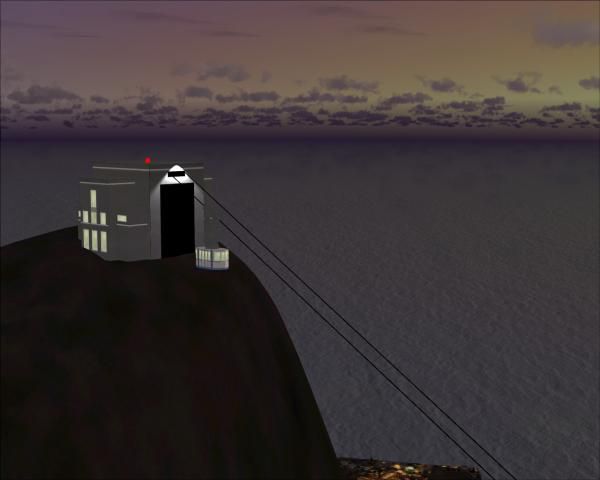
This freeware release provides a sophisticated rendition of Cape Town’s famous aerial tram system with fully animated gondolas traversing the slopes of Table Mountain. Developed by Frits Beyer, this Version 2.0 update enhances the panoramic skyline and ensures a more realistic depiction of one of South Africa’s most iconic landmarks in Microsoft Flight Simulator X.
Experience a renewed sense of scale around Table Mountain’s upper station, featuring newly modeled structures and complex geometry. This enhancement captures the unique contours of the region, creating a more convincing topography that complements any detailed freeware or payware scenery of Cape Town. The gondolas, also known as cable cars, travel seamlessly between the summit and the lower station, delivering a dynamic element that simulates real-world operations.
Kabelcar Complex Scenery.
This scenery is optimized to function accurately with third-party terrain expansions. The developer has specifically adapted the layout to match the precise elevation data from Aeroworx or NMG Trading mesh products. If the default FSX mesh is utilized, the position and alignment of the cablecar stations will likely appear off-scale, so it is recommended to activate one of the enhanced meshes for best results.
All credit belongs to Frits Beyer for bringing this piece of Cape Town’s character to the virtual skies, offering flight sim enthusiasts a specialized look at the famed aerial tram route and mountain setting. This package adds a welcome layer of authenticity to any South Africa-focused flying session.
Free for all simmers · 154.85 KB · Scanned clean Oct 2026
Download speed: Free tier is capped at 0.5 Mbps. PRO members download at full line speed.
FSX\Addon Scenery\ containing scenery and texture sub-folders.readme.txt or README file. It tells you exactly where files go, what dependencies are needed, and any quirks specific to this add-on.Use these coordinates to fly directly to this location once the mod is installed.
-33.92490000,18.42410000
Launch FSX or Prepar3D and use Flights → Load to open the downloaded .pln file. Your aircraft will be positioned at this location.
The archive kabelcarcomplexv20-capetown.zip has 6 files and directories contained within it.
This list displays the first 500 files in the package. If the package has more, you will need to download it to view them.
| Filename/Directory | File Date | File Size |
|---|---|---|
| Aeroworx - Kabel Car Complex.zip | 07.04.09 | 59.97 kB |
| Kabelcar.jpg | 06.27.09 | 19.75 kB |
| NMG - Kabel Car Complex.zip | 07.04.09 | 78.88 kB |
| Read me.txt | 07.04.09 | 531 B |
| flyawaysimulation.txt | 10.29.13 | 959 B |
| Go to Fly Away Simulation.url | 01.22.16 | 52 B |
Only PRO members can place votes.
More FSX & P3D add-ons hand-picked based on this download.
FSX Scenery
KSC Launch Complex 39, Florida (FL). This is a rebuild of Kennedy Space Cente…
 FSX Scenery
Baie James Hydroelectric Complex terrain mesh, Quebec, Canada in LOD10 (38m).…
 FSX Scenery
Skara Scenery Bonaire X. Flamingo International Airport or Bonaire Internatio…
 FSX Scenery
Iwo Jima Scenery 1945 Update. This is a complete scenery with added effects a…
FSX Scenery
Kjeller Area Scenery X, Norway. Scenery around Kjeller airport with photoreal…
 FSX Scenery
FSX Loney's Alaska For FSX. This is a compilation of the author's Alaskan sce…
 FSX Scenery
For users of Flight Simulator X (and FSX: Steam Edition) and/or Prepar3D, ter…
 FSX Scenery
This freeware release by developer Aime Leclercq introduces revised highways …
Be the first to leave a comment on this download.
Be the first to share your thoughts on this download.