


 Italy
Italy  FSX Scenery
Monte Alto/SP Photoreal
Photoreal Scenery Monte Alto/SP, Brazil. Monte Alto is a small town at Sao Pa…
Trentino–Alto Adige comes alive with 2 m photoreal terrain imagery that accurately redraws the entire region in a crisp summer-only look, ideal for VFR sightseeing and low-level routes. Part of ItalVFR’s wider Italy coverage, this complete scenery package integrates cleanly with FSX for a seamless regional upgrade.
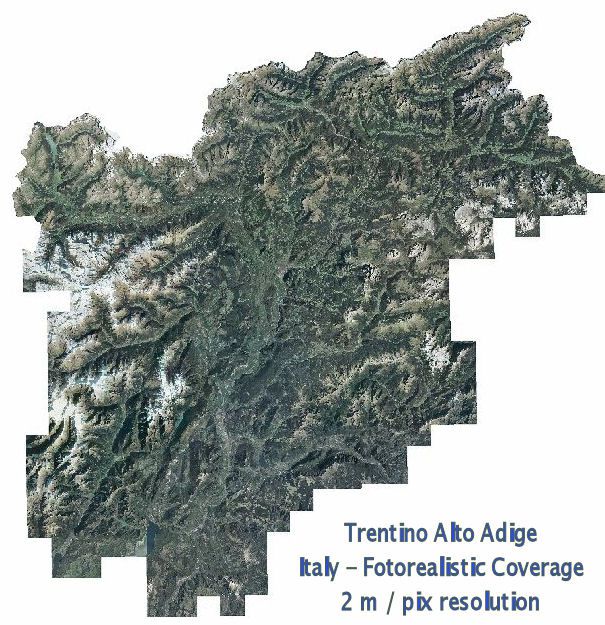
ItalVFR - Trentino Alto Adige Photorealistic Scenery. This scenery covers the whole of the Trentino Alto Adige with photorealistic scenery 2 m resolution - Summer only. part of the ItalVFR photorealistic scenery of Italy. By Raimondo Taburet. Complete package, all files included.
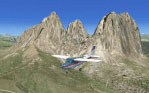
Trentino Alto Adige Scenery.
Installation:
Unzip bgl file in any activated scenery folder - or create a new folder called trentino in your Main FSX scenery folder, create a subofolder of trentino folder called: scenery, unzip bgl files into the trentino / scenery folder. Start sim - add the trentino folder in scenery library.
Done.
Rai
Free for all simmers · 2.1 GB · Scanned clean Oct 2026
Download speed: Free tier is capped at 2 Mbps (this file takes approximately 2h 31m at the cap). PRO members download at full line speed.
FSX\Addon Scenery\ containing scenery and texture sub-folders.readme.txt or README file. It tells you exactly where files go, what dependencies are needed, and any quirks specific to this add-on.Use these coordinates to fly directly to this location once the mod is installed.
46.50000000,11.30000000
Launch FSX or Prepar3D and use Flights → Load to open the downloaded .pln file. Your aircraft will be positioned at this location.
The archive trent.zip has 124 files and directories contained within it.
This list displays the first 500 files in the package. If the package has more, you will need to download it to view them.
| Filename/Directory | File Date | File Size |
|---|---|---|
| trent | 09.13.12 | 0 B |
| __MACOSX | 09.13.12 | 0 B |
| trent | 09.13.12 | 0 B |
| README.txt | 02.06.08 | 953 B |
| trentino.gif | 06.15.07 | 10.95 kB |
| trentino1.bgl | 06.07.07 | 71.96 MB |
| trentino10.bgl | 06.08.07 | 86.75 MB |
| trentino11.bgl | 06.10.07 | 36.73 MB |
| trentino11_2.bgl | 06.10.07 | 25.41 MB |
| trentino11_3.bgl | 06.10.07 | 21.69 MB |
| trentino11_4.bgl | 06.10.07 | 4.32 MB |
| trentino12.bgl | 06.10.07 | 73.23 MB |
| trentino13.bgl | 06.10.07 | 29.88 MB |
| trentino13_2.bgl | 06.10.07 | 35.21 MB |
| trentino13_3.bgl | 06.10.07 | 11.57 MB |
| trentino14.bgl | 06.12.07 | 96.72 MB |
| trentino15.bgl | 06.12.07 | 94.45 MB |
| trentino16.bgl | 06.12.07 | 86.95 MB |
| trentino17.bgl | 06.12.07 | 85.23 MB |
| trentino18.bgl | 06.12.07 | 20.30 MB |
| trentino18_2.bgl | 06.12.07 | 59.74 MB |
| trentino19.bgl | 06.12.07 | 92.90 MB |
| trentino2.bgl | 06.15.07 | 66.65 MB |
| trentino20.bgl | 06.12.07 | 85.88 MB |
| trentino21.bgl | 06.12.07 | 23.63 MB |
| trentino22.bgl | 06.12.07 | 97.39 MB |
| trentino23.bgl | 06.12.07 | 60.10 MB |
| trentino23_2.bgl | 06.12.07 | 18.49 MB |
| trentino24.bgl | 06.12.07 | 45.84 MB |
| trentino24_2.bgl | 06.12.07 | 16.91 MB |
| trentino24_3.bgl | 06.12.07 | 19.08 MB |
| trentino25.bgl | 06.12.07 | 75.44 MB |
| trentino25_2.bgl | 06.12.07 | 21.15 MB |
| trentino26.bgl | 06.09.07 | 74.17 MB |
| trentino26_2.bgl | 06.13.07 | 3.63 MB |
| trentino27.bgl | 06.12.07 | 24.73 MB |
| trentino28.bgl | 06.13.07 | 99.82 MB |
| trentino29.bgl | 06.12.07 | 28.63 MB |
| trentino29_2.bgl | 06.13.07 | 5.58 MB |
| trentino29_3.bgl | 06.13.07 | 6.61 MB |
| trentino3.bgl | 06.07.07 | 74.24 MB |
| trentino30.bgl | 06.12.07 | 3.26 MB |
| trentino31.bgl | 06.12.07 | 1.43 MB |
| trentino32.bgl | 06.13.07 | 17.67 MB |
| trentino33.bgl | 06.15.07 | 9.86 MB |
| trentino4.bgl | 06.07.07 | 86.64 MB |
| trentino5.bgl | 06.07.07 | 42.80 MB |
| trentino5_2.bgl | 06.07.07 | 12.56 MB |
| trentino5_3.bgl | 06.07.07 | 6.73 MB |
| trentino5_4.bgl | 06.07.07 | 4.92 MB |
| trentino6.bgl | 06.07.07 | 27.33 MB |
| trentino6_2.bgl | 06.07.07 | 31.79 MB |
| trentino6_3.bgl | 06.07.07 | 9.25 MB |
| trentino6_4.bgl | 06.07.07 | 3.70 MB |
| trentino7.bgl | 06.07.07 | 11.17 MB |
| trentino7_2.bgl | 06.07.07 | 3.93 MB |
| trentino7_3.bgl | 06.07.07 | 6.66 MB |
| trentino8.bgl | 06.07.07 | 67.45 MB |
| trentino9.bgl | 06.08.07 | 12.19 MB |
| trentino9_2.bgl | 06.08.07 | 48.80 MB |
| trentino_coverage.jpg | 06.15.07 | 120.33 kB |
| flyawaysimulation.txt | 10.29.13 | 959 B |
| Go to Fly Away Simulation.url | 01.22.16 | 52 B |
Only PRO members can place votes.
More FSX & P3D add-ons hand-picked based on this download.
FSX Scenery
Photoreal Scenery Monte Alto/SP, Brazil. Monte Alto is a small town at Sao Pa…
 FSX Scenery
This comprehensive freeware package, crafted by PhotoScenery (PhotoScenery@ya…
 FSX Scenery
Photoreal model of terminal, tower and PIR in the photo scenery of St. Eustat…
 FSX Scenery
Mt Washington And The Presidential Range, NH. Welcome to the Presidential Ran…
 FSX Scenery
KSAN Photo Real Scenery and AFCAD update, San Diego International Airport, Ca…
 FSX Scenery
Americana Photo Realistic. Photoreal scenery of a fine country in Brasil call…
 FSX Scenery
(TNCE). Scenery of St. Eustatius (Statia) in the Caribbean with the airport F…
 FSX Scenery
Photo Scenery Greece GR2-6. This package includes two islands of Greece, Agio…
Read what other simmers think, or add your own.

The download went smoothly and the scenery didn't disappoint. Obviously, it's not MS 2020, but for my MS Steam X, it's a great improvement. Now I will tackle some USA scenery. Thank you.