


 Australia
  FSX Scenery
Melbourne International Airport
Immerse yourself in a detailed re-creation of Melbourne International Airport…
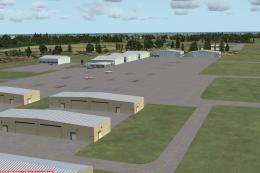
Melbourne International Airport (YMML) for FSX refreshes the default field with updated parking gates, roads, and terminal-area layout, plus added fuel services, a relocated control tower, and PAPI on both runways for more realistic approaches. Choose a standard runway setup or a crosswind-enabled configuration that supports simultaneous runway operations.
Enhance your default FSX experience at Melbourne International Airport (YMML) in Victoria, Australia, with an updated layout that refines parking gates, runway operations, and general airport infrastructure. This scenery add-on—crafted by Ray Smith—includes two file configurations that modify everything from the crosswind runway behavior to supplementary ground services, ensuring a more authentic environment for simulation enthusiasts.
Aircraft parking assignments, access roads, and the terminal vicinity have been carefully rearranged in accordance with the latest ADE (Airport Design Editor) capabilities. This refinement also introduces additional fuel services, a newly situated control tower, and PAPI (Precision Approach Path Indicator) systems on both runways for improved approach guidance. These enhancements mirror real-world flight operations while preserving smooth performance.
One version of this add-on activates Runway 9/27 in tandem with Runway 16/34, promoting parallel departures and arrivals when traffic levels justify it. Under this arrangement, you will notice both active runways utilized for takeoffs and landings, which can reduce bottlenecks during peak hours. If you tune into ATIS, you might hear references to extra (or “fake”) strips, a technique employed to unlock crosswind functionality.
The alternative version retains the default single-runway operation, omitting any adjustments for crosswind usage. Parking spots, gates, and ramps remain consistent between the two options, so you can freely choose the approach that fits your flying style.
Important: To prevent conflicts, only use one YMML.BGL file in the Addon Scenery/scenery folder. Ensure no other YMML-related files are active there.
Simply remove all three installed BGLs (the chosen RS file plus YMML_ADE_OBJ.BGL) from your FSX directories, and your original configuration will be restored automatically.
If you elect to use the crosswind edition, ignore any extra runway callouts when listening to ATIS; it is part of the process that unlocks simultaneous operations and should not affect flight performance. If you ever wish to avoid these callouts, revert to the default-layout version.
Ray Smith extends gratitude to:
For an immersive tower-view experience within FSX, consider assigning a keystroke to the “View track/pan Toggle” in your control settings. This allows you to pivot the camera 360 degrees around the airport from the tower vantage point, helping you monitor traffic flow and enjoy a more comprehensive observation of YMML’s layout.
Enjoy this enhanced rendition of Melbourne International, and happy flying from Ray Smith!
Free for all simmers · 47.07 KB · Scanned clean
Download speed: Free tier is capped at 0.5 Mbps. PRO members download at full line speed.
FSX\Addon Scenery\ containing scenery and texture sub-folders.readme.txt or README file. It tells you exactly where files go, what dependencies are needed, and any quirks specific to this add-on.Use these coordinates to fly directly to this location once the mod is installed.
-37.67333300,144.84333300
Launch FSX or Prepar3D and use Flights → Load to open the downloaded .pln file. Your aircraft will be positioned at this location.
The archive ymml_ade_rs_fsx.zip has 7 files and directories contained within it.
This list displays the first 500 files in the package. If the package has more, you will need to download it to view them.
| Filename/Directory | File Date | File Size |
|---|---|---|
| ReadMe.txt | 12.05.09 | 2.97 kB |
| YMML_ADE_CW_RS.BGL | 12.05.09 | 48.95 kB |
| YMML_ADE_OBJ.BGL | 12.05.09 | 23.18 kB |
| YMML_ADE_RS.BGL | 12.05.09 | 48.49 kB |
| FSX_ymml_ade_rs | 11.03.09 | 0 B |
| flyawaysimulation.txt | 10.29.13 | 959 B |
| Go to Fly Away Simulation.url | 01.22.16 | 52 B |
More FSX & P3D add-ons hand-picked based on this download.
FSX Scenery
Immerse yourself in a detailed re-creation of Melbourne International Airport…
 FSX Scenery
FSX Atlanta Int'l Airport. Scenery for Hartsfield - Jackson Atlanta Internati…
 FSX Scenery
Vienna Schwechat Int'l Airport (LOWW), Austria. Features Skylink terminal, fi…
 FSX Scenery
Denver Int'l Airport (KDEN), Colorado (CO). Features added jetways, expanded …
 FSX Scenery
Tocumen Int'l Airport (MPTO), Panama. This is an AFCAD-type scenery (plus a l…
 FSX Scenery
Venice Tessera Int'l Airport "Marco Polo" (LIPZ), Italy. Based on the latest …
 FSX Scenery
Kingsford Smith Int'l Airport (YSSY), Sydney, Australia. Includes two version…
 FSX Scenery
Maceio Int'l Airport (SBMO), Brazil. Functional, with taxiway signs. By Gusta…
Be the first to leave a comment on this download.
Be the first to share your thoughts on this download.