


 FSX Missions
French Alps Rescue Mission
A family of tourists is reported missing, they would have spent the day in th…
Niagara Rescue Mission turns Niagara Falls into a time-critical helicopter sling-extraction scenario, racing from KIAG to lift a stranded bucket trapped among fast-moving logs and deliver it safely back to base. Built for Microsoft Flight Simulator X, it includes custom objects, voice and music cues, clear goals, and requires the Acceleration Pack.
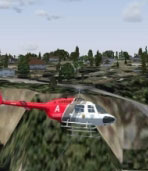
Niagara Rescue. A logging accident has created a strange rescue for a couple of women trapped in a floating bucket. Since their boat has overturned by logs they where washed away down towards Niagara Falls. They are trapped between two logs up against some rocks near the base of the falls. A boat rescue is too risky. They need a sling extraction ASAP. By Ed Olander.
Niagara Rescue Mission.
Briefing-
A logging accident has created a strange Rescue for a couple of women trapped in a floating Bucket. Since thier boat has overturned by logs they where washed away down towards Niagra Falls. They are trapped between two logs up against some rocks near the base of the falls. A boat rescue is too risky. They need a Sling extraction ASAP.
Starting at KIAG, your mission is to fly as fast as possible to the location of the accident. Sling the Bucket ASAP. Logs are coming down river fast. Time is critical, there is no telling if the logs will jar thier bucket loose and send them falling down the Falls.
This mission uses the sling loader attached to the Bell206B. Be sure to read the readme file and adjust the aricraft Config file as needed, otherwise the sling will not show up. Two goals are required to complete this mission successfully - 1.) Pickup Bucket 2.) Drop Bucket off without damaging it and return to the Airport. A reward is granted after completion.
Hopefully everything is in-tact, just unzip the compressed Folder to a Temp Directory. Place the NiagraRescue Directory into your Mission Directory under the Emergency folder, ie, /Microsoft Flight Simulator X/Missions/Emergency/, you should have a Directory called NiagraRescue. Open the SimObjects Directory and Place all the Misc directories into you FSX Root/SimObjects/Misc Directory these include bbucket,bbucketlost,Mis_log_large_sm_move. Make sure to move the reward from the Rewards Directory to your FSX/root/Rewards.
*** Make a Backup of Original aircraft.cfg file before proceeding *** *** Call it aircraftor.cfg or something.
Very Important - Open up the Rotorcraft Directory and go into the Bell206B Directory and Copy this aircraft.cfg into your original FSX root/SimObjects/Rotorcraft/bell206B directory -> *** make a Backup of the Original before Copy *** This will have the needed statements to get the Sling to Work on the Bell for this Mission **
*** The Adjustment to the aircraft.cfg is follows between the [helicopter] & [electrical] ***
[Sling.0]

	position = 0.0, 0.0, 0.0 //Feet from datum

	max_stretch = 2.0 //Max stretch distance at ultimate load

	damping_ratio = 0.75 //0 for no damping to 1.0 for critically damped.

	rated_load = 2000 //Characteristics tension of cable in pounds

	ultimate_load = 6000 //Breaking force in pounds

	tolerance_angle= 70 //Angle, in degrees, used to determine lateral breaking force limit

	auto_pickup_range = 20 //Max Range, in feet, for auto-pickup

	auto_pickup_max_speed = 20.5 //Maximum speed (feet per second) for auto-pickup
Be sure to adjust your sounds within FSX to get the best effects and to hear the voices.
Requirements-
FSX, and the Acceleration Pack. Uses all FSX Aircraft and Scenery.
Voices - All me (Morphed, resampled).
Music Magix Soundloops created by Me.
Used FSX Mission Maker by Jim Keir to Help with Building.
*Note to the User -
This mission as are all my Missions are purley Fictional. I have no Experience in Air Traffic Communication nor do I fly Aircraft for Real life. Everything is WysiWyg. Everything I do is Free, Do with it What you want but please keep it Free.
My Scenery Settings where set to just High, Anything Below this I'm not sure what effect it will have on landing in certain locations.
** I set the Sling up to be relatively easy to pickup the Bucket, Maintain a Hover 45 or so feet above it and stay under 20 knots. Good lcuk have fun...
Cheers Have Fun -
Free for all simmers · 7.83 MB · Scanned clean
Download speed: Free tier is capped at 0.5 Mbps (this file takes approximately 2 mins at the cap). PRO members download at full line speed.
FSX\Missions\ as a sub-folder. The folder must contain an XML file describing the mission.readme.txt or README file. It tells you exactly where files go, what dependencies are needed, and any quirks specific to this add-on.The archive niagrare.zip has 76 files and directories contained within it.
This list displays the first 500 files in the package. If the package has more, you will need to download it to view them.
| Filename/Directory | File Date | File Size |
|---|---|---|
| NiagraRescue | 02.28.09 | 0 B |
| bell206b.FSR | 02.23.09 | 1.71 MB |
| Briefing.htm | 02.27.09 | 3.41 kB |
| eh101_2.FSR | 02.23.09 | 1.14 MB |
| exitpic.bmp | 02.28.09 | 49.48 kB |
| Images | 02.28.09 | 0 B |
| Overview.jpg | 02.27.09 | 20.12 kB |
| Install.txt | 02.28.09 | 3.62 kB |
| Kneeboard.htm | 02.27.09 | 1.03 kB |
| news41.FSR | 02.22.09 | 1.95 MB |
| NiagraRescue.FLT | 02.28.09 | 9.47 kB |
| NiagraRescue.spb | 02.28.09 | 37.69 kB |
| NiagraRescue.WX | 02.28.09 | 209.24 kB |
| NiagraRescue.xml.layout | 02.28.09 | 937 B |
| niagra_complete.bmp | 02.27.09 | 171.33 kB |
| niagra_incomplete.bmp | 02.27.09 | 171.33 kB |
| Readme.txt | 02.28.09 | 71 B |
| Rewards | 02.28.09 | 0 B |
| niagra.RWD | 02.27.09 | 221.25 kB |
| SimObjects | 02.28.09 | 0 B |
| Misc | 02.28.09 | 0 B |
| bbucket | 02.28.09 | 0 B |
| model | 02.28.09 | 0 B |
| babebucket.MDL | 02.21.09 | 2.16 MB |
| Model.cfg | 02.21.09 | 31 B |
| panel | 02.28.09 | 0 B |
| panel.cfg | 05.12.06 | 29 B |
| sim.cfg | 02.23.09 | 1.42 kB |
| sound | 02.28.09 | 0 B |
| sound.cfg | 05.12.06 | 702 B |
| bbucketlost | 02.28.09 | 0 B |
| model | 02.28.09 | 0 B |
| babebucket.MDL | 02.21.09 | 2.16 MB |
| Model.cfg | 02.23.09 | 31 B |
| panel | 02.28.09 | 0 B |
| panel.cfg | 05.12.06 | 29 B |
| sim.cfg | 02.23.09 | 1.75 kB |
| sound | 02.28.09 | 0 B |
| sound.cfg | 05.12.06 | 702 B |
| Mis_log_large_sm_move | 02.28.09 | 0 B |
| model | 02.28.09 | 0 B |
| Mis_Log_large_sm_move.mdl | 08.22.07 | 27.90 kB |
| model.cfg | 02.23.09 | 40 B |
| sim.cfg | 02.23.09 | 1.72 kB |
| texture | 02.28.09 | 0 B |
| texture.cfg | 08.22.07 | 110 B |
| Rotorcraft | 02.28.09 | 0 B |
| Bell206B | 02.28.09 | 0 B |
| aircraft.cfg | 02.21.09 | 20.66 kB |
| Sound | 02.28.09 | 0 B |
| da_airport_clearence.wav | 02.26.09 | 54.98 kB |
| da_airport_landing.wav | 02.27.09 | 46.81 kB |
| da_airport_landing_clear.wav | 02.27.09 | 47.25 kB |
| da_airport_return.wav | 02.24.09 | 38.53 kB |
| da_babebucket.wav | 02.28.09 | 36.35 kB |
| da_broke_cable.wav | 02.24.09 | 26.00 kB |
| da_bucket_damaged.wav | 02.24.09 | 31.34 kB |
| da_clearance.wav | 02.24.09 | 115.34 kB |
| da_drop_to_soon.wav | 02.26.09 | 32.54 kB |
| da_got_bucket.wav | 02.24.09 | 30.90 kB |
| da_got_log.wav | 02.28.09 | 75.02 kB |
| da_head_to_ariport.wav | 02.26.09 | 47.90 kB |
| da_hope_goodside.wav | 02.27.09 | 35.26 kB |
| da_lets_go.wav | 02.26.09 | 107.82 kB |
| da_mission_completion.wav | 02.27.09 | 29.71 kB |
| da_new4_confirm.wav | 02.25.09 | 65.88 kB |
| da_new4_great_pickup.wav | 02.26.09 | 116.53 kB |
| da_news4_confirm.wav | 02.25.09 | 227.66 kB |
| da_release_bucket.wav | 02.24.09 | 31.88 kB |
| da_slow_down_dropoff.wav | 02.28.09 | 106.62 kB |
| da_slow_for_pickup.wav | 02.26.09 | 94.75 kB |
| da_welcome.wav | 02.24.09 | 77.21 kB |
| da_wow_logs.wav | 02.27.09 | 37.44 kB |
| nfalls.WAV | 02.24.09 | 1.43 MB |
| flyawaysimulation.txt | 10.29.13 | 959 B |
| Go to Fly Away Simulation.url | 01.22.16 | 52 B |
More FSX & P3D add-ons hand-picked based on this download.
FSX Missions
A family of tourists is reported missing, they would have spent the day in th…
 FSX Missions
FSX Oil Rig Rescue SAR Mission. Fly a Bell JetRanger to an oil rig in the Chu…
 FSX Missions
FSX Sequim Valley Emergency Rescue Mission. Fly from Port Angeles CGAS (KNOW)…
 FSX Missions
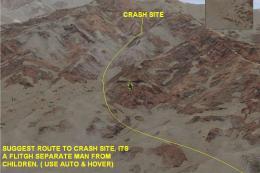
Furnace Creek Rescue. Rescue crash victems by helicopter. Requires Accelerati…
 FSX Missions
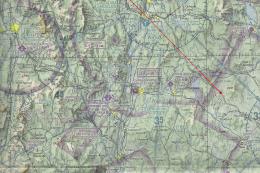
Helicopter Rescue. You must pilot a helicopter to a rollover accident on Rout…
 FSX Missions
Acceleration Canyon Rescue Mission. Use the default Bell 206B JetRanger and r…
 FSX Missions
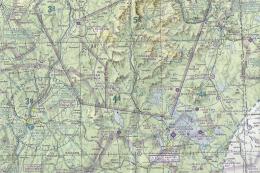
FSX White Mountains Rescue Mission. Two inexperience hikers decide to do some…
 FSX Missions
FSX Rescue Mission. You must pilot a helicopter at night to a multi-vehicle a…
Read what other simmers think, or add your own.


Do I need the Bell 206B or can I use the "sling extraction ASAP" synonymous with another Helicopter and use it?