


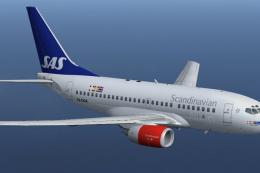
 FSX Civil Aircraft
SAS Scandinavian Airlines Boeing 737-683
Complete package for FSX only of the Project Open Sky B737-600 model in SAS S…
Scandinavian Airlines livery brings the SAS look to the default Boeing 737-800 with clean fuselage colors, accurate tail branding, and matching engine details that suit Northern Europe and wider European routes in Microsoft Flight Simulator X. Textures integrate with the standard external model and virtual cockpit, and require the base 737-800 model.
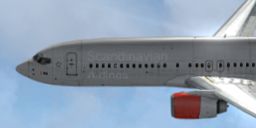
This add-on provides detailed Scandinavian Airlines (SAS) textures designed for the default Boeing 737-800 in Microsoft Flight Simulator X. It depicts the airline’s typical color scheme and logo, offering virtual pilots a faithful interpretation of the real-world livery that crisscrosses Northern Europe. This repaint is freeware, crafted by Alex James, and requires the base model from the Fly Away Simulation mod library. Below, you will find essential information on the modifications, along with instructions on how to install these files into your simulator.
SAS, also referred to as Scandinavian Airlines System, is a major carrier serving Denmark, Norway, and Sweden. It frequently employs the Boeing 737-800 for short- to medium-haul flights throughout the Scandinavian region and broader Europe. The 737-800 itself, produced by Boeing (recognized for its extensive expertise in commercial aviation manufacturing), has gained acclaim as one of the most widely used jetliners globally. This variation of the 737 series emerged as a best-selling aircraft, ultimately surpassing the 727 in total orders. Enthusiasts who operate this repaint in their simulation can immerse themselves in the characteristic SAS look and experience the streamlined performance of a single-aisle airliner that epitomizes modern civil aviation design.

Scandinavian Airlines Boeing 737-800 in flight.
[fltsim.X]
title=Boeing 737-800 Scandinavian
sim=Boeing737-800
model=
panel=
sound=
texture=Scandinavian
kb_checklists=Boeing737-800_check
kb_reference=Boeing737-800_ref
atc_id=LN-RNO
atc_airline=Scandinavian
atc_flight_number=112
ui_manufacturer="Boeing"
ui_type="737-800"
ui_variation="Scandinavian Airlines"
ui_typerole="Commercial Airliner"
ui_createdby="One should hardly be surprised that the world's most prolific
manufacturer of commercial aircraft is also the producer of the world's most
popular jetliner. The 737 became the best-selling commercial jetliner worldwide
when orders for it hit 1,831 in June 1987 (surpassing Boeing's own 727 as the previous
champ). However, it wasn't always that way… in the first few years of production,
there were so few orders that Boeing considered canceling the program. They didn't,
and the airplane has more than proven itself in over three decades of service."
This package is distributed as freeware and does not include the base model—ensure you have obtained the original Boeing 737-800 from the Fly Away Simulation library. All livery modifications were authored and developed by Alex James. Use this repaint to enhance your simulation environment and explore Scandinavian routes with an extra degree of visual fidelity.
Free for all simmers · 1.84 MB · Scanned clean
Download speed: Free tier is capped at 0.5 Mbps. PRO members download at full line speed.
FSX\SimObjects\Airplanes\. The folder must contain an aircraft.cfg file. Effects go into FSX\Effects\; gauges go into FSX\Gauges\.readme.txt or README file. It tells you exactly where files go, what dependencies are needed, and any quirks specific to this add-on.The archive default737-800scandinavian.zip has 10 files and directories contained within it.
This list displays the first 500 files in the package. If the package has more, you will need to download it to view them.
| Filename/Directory | File Date | File Size |
|---|---|---|
| b737_800_1_LM.dds | 11.22.10 | 256.12 kB |
| b737_800_1_T.dds | 11.23.10 | 4.00 MB |
| b737_800_1_T_Specular.dds | 11.22.10 | 1.33 MB |
| Fresnel_Ramp.dds | 11.22.10 | 640 B |
| texture.cfg | 11.22.10 | 137 B |
| thumbnail.jpg | 11.23.10 | 17.63 kB |
| README _INSTALL.txt | 11.23.10 | 1.97 kB |
| Scandinavian.jpg | 11.23.10 | 17.63 kB |
| flyawaysimulation.txt | 10.29.13 | 959 B |
| Go to Fly Away Simulation.url | 01.22.16 | 52 B |
More FSX & P3D add-ons hand-picked based on this download.
FSX Civil Aircraft
Complete package for FSX only of the Project Open Sky B737-600 model in SAS S…
 FSX Civil Aircraft
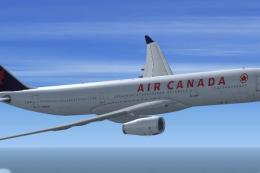
Designed to be a competitor to the Boeing 777-200, Airbus Industries has out …
 FSX Civil Aircraft
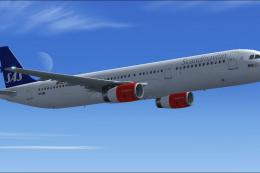
This freeware release brings a detailed Scandinavian Airlines (SAS) Airbus A3…
 FSX Civil Aircraft
Scandinavian Airlines Douglas DC-8-63. Textures for the AeroSim Add-On Series…
 FSX Civil Aircraft
Blackbox Simulation Airbus X'treme (Prologue) A319 IAE in Scandinavian Airlin…
 FSX Civil Aircraft
The latest CamSim release of the SAS Scandinavian Airbus A350-900, created by…
 FSX Civil Aircraft
Continental Boeing 737-800. Fictional textures for the default B737-800. Repa…
 FSX Civil Aircraft
Turkish Airlines Boeing 737-800. Textures by Alex James for the default B737-…
Be the first to leave a comment on this download.
Be the first to share your thoughts on this download.