

 FS2004 Civil Jet Aircraft
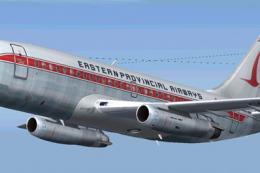
Eastern Provincial Airways Boeing 737-200
Immerse yourself in a classic aviation experience with a detailed Eastern Pro…
Eastern Provincial Airways’ classic Boeing 737-200 arrives as an AI-optimized freeware aircraft for FS2004, combining an AI Aardvark base model with a crisp, era-accurate Canadian livery. Multi-LOD geometry and tuned traffic-friendly flight dynamics keep busy schedules smooth, while animated gear, flaps, spoilers, and thrust reversers add convincing ramp and runway movement.
 Rate
Rate
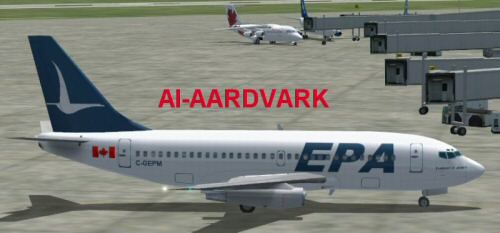
This comprehensive freeware package brings you an AI-tailored rendition of an Eastern Provincial Airways Boeing 737-200 for FS2004 (also commonly known as FS9). The original model, developed by AI Aardvark, is carefully painted by Shane Strong to depict the distinctive livery once used by this well-known Canadian regional carrier. The 737-200, a member of Boeing’s classic narrow-body line, served small to medium hops efficiently, and this package pays homage to that operational flair. It also includes a base model, so no separate downloads are necessary.
The aircraft model has been optimized for an AI setting, ensuring stable performance in busy virtual skies with numerous traffic assets. By incorporating multiple LOD (Levels of Detail) configurations, the polygon count is automatically reduced as the model’s distance increases. When close up at the gate, you will see antennas, flap fairings (often called flap canoes), and other finer details, while at greater distances, the model is simplified to maintain favorable frame rates.
These flight dynamics strike a balance between realistic operation and effective traffic flow management. In an AI environment, it is crucial for an aircraft to exit the runway promptly to avoid congestion. Consequently, this 737-200 is tuned to touch down close to the runway threshold and vacate without delay. If you seek more pronounced flare and float, you may refine parameters such as cruise lift, parasite drag, or induced drag directly in the aircraft.cfg file. Simply adjust those entries to achieve a landing behavior that meets your preference.
Eastern Provincial Airways was well-known for operating in challenging Canadian coastal conditions, and the 737-200’s robust design made it especially suited for shorter or more remote fields. This AI version emulates that practicality, allowing simmers to populate domestic and regional routes with historically accurate traffic.
Screenshot of Eastern Provincial Airways 737-200 on the ground.
To install on your FS2004 setup, place the AIA_737_200_ALASKA folder into your FS2004 Aircraft directory. You can then configure flight plans so that this 737-200 will appear in the simulator’s AI traffic. If you’re unsure how to perform aircraft-to-flightplan assignments, refer to a FAQ or help resource within the documentation of your traffic tool.
This package defaults to a non-reflective model, though you do have the alternative of activating reflective visuals if desired. To switch, open aircraft.cfg and change model=no_refl to model=reflective. The included texture set does not contain reflective channels, so there will be no noticeable difference using that particular material. However, you might want to keep this option in mind if you have textures that support reflective effects.
Since many AI aircraft can appear simultaneously, the polygon count has been carefully balanced to avoid negative impact on frame rates. The progressive LOD structure ensures you do not sacrifice visual fidelity when the aircraft is viewed up close, yet still maintains efficiency at a distance. By focusing on essential geometry, the designers have made certain that large-scale traffic operations remain fluid.
This add-on remains an excellent choice for simmers who wish to populate Canadian regional airports or re-create historical Eastern Provincial Airways routes. With the carefully tuned AI dynamics, it will blend seamlessly into your traffic environment, especially if you rely on multiple carriers and busy schedules. Credit goes to AI Aardvark for the model and Shane Strong for the paintwork, both of whom have contributed significantly to the flight simulation community with this Boeing 737-200 release.
Free for all simmers · 349.39 KB · Scanned clean Oct 2026
Download speed: Free tier is capped at 0.5 Mbps. PRO members download at full line speed.
FS9\Aircraft\, FS9\Addon Scenery\, FS9\Gauges\, or FS9\Effects\.readme.txt or README file. It tells you exactly where files go, what dependencies are needed, and any quirks specific to this add-on.The archive 737epa.zip has 12 files and directories contained within it.
This list displays the first 500 files in the package. If the package has more, you will need to download it to view them.
| Filename/Directory | File Date | File Size |
|---|---|---|
| aia_737_XXX.air | 06.12.03 | 7.36 kB |
| Aircraft.cfg | 10.30.03 | 9.70 kB |
| epa.gif | 06.17.03 | 4.43 kB |
| epa.jpg | 06.17.03 | 20.36 kB |
| FILE_ID.diz | 10.30.03 | 336 B |
| aia_737_200.mdl | 10.23.03 | 324.18 kB |
| model.cfg | 04.08.03 | 28 B |
| README.txt | 10.30.03 | 4.35 kB |
| aia_737_200_l.bmp | 05.23.03 | 256.07 kB |
| AIA_737_200_t.bmp | 10.29.03 | 1.00 MB |
| flyawaysimulation.txt | 10.29.13 | 959 B |
| Go to Fly Away Simulation.url | 01.22.16 | 52 B |
Only PRO members can place votes.
More FS2004 add-ons hand-picked based on this download.
FS2004 Civil Jet Aircraft
Immerse yourself in a classic aviation experience with a detailed Eastern Pro…
 FS2004 Civil Jet Aircraft
This freeware Boeing 727-200 simulation package has been crafted through a co…
 FS2004 Civil Jet Aircraft
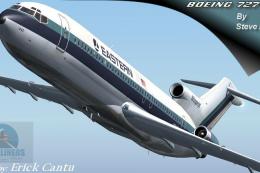
This freeware package features a classic Boeing 727-200 in the colors of East…
 FS2004 Civil Jet Aircraft
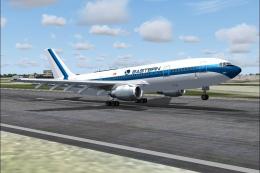
A repaint of the SGA A300-B4-200 in EAL livery, registration N201EA, white pa…
 FS2004 Civil Jet Aircraft
Model by Project Open Sky. MEA repaint by Michael Pearson. Screenshot of Midd…
 FS2004 Civil Jet Aircraft
The Boeing 757-200 has long been a favored narrow-body airliner in both passe…
FS2004 Civil Jet Aircraft
This freeware release brings a faithfully recreated Eastern Airlines Boeing 7…
FS2004 Civil Jet Aircraft
Enthusiasts seeking an authentic mid-range classic in Flight Simulator 2004 c…
Be the first to leave a comment on this download.
Be the first to share your thoughts on this download.