

 FSX General Aviation Aircraft
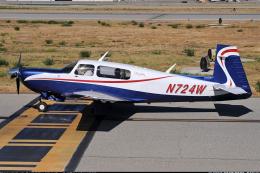
Red & Blue/Blue & Red Mooney Bravo
Two repaints of the default Mooney Bravo in Freedom Scheme 5. By David Robins…
Red-and-blue BD-5 package for FSX pairs a glossy repaint with a clear canopy, cleaner windscreen seam, and a static exterior panel that matches the cockpit view for tighter visual continuity. It includes the complete aircraft and captures the iconic Bede micro-aircraft vibe made famous by the BD-5J’s film-era notoriety.
 Rate
Rate

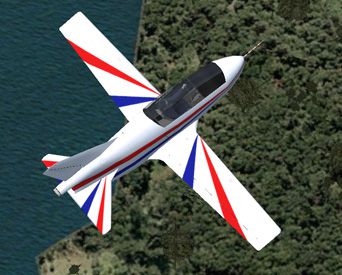
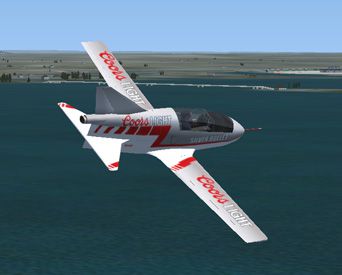
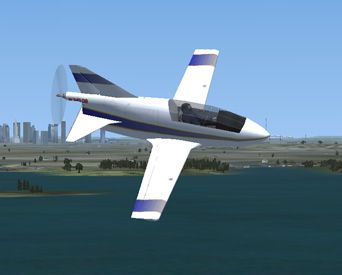
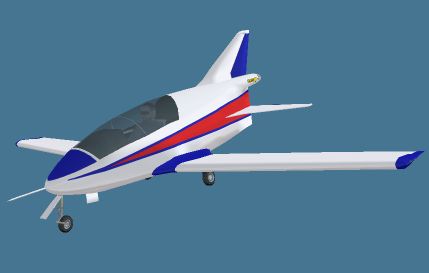
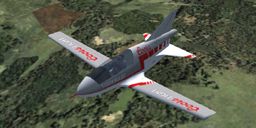
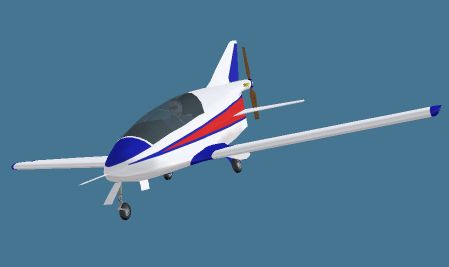
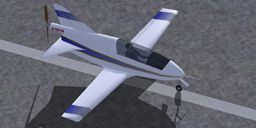
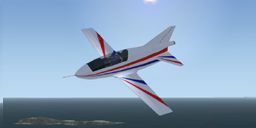
Red and blue repaint of the BD5 by "Jez G". This file includes the complete aircraft. Repaint includes gloss paint, a clear canopy, and a thinner seam where the canopy meets the windscreen. The static panel (exterior view) now matches the cockpit view. Repaint by Rick Federmann.
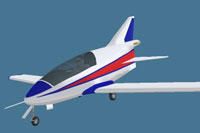
Screenshot of a red, white and blue BD-5.
The original design for the BD-5 was penned in the late 60's by Jim Bede. This was then made into a home build kit available to anyone for the asking price of around $3000 including a 70hp engine. Later the jet "J" version came along powered by a TRS-18 microturbo jet engine. In 1983 the BD-5J became famous due to its appearance in the James Bond film 'Octopussy' which was flown by 'Corkey'Fornof.
Over 5000 kits were produced and shipped to builders, sadly only around 150 remain flying but in recent years it has been certified as a cruise missile substitute for training and radar testing. The BD5 is not permitted to fly in the United Kingdom though.
Free for all simmers · 15.8 MB · Scanned clean Oct 2026
Download speed: Free tier is capped at 0.5 Mbps (this file takes approximately 4 mins at the cap). PRO members download at full line speed.
SimObjects\Airplanes\, Addon Scenery\, Effects\, or Gauges\.readme.txt or README file. It tells you exactly where files go, what dependencies are needed, and any quirks specific to this add-on.The archive bd5_redblue_textures.zip has 155 files and directories contained within it.
This list displays the first 500 files in the package. If the package has more, you will need to download it to view them.
| Filename/Directory | File Date | File Size |
|---|---|---|
| bd5collection.gif | 01.12.07 | 10.15 kB |
| FILE_ID.DIZ | 01.12.07 | 398 B |
| readme.txt | 01.12.07 | 4.99 kB |
| aircraft.cfg | 01.12.07 | 10.06 kB |
| BD-5.air | 12.25.06 | 8.81 kB |
| bd-5.jpg | 01.12.07 | 46.84 kB |
| BD_5.mdl | 12.22.06 | 467.89 kB |
| Model.cfg | 11.19.06 | 25 B |
| bd5.cab | 11.27.06 | 10.63 kB |
| PANEL.CFG | 12.25.06 | 4.00 kB |
| bd_flap.wav | 05.12.06 | 923.11 kB |
| geardown.wav | 05.07.03 | 51.12 kB |
| gearup.wav | 05.07.03 | 49.96 kB |
| sound.cfg | 01.11.07 | 6.57 kB |
| Trike_01.wav | 05.12.06 | 356.58 kB |
| Trike_02.wav | 05.12.06 | 158.05 kB |
| Trike_03.wav | 05.12.06 | 259.47 kB |
| Trike_04.wav | 05.12.06 | 212.12 kB |
| Trike_GroundRoll.wav | 05.12.06 | 234.12 kB |
| Trike_Shutdown.wav | 05.12.06 | 311.50 kB |
| Trike_Starter.wav | 05.12.06 | 27.93 kB |
| Trike_Startup.wav | 05.12.06 | 308.70 kB |
| xTrike_f01.wav | 06.30.06 | 258.22 kB |
| xTrike_f02.wav | 06.30.06 | 200.89 kB |
| xTrike_f03.wav | 06.30.06 | 223.09 kB |
| xTrike_f04.wav | 06.30.06 | 185.03 kB |
| xTrike_r01.wav | 06.30.06 | 258.21 kB |
| xTrike_r02.wav | 06.30.06 | 200.84 kB |
| xTrike_r03.wav | 06.30.06 | 299.95 kB |
| xTrike_r04.wav | 06.30.06 | 273.49 kB |
| xTrike_Shutdown.wav | 06.30.06 | 130.12 kB |
| xTrike_Starter.wav | 06.30.06 | 19.29 kB |
| xTrike_Startup.wav | 06.30.06 | 46.76 kB |
| xTrike_wind01.wav | 06.21.06 | 269.53 kB |
| xTrike_wind02.wav | 06.21.06 | 268.04 kB |
| xTrike_wind03.wav | 06.21.06 | 528.07 kB |
| $vc | 07.14.03 | 768.05 kB |
| $vca | 07.14.03 | 768.05 kB |
| $vcb | 07.14.03 | 768.05 kB |
| $vcc | 07.14.03 | 768.05 kB |
| cp_32.bmp | 11.29.06 | 1.33 MB |
| cp2_32.bmp | 11.28.06 | 1.33 MB |
| cp3.bmp | 12.25.06 | 1.33 MB |
| dash_32.bmp | 11.28.06 | 1.33 MB |
| fuse1_32.bmp | 11.23.06 | 1.33 MB |
| glass.bmp | 11.01.06 | 85.43 kB |
| glass2.bmp | 11.01.06 | 85.43 kB |
| parts_32.bmp | 11.22.06 | 1.33 MB |
| prop.bmp | 11.23.06 | 1.33 MB |
| Proptbmp | 01.28.02 | 86.39 kB |
| thumbnail.jpg | 11.23.06 | 31.96 kB |
| wingsB-32.bmp | 12.22.06 | 1.33 MB |
| wingsT_32.bmp | 11.29.06 | 1.33 MB |
| Aircraft.cfg | 01.12.07 | 10.93 kB |
| bd-5coors.jpg | 01.12.07 | 52.72 kB |
| BD-5j.air | 12.24.06 | 12.26 kB |
| bd-5Jacrostar.jpg | 01.12.07 | 87.45 kB |
| BD_5J.mdl | 12.25.06 | 412.97 kB |
| Model.cfg | 11.01.06 | 24 B |
| bd5_background.bmp | 12.25.06 | 769.02 kB |
| PANEL.CFG | 12.25.06 | 3.56 kB |
| bd_flap.wav | 05.12.06 | 923.11 kB |
| c5wind2.wav | 05.12.06 | 426.64 kB |
| canopy.wav | 05.12.06 | 131.81 kB |
| geardown.wav | 05.07.03 | 51.12 kB |
| gearup.wav | 05.07.03 | 49.96 kB |
| lan11.wav | 08.01.06 | 68.23 kB |
| lan12.wav | 08.01.06 | 68.73 kB |
| lan13.wav | 08.01.06 | 60.23 kB |
| lan14.wav | 08.01.06 | 63.19 kB |
| lan1shut.wav | 08.01.06 | 243.77 kB |
| lan1strt.wav | 08.01.06 | 493.84 kB |
| lan21.wav | 08.01.06 | 46.23 kB |
| lan22.wav | 08.01.06 | 68.23 kB |
| lan23.wav | 08.01.06 | 59.73 kB |
| lan24.wav | 08.01.06 | 44.69 kB |
| lan2strt.wav | 08.01.06 | 100.27 kB |
| lan2t.wav | 08.01.06 | 101.34 kB |
| lbn2t.wav | 08.01.06 | 97.34 kB |
| LearRumble1.wav | 06.01.06 | 30.68 kB |
| lmflaps.wav | 05.12.06 | 95.79 kB |
| sound.cfg | 01.11.07 | 9.37 kB |
| xlan11.wav | 05.12.06 | 67.73 kB |
| xlan12.wav | 05.12.06 | 68.23 kB |
| xlan13.wav | 05.12.06 | 65.23 kB |
| xlan14.wav | 05.12.06 | 62.69 kB |
| xlan1shut.wav | 05.12.06 | 220.75 kB |
| xlan1strt.wav | 05.12.06 | 464.31 kB |
| xlan21.wav | 05.12.06 | 62.23 kB |
| xlan22.wav | 05.12.06 | 56.73 kB |
| xlan23.wav | 05.12.06 | 60.73 kB |
| xlan24.wav | 05.12.06 | 64.23 kB |
| xlan2strt.wav | 05.12.06 | 71.75 kB |
| xlan2t.wav | 05.12.06 | 100.81 kB |
| xlbn11.wav | 05.12.06 | 68.73 kB |
| xlbn12.wav | 05.12.06 | 69.23 kB |
| xlbn13.wav | 05.12.06 | 60.23 kB |
| xlbn14.wav | 05.12.06 | 64.19 kB |
| xlbn21.wav | 05.12.06 | 41.69 kB |
| xlbn22.wav | 05.12.06 | 53.69 kB |
| xlbn23.wav | 05.12.06 | 69.19 kB |
| xlbn24.wav | 05.12.06 | 68.19 kB |
| xlbn2t.wav | 05.12.06 | 96.81 kB |
| $vc | 04.11.03 | 64.09 kB |
| $vc_T | 10.30.06 | 768.05 kB |
| $vc2 | 04.11.03 | 64.09 kB |
| cp_32.bmp | 12.24.06 | 1.33 MB |
| cp2_32.bmp | 12.24.06 | 1.33 MB |
| cp3.bmp | 12.25.06 | 1.33 MB |
| dash_32.bmp | 11.28.06 | 1.33 MB |
| fuse1_32.bmp | 12.24.06 | 1.33 MB |
| glass.bmp | 11.01.06 | 85.43 kB |
| glass2.bmp | 11.01.06 | 85.43 kB |
| parts_32.bmp | 11.22.06 | 1.33 MB |
| thumbnail.jpg | 12.24.06 | 21.96 kB |
| wingsB-32.bmp | 12.24.06 | 1.33 MB |
| wingsT_32.bmp | 12.24.06 | 1.33 MB |
| $vc | 04.11.03 | 64.09 kB |
| $vc_T | 10.30.06 | 768.05 kB |
| $vc2 | 04.11.03 | 64.09 kB |
| cp_32.bmp | 11.29.06 | 1.33 MB |
| cp2_32.bmp | 01.11.07 | 1.33 MB |
| cp3.bmp | 12.25.06 | 1.33 MB |
| dash_32.bmp | 11.28.06 | 1.33 MB |
| fuse1_32.bmp | 01.12.07 | 1.33 MB |
| glass.bmp | 11.01.06 | 85.43 kB |
| glass2.bmp | 11.01.06 | 85.43 kB |
| parts_32.bmp | 11.22.06 | 1.33 MB |
| thumbnail.jpg | 11.10.06 | 44.61 kB |
| wingsB-32.bmp | 01.12.07 | 1.33 MB |
| wingsT_32.bmp | 01.12.07 | 1.33 MB |
| Cockpit.jpg | 01.31.14 | 160.92 kB |
| Exterior.jpg | 01.29.14 | 30.01 kB |
| Instructions.txt | 02.01.14 | 2.77 kB |
| $vc | 11.21.13 | 64.09 kB |
| $vca | 11.21.13 | 64.09 kB |
| cp_32.bmp | 01.25.14 | 1.00 MB |
| cp2_32.bmp | 01.25.14 | 1.00 MB |
| cp3.bmp | 01.27.14 | 1.33 MB |
| dash_32.bmp | 11.21.13 | 1.00 MB |
| fuse1_32.bmp | 01.29.14 | 5.33 MB |
| glass.bmp | 01.28.14 | 85.43 kB |
| glass2.bmp | 01.28.14 | 85.43 kB |
| parts_32.bmp | 01.29.14 | 5.33 MB |
| prop.bmp | 11.21.13 | 1.33 MB |
| Proptbmp | 11.21.13 | 86.39 kB |
| thumbnail.jpg | 01.29.14 | 26.95 kB |
| thumbnail-jet.jpg | 01.29.14 | 30.01 kB |
| thumbnail-prop.jpg | 01.29.14 | 26.95 kB |
| wingsb-32.bmp | 01.27.14 | 5.33 MB |
| wingst_32.bmp | 01.27.14 | 5.33 MB |
| FILE_ID.DIZ | 03.13.14 | 380 B |
| BD5_RedBlue_Textures.gif | 03.13.14 | 3.20 kB |
| flyawaysimulation.txt | 10.29.13 | 959 B |
| Go to Fly Away Simulation.url | 01.22.16 | 52 B |
Only PRO members can place votes.
More FSX & P3D add-ons hand-picked based on this download.
FSX General Aviation Aircraft
Two repaints of the default Mooney Bravo in Freedom Scheme 5. By David Robins…
 FSX General Aviation Aircraft
This repaint package brings a striking red and gold color scheme to the freew…
 FSX General Aviation Aircraft
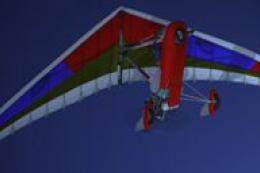
Red And Blue Aircreation 582SL. A repaint of the default Air Creation 582 SL …
 FSX General Aviation Aircraft
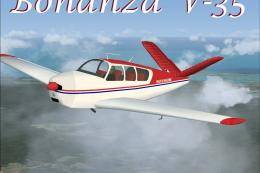
This alluring freeware release, crafted specifically for Microsoft Flight Sim…
 FSX General Aviation Aircraft
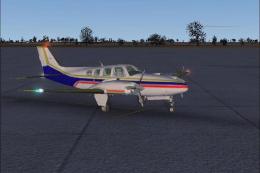
Beechcraft Baron 58 in blue with red and gold. This is a texture for the defa…
 FSX General Aviation Aircraft
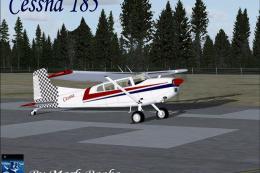
A Cessna 185 modified for Flight Simulator X by Mark Rooks. Screenshot of Ces…
 FSX General Aviation Aircraft
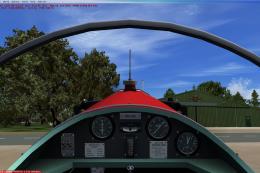
Experience a fresh take on the 1930s-era Dart Kitten II with this special, Du…
 FSX General Aviation Aircraft
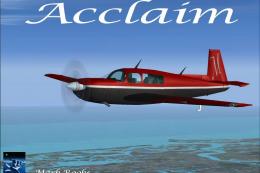
This enhanced package offers a newly repainted red-and-black Mooney Acclaim f…
Read what other simmers think, or add your own.

I have a FS 95 or 98 model of the BD-10. Is there some way to update it so it will work in FSX Acceleration?

Fun little plane. I saw this plane at an airshow years ago. It is small. I like the prop version option as well.