

 FSX Civil Aircraft
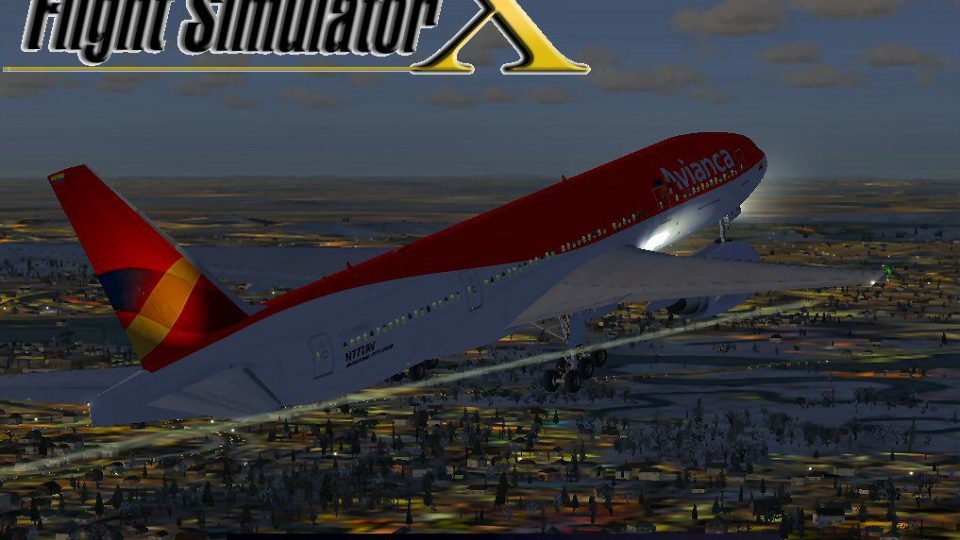
Avianca Boeing 777-200ER
This freeware release features a complete Boeing 777-200ER package in Avianca…
Avianca’s Boeing 777-200ER N777AV brings a long-haul widebody to life in FSX with vivid livery work, tuned flight dynamics, and small system refinements, plus animated engine cowlings and jetway support. Optional lighting enhancements integrate with A2A 3D Lights and Redux when installed.
 Rate
Rate
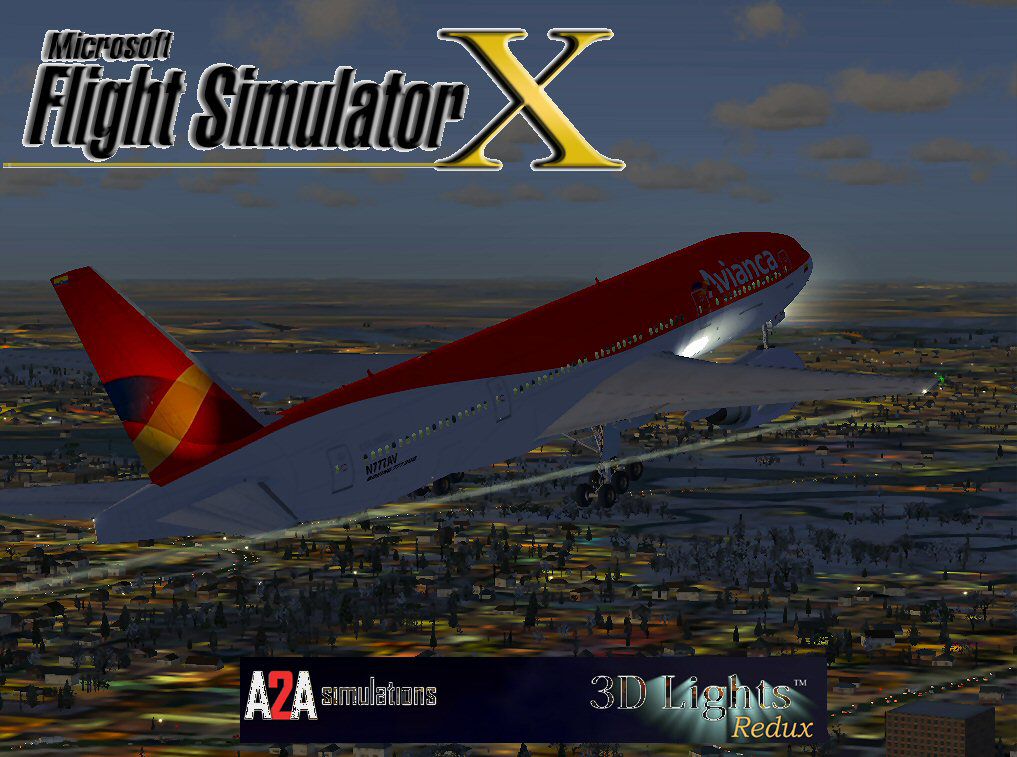
This add-on provides a carefully refined Avianca Boeing 777-200ER (registration N777AV) for FSX. It includes reworked flight dynamics, vivid texturing, and minor system upgrades. It also offers optional A2A 3D Lights and Redux integration. Originally developed by Melvin Rafi, then converted for the FSX platform by David Grindele, it maintains the distinctive quality of the original design. This paragraph serves as both an introduction and summary.
This widebody airliner reflects the major visual elements of Avianca’s new colors. Equipped with Rolls-Royce engines, it features smooth handling and enhanced realism. The Boeing 777-200ER, known for its extended range capability, remains a popular long-haul model. Many aviators respect this aircraft for its efficient performance and versatile mission profiles.
Despite the original Meljet design being optimized for earlier simulators, the conversion process retains the visual fidelity and structural detail. The developers have minimized compromises. With these modifications, the aircraft exhibits a balanced flight envelope under FSX.
Melvin Rafi (Mel) crafted the original models. His work gained recognition in earlier simulator releases. Meanwhile, the FSX updates by David Grindele focus on revised air files and added compatibility layers. Both creators have preserved this aircraft’s classic character, ensuring continued accessibility.
Avianca, a major Latin American carrier, has operated numerous widebody types. The Boeing 777 series offers high-capacity transport and advanced avionics. Even in this simulation, one can view the cockpit details or watch the engine start-up sequences. The developer’s intent was to keep the experience authentic while honoring the aesthetics of the real-world livery.
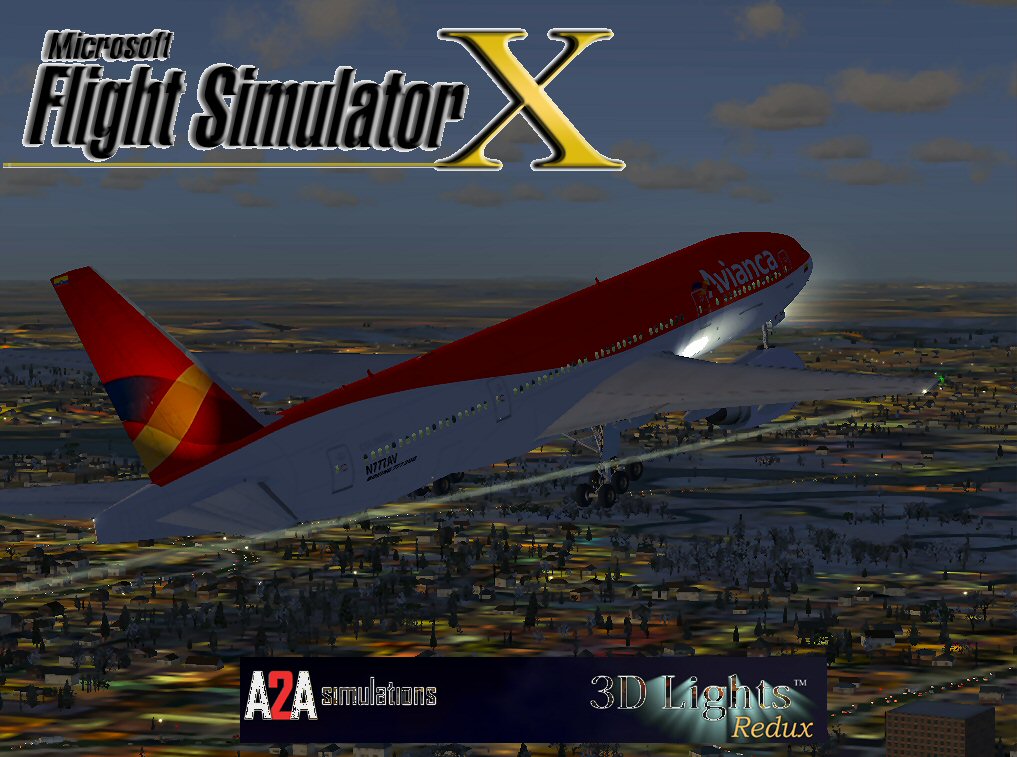
Avianca Boeing 777-200E.
In all, this freeware mod preserves the spirit of Mel’s original creation. Updated flight characteristics, realistic animations, and refined textures provide an elevated experience for Boeing long-haul enthusiasts. Both authors, Melvin Rafi and David Grindele, have contributed significantly to maintain top-tier quality. Pilots can now enjoy a timeless aircraft that handles well through extended flights and retains the charm of classic sim heritage.
Free for all simmers · 54.39 MB · Scanned clean Oct 2026
Download speed: Free tier is capped at 0.5 Mbps (this file takes approximately 15 mins at the cap). PRO members download at full line speed.
FSX\SimObjects\Airplanes\. The folder must contain an aircraft.cfg file. Effects go into FSX\Effects\; gauges go into FSX\Gauges\.readme.txt or README file. It tells you exactly where files go, what dependencies are needed, and any quirks specific to this add-on.The archive anrrfsx.zip has 141 files and directories contained within it.
This list displays the first 500 files in the package. If the package has more, you will need to download it to view them.
| Filename/Directory | File Date | File Size |
|---|---|---|
| AviancaRR 777.jpg | 12.10.09 | 142.67 kB |
| Boeing 777_RR_Avianca | 12.10.09 | 0 B |
| aircraft.cfg | 12.10.09 | 18.37 kB |
| Boeing777-200-MR-MKIII.air | 07.08.03 | 8.66 kB |
| boeing777-200_check.htm | 05.21.03 | 49.99 kB |
| boeing777-200_ref.htm | 05.21.03 | 9.48 kB |
| model.rr | 12.10.09 | 0 B |
| Boeing777-200-MR-MKIII.mdl | 07.13.03 | 3.57 MB |
| Model.cfg | 11.09.02 | 41 B |
| panel | 12.10.09 | 0 B |
| 777KM.cab | 09.17.04 | 1.25 MB |
| forward_1024.bmp | 07.06.01 | 769.05 kB |
| forward_640.bmp | 07.06.01 | 301.05 kB |
| FORWARD_LEFT.bmp | 08.05.00 | 335.36 kB |
| forward_right.bmp | 08.11.00 | 769.05 kB |
| LEFT.bmp | 08.11.00 | 140.55 kB |
| MAIN.bmp | 09.17.04 | 5.49 MB |
| OVERHEAD.bmp | 09.16.04 | 2.70 MB |
| panel.cfg | 11.17.09 | 8.12 kB |
| PEDESTAL.bmp | 09.16.04 | 1.09 MB |
| REAR.bmp | 07.25.00 | 733.47 kB |
| REAR_LEFT.bmp | 07.27.00 | 582.27 kB |
| REAR_RIGHT.bmp | 07.24.00 | 680.04 kB |
| right2.bmp | 08.10.00 | 606.57 kB |
| Thumbs.db | 12.04.09 | 21.50 kB |
| sound | 12.10.09 | 0 B |
| A_COMB_1.wav | 12.12.04 | 728.63 kB |
| A_COMB_2.wav | 12.12.04 | 728.63 kB |
| A_COMB_3.wav | 12.12.04 | 728.63 kB |
| A_COMB_4.wav | 05.07.05 | 691.51 kB |
| A_EFSC.wav | 09.27.05 | 325.45 kB |
| A_JT8D_0.wav | 06.04.04 | 209.46 kB |
| A_JT8D_1.wav | 05.01.05 | 1.69 MB |
| A_JT8D_2.wav | 01.19.06 | 605.39 kB |
| A_JT8D_3.wav | 02.11.06 | 418.02 kB |
| b_COMB_1.wav | 12.12.04 | 728.63 kB |
| B_COMB_2.wav | 12.12.04 | 728.63 kB |
| B_COMB_3.wav | 12.12.04 | 728.63 kB |
| B_COMB_4.wav | 05.07.05 | 691.51 kB |
| B_EFSC.wav | 09.27.05 | 325.45 kB |
| b_JT8D_0.wav | 06.04.04 | 209.46 kB |
| b_JT8D_1.wav | 05.01.05 | 1.69 MB |
| b_JT8D_2.wav | 01.19.06 | 605.39 kB |
| B_JT8D_3.wav | 02.11.06 | 418.02 kB |
| FLAPS.wav | 08.22.03 | 210.75 kB |
| GEARDOWN.wav | 02.17.06 | 1.96 MB |
| gearup.wav | 02.17.06 | 1.98 MB |
| NEWWIND.WAV | 03.29.04 | 858.65 kB |
| reverser,BBN2T.wav | 01.19.06 | 1.79 MB |
| reverser.wav | 12.27.05 | 1.81 MB |
| Sound.cfg | 02.17.06 | 14.99 kB |
| touchc.wav | 01.06.99 | 286.01 kB |
| touchl.wav | 09.10.98 | 14.22 kB |
| touchr.wav | 07.01.97 | 10.85 kB |
| T_COMB_SHUT.WAV | 04.01.04 | 2.32 MB |
| T_COMB_START.wav | 06.30.01 | 107.55 kB |
| T_JT8D_START.wav | 12.12.04 | 3.63 MB |
| wind.wav | 03.29.04 | 858.65 kB |
| XBAN2T.wav | 12.21.05 | 1.81 MB |
| XBBN2T.wav | 12.21.05 | 1.81 MB |
| X_A_COMB_1.wav | 05.07.05 | 693.93 kB |
| X_A_COMB_2.wav | 05.07.05 | 693.93 kB |
| X_A_COMB_3.wav | 05.07.05 | 693.93 kB |
| X_A_COMB_4.wav | 02.04.06 | 325.45 kB |
| X_a_EFSC.wav | 01.16.06 | 648.45 kB |
| X_A_JT8D_0.wav | 02.04.06 | 325.45 kB |
| X_a_JT8D_1.wav | 02.04.06 | 325.45 kB |
| X_A_JT8D_2.wav | 02.04.06 | 669.99 kB |
| X_a_JT8D_3.wav | 02.04.06 | 669.99 kB |
| X_A_REVRS.wav | 09.16.99 | 108.81 kB |
| X_b_COMB_1.wav | 05.07.05 | 693.93 kB |
| X_b_COMB_2.wav | 05.07.05 | 693.93 kB |
| X_b_COMB_3.wav | 05.07.05 | 693.93 kB |
| X_B_COMB_4.wav | 02.04.06 | 325.45 kB |
| X_B_EFSC.wav | 12.21.05 | 1.81 MB |
| X_b_JT8D_0.wav | 02.04.06 | 325.45 kB |
| X_b_JT8D_1.wav | 02.04.06 | 325.45 kB |
| X_b_JT8D_2.wav | 02.04.06 | 669.99 kB |
| X_b_JT8D_3.wav | 02.04.06 | 669.99 kB |
| X_B_REVRS.wav | 09.16.99 | 119.31 kB |
| X_T_COMB_START.wav | 03.17.05 | 693.93 kB |
| X_T_JT8D_SHUT.WAV | 09.19.04 | 3.98 MB |
| X_T_JT8D_START.wav | 03.31.04 | 3.58 MB |
| soundai | 12.10.09 | 0 B |
| soundai.cfg | 05.12.06 | 34 B |
| texture.avianca_nc | 12.10.09 | 0 B |
| 777Cargohold_L.bmp | 12.30.02 | 256.07 kB |
| 777Cargohold_T.bmp | 12.30.02 | 256.07 kB |
| 777cockpitwindows.bmp | 12.29.02 | 257.05 kB |
| 777FuselagePort1_L.bmp | 01.08.06 | 1.00 MB |
| 777FuselagePort1_T.bmp | 01.30.06 | 4.00 MB |
| 777FuselageStar1_L.bmp | 01.08.06 | 1.00 MB |
| 777FuselageStar1_T.bmp | 01.30.06 | 4.00 MB |
| 777gear2_L.bmp | 12.30.02 | 16.07 kB |
| 777gear2_T.bmp | 01.29.06 | 1.00 MB |
| 777interior10_L.bmp | 07.11.03 | 256.07 kB |
| 777interior10_T.bmp | 01.28.06 | 256.07 kB |
| 777interior11_L.bmp | 07.11.03 | 256.07 kB |
| 777interior11_T.bmp | 01.28.06 | 256.07 kB |
| 777interior1_L.bmp | 12.30.02 | 256.07 kB |
| 777interior1_T.bmp | 01.28.06 | 256.07 kB |
| 777interior2_L.bmp | 01.01.03 | 256.07 kB |
| 777interior2_T.bmp | 01.07.06 | 256.07 kB |
| 777interior3_L.bmp | 07.11.03 | 1.00 MB |
| 777interior3_T.bmp | 01.28.06 | 1.00 MB |
| 777interior4_L.bmp | 07.11.03 | 1.00 MB |
| 777interior4_T.bmp | 01.28.06 | 1.00 MB |
| 777interior5_L.bmp | 07.11.03 | 1.00 MB |
| 777interior5_T.bmp | 01.28.06 | 1.00 MB |
| 777interior6_L.bmp | 07.11.03 | 1.00 MB |
| 777interior6_T.bmp | 01.28.06 | 1.00 MB |
| 777interior7_L.bmp | 07.11.03 | 1.00 MB |
| 777interior7_T.bmp | 01.28.06 | 1.00 MB |
| 777interior8_L.bmp | 07.11.03 | 256.07 kB |
| 777interior8_T.bmp | 01.28.06 | 256.07 kB |
| 777interior9_L.bmp | 07.11.03 | 256.07 kB |
| 777interior9_T.bmp | 01.28.06 | 256.07 kB |
| 777LandingGear01.bmp | 12.30.02 | 257.05 kB |
| 777Tail_L.bmp | 12.30.02 | 1.00 MB |
| 777Tail_T.bmp | 01.28.06 | 1.00 MB |
| 777Wing1_L.bmp | 12.30.02 | 16.07 kB |
| 777Wing1_T.bmp | 01.29.06 | 1.00 MB |
| 777Wing2_L.bmp | 12.30.02 | 16.07 kB |
| 777Wing2_T.bmp | 01.30.06 | 1.00 MB |
| Powerplant-RRTrent800-Exterior_L.bmp | 12.30.02 | 16.07 kB |
| Powerplant-RRTrent800-Exterior_T.bmp | 01.23.06 | 1.00 MB |
| Powerplant-RRTrent800-Fan.bmp | 11.22.01 | 65.05 kB |
| Powerplant-RRTrent800-FanShaft.bmp | 07.06.03 | 65.05 kB |
| Powerplant-RRTrent800-FanShaftMotion.bmp | 07.06.03 | 65.05 kB |
| Powerplant-RRTrent800-Interior_L.bmp | 12.30.02 | 16.07 kB |
| Powerplant-RRTrent800-Interior_T.bmp | 07.13.03 | 1.00 MB |
| Thumbnail.jpg | 12.10.09 | 9.52 kB |
| Thumbs.db | 12.10.09 | 100.00 kB |
| Thumbs.db | 01.30.06 | 9.00 kB |
| file_id.diz | 12.08.09 | 1.83 kB |
| Install.txt | 12.10.09 | 1.33 kB |
| WallPaper | 12.10.09 | 0 B |
| AviancaRR 777.bmp | 12.10.09 | 2.20 MB |
| ANRRFSX | 12.10.09 | 0 B |
| flyawaysimulation.txt | 10.29.13 | 959 B |
| Go to Fly Away Simulation.url | 01.22.16 | 52 B |
Only PRO members can place votes.
More FSX & P3D add-ons hand-picked based on this download.
FSX Civil Aircraft
This freeware release features a complete Boeing 777-200ER package in Avianca…
 FSX Civil Aircraft
American Airlines Boeing 777-200ER (real chrome v2). Original model by Melvin…
 FSX Civil Aircraft
This freeware package faithfully represents a wide-body twinjet featuring Gar…
 FSX Civil Aircraft
This freeware release features a meticulously updated Malaysia Boeing 777-200…
 FSX Civil Aircraft
This is a repaint of the payware PMDG B777-200ER in the livery of Air France.…
 FSX Civil Aircraft
Photorealistic repaint of American Airlines B777-200ER GE N781AN for the payw…
 FSX Civil Aircraft
Textures for the default B777-200. The panel background was created entirely …
 FSX Civil Aircraft
Explore a finely tuned freeware simulation of Austrian Airlines’ Boeing 777-2…
Be the first to leave a comment on this download.
Be the first to share your thoughts on this download.