

 FSX Civil Aircraft
Mexicana de Aviacion Boeing 737-800 2000 Livery
This repaint showcases the classic aesthetic of Mexicana de Aviación wrapped …
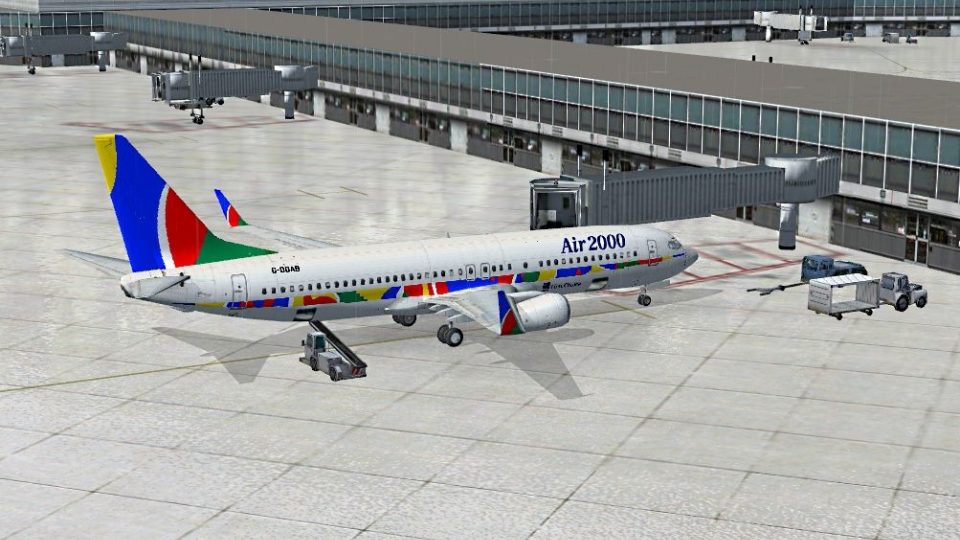
Air 2000’s classic holiday-era livery comes to the Boeing 737-800 with crisp, carefully aligned textures that replicate the airline’s distinctive tail and fuselage branding from its 1987–2004 operation. Designed for Microsoft Flight Simulator X, this repaint package requires the default 737-800 base model and adds an authentic period look in the virtual cockpit and exterior views.
 Rate
Rate
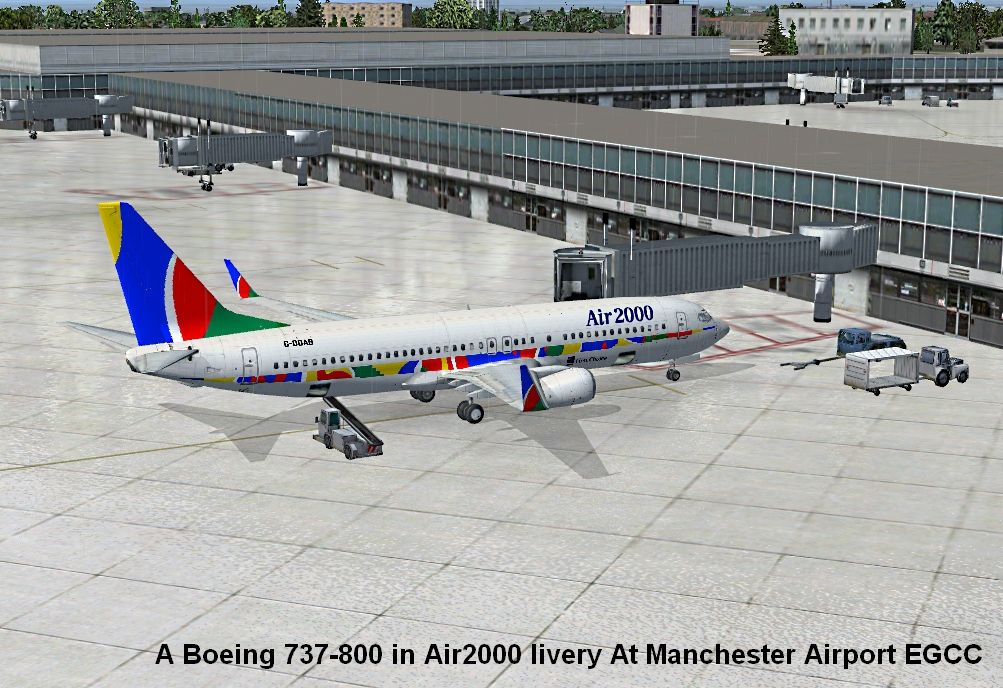
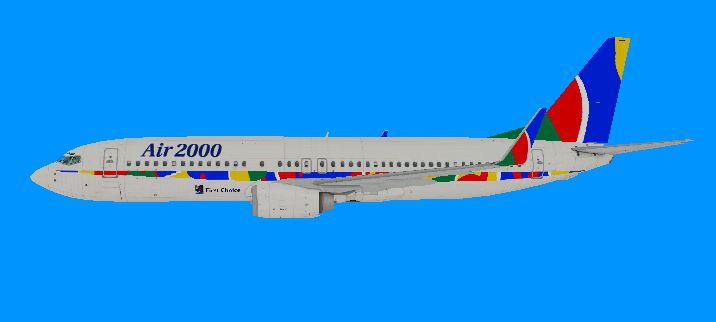
Experience the nostalgic Air 2000 paint scheme on the Boeing 737-800 within Microsoft Flight Simulator X, re-created by Anthony Smith. This freeware package provides custom textures carefully modeled to reflect the airline’s former branding, which was known for operating holiday flights from 1987 until 2004. It does not include the default aircraft files, so you will need the base model found in the Fly Away Simulation mod library. Below, you will find details on the repaint, alongside technical guidance for integrating it into your simulator.
Air 2000 (previously associated with Britannia Airways and later merging into First Choice) once offered leisure travel services across Europe. This repaint captures their recognizable livery and applies it to the default Boeing 737-800 in FSX. Boeing’s 737-800 variant, often used for short- to medium-range flights, features advanced winglets and a versatile cabin layout, making it a staple in commercial fleets. In this repaint, you will see accurate graphics reflecting the Air 2000 branding on fuselage and tail sections.
Anthony Smith is credited with this re-texture, bringing a detailed and faithful representation of the airline’s scheme to flight simulation enthusiasts. The textures are meticulously aligned to the aircraft’s surfaces, resulting in a realistic in-sim appearance.
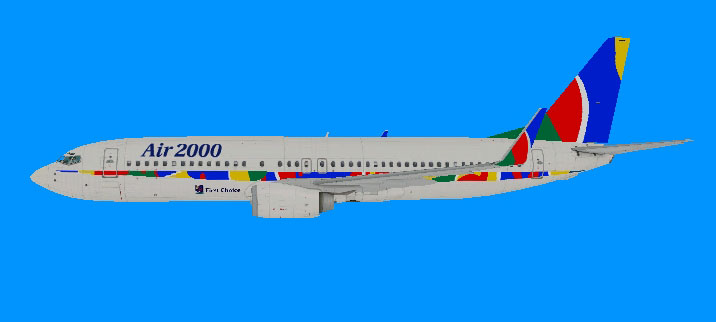
Air 2000 Boeing 737-800 in flight.
This add-on offers only the texture folder, so you will need to have the default Boeing 737-800 from Microsoft Flight Simulator X installed. Because it is freeware, no payware components are necessary, but ensure you consult the Fly Away Simulation library if you need to download the required base model or verify compatibility with your simulator installation.
SimObjects folder, then proceed to the Airplanes or Aircraft folder (depending on your FSX version). Locate the directory named B737_800.B737_800 directory.B737_800 directory, locate and open the aircraft.cfg file using a text editor (for instance, Notepad).[fltsim.x] entries until you find the last one. Take note of its numeric index. For instance, if the last entry is [fltsim.5], your new entry should be assigned an index incremented by one (e.g., [fltsim.6]).[General] heading, ensuring you modify the “XX” after [fltsim. to match the new number:[fltsim.XX]
title=Airbus A321 Air 2000
sim=Airbus_A321
model=
panel=
sound=
texture=Air 2000
kb_checklists=AirbusA321_check
kb_reference=AirbusA321_ref
atc_id=G-W5A4
atc_airline=
atc_flight_number=
ui_manufacturer=Airbus
ui_type=A321
ui_variation=Air 2000
ui_typerole=Commercial Airliner
ui_createdby=Microsoft Corporation
description=repaint by TonyGD.
This snippet references the texture folder name “Air 2000.” If you have renamed your folder to something different, adjust the texture= line above accordingly.

Air 2000 Boeing 737-800 at boarding gate.
[fltsim.x] entries in aircraft.cfg are sequentially numbered with no duplicates.This repaint set provides a fascinating glimpse into the early days of modern British charter operations, with a vibrant color scheme applied to a popular twinjet. Simply follow the installation sequence, update your configuration file, and you can start enjoying Air 2000’s classic visual identity on your flights. Go ahead and explore routes reminiscent of the airline’s real-world vacation services from years gone by.
Free for all simmers · 8.96 MB · Scanned clean Oct 2026
Download speed: Free tier is capped at 0.5 Mbps (this file takes approximately 3 mins at the cap). PRO members download at full line speed.
texture.{airline}) inside FSX\SimObjects\Airplanes\{base-aircraft}\.aircraft.cfg in Notepad. Add a new [fltsim.X] section per the readme.readme.txt or README file. It tells you exactly where files go, what dependencies are needed, and any quirks specific to this add-on.The archive b738_air_2000.zip has 30 files and directories contained within it.
This list displays the first 500 files in the package. If the package has more, you will need to download it to view them.
| Filename/Directory | File Date | File Size |
|---|---|---|
| B738 Air2000.jpg | 05.23.11 | 600.95 kB |
| texture.Air 2000 | 05.23.11 | 0 B |
| 737_Refection.dds | 09.04.06 | 170.79 kB |
| B737_800_1_C.dds | 09.04.06 | 682.79 kB |
| b737_800_1_LM.dds | 09.04.06 | 170.79 kB |
| B737_800_1_night_C.dds | 09.04.06 | 682.79 kB |
| b737_800_1_T.dds | 05.22.11 | 1.00 MB |
| b737_800_1_T_Bump.dds | 09.04.06 | 1.00 MB |
| b737_800_1_T_Specular.dds | 09.04.06 | 1.33 MB |
| B737_800_2_C.dds | 09.04.06 | 682.79 kB |
| B737_800_2_night_C.dds | 09.04.06 | 682.79 kB |
| b737_800_2_T.dds | 09.04.06 | 1.33 MB |
| b737_800_2_T_Bump.dds | 09.04.06 | 1.00 MB |
| b737_800_2_T_Specular.dds | 09.04.06 | 1.33 MB |
| B737_800_3_C.dds | 09.04.06 | 682.79 kB |
| B737_800_3_night_C.dds | 09.04.06 | 682.79 kB |
| B737_800_4_C.dds | 09.04.06 | 682.79 kB |
| B737_800_4_night_C.dds | 09.04.06 | 682.79 kB |
| B737_800_5_C.dds | 09.04.06 | 170.79 kB |
| B737_800_5_night_C.dds | 09.04.06 | 170.79 kB |
| B737_800_C.bmp | 05.12.06 | 682.74 kB |
| B737_800_Interior.dds | 09.04.06 | 170.79 kB |
| Fresnel_Ramp.dds | 09.04.06 | 640 B |
| Pilots_737.dds | 09.04.06 | 42.79 kB |
| texture.cfg | 08.14.06 | 137 B |
| thumbnail.JPG | 05.23.11 | 55.49 kB |
| Thumbs.db | 01.15.11 | 5.00 kB |
| INSTALL.txt | 05.25.11 | 1.50 kB |
| flyawaysimulation.txt | 10.29.13 | 959 B |
| Go to Fly Away Simulation.url | 01.22.16 | 52 B |
Only PRO members can place votes.
More FSX & P3D add-ons hand-picked based on this download.
FSX Civil Aircraft
This repaint showcases the classic aesthetic of Mexicana de Aviación wrapped …
 FSX Civil Aircraft
Continental Boeing 737-800. Fictional textures for the default B737-800. Repa…
 FSX Civil Aircraft
FSX Air Berlin Boeing 737-800. Model by Project Open Sky. Repaint by Misha Gr…
 FSX Civil Aircraft
FSX Norwegian Air Shuttle Boeing 737-800, registration LN-NOB. Textures only …
 FSX Civil Aircraft
This freeware package enhances the default Boeing 737-800 in Microsoft Flight…
 FSX Civil Aircraft
Lion Air Boeing 737-800, registration PK-LJQ (the first Boeing 737-800 in Lio…
 FSX Civil Aircraft
This freeware repaint offers a crisp 32-bit Air Algerie livery for the defaul…
 FSX Civil Aircraft
Air Europa Boeing 737-800. Air Europa Pepe Travel repaint for the default B73…
Be the first to leave a comment on this download.
Be the first to share your thoughts on this download.