

 FS2004 Civil Jet Aircraft
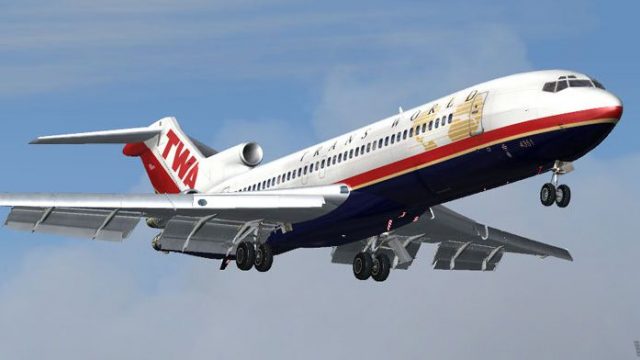
Trans World Airlines Boeing 727-200 1970
Transport yourself back to a mid-century era of aviation with this meticulous…
Trans World Airlines Boeing 727-200 repaint depicts N54351 as flown in 2000, with crisp TWA-era markings tailored to the Vistaliners SilverJet 727 visuals for authentic ramp and cruise presence. Built for FS2004 and designed to blend cleanly with the base model’s details, it requires Vistaliners B72720VL.ZIP.
 Rate
Rate

Vistaliners SilverJet B727 TWA textures. Textures only for Vistaliners latest 727 release (B72720VL.ZIP). By Frank Idone.
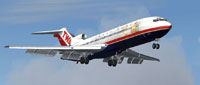
Screenshot of Trans World Airlines Boeing 727-200 in the air.
This is a repaint of Boeing 727 N54351 (45783/128) flown by Trans World Airlines in 2000.
Simply unzip directly into your aircraft folder and edit your aircraft's config file:
[fltsim.XX]

	title=Vistaliners Boeing 727-200 TWA 2000

	sim=B727200_VL

	model=

	panel=

	sound=

	texture=twa00

	atc_id=N54351

	atc_heavy=0

	atc_flight_number=397

	atc_airline=

	ui_manufacturer=Boeing

	ui_type=727-231 Adv

	ui_variation=Trans World Airlines (2000)

	description=One of the most successful commercial jet airliners ever designed. Production totaled 1,831 aircraft between the early 1960's and 1984.

	visual_damage=1

	atc_id_color=0x00000000

	atc_id_font=Verdana,-11,1,600,0
Free for all simmers · 3.19 MB · Scanned clean Oct 2026
Download speed: Free tier is capped at 0.5 Mbps. PRO members download at full line speed.
This file is a repaint — the package below is the base model it paints onto. Install it first, or the textures will have nothing to load onto.
FS9\Aircraft\, FS9\Addon Scenery\, FS9\Gauges\, or FS9\Effects\.readme.txt or README file. It tells you exactly where files go, what dependencies are needed, and any quirks specific to this add-on.The archive tw3722fi.zip has 14 files and directories contained within it.
This list displays the first 500 files in the package. If the package has more, you will need to download it to view them.
| Filename/Directory | File Date | File Size |
|---|---|---|
| texture.twa00 | 11.22.04 | 0 B |
| B727_A_L.BMP | 11.22.04 | 256.07 kB |
| B727_A_T.bmp | 11.21.04 | 4.00 MB |
| B727_B_L.BMP | 11.22.04 | 256.07 kB |
| B727_B_T.bmp | 11.21.04 | 4.00 MB |
| B727_C_L.BMP | 11.17.04 | 256.07 kB |
| B727_C_T.BMP | 11.22.04 | 1.00 MB |
| AAL Legal readme .txt | 10.29.04 | 130 B |
| 727 readme.pdf | 11.17.04 | 223.69 kB |
| Install.txt | 11.23.04 | 1.47 kB |
| file_id.diz | 12.01.04 | 152 B |
| tw2.jpg | 12.02.04 | 70.91 kB |
| flyawaysimulation.txt | 10.29.13 | 959 B |
| Go to Fly Away Simulation.url | 01.22.16 | 52 B |
Only PRO members can place votes.
More FS2004 add-ons hand-picked based on this download.
FS2004 Civil Jet Aircraft
Transport yourself back to a mid-century era of aviation with this meticulous…
 FS2004 Civil Jet Aircraft
Trans World Airlines Boeing 777-236ER, registration N765TW in the old TWA pai…
 FS2004 Civil Jet Aircraft
Model by Project Open Sky. Repaint by Brian Williams. Screenshot of Guyana Ai…
 FS2004 Civil Jet Aircraft
This comprehensive freeware package introduces an Air 2000 Boeing 757-200 in …
 FS2004 Civil Jet Aircraft
This freeware Boeing 757-200 in elegant Air 2000 markings (registration G-OOO…
 FS2004 Civil Jet Aircraft
Model by Project Open Sky. Livery by Massimo Grassi. Screenshot of Alitalia T…
 FS2004 Civil Jet Aircraft
Discover this freeware Boeing 757-200 add-on created for Microsoft Flight Sim…
 FS2004 Civil Jet Aircraft
Model by Project Open Sky. Liveries by Andrew Wells. Screenshot of One World …
Be the first to leave a comment on this download.
Be the first to share your thoughts on this download.